Thursday, January 31, 2013

Evernote Relaunches Penultimate: Free, Evernote Sync, Search

Evernote Relaunches Penultimate: Free, Evernote Sync, Search:
In May 2012, Evernote acquired Penultimate, one of the most popular handwriting apps for the iPad. Today, Evernote is relaunching Penultimate as a free app with built-in Evernote sync and search for handwritten notes.
I have been beta testing the new Penultimate, and, overall, I like the update. I have to admit that my usage of the application is limited to importing images into the app’s notebooks and drawing a few callouts and simple illustrations on them. I usually prefer Evernote’s other app, Skitch, for quick image annotations, but I don’t mind using Penultimate every once in a while when I need something more complex than a straight line or callout. Still, keep in mind that I don’t store hundreds of notes in Penultimate.
The first big change of the new Penultimate is Evernote integration. It can be turned off in the Settings to keep using Penultimate as a standalone handwriting tool, but Evernote is pretty aggressive in promoting the benefits of integration: sync and search will remain exclusive to those who choose to link the app to their Evernote accounts. I like how the company isn’t forcing the usage of an Evernote account, but it’s also fairly clear where the main benefits are. Evernote has explained the migration from the old Penultimate to the new one with Evernote sync in a blog post.
However, don’t expect your Penultimate notes to gain a particularly different interface in the desktop Evernote app. Penultimate will sync each notebook into an existing Evernote notebook, displaying your notes as .png images mapped to a single note. If it sounds confusing, here’s an example: I have a notebook in Penultimate called “Notes”; inside this notebook, there are sketches organized as pages. In Penultimate, I can choose to sync to a “Penultimate” notebook in Evernote, or any other notebook in my Evernote account. This is done through the “Keep In” option in the app’s Settings. For consistency, I chose my Evernote Inbox. Once synced, the Penultimate notebook called Notes will become an Evernote note called “Notes”, using images of my pages as content.

If you try to open the just-synced notebook in Evernote for Mac, the app will say that you can’t edit it because it was “created in another application”. I assume that, in order to avoid conflicts with edits made on the Mac but also synced to Penultimate, Evernote went for a simple “lock” mode that makes the notes available on the Mac, albeit without the possibility of editing them (the same happens with Skitch sync).[1] This is the downside of using Evernote as a both a location to sync files and an application to edit them; unlike Dropbox – which relies on other apps to open the files it contains – Evernote wants to be a note editor and a file manager at the same time, leading to a confusing mix of notes you can edit and notes that come from other apps. As I’ve always said, this can either be fixed by releasing standalone desktop companions (Skitch for Mac syncs to Skitch for iOS) or by making sure the difference of Evernote notes Vs. other Evernote notes is clear. It seems Evernote wants to try both paths, and I still think both Skitch and Penultimate notes could use a better, different visual representation inside the Evernote app to avoid confusion.
I appreciate the convenience of seeing Penultimate notes on the desktop, but I believe that search will turn out to be many’s favorite addition in this update. By using handwriting recognition on the Evernote servers, Penultimate is capable of letting you find what you wrote through a search box. In practice, as someone with terrible handwriting, I noticed Penultimate couldn’t find my notes unless I wrote with block letters. I am comforted by the fact that Evernote’s own blog post shows the same kind of handwriting in the section about text recognition. Handwriting recognition is still hard. They also mention that the servers need a few minutes to process handwriting, and I can confirm that’s the case with Penultimate 4.0. Once it’s processed, I really like how results are highlighted in yellow directly on the pages that match your search query.
Surprisingly, even after the acquisition, Evernote kept Dropbox sharing and in-app purchases in this new version of the app. Dropbox sharing can be configured from the Settings and it’ll let you send a notebook (or individual pages) directly to Dropbox as flattened PDFs (an entire notebook) or PNGs (single notes).[2] Pages will be saved with the paper pattern you were using in the app; more papers can be bought in the Paper Shop that is still available inside Penultimate.
I am not a Penultimate power user, therefore I really can’t judge the reshuffling of various menus and tools. However, I can say that ink appears faster and smoother to me in this version, and I was already a fan of how Penultimate rendered virtual ink.[3] Overall, I’ve found the app very easy and fun to use with my iPad mini, thanks to the reduced weight of the device that makes it less stressing on my wrist to hold the iPad with one hand and sketch with the other.
I believe Penultimate 4.0 is a solid update. I use Evernote to store all kinds of notes and reference material, and while I won’t draw and sketch in Penultimate every day, Paper and Penultimate are the only apps I keep on my iPad to quickly jot down visual ideas, and I like Penultimate especially for its Evernote sync. Penultimate 4.0 is free on the App Store.


  1. On a technical level, these notes are available in the Finder inside Application Support as both .png files and an HTML preview that, if you want, can be opened in a web browser for a preview outside of Evernote’s main window. The files are not locked in the Finder, so, in theory, you could still mess up with Evernote sync badly if you went ahead and edited them. I wonder why Evernote chose to display “Inspect Element” – the easiest way to show an image’s actual path – by right-clicking on a preview in Evernote.  ↩
  2. Evernote even made a nice UIActivity icon for Dropbox.  ↩
  3. In this update, ink should also be ready for the Retina display.  ↩

Last Chance to Register! NetScaler Master Class February 6th

Last Chance to Register! NetScaler Master Class February 6th: DON’T MISS OUT this exciting Master Class experience February, 6th at 10 AM PT/ 1PM ET. During this live webinar you will learn about the most critical elements of cloud infrastructures and enterprise datacenter architectures. Get details on latest features of NetScaler, tips and tricks for easy configuration, and get a chance to consult with the experts. Agenda: •  NetScaler 101 – Rate limiting • …
Read More

Technotes: How to Reattach a Forgotten Intergrated StorageLink (iSL) Storage Repository

Technotes: How to Reattach a Forgotten Intergrated StorageLink (iSL) Storage Repository: This article describes how to reattach a forgotten Intergrated StorageLink (iSL) Storage Repository (SR).

Register Today! Citrix Support Secrets Webinar – Provisioning Services

Register Today! Citrix Support Secrets Webinar – Provisioning Services: Thanks to everyone who attended our Citrix Support Secrets January webinar covering CloudGateway 2.5 Technical Overview and Troubleshooting.  The on-demand recording is here. Each month we will pick a subject that is hot within the support dept, like a hot/common issue, new Citrix product or tools that make troubleshooting much easier. Previous Webinars available on-demand: Jan 2013 - CloudGateway 2.5 Technical Overview and Troubleshooting Dec 2012 –  Reduce…
Read More

Technotes: Please wait... message may being displayed till a user taps on screen by Auto Client Reconnect in Gateway Direct mode

Technotes: Please wait... message may being displayed till a user taps on screen by Auto Client Reconnect in Gateway Direct mode

Technotes: Error 1012: The Citrix Access Gateway Plug-in could not start. For more information, see the connection log. (15) or (18)

Technotes: Error 1012: The Citrix Access Gateway Plug-in could not start. For more information, see the connection log. (15) or (18): When launching the Access Gateway Plug-in, it fails with the error 1012: The Citrix Access Gateway Plug-in could not start. This article contains the solution to this issue.

Technotes: How to Configure Enterprise File Shares to Use Microsoft Hidden Shares and Environment Variables on Windows Server 2008

Technotes: How to Configure Enterprise File Shares to Use Microsoft Hidden Shares and Environment Variables on Windows Server 2008: How to configure Enterprise File Shares on Access Gateway Enterprise Edition to use Microsoft hidden shares and %username% environment variable on Microsoft Windows Server 2008

Citrix morphs from Windows app virtualizer to all app mobilizer

Citrix morphs from Windows app virtualizer to all app mobilizer:

Projecting a $3bn air kiss in 2013

In its last quarter Citrix has blasted past analyst expectations and produced a very healthy set of results and predicting that revenues will hit the $3bn mark for the year.…

Cisco VXLAN Innovations Overcoming IP Multicast Challenges

Cisco VXLAN Innovations Overcoming IP Multicast Challenges: At Cisco Live! in London this week, Cisco is demonstrating some enhancements to its Nexus 1000V virtual switch that greatly ease some of the challenges in deploying VXLAN in [...]

SDN is not OpenFlow, but OpenFlow is a real disruption

SDN is not OpenFlow, but OpenFlow is a real disruption:
If 2012 was the year that software-defined networking sold out, then 2013 should be the year that the big players in the industry recognize that their efforts to neutralize the threat of OpenFlow and the coming commoditization of networking hardware are doomed to failure. I’m sure that many people will declare me wrong, but the promise of SDN and the promise of OpenFlow are different.
Software-defined networking doesn’t require OpenFlow. And it will still make a network programmable and responsive in ways that both scaled-out web-services providers and enterprise customers dealing with virtualization will appreciate. But it won’t necessarily affect the underlying networking hardware in the same way OpenFlow can. However, OpenFlow — the protocol that aims to separate the intelligence required to route a packet from the act of moving a packet– can commoditize the switches and routers. And it will have a big impact on the networking vendors such as Cisco, Arista and Juniper.

SDN is good for many things, but not everything.


Nick McKeown, one of the fathers of OpenFlow onstage at Structure.
Right now, that impact has been ignored because many of the benefits of software-defined networking can exist without using OpenFlow. Products from Nicira as well as upcoming offerings from Juniper, Cisco and many other SDN startups don’t depend on the lowest levels of the network. They offer programmability and better ways to manage scaled out and virtualized infrastructure without OpenFlow. And they offer these features in a way that’s far easier for enterprises and even cloud customers to consume. Few businesses have the resources to program and support entirely new networking code for new routers built on commodity hardware, and even fewer want to rip out their existing gear to buy a new OpenFlow-based network.
But it’s early: the promise of real, commodity-based networking gear will not dissipate. Stu Bailey, the CTO of Infoblox told me last week as his company was launching new software-based networking products that the emphasis on specialized chips and networking hardware is doomed. Both cloud and the enterprise networks are becoming increasingly complicated; not just because of virtualization and scale, but also because of the increasing number of devices at the edge. Smartphones are pressuring networks, but adding sensors and other connected devices as integral business equipment, will require some serious thinking about networking hardware and cost.
“How quickly will a large healthcare org realize that the network is not the collection of routers and switches, but is instead these things connected to the network?” asked Bailey. “And how they interact fundamentally and how they are secured is responsible for the business. With that awareness they need SDN economics and OpenFlow will hasten that.” Hence InfoBlox’s decision to focus on software — software that is OpenFlow compatible.

This revolution won’t come immediately, but it will come.

Others, such as Jim Theodoras, director of technical marketing at ADVA, an optical provider to data centers, have expressed similar thoughts. Theodora has also expressed frustration that so far the message of router and hardware commoditization has been ignored. But for the most part, the existing products on the market and their associated marketing and product managers have been good at loudly shouting down the camp of people who see OpenFlow as a legitimate threat to the hardware makers. And it’s not just marketing. There are many obstacles to deploying an OpenFlow-based networking infrastructure.

Lane Patterson Equinix Kenneth Duda Arista Networks Structure 2012
(L to R) Lane Patterson, CTO, Equinix; Kenneth Duda, Founder, CTO and SVP, Software Engineering, Arista Networks
(c)2012 Pinar Ozger pinar@pinarozger.com
People love pointing out Google’s OpenFlow-based data center communications network as an example of a successful OpenFlow-based implementation, but Google had to develop a lot of its own expertise to make that happen. In fact, Ken Duda, a co-founder and CTO at Arista, accused Google last June at our structure conference of bastardizing OpenFlow to the point where it wasn’t OpenFlow anymore. Duda is from Arista, one of the companies set to feel the pain of any router and switch commoditization, but he’s no marketing parrot.
One obstacle, other than just getting the gear to work, is that the current chips sold by merchant silicon providers aren’t ready to support the most recent and faster versions of OpenFlow. NoviFlow, a startup in Montreal, that just announced an OpenFlow compatible switch that processes information at 100 gigabits per second per second — a significant amount of capacity when we’re talking about the data center market — went with specialty networking processors. It couldn’t build such a high capacity OpenFlow switch with existing chips, so it used network processors from EZChip. It’s still using a specialty chip to make its boxes, much like Cisco and Juniper do.

OpenFlow creates a common networking platform, not lock-in


NoviFlow's 100 Gbps switch.
NoviFlow’s 100 Gbps switch.
However, by using OpenFlow, NoviFlow is anticipating a world when customers can buy a range of switches from different vendors and expect them to work because they are all OpenFlow compliant. And that is when the hardware prices will likely change. Just like x86 processors turned the server market into a battle over new features on a consistent platform, networking gear will soon be about a consistent platform where features matter and vendors can’t lock in their clients.
Marc LeClerc, NoviFlow’s VP of strategy and marketing is anticipating that day, explaining that NoviFlow has a high-end switch, but that it expects customers to also purchase lower-end gear that they will expect will work with the NoviFlow products. And when that day comes, the question is what kind of shakeout we’ll see in the networking world.
“When the world went over from mainframes to client-server it was a huge shift and plenty of companies that used to play in that market like Wang and DEC are no longer around anymore,” Bailey said.


Related research and analysis from GigaOM Pro:
Subscriber content. Sign up for a free trial.


VMware’s Tod Nielsen follows Maritz to Pivotal Initiative

VMware’s Tod Nielsen follows Maritz to Pivotal Initiative:
Tod Nielsen, one-time COO of VMware  is moving over to the EMC-led Pivotal Initiative.
At that new outfit, Nielsen will report to Paul Maritz, who will head up that cloud computing/big data spinoff of EMC and VMware, according to a document filed with the Securities & Exchange  Commission.
The move, which according to the SEC document, was official as of December 5 but not widely known. But it comes as little surprise because Nielsen — who was most recently co-president of VMware’s application platform group – was heavily involved with  Cloud Foundry, one of the VMware technologies turned over to the new spinoff. And he and Maritz go way back — they worked together at Microsoft more than a decade ago.
Having said that, there is concern of a continued brain drain at VMware. CTO Steven Herrod, a widely respected exec, is leaving for a VC gig at General Catalyst Partners.
With Nielsen’s move, another piece of the Pivotal Initiative puzzle falls into place.  Personnel from VMware and EMC are shifting around to staff up this new effort which combines IP from both parent companies. Some GreenPlum big data know-how and Pivotal Labs agile development from EMC as well as Cloud Foundry PaaS, Cetas analytics, and vFabric from VMware are flowing into the spin off.  Mark Lucovsky, who helped spearhead Cloud Foundry, is staying at the VMware mothership.
EMC, VMware and Pivotal Initiative folks will talk more specifics about the cloud and big data spin off March 13 at a NY event, VMware CEO Pat Gelsinger said on Monday’s earnings call. 
Feature photo courtesy of Flickr user Luke Kilpatrick


Related research and analysis from GigaOM Pro:
Subscriber content. Sign up for a free trial.


VMware vSphere Blog: vSphere 5.1 – VDS Feature Enhancements – Port Mirroring – Part 1

VMware vSphere Blog: vSphere 5.1 – VDS Feature Enhancements – Port Mirroring – Part 1:
Network troubleshooting and monitoring tools are critical in any environment. Especially in data centers where you have many applications or workloads consolidated on server virtualization platforms such as vSphere. When you ask any network administrators, what are the challenges in troubleshooting data center networks, where server virtualization is prominent? They will say that they don’t have the visibility into virtual networks and they don’t know what is going on in the hypervisor world.
To provide the right amount of visibility to the administrators, VMware vSphere Distributed Switch (VDS) supports industry standard features such as port mirroring and NetFlow. These features were introduced with the release of vSphere 5.0. In this latest release there are more enhancements to the features along with configuration workflow improvements. I will provide more details on the different types of port mirroring capabilities and which one to choose while troubleshooting or monitoring your network.
First of all, what is port mirroring? Those who have worked with physical switches know that this feature allows you to copy packets from a port to another port. The port from which the packet is copied is called a monitored or source port while the port where the packet is copied to is called a destination port. As you can tell, this feature allows you to copy packets to a central device for analysis. Now, the device could be a packet analyzer or Intrusion detection system that can help detect any issue in the network. However, the port mirroring capability on physical switches can only replicate traffic that is visible on the physical port and can’t help monitor flows between two virtual machines running on same vSphere host. This is because vm to vm traffic on same host never hits the physical switch port.
Let’s now look at the port-mirroring feature on VDS. The virtual switch, VDS, has virtual ports, where you connect virtual machines vnics or infrastructure vmkernel NICs. When you want to monitor particular virtual machine traffic you really are monitoring a virtual port where that particular virtual machine is connected. Similar to the physical switches, VDS allows you to establish port mirroring sessions with configurable source and destination ports.
We will now walk through a port mirroring session configuration steps on VDS:
As shown below, first select the VDS and under Manage tab click on port mirroring. Then click the “+ New” sign to create a new port mirror session

Port mirror configuration – screen 1
This will pop up the following five different options for you to choose from !! Let’s choose the first one, which is called as “Distributed Port Mirroring”. This port mirroring option is equivalent to the Switch Port Analyzer (SPAN) feature on a physical switch.

Port mirror configuration – screen 2
Users should use this type of port mirroring session whenever they want to debug any networking issue directly on a particular host. The diagram below shows a host with three virtual machines. The Analyzer virtual machine on the right is where wireshark tool is installed to help in the debug process. The Monitored virtual machine on the left is the one having application connectivity issues. Let’s continue through the steps of creating the port mirror session from the Monitored VM virtual port to the Analyzer VM virtual port.

Port mirror session configured on a host
Provide a name for this session and make sure to enable Status and enable Normal I/O traffic for this session. Enabling  normal I/O on destination port allows the destination virtual port to communicate normally. If you don’t allow the normal I/O traffic in this session, the Analyzer VM will not be able to communicate. It will just be able to receive traffic for monitoring. There are also other parameters such as packet length and sampling rate that controls the amount of traffic you are copying to the destination in this session.

Port mirror configuration – screen 3
Let’s now select the source port that needs monitoring. As you can see, once you click “+” a screen pops up with the list of virtual ports that are active on VDS. In this example we are going to select the virtual machine (Web server – 03) running on host bk09-h380-07 as the monitored VM.

Port mirror configuration – screen 4
The next step is to choose the direction of traffic that you want to monitor. You have an option to only monitor Ingress or Egress traffic or both Ingress/Egress traffic. In this example we have selected both Ingress and Egress traffic as shown below.

Port mirror configuration – screen 5
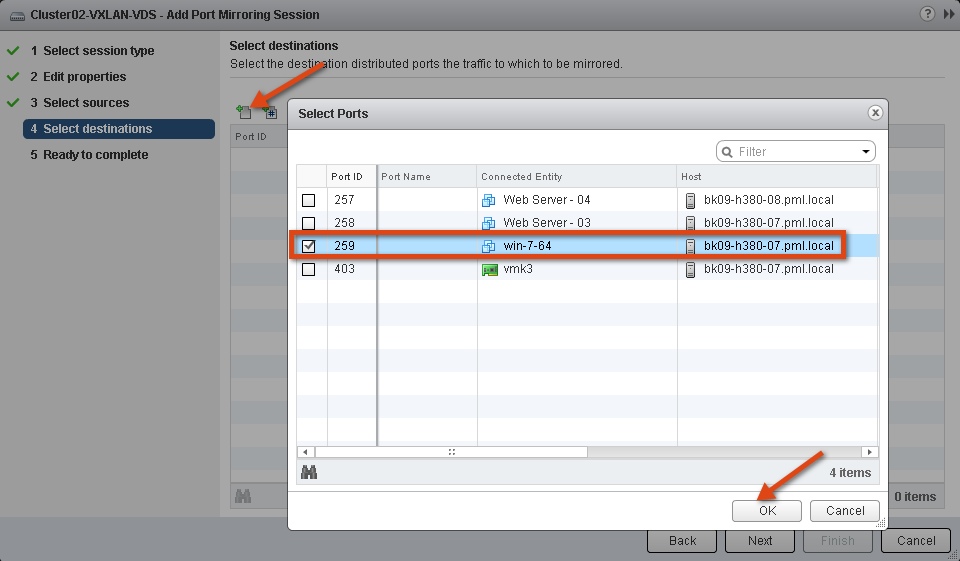
After selecting the direction of traffic to monitor, it is time to choose the destination virtual port where the traffic will be copied. As shown below, an Analyzer virtual machine (win7-64) on the same host bk09-h380-07 is selected as the destination.

Port mirror configuration – screen 6
This concludes the creation of the port mirror session configuration that allows you to monitor traffic of a virtual machine running on the same host.

Port mirror configuration – screen 7
Another use case of this port-mirroring configuration is to provide Intrusion detection services for the applications running on a host through an IDS virtual appliance. In the next post, I will discuss another port mirroring session type – Remote Mirroring source and destination also called as Remote Switch Port analyzer (RSPAN). Please stay tuned and let me know if you have any questions about this post.
Get notification of these blogs postings and more VMware Networking information by following me on Twitter:  @VMWNetworking

About the security content of Apple TV 5.2

About the security content of Apple TV 5.2: This document describes the security content of Apple TV 5.2.
For the protection of our customers, Apple does not disclose, discuss, or confirm security issues until a full investigation has occurred and any necessary patches or releases are available. To learn more about Apple Product Security, see the Apple Product Security website.
For information about the Apple Product Security PGP Key, see How to use the Apple Product Security PGP Key.
Where possible, CVE IDs are used to reference the vulnerabilities for further information.
To learn about other Security Updates, see Apple Security Updates.

About the security content of iOS 6.1 Software Update

About the security content of iOS 6.1 Software Update: This document describes the security content of iOS 6.1.
For the protection of our customers, Apple does not disclose, discuss, or confirm security issues until a full investigation has occurred and any necessary patches or releases are available. To learn more about Apple Product Security, see the Apple Product Security website.
For information about the Apple Product Security PGP Key, see How to use the Apple Product Security PGP Key.
Where possible, CVE IDs are used to reference the vulnerabilities for further information.
To learn about other Security Updates, see Apple Security Updates.

VROOM!: vCloud Director 5.1 Performance and Best Practices

VROOM!: vCloud Director 5.1 Performance and Best Practices:
VMware vCloud Director 5.1 gives enterprise organizations the ability to build secure private clouds that dramatically increase datacenter efficiency and business agility. Coupled with VMware vSphere, vCloud Director delivers cloud computing for existing datacenters by pooling virtual infrastructure resources and delivering them to users as catalog-based services.  vCloud Director 5.1 helps helps IT professionals build agile infrastructure-as-a-service (IaaS)  cloud environments that greatly accelerate the time-to-market for applications and responsiveness of IT organizations.
This white paper addresses three areas regarding vCloud Director performance:
  • vCloud Director sizing guidelines and software requirements
  • Performance characterization and best practices for key vCloud Director operations and new features
  • Best practices in improving performance and tuning vCloud Director architecture
For more details and performance tips, please refer to VMware vCloud Director 5.1 Performance and Best Practices.

Impacts of PVS implementation in large enterprise companies

Impacts of PVS implementation in large enterprise companies: In general, when we discuss PVS implementation during a XenDesktop or XenApp design, the focus is always on technical aspects of the PVS, e.g. PVS must be virtual or physical, one or two servers, NIC type, etc. Additional questions/answers, however, may be needed in order for a successful implementation to take place. PVS implementation is not only a technical challenge. In dealing with large enterprise…
Read More

Wednesday, January 30, 2013

CloudPlatform Master Class FAQs

CloudPlatform Master Class FAQs: Last week we demonstrated the capabilities of our CloudPlatform product to over 1300 people live on our Cloud 101 Master Class. Find out the most frequently asked questions that our Cloud Agents were asked to answer.

Citrix Support Secrets: January Webinar Q&A

Citrix Support Secrets: January Webinar Q&A: Following on from our January 2013 Citrix Support Secrets webinar which covered Cloud Gateway 2.5 Technical Overview and Troubleshooting, there was a series of questions asked during the session that we didn’t get to answer.  See the questions and answers below. BTW if you missed the webinar and would like to watch it on-demand, you can find it here.   Q: The wizard will create…
Read More

Tuesday, January 29, 2013

Citrix Receiver for HTML5 Version 1.1 – Released !

Citrix Receiver for HTML5 Version 1.1 – Released !: Citrix Receiver for HTML5 Version 1.1 is released.. And it now has the support for all the Major Desktop Browsers. Version 1.1 supports the latest updates of the following Desktop browsers Internet Explorer 10 Safari 6 Google Chrome Firefox You can download this from https://www.citrix.com/content/citrix/en_us/downloads/citrix-receiver/receivers-by-platform/receiver-for-html5/ eDocs Location : http://support.citrix.com/proddocs/topic/receiver-html5-11/receiver-html5-version-wrapper.html   Key things to check out for while installing and configuring Citrix Receiver for HTML5 v1.1 Direct Internal Acces…
Read More

EPA scans are not for everybody

EPA scans are not for everybody: How to prevent users from downloading the EPA scan plugin from Citrix NetScaler / Access Gateway Enterprise Edition

Apple - Press Info - Apple Increases iPad with Retina Display to 128GB

Apple - Press Info - Apple Increases iPad with Retina Display to 128GB

Public Hotfixes: Driver Disk for Emulex be2net 4.2.389.0 & lpfc 8.3.5.86 - For XenServer 6.1.0

Public Hotfixes: Driver Disk for Emulex be2net 4.2.389.0 & lpfc 8.3.5.86 - For XenServer 6.1.0: This is a driver disk for customers running Citrix XenServer 6.1, on a server with Emulex Fibre Channel (FC) Host Bus Adapters (HBA), Fibre Channel over Ethernet (FCoE) Converged Network Adapters (CNA), and Ethernet Network Adapters, and wish to upgrade to the latest support version of this driver (lpfc v8.3.5.86, be2net v4.2.389.0, ocm v6.1.34.2).

Technotes: Enabling Boot From SAN with Emulex 16GB LPe1600x Adapters with XenServer 6.1.0

Technotes: Enabling Boot From SAN with Emulex 16GB LPe1600x Adapters with XenServer 6.1.0: This article is for customers who wish to use XenServer 6.1.0 with Emulex LightPulse 16Gb Fibre Channel Host Bus Adapters (HBAs) (LPe1600x)

Technotes: How to Collect Diagnostics Information during XenServer Installation

Technotes: How to Collect Diagnostics Information during XenServer Installation: This article describes how to collect diagnostics information during XenServer installation.

NetScaler VPX on Cisco Nexus 1110 at Cisco Live!

NetScaler VPX on Cisco Nexus 1110 at Cisco Live!: What I’ve enjoyed about Citrix’s relationship with Cisco is the substance that backs it, especially with regard to product integrations. These integrations have given us the opportunity to work with some of the brightest folks on the Cisco team and identify new and creative solutions to challenging problems. The result is a product roadmap that has exciting developments with technology that “moves the needle” as…
Read More

Technotes: How to Configure HDX Image Quality Using Extra Color Compression

Technotes: How to Configure HDX Image Quality Using Extra Color Compression: This article describes how to configure HDX Image Quality using Extra Color Compression.

Master Class- Installing and Configuring CloudPlatform

Master Class- Installing and Configuring CloudPlatform:
Learn more about the Citrix CloudPlatform solution and technology as you follow our step by step lab exercises and interact with our cloud product experts.

What you will learn:
Installing CloudPlatform, building your cloud infrastructure, defining your configuration offerings, creating your new cloud virtual machines, setting-up multi-tenant isolation with security groups and defining your self-service limits.
Views:79
Length:3:43:29

Register Today! How to Implement Citrix Syndication Webinar: January 31

Register Today! How to Implement Citrix Syndication Webinar: January 31: JOIN US for this live, 30 minute webinar that will show you how you can implement Citrix content directly to your website for free! Citrix Syndication is the ideal way for you quickly place the latest Citrix content and resources directly on your website and is packed full of lead-generating assets and resources that provide customer information and leads directly back to you. Customize the…
Read More

Americas Partners – Get up to speed rapidly on Citrix AppDNA FREE with our self-paced online course.

Americas Partners – Get up to speed rapidly on Citrix AppDNA FREE with our self-paced online course.: Learn how to position AppDNA to your customers and prospects by taking our AppDNA self-paced online course that is free of charge through March 31, 2013. This course provides a detailed look at AppDNA and includes a virtual lab environment for hands-on exercises in AppDNA key features. An AppDNA Virtualization Sales Playbook is also available so partner sales teams can better understand how to position…
Read More