Monday, June 30, 2025

Tool Calling with Local LLMs: A Practical Evaluation

Which local model should I use for tool calling?

When building GenAI and agentic applications, one of the most pressing and persistent questions is: “Which local model should I use for tool calling?”  We kept hearing again and again, from colleagues within Docker and the developer community, ever since we started working on Docker Model Runner, a local inference engine that helps developers run and experiment with local models. 

It’s a deceptively simple question with a surprisingly nuanced answer. Even when we tried to answer it for a very specific case: “What if I just expose 5 simple tools to the model?”
We realized we had no definite answer for that. Local LLM models offer control, cost-efficiency, and privacy, but when it comes to structured tool use, deciding when and how to act, they can behave very differently. We decided to dig deep and test this properly. We started with manual experimentation, then built a framework to scale our testing. This blog documents that journey and shares which models ranked highest on our tool-calling leaderboard.

The first attempt: Manual testing

Our first instinct was to build something quickly and try it out manually.

So we created chat2cart, an AI-powered shopping assistant that lets users interact via chat to build, modify, and check out a shopping cart. Through a natural conversation, users can discover products, add or remove items, and complete or cancel their purchase, all from the chat interface.

To support testing across different LLMs, we added a model selector that makes it easy to switch between local models (via Docker Model Runner or Ollama) and hosted models using the OpenAI API.

OpenAI’s GPT-4 or GPT-3.5 worked as expected, and the experience was fairly smooth. 

  • Called tools when they were needed
  • Avoided unnecessary tool usage
  • Handled tool responses naturally

But the local models? That’s where the challenges started to surface.

What went wrong with local models

We started experimenting with some of the local models listed on the Berkeley Function-Calling Leaderboard. Our goal was to find smaller models, ideally with fewer than 10 billion parameters, so we tested xLAM-2-8b-fc-r and watt-tool-8B. We quickly ran into several recurring issues:

  • Eager invocation: Tools were being called even for greeting messages like “Hi there!”
  • Wrong tool selection: The model would search when it should have added, or tried to remove when the cart was empty
  • Invalid arguments: Parameters like product_name or quantity were missing or malformed
  • Ignored responses: The model often failed to respond to tool output, leading to awkward or incomplete conversations

At this point, it was clear that manual testing wouldn’t scale. Different models failed in different ways, some struggled with invocation logic, while others mishandled tool arguments or responses.  Testing was not only slow, but also unreliable. Because these models are non-deterministic, we had to run each scenario multiple times just to get a reliable read on behavior.

We needed a testing setup that was repeatable, measurable, and fast.

Our second attempt: A scalable testing tool

Our goal wasn’t academic rigor.
It was: “Give us good-enough answers in 2–3 days, not weeks.”

In a couple of days, we created model-test, This is a flexible project with the following capabilities

  • Define real-world test cases with multiple valid tool call sequences
  • Run them against many models (local & hosted)
  • Track tool-calling accuracy, tool selection, and latency
  • Log everything for analysis (or eventual fine-tuning)

How it works

The core idea behind model-test is simple: simulate realistic tool-using conversations, give the model room to reason and act, and check whether its behavior makes sense.

Each test case includes:

  • A prompt (e.g. “Add iPhone to cart”)
  • The initial cart state (optional)
  • One or more valid tool-call variants, because there’s often more than one right answer

Here’s a typical case:

{
  "prompt": "Add iPhone to cart",
  "expected_tools_variants": [
    {
      "name": "direct_add",
      "tools": [{ "name": "add_to_cart", "arguments": { "product_name": "iPhone" } }]
    },
    {
      "name": "search_then_add",
      "tools": [
        { "name": "search_products", "arguments": { "query": "iPhone" } },
        { "name": "add_to_cart", "arguments": { "product_name": "iPhone 15" } }
      ]
    }
  ]
}

In this case, we consider both “just add ‘iPhone'” and “search first, then add the result” as acceptable. Even though “iPhone” isn’t a real product name, we’re fine with it. We weren’t aiming for overly strict precision, just realistic behavior.

Each test case belongs to a test suite. We provide two built-in suites. However, you can run an entire suite, individual test cases, or a selection of multiple test cases. Additionally, you can create your own custom suites to group tests as needed. 

  • Simple: Greetings, single-step actions
  • Complex: Multi-step reasoning and tool chaining

The agent loop

To make tests feel closer to how real agents behave, we simulate an agent loop up to 5 rounds.

Example:

User: “Add iPhone 5 to cart”

  1. Model: “Let me search for iPhone 5…”
    1. Tool: (returns product list)
  2. Model: “Adding product X to cart…”
    1. Tool: (updates cart)
  3. Model: “Done”
    → Great, test passed!

But if the model still wants to keep going after round 5?

That’s it, my friend,  test failed. Time’s up.

Not all-or-nothing

We deliberately avoided designing tests that require perfect predictions.

  • We didn’t demand that the model always know the exact product name.
  • What mattered was: did the tool sequence make sense for the intent?

This helped us focus on the kind of reasoning and behavior we actually want in agents, not just perfect token matches.

What We Measured

Our test outputs distilled down to a final F1 score, encapsulating three core dimensions:

Metric

What it tells us

Tool Invocation

Did the model realize a tool was needed?

Tool Selection

Did it choose the right tool(s) and use them correctly?

Parameter accuracy

Whether the tool call arguments were correct?

The F1 score is the harmonic mean of two things: precision (how often the model made valid tool calls) and recall (how often it made the tool calls it was supposed to).

We also tracked latency, the average runtime in seconds, but that wasn’t part of the F1 calculation; it simply helped us evaluate speed and user experience.

21 models and 3,570 tests later: Which models nailed tool calling?

We tested 21 models across 3570 test cases using 210 batch runs.

Hardware: MacBook Pro M4 Max, 128GB RAM
Runner: test-all-models.sh

Overall Rankings (by Tool Selection F1):

Model

F1 Score

gpt-4

0.974

qwen3:14B-Q4_K_M

0.971

qwen3:14B-Q6_K

0.943

claude-3-haiku-20240307

0.933

qwen3:8B-F16

0.933

qwen3:8B-Q4_K_M

0.919

gpt-3.5-turbo

0.899

gpt-4o

0.857

gpt-4o-mini

0.852

claude-3-5-sonnet-20241022

0.851

llama3.1:8B-F16

0.835

qwen2.5:14B-Q4_K_M

0.812

claude-3-opus-20240229

0.794

llama3.1:8B-Q4_K_M

0.793

qwen2.5:7B-Q4_K_M

0.753

gemma3:4B

0.733

llama3.2:3B_F16

0.727

llama3grog:7B-Q4_K_M

0.723

llama3.3:70B.Q4_K_M

0.607

llama-xlam:8B-Q4_K_M

0.570

watt-tool:8B-Q4_K_M

0.484

Top performers

Among all models, OpenAI’s GPT-4 came out on top with a tool selection F1 score of 0.974, completing responses in just under 5 seconds on average. While hosted and not the focus of our local model exploration, it served as a reliable benchmark and provided some ground truths.

On the local side, Qwen 3 (14B) delivered outstanding results, nearly matching GPT-4 with a 0.971 F1 score, though with significantly higher latency (~142 seconds per interaction).

If you’re looking for something faster, Qwen 3 (8B) also achieved an F1 score of 0.933, while cutting latency nearly in half (~84 seconds), making it a compelling balance between speed and tool-use accuracy.

Hosted models like Claude 3 Haiku also performed very well, hitting 0.933 F1 with exceptional speed (3.56 seconds average latency), further illustrating the high bar set by cloud-based offerings.

Underperformers

Not all models handled tool calling well. The quantized Watt 8B model struggled with parameter accuracy and ended up with a tool selection F1 score of just 0.484. Similarly, the LLaMA-based XLam 8B variant often missed the correct tool path altogether, finishing with an F1 score of 0.570. These models may be suitable for other tasks, but for our structured tool use test, they underdeliver.

Quantization

We also experimented with both quantized and non-quantized variants for some models, and in all cases observed no significant difference in tool-calling behavior or performance. This suggests that quantization is beneficial for reducing resource usage without negatively impacting accuracy or reasoning quality, at least for the models and scenarios we tested.

Our recommendations

If your goal is maximum tool-calling accuracy, then Qwen 3 (14B) or Qwen 3 (8B) are your best bets, both local, both precise, with the 8B variant being notably faster.

For a good trade-off between speed and performance, Qwen 2.5 stood out as a solid option. It’s fast enough to support real-time experiences, while still maintaining decent tool selection accuracy.

If you need something more lightweight, especially for resource-constrained environments, the LLaMA 3 Groq 7B variant offers modest performance at a much lower compute footprint.

What we learned and why this matters

Our testing confirmed that the Qwen family of models leads the pack among open-source options for tool calling. But as always, there’s a trade-off; you’ll need to balance between accuracy and latency when designing your application

  • Qwen models dominate: Even the 8B version of Qwen3 outperformed any other local model
  • Reasoning = latency: Higher-accuracy models take longer, often significantly.

Tool calling is core to almost every real-world GenAI application. Whether you’re building agents or creating agentic workflows, your LLM must know when to act and how. Thanks to this simple framework, “We don’t know which model to pick” became “We’ve narrowed it down to three great options, each with clear pros and cons.”

If you’re evaluating models for your agentic applications, skip the guesswork. Try model-test and make it your own for testing! 

Learn more


from Docker https://ift.tt/mx1SRAT
via IFTTT

Apache CloudStack for Beginners – Part 3: Getting Started and What Comes Next

In this series, we introduced Apache CloudStack—a robust, open-source platform for building Infrastructure-as-a-Service (IaaS) clouds, and explored its key components and architecture, demystifying terminology such as zones, pods, clusters, and storage types.

Now it’s time to put this knowledge into action. This final instalment will help you take your first steps toward using CloudStack in a lab or test environment. We will walk through installation options, highlight where to find reliable documentation and community support, and explain how to stay informed as CloudStack evolves. This is not just the end of the series—it’s the beginning of your hands-on journey with cloud infrastructure.

setting up CS

Setting Up CloudStack: Where to Begin

Apache CloudStack can be deployed in both small and large environments, but if you’re new, starting with a minimal test setup is recommended. This allows you to explore the features without the overhead of configuring complex infrastructure.

The easiest way to start is with a single-node or “all-in-one” installation, which runs all components—management server, database, hypervisor, and storage—on one machine. This is ideal for personal testing or classroom learning.

Installation Resources:

This approach typically uses Ubuntu or Rocky Linux and the KVM hypervisor. It allows you to explore the interface, launch virtual machine instances, test networking, and experiment with templates—all from one physical or virtual server.

If you’re setting this up in a home lab, tools like VirtualBox or VMware Workstation can simulate an infrastructure needed to deploy CloudStack.

Learn from the Community and Shared Knowledge

Apache CloudStack has a strong open-source community. Getting support and learning from others is an essential part of the journey—especially for beginners. Fortunately, the community offers several helpful resources where you can ask questions, share experiences, and get direct advice from developers and advanced users.

Community Resources:

You can also follow ShapeBlue’s blog for practical use cases and deployment tips, especially from those managing large-scale production environments.

Staying Current: Releases and Roadmap

Apache CloudStack is under active development, with frequent improvements and clearly defined release cycles. Minor and major versions are typically released every 6 to 9 months. These releases may include new features, hypervisor integrations, enhanced performance, or critical security updates.

Every version is accompanied by detailed documentation, which includes upgrade guides and changelogs. There are no “paid” versions or limited editions—everyone has access to the full platform, including support for new technologies as they are added.

Key Links:

Next Steps for beginneres

Next Steps for Beginners

Once you have installed Apache CloudStack in a lab environment, you can begin experimenting with the features you’ve read about in this series. Here are a few practical actions you can take right away:

  • Log in to the CloudStack web interface as the administrator to explore the main dashboard.
  • Navigate to the Templates section and upload your own ISO or pre-configured template.
  • Create an isolated network, then deploy two virtual machine instances connected to it.
  • Verify network connectivity by pinging between the instances from their internal IPs.
  • Install a web server (like Apache or Nginx) on one of the instances.
  • Create a firewall rule and port forwarding rule to allow external HTTP access to the web server.
  • Access the web server from your browser to confirm everything is working.
  • Take a snapshot of the running instance and practice restoring it.
  • Monitor instance activity, resource usage, and logs using the CloudStack dashboard and logging tools.

These activities will help you build a real-world understanding of cloud orchestration and infrastructure management. The interface is designed to be intuitive, even for beginners, while still offering the depth needed for complex deployments.

looking ahead

Looking Ahead

Apache CloudStack is not just a platform—it’s a foundation for building future-ready, self-managed cloud environments. Whether you are exploring cloud concepts for the first time or planning a larger infrastructure project, the skills you develop using CloudStack are highly transferable to the broader world of cloud engineering.

As you grow more comfortable, you may want to explore topics like:

ShapeBlue has also developed a step-by-step video guide to speed up your journey with the CloudStack Demo. Explore the playlist on YouTube, which covers:

To explore more, see all CloudStack packages.

Apache CloudStack offers a complete, scalable cloud management platform that is freely available to everyone. For beginners, it provides an excellent opportunity to gain hands-on experience with modern cloud technologies. By starting in a controlled lab environment, learning from the community, and staying current with new releases, you can build the skills to design and manage real-world cloud infrastructures.

You are now equipped with the foundation to take your next step in cloud computing. Whether you’re a student, IT enthusiast, or entry-level sysadmin, CloudStack is a powerful tool to add to your toolkit.


The post Apache CloudStack for Beginners – Part 3: Getting Started and What Comes Next appeared first on ShapeBlue.


from CloudStack Consultancy & CloudStack... https://ift.tt/7ZX2s49
via IFTTT

Apache CloudStack for Beginners – Part 2: CloudStack Architecture and Key Components

In our first post in this series, we introduced Apache CloudStack and explained why it’s a great cloud platform for building and managing IaaS clouds. We looked at its main capabilities—like launching virtual machine instances, managing networking and storage, using the web-based UI and REST-like API for automation, and deploying on top of existing infrastructure with minimal overhead.

Now, let’s dive a little deeper.

This post will explore how CloudStack is structured—its architecture and components. Don’t worry if these terms are new. We’ll explain everything in plain language and link to useful videos so you can see these concepts in action.

why architecture matters

Why Architecture Matters

CloudStack may look simple from the user interface, but under the hood, it follows a layered architecture with clearly defined components and responsibilities. While it is delivered as a monolithic application, its internal structure separates concerns like compute orchestration, storage, and networking, making it scalable and easy to operate.

Understanding how it’s built will help you:

  • Set up your own CloudStack test environment with confidence
  • See how resources like virtual machine instances, networks, and storage fit together
  • Troubleshoot issues more effectively by knowing where each function takes place

Let’s break it down, piece by piece.

The CloudStack Hierarchical Architecture

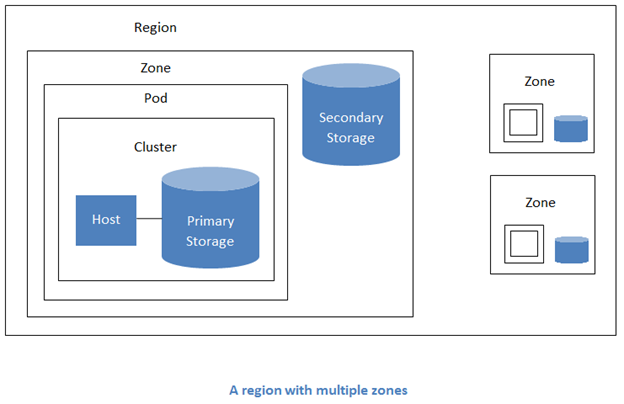
Multiple zones

CloudStack organises all the physical and virtual resources of your cloud into a clear hierarchy. At the top of this structure is the Region, which can represent a large geographic area. At the bottom is the Host, a physical server that runs your virtual machine instances.

This layered structure helps CloudStack manage everything efficiently—whether you’re running just a few servers or scaling up to thousands spread across multiple geographically distributed data centres.

We’ll now walk through each part of the CloudStack architecture—from the top-level Region to the physical Host. Understanding how these layers work together will help you see how CloudStack organises and controls your entire cloud infrastructure.

Region

  • The highest level of organisation—you can think of a Region as a logical grouping of cloud infrastructure, often representing a geographic location or an isolated administrative domain.
  • Every CloudStack deployment starts with a default Region (ID 1), and in most setups, a single Region is all you need.
  • A Region includes one or more Zones and shares a single Management Server database, which means all Zones in that Region are centrally managed.
  • Additional Regions are only used in advanced scenarios—such as when you want to operate completely independent cloud environments across different countries or data sovereignty zones.

Availability Zone

  • A Zone usually represents a single data centre—a physical location where your servers, storage, and networking equipment are hosted.
  • Each Zone contains at least one Pod, where compute resources (Hosts and Clusters) are located.
  • It also includes a shared storage component used to hold reusable assets like virtual machine templates and ISO images.
  • Zones are completely isolated from each other in terms of networking. This means that virtual machine instances in different Zones can’t communicate directly.
  • Most CloudStack environments start with a single Zone, but you can add more to spread workloads across different locations, improve availability, or separate environments for specific use cases.

Pod

  • A Pod usually represents a group of servers placed together in the same part of a data center—often in the same rack or connected to the same network switch.
  • Each Pod contains one or more Clusters, where your compute resources (Hosts) live.
  • All Hosts in a Pod must be connected to the same local network, so they can talk to each other directly without going through a router.

Cluster

  • A Cluster is a group of physical servers (Hosts) that all run the same hypervisor type—like KVM, VMware, or XCP-ng.
  • These Hosts share access to the same Primary Storage, where the virtual machine instances’ disks are stored.
  • Because the Hosts are connected and compatible, CloudStack can move virtual machine instances between them automatically—for example, to balance resource usage, recover from a failure, or when you place a Host into maintenance mode for upgrades or repairs.

Host

  • A Host is a physical server running a hypervisor like KVM, XenServer, or VMware.
  • This is where virtual machine instances are actually created, started, and executed.
  • How CloudStack communicates with the Host depends on the hypervisor:
    • For KVM, an Agent runs directly on the Host to receive instructions.
    • For XCP-ng/XenServer, CloudStack uses the built-in XenAPI.
    • For VMware, CloudStack talks to the vCenter server, which manages the ESXi Hosts.

Primary Storage

  • This is the storage used for running virtual machine instances. It stores the root volumes (the virtual disks that contain the OS) and any additional data volumes attached to the instances.
  • Primary Storage is usually associated with a Cluster, meaning each Cluster can have its own storage system. However, depending on the hypervisor and setup, storage can also be shared across multiple Clusters or configured at the Zone level.
  • CloudStack also supports local storage, where each Host uses its own disks to store virtual machine volumes.
  • Supported storage backends include NFS, iSCSI, shared block storage, and software-defined storage (SDS) platforms—essentially, any storage supported by the underlying hypervisor.

Secondary Storage

  • Secondary Storage is used to store reusable and backup data, such as virtual machine templates, ISO images, and snapshots of virtual machine instance volumes.
  • It is shared across the entire Zone, so all Clusters and Pods within that Zone can access the same images and backups.
  • The standard and supported backend for Secondary Storage is NFS (Network File System).

acs key components

CloudStack Key Components

Here are some of the main software components that make CloudStack work behind the scenes:

Management Server

  • This is the central brain of CloudStack.
  • It handles all orchestration tasks: provisioning virtual machine instances, configuring networks, managing storage, applying user permission, tracking resource usage, and much more.
  • Most CloudStack environments only required a single Management Server, but it can be scaled horizontally for high availability and performance, using a load balancer and a shared database.

Database

  • Apache CloudStack uses a relational database (typically MySQL) to store all configuration data, user information, resource states, and system logs.
  • The database is a critical component—it holds the “memory” of your cloud. The Management Server interacts with it constantly to track the state of virtual machine instances, networks, storage, and more.
  • In production environments, the database can be replicated and backed up regularly to ensure high availability and disaster recovery.
  • For beginners or lab setups, a single-node installation usually comes with a local database preconfigured.

CloudStack Agent

  • Used in KVM-based environments, the Agent runs directly on each Host.
  • It receives instructions from the Management Server—like “start this VM instance” or “attach this volume”— and executes them on the Host.
  • For other hypervisors, such as VMware and XCP-ng, CloudStack uses their native APIs (vCenter and XenAPI, respectively) instead of an on-host agent.

API & User Interface  

  • Every feature in CloudStack is accessible through a REST-like API, which allows developers and tools to automate tasks such as deploying virtual machine instances, configuring networks, and managing storage.
  • The web-based UI is build on top of the same API, offering an intuitive, graphical interface to perform these tasks without writing code.
  • Because the API is open and well-documented, CloudStack can be integrated with popular external tools such as Terraform, ClusterAPI, Ansible, and Packer—allowing users to provision and manage infrastructure using their preferred automation workflows.

bringing it all together

Bringing It All Together

Once you understand CloudStack’s basic structure, the rest starts to make sense. When a user launches a virtual machine instance:

  • CloudStack automatically selects the appropriated Zone, Pod, Cluster, and Host based on available resources and policies.
  • It provisions the required compute and storage, such as CPUs, memory, and volumes.
  • It attaches the instance to the correct network, including firewalls and load balancers if needed.
  • All of this happens behind the scenes, managed by CloudStack’s powerful orchestration engine—so users don’t have to worry about the underlying complexity.

Pretty neat, right?

What’s Next?

Now that you understand the architecture and terminology, you’re well on your way to becoming a CloudStack pro. In the next part of our series, we’ll walk you through how to get started with Apache CloudStack—including where to find downloads, how to spin up a lab environment, and how to connect with the community.

Curious to explore more right now? Check out:


The post Apache CloudStack for Beginners – Part 2: CloudStack Architecture and Key Components appeared first on ShapeBlue.


from CloudStack Consultancy & CloudStack... https://ift.tt/VCtjReu
via IFTTT

Security Onion Documentation printed book now updated for Security Onion 2.4.160!

We've been offering our Security Onion documentation in book form on Amazon for a few years and it's now been updated for the recently released Security Onion 2.4.160!


Thanks to Richard Bejtlich for writing the inspiring foreword!


Proceeds go to the Rural Technology Fund!


This edition has been updated for Security Onion 2.4.160 and includes a 20% discount code for our on-demand training and certification!


This book covers the following Security Onion topics:


  • First Time Users
  • Getting Started
  • Security Onion Console (SOC)
  • Security Onion Desktop
  • Network Visibility
  • Additional Network Visibility
  • Host Visibility
  • Third Party Integrations
  • Rules
  • Logs
  • Updating
  • Accounts
  • Services
  • Customizing for Your Environment
  • Tricks and Tips
  • Utilities
  • Help


Q&A


What is the difference between this book and the online documentation?


This book is the online documentation formatted specifically for print. It also includes an inspiring foreword by Richard Bejtlich that is not available anywhere else! Proceeds go to the Rural Technology Fund! Finally, the printed book includes a 20% discount code for our on-demand training and certification.


Who should get this book?


You should get this book if you work on airgap networks or simply want a portable reference that doesn't require an Internet connection or batteries! Also anyone who wants to donate to a worthy cause like Rural Technology Fund!


What is the difference between this edition and the previous edition?


This edition has been updated for Security Onion 2.4.160!


Where do we get it?


https://securityonion.com/book


from Security Onion https://ift.tt/yFSUPIt
via IFTTT

Apache CloudStack for Beginners – Part 1: CloudStack Introduction and Why Use It?

Cloud computing is everywhere, powering everything from social media and streaming services to enterprise IT and scientific research. But behind the scenes of every cloud platform is a set of tools that make it all work.

In this blog post series, we’ll dive deep into Apache CloudStack, a leading open-source platform for orchestrating cloud infrastructure. Whether you’re a student, a beginner in IT, or just someone curious about how clouds are built, this is your starting point.

Let’s begin with the basics: what CloudStack is, why it matters, and who uses it.

cloud computing

The Foundation of Cloud Computing

Before we dive into Apache CloudStack, let’s take a moment to understand what cloud computing really means.

What is Cloud Computing?

Cloud computing means accessing computing resources—like storage, servers, and software—over the internet instead of installing them locally on your computer. It’s like renting what you need, when you need it.

Rather than buying physical servers or installing applications on every machine, you can:

  • Store files online (e.g. Google Drive, Dropbox)
  • Use apps directly in your browser (e.g. Gmail, Canva)
  • Build and host applications without managing hardware

These services are usually grouped into three main categories:

Software as a Service (SaaS)

The most common type of cloud service. You use a complete application online without worrying about how it runs behind the scenes.

Examples: Gmail, Netflix, Microsoft 365

You control: Nothing (use the app)

Provider controls: Everything (application, infrastructure, updates)

Platform as a Service (PaaS)

A toolkit for developers. It gives you an environment to build and deploy applications without managing the underlying infrastructure.

Examples: Heroku, Google App Engine

You control: Your app and your data

Provider controls: The platform and infrastructure

Infrastructure as a Service (IaaS)

This is where Apache CloudStack fits in.

IaaS offers virtual machine instances, storage, and networking—just like renting physical hardware, but in the cloud. You build everything on top of it: operating systems, applications, and databases.

Examples: Amazon EC2, Microsoft Azure (VMs), Apache CloudStack

You control: Everything from the operating system up

Provider controls: Only the infrastructure

Apache CloudStack helps you become an IaaS provider—just like AWS or Azure—but using your own data centre and hardware.

what is acs

What is Apache CloudStack?

Apache CloudStack is an open-source platform designed to help you build and manage Infrastructure as a Service (IaaS) cloud. Think of it as the brain behind a cloud—a powerful orchestration layer that automates the setup and management of virtual machine instances, networking, storage, and more.

Instead of building everything from scratch, CloudStack allows organisations to turn their existing virtualised infrastructure into a full-featured, multi-tenant cloud. You can build private, public, or hybrid cloud environments quickly and reliably—all with an intuitive interface and a strong set of features out of the box.

why use cloudstack

Why Use CloudStack?

Apache CloudStack is built for simplicity, scalability, and flexibility. It’s trusted by organisations around the world to deploy and manage IaaS clouds—whether for internal use, public services, or educational labs.

Here are some of the reasons why CloudStack stands out:

It’s a Complete Turnkey Solution

CloudStack includes everything needed to run a full-featured IaaS cloud right out of the box. No need to stitch together multiple tools or plugins—it all comes built-in:

  • Compute orchestration: Create and manage virtual machine instances and Kubernetes clusters.
  • Networking: Set up firewalls, load balancers, isolated networks, and VPNs.
  • Storage: Manage virtual machine volumes, backups, and object storage.
  • Domain and account management: Organise users, accounts, and access controls across projects or teams.
  • User Interface: A clean, responsive, and functional web-based dashboard.
  • API: A fully documented native API for automation and integration.

Whether you’re setting up a small lab environment or a large-scale production cloud, CloudStack gives you the tools to get started quickly and grow with confidence.

Reduces Costs

Because CloudStack works with existing infrastructure, it helps reduce both setup time and long-term costs. You don’t need to buy expensive licenses or proprietary tools—CloudStack gives you enterprise-grade capabilities without the price tag. This makes it a cost-effective solution for any organisation looking to build and operate cloud infrastructure—regardless of scale.

Easy to Learn and Use

Despite being a powerful platform, CloudStack is surprisingly approachable. Its intuitive web interface and clear workflows make it easy to deploy and manage even complex environments. You don’t need a large team or deep expertise to get started—just a basic understanding of cloud concepts is enough to begin building.

Massive Scalability

CloudStack is designed to grow with you. From small test labs to global infrastructures, it can manage tens of thousands of physical servers spread across multiple, geographically distributed data centres—all from a single control panel. You don’t need a large team or deep expertise to get started—just a basic understanding of cloud concepts is enough to begin building.

Open-Source and Community-Driven

As part of the Apache Software Foundation, CloudStack is a fully open-source project maintained by a global community of users and contributors. There are no hidden costs, licensing tiers, or vendor lock-ins. You remain in full control of your infrastructure, your hardware choices, and your cloud roadmap—with the support of an open, transparent, and collaborative ecosystem.

Who Uses Apache CloudStack?

Apache CloudStack is trusted by a wide range of organisations—from small teams to global enterprises. It’s used wherever there’s a need to deliver reliable, scalable Infrastructure as a Service.

Here are some common use cases:

  • Cloud Service Providers (CSPs):  Delivering public and private IaaS clouds to customers.
  • Telecom operators: Offering network-based cloud services, edge workloads, and virtualised infrastructure.
  • Managed Service Providers (MSPs): Need a turnkey cloud management platform to serve multiple clients.
  • Enterprises: Running secure, scalable on-premises or hybrid clouds across business units.
  • Universities and Research Centres: Supporting labs, testing environments, and academic infrastructure.
  • Edge and Remote Deployments:  Managing distributed environments in factories, branches, or underserved areas.

Whether you’re launching a startup, running a university lab, or maintaining a multinational infrastructure—CloudStack adapts to your needs.

a peek behind certain

Behind the Curtains: What CloudStack Actually Does

So, what happens when you install Apache CloudStack?

Behind the scenes, CloudStack becomes the control centre for your cloud infrastructure. It takes care of orchestrating everything— virtual machine instances, networks, storage, user access, quota limits, templates, snapshots, firewall rules, load balancers, VPNs, ISO images, project isolation, and more—so you can focus on running services instead of managing low-level details.

Here’s a quick look at what CloudStack can do for you:

  • Create and manage virtual machine instances across various hypervisors, including KVM, VMware, XCP-ng, and XenServer.
  • Build isolated, VPC, or shared networks using VLANs, VXLANs or SDNs (Software Defined Network) as isolation method with firewalls or security groups (SG), load balancers, and VPNs.
  • Manage virtual machine instance volumes and snapshots using storage appliances with standard protocols supported by the underlying hypervisor or SDS (Software Defined Storage).
  • Support multi-tenant environments, so different users or teams can use the same infrastructure independently.
  • Track resource usage and apply quotas for fair sharing or billing.
  • Control everything via the web UI or REST-like API—no need for complex scripts.

In short, CloudStack turns your infrastructure into a cloud—automated, scalable, and easy to manage.

open, evolving

Open, Evolving, and Here to Stay

Apache CloudStack boasts a long and stable development history, characterised by regular updates and a growing contributor base. Every release is shaped by practical experience from real-world deployments, ensuring the platform evolves to meet today’s infrastructure challenges.

Unlike proprietary solutions with closed roadmaps, CloudStack follows an open development process that prioritises transparency and collaboration.

Here’s what that means in practice:

  • Consistent release cycles with well-documented features
  • Quick adoption of new industry standards and technologies
  • Real-world-tested improvements contributed by users and operators

The result is a production-grade platform that continues to grow in capability, reliability, and adoption—trusted by organizations of all sizes around the world.

In Summary

Apache CloudStack is the perfect starting point for anyone looking to understand cloud infrastructure and explore real-world deployments. It’s a mature, feature-rich IaaS orchestration platform that simplifies everything from deployment to daily management, whether you’re building a cloud for learning, experimentation, or full-scale enterprise use.

In the next post, we’ll explore the architecture of CloudStack and the key terminology you’ll need to understand how everything fits together—from availability zones to storage layers.

Ready to dive deeper? Check out:


The post Apache CloudStack for Beginners – Part 1: CloudStack Introduction and Why Use It? appeared first on ShapeBlue.


from CloudStack Consultancy & CloudStack... https://ift.tt/X9jt0PF
via IFTTT

Leveraging Credentials As Unique Identifiers: A Pragmatic Approach To NHI Inventories 

Identity-based attacks are on the rise. Attacks in which malicious actors assume the identity of an entity to easily gain access to resources and sensitive data have been increasing in number and frequency over the last few years. Some recent reports estimate that 83% of attacks involve compromised secrets. According to reports such as the Verizon DBIR, attackers are more commonly using stolen credentials to gain their initial foothold, rather than exploiting a vulnerability or misconfiguration.

Attackers are not just after human identities that they can assume, though. More commonly, they are after Non-Human Identities (NHIs), which outnumber human identities in the enterprise by at least 50 to one. Unlike humans, machines have no good way to achieve multi-factor authentication, and we, for the most part, have been relying on credentials alone, in the form of API keys, bearer tokens, and JWTs.

Traditionally, identity and access management (IAM) has been built on the idea of persistent human traits over time. It is rare for a person to change their name, fingerprints, or DNA. We can assume that if you went through an identity verification process, you are confirmed to be the human you claim to be. Based on this, you can obtain certain permissions dependent on your role within the organization and your level of trust.

Securing machine identities means getting a handle on the unique trait that bad actors actually care about, namely, their access keys. If we treat these highly valued secrets as the way to uniquely identify the identities we are protecting, then we can leverage that into true observability around how access is granted and used throughout your enterprise.

Accounting For NHIs Through A Fractured Lens

Before we take a deeper look at secrets as unique identifiers, let's first consider how we currently talk about NHIs in the enterprise.

Most teams struggle with defining NHIs. The canonical definition is simply "anything that is not a human," which is necessarily a wide set of concerns. NHIs manifest differently across cloud providers, container orchestrators, legacy systems, and edge deployments. A Kubernetes service account tied to a pod has distinct characteristics compared to an Azure managed identity or a Windows service account. Every team has historically managed these as separate concerns. This patchwork approach makes it nearly impossible to create a consistent policy, let alone automate governance across environments.

The exponential growth of NHIs has left a gap in traditional asset inventory tools, and access reviewers can't keep pace. Enforcement of consistent permissions or security controls across such a wildly varied set of identities seems near impossible. This is on top of aging legacy systems that have not had their passwords rotated or audited in years.

Compounding this issue is the lack of metadata and ownership around NHIs. Questions like "What is this identity for?" or "Who owns this token?" frequently go unanswered, as the person who created and released that identity into the system has moved on. This vacuum of accountability makes it difficult to apply basic lifecycle practices such as rotation or decommissioning. NHIs that were created for testing purposes often persist long after the systems they were tied to are discontinued, accumulating risk silently.

The UUIDs Of Your Zero Trust Protect Surface

No matter what form or shape an NHI takes, in order to do work as part of an application or system, it needs to authenticate to access data and resources and do its work.

Most commonly, this takes the form of secrets, which look like API keys, certificates, or tokens. These are all inherently unique and can act as cryptographic fingerprints across distributed systems. When used in this way, secrets used for authentication become traceable artifacts tied directly to the systems that generated them. This allows for a level of attribution and auditing that's difficult to achieve with traditional service accounts. For example, a short-lived token can be directly linked to a specific CI job, Git commit, or workload, allowing teams to answer not just what is acting, but why, where, and on whose behalf.

This access-as-the-identifier model can bring clarity to your inventory, offering a unified view of all your machines, workloads, task runners, and even agent-based AI systems. Secrets offer a consistent and machine-verifiable method of indexing NHIs, letting teams centralize visibility into what exists, who owns it, and what it can access, regardless of whether it's running on Kubernetes, GitHub Actions, or a public cloud.

Critically, this model also supports lifecycle management and Zero Trust principles more naturally than legacy identity frameworks. A secret is only valid when it can be used, which is a provable state, which means unused or expired secrets can be automatically flagged for cleanup. This can stop identity sprawl and ghost accounts, which are endemic in NHI-heavy environments.

The Security Ramifications Of Secrets At NHI Identifiers

If we are going to talk about secrets as the unique identifier for machines and workloads, we do need to address the fact that they have a nasty tendency to leak. According to our State of Secrets Sprawl 2025 research, almost 23.8 million secrets were leaked on public GitHub repositories in 2024, a 25% year-over-year increase. Worse yet, a full 35% of the private repositories we researched contained secrets, 8 times as many as we found in public repositories.

Breaches over the past several years, from Uber to the U.S. Department of the Treasury, have shown that when secrets are scattered across pipelines, codebases, containers, and cloud configs without consistent management, they become a silent invitation to attackers. These leaked or stolen credentials offer attackers a low-friction path to compromise.

A leaked API key or NHI token allows anyone who attempts to use it to establish a valid session, with no mechanism in place to verify its legitimacy or the context of its use. If the secret is tied to a long-lived, over-permissioned bot or service account, the attacker instantly inherits all that trust.

The problem is amplified further when secrets outlive their purpose. Orphaned secrets, credentials forgotten about and never decommissioned, abandoned CI/CD jobs, or one-off projects, linger quietly, often with dangerous levels of access and zero visibility. Without ownership, expiration, or revocation processes, they become ideal entry points for attackers looking for stealth and persistence.

GitGuardian Can Inventory All Your Secrets, Not Just The Leaked Ones

Secrets can only live in two possible places: where they belong, safely stored in a secrets management vault, or leaked elsewhere. We have been helping people find the secrets leaked where they are not supposed to be for years now, with our internally focused Secrets Detection offering and our Public Monitoring platform.

Now, GitGuardian can act as your cross-environment NHI inventory platform, helping you gain visibility into what secrets are in your vaults, along with metadata around how they are used. GitGuardian builds a unified, contextualized inventory of every secret, regardless of origin or format. Whether it's injected via Kubernetes, embedded in an Ansible playbook, or retrieved from a vault like HashiCorp, each secret is fingerprinted and monitored.

This cross-environment awareness allows teams to quickly see

  • Which NHIs have keys leaked publicly.
  • If any internal leaks happened for those same secrets.
  • Any secrets redundantly stored in multiple vaults
  • If the secret is long lived and needs rotation
The GitGuardian NHI Governance Inventory dashboard showing policy violations and risk scores.

Crucially, GitGuardian also detects "zombie" credentials, secrets that persist without authorization or oversight. Rich metadata, like creator attribution, secret lifespan, permissions scope, and context, empower governance over these non-human actors, enabling real-time inventory alignment and accountability.

This visibility isn't just operational, it's strategic. GitGuardian enables centralized policy enforcement across all secret sources, transforming reactive secrets detection into proactive identity governance. By mapping secrets to NHIs and enforcing lifecycle policies like expiration, rotation, and revocation, GitGuardian closes the loop between discovery, vaulting, and enforcement

Beyond Inventory And Towards NHI Governance

The rise of non-human identities has reshaped the identity landscape, and with it, the attack surface. Credentials aren't just access keys. Secrets are the mechanism that allows an attacker to assume an identity that already has persistent access to your data and resources. Without visibility into where those credentials live, how they're used, and whether they're still valid, organizations are left vulnerable to silent compromise.

GitGuardian's Secrets Security + NHI Governance = Non-Human Identity Security

Treating secrets as the UUIDs of modern workloads is the clearest path to scalable, cross-platform NHI governance. But that approach only works if you can see the full picture: vaults, pipelines, ephemeral infrastructure, and everything in between.

GitGuardian delivers that visibility. We are turning fragmented credential sprawl into a unified, actionable inventory. By anchoring NHI identity to its authenticating secret, and layering in rich metadata and lifecycle controls, GitGuardian enables security teams to detect issues early, identify over-permissioned and orphaned credentials, and enforce revocation before a breach occurs.

We are helping complex modern enterprises reduce the likelihood of successful identity-based attacks. When credentials are monitored, scoped, and managed in real time, they're no longer low-hanging fruit for attackers.

We would love to give you a full demo of the capabilities of the GitGuardian NHI Security platform and help you get unparalleled insight into your NHIs and secrets security. And if you'd rather explore on your own, take a guided tour of GitGuardian with our interactive demo!

Found this article interesting? This article is a contributed piece from one of our valued partners. Follow us on Twitter and LinkedIn to read more exclusive content we post.


from The Hacker News https://ift.tt/nZ5tPjb
via IFTTT

⚡ Weekly Recap: Airline Hacks, Citrix 0-Day, Outlook Malware, Banking Trojans and more

Jun 30, 2025Ravie LakshmananCybersecurity / Hacking News

Ever wonder what happens when attackers don't break the rules—they just follow them better than we do? When systems work exactly as they're built to, but that "by design" behavior quietly opens the door to risk?

This week brings stories that make you stop and rethink what's truly under control. It's not always about a broken firewall or missed patch—it's about the small choices, default settings, and shortcuts that feel harmless until they're not.

The real surprise? Sometimes the threat doesn't come from outside—it's baked right into how things are set up. Dive in to see what's quietly shaping today's security challenges.

⚡ Threat of the Week

FBI Warns of Scattered Spider's on Airlines — The U.S. Federal Bureau of Investigation (FBI) has warned of a new set of attacks mounted by the notorious cybercrime group Scattered Spider targeting the airline sector using sophisticated social engineering techniques to obtain initial access. Cybersecurity vendors Palo Alto Networks Unit 42 and Google Mandiant have also issued similar alerts, urging organizations to be on alert and apply necessary mitigations, including strong authentication, segregation of identities, and enforcing rigorous identity controls for password resets and multi-factor authentication (MFA) registration, to harden their environments to protect against tactics utilized by the threat actor.

🔔 Top News

  • LapDogs ORB Network Compromised Over 1,000 SOHO Devices — A China-linked APT has built an operational relay box (ORB) network called LapDogs comprising over 1,000 backdoored routers for espionage purposes. The digital break-ins began no later than September 2023 and have expanded ever since. The campaign mostly targets end-of-life routers, IoT devices, internet-connected security cameras, virtual servers, and other small office/home office (SOHO) devices, with the goal of building an Operational Relay Box (ORB) network. Five geographic regions — the US (352 victims), Japan (256 victims), South Korea (226 victims), Taiwan (80 victims), and Hong Kong (37 victims) — make up about 90% of the entire ORB network. The attacks leverage known security flaws in Linux-based devices to drop a backdoor called ShortLeash. The purpose of the malware itself is not known, although it has been found to share similarities with another malware sample used by UAT-5918. It's suspected that the devices are being gradually, but steadily, compromised as part of methodical and small-scale efforts across the world to gain long-term access to networks.
  • Iranian Hacking Group Targets Israeli Cybersecurity Experts — APT35, an Iranian state-sponsored hacking group associated with the Islamic Revolutionary Guard Corps (IRGC) has been linked to a spear-phishing campaign targeting journalists, high-profile cyber security experts, and computer science professors in Israel that seeks to redirect them to bogus phishing pages that are capable of harvesting their Google account credentials. The attacks, which take place via emails and WhatsApp messages, leverage fake Gmail login pages or Google Meet invitations to harvest their credentials. The development comes amid geopolitical tensions between Iran and Israel, which has also led to a spike in hacktivist activity in the region. "There are about 170 hacker groups attacking Israel, with about 1,345 cyber attacks on Israel, including about 447 cyber attacks launched against Israel after the conflict broke out," NSFOCUS said in a report published last week. "The number of hacker groups attacking Iran reached about 55, and the number of cyber attacks on Iran reached about 155, of which about 20 were launched against Iran after the conflict broke out."
  • Citrix Patches Actively Exploited 0-Day — Citrix has released security updates to address a critical flaw affecting NetScaler ADC that it said has been exploited in the wild. The vulnerability, tracked as CVE-2025-6543 (CVSS score: 9.2), is a memory overflow bug that could result in unintended control flow and denial-of-service. It's currently not known how the vulnerability is being exploited in the wild. The exploitation of CVE-2025-6543 coincides with reports that another critical security vulnerability in NetScaler ADC (CVE-2025-5777, CVSS score: 9.3) is also being weaponized in real-world attacks post public-disclosure.
  • U.S. House Bans WhatsApp Use in Government Devices — The U.S. House of Representatives has formally banned congressional staff members from using WhatsApp on government-issued devices, citing security concerns. According to the House Chief Administrative Officer (CAO), the decision was taken based on a lack of transparency in how WhatsApp protects user data, the absence of stored data encryption, and potential security risks. WhatsApp has rejected these concerns, stating messages are end-to-end encrypted by default, and that it offers a "higher level" of security than other apps.
  • New Tool to Neutralize Cryptomining Botnets — Akamai has proposed a novel mechanism to defang cryptomining botnets using XMRogue, a proof-of-concept (PoC) tool that lets defenders stop miners' proxy servers from using compromised endpoints for illicit mining purposes. In cases where a mining proxy is not used, the approach uses a script to send more than 1,000 simultaneous login requests using the attacker's wallet, which will force the pool to temporarily ban the wallet. That said, it's worth noting that these methods don't necessarily remove the malicious code from the systems as it's just a way to disable the mining infrastructure.

‎️‍🔥 Trending CVEs

Hackers are quick to jump on newly discovered software flaws—sometimes within hours. Whether it's a missed update or a hidden bug, even one unpatched CVE can open the door to serious damage. Below are this week's high-risk vulnerabilities making waves. Review the list, patch fast, and stay a step ahead.

This week's list includes — CVE-2025-49825 (Teleport), CVE-2025-6218 (WinRAR), CVE-2025-49144 (Notepad++), CVE-2025-27387 (OPPO ColorOS), CVE-2025-2171, CVE-2025-2172 (Aviatrix Controller), CVE-2025-52562 (ConvoyPanel), CVE-2025-27915 (Zimbra Classic Web Client), CVE-2025-48703 (CentOS Web Panel), CVE-2025-23264, CVE-2025-23265 (NVIDIA Megatron LM), CVE-2025-36537 (TeamViewer), CVE-2025-4563 (Kubernetes), CVE-2025-2135 (Kibana), CVE-2025-3509 (GitHub), CVE-2025-36004 (IBM i), CVE-2025-49853 (ControlID iDSecure), CVE-2025-37101 (HPE OneView for VMware vCenter), CVE-2025-3699 (Mitsubishi Electric), CVE-2025-6709 (MongoDB), CVE-2025-1533, CVE-2025-3464 (ASUS Armoury Crate), and an unpatched flaw affecting Kerio Control.

📰 Around the Cyber World

  • Security Flaws Affect 100s of Printers and Scanners — Eight security vulnerabilities have been disclosed in multifunction printers (MFP) from Brother Industries, Ltd, that affect 742 models across 4 vendors, including FUJIFILM Business Innovation, Ricoh, Toshiba Tec Corporation, and Konica Minolta. "Some or all of these vulnerabilities have been identified as affecting 689 models across Brother's range of printer, scanner, and label maker devices," Rapid7 said. "Additionally, 46 printer models from FUJIFILM Business Innovation, 5 printer models from Ricoh, and 2 printer models from Toshiba Tec Corporation are affected by some or all of these vulnerabilities." The most severe of the flaws is CVE-2024-51978 (CVSS score: 9.8), a critical bug that allows remote unauthenticated attackers to leak the target device's serial number by chaining it with CVE-2024-51977 (CVSS score: 5.3), and generate the target device's default administrator password. Having the admin password enables an attacker to reconfigure the device or abuse functionality intended for authenticated users.
  • French Police Reportedly Arrest BreachForums Admins — French authorities have arrested five high-ranking members of BreachForums, a notorious online hub that specializes in selling stolen data and cybercriminal tools. This included forum users ShinyHunters, Hollow, Noct, and Depressed. A fifth suspect is said to have been apprehended by French police officials in February 2025. He went by the pseudonym IntelBroker (aka Kyle Northern), who has now been identified as a 25-year-old British man named Kai West. The latest iteration of BreachForums is currently offline. According to the U.S. Department of Justice (DoJ), West's real-world identity was exposed after undercover Federal Bureau of Investigation (FBI) agents purchased a stolen API key that granted illicit access to one victim's website, and traced the Bitcoin wallet's address back to him. West has been charged with conspiracy to commit computer intrusions, conspiracy to commit wire fraud, accessing a protected computer to obtain information, and wire fraud. In total, he faces up to 50 years in prison. "Kai West, an alleged serial hacker, is charged for a nefarious, years-long scheme to steal victim's [sic] data and sell it for millions in illicit funds, causing more than $25 million in damages worldwide," said FBI Assistant Director in Charge Christopher G. Raia. The U.S. is seeking his extradition.
  • Canada Orders Hikvision to Close its Canadian Operations — Canada's government has ordered Chinese CCTV systems vendor Hikvision to cease all its operations in the country and shut down its Canadian business following a national security review. "The government has determined that Hikvision Canada Ic.'s continued operations in Canada would be injurious to Canada's national security," according to a statement released by Mélanie Joly, Canada's Minister of Industry. "This determination is the result of a multi-step review that assessed information and evidence provided by Canada's security and intelligence community." In addition, the order prohibits the purchase or use of Hikvision products in government departments, agencies, and crown corporations. Hikvision called the allegations "unfounded" and that the decision "lacks a factual basis, procedural fairness, and transparency."
  • U.K. NCSC Details "Authentic Antics" Malware — The National Cyber Security Centre (NCSC) is calling attention to a new malware it calls Authentic Antics that runs within the Microsoft Outlook process, displaying periodic malicious login prompts to steal credentials and OAuth 2.0 tokens in an attempt to gain unauthorized access to victim email accounts. "The stolen credential and token data is then exfiltrated by authenticating to the victim's Outlook on the web account via the Outlook web API, with the freshly stolen token, to send an email to an actor-controlled email address," the NCSC said. "The emails will not show in the victim's sent folder."
  • Microsoft Wants to Avoid Another CrowdStrike-like Outage — Microsoft said it's planning to deliver a private preview of the Windows endpoint security platform to select endpoint security partners, including Bitdefender, CrowdStrike, ESET, SentinelOne, Trellix, Trend Micro, and WithSecure, that will allow them to build their anti-malware solutions to run outside the Windows kernel and in the user mode, just as other regular applications. "This means security products like anti-virus and endpoint protection solutions can run in user mode just as apps do," Microsoft said. "This change will help security developers provide a high level of reliability and easier recovery resulting in less impact on Windows devices in the event of unexpected issues." The change, first announced in November 2024, comes nearly a year after a faulty CrowdStrike update took down 8.5 million Windows-based machines around the world. In tandem, Microsoft said it's also giving Blue Screen of Death (BSoD) a big visual makeover nearly 40 years after its debut in Windows, turning it black and listing the stop code and faulty system driver behind the crash in an attempt to give more clarity.
  • Noyb Accuses Bumble of Violating E.U. GDPR — Bumble's partnership with OpenAI for its Bumble for Friends feature violates Europe's General Data Protection Regulation, according to a complaint from Austrian privacy non-profit noyb. "Powered by OpenAI's ChatGPT, the feature is designed to help you start a conversation by providing an AI-generated message," noyb said. "In order to do this, your personal profile information is fed into the AI system without Bumble ever obtaining your consent. Although the company repeatedly shows you a banner designed to nudge you into clicking 'Okay,' which suggests that it relies on user consent, it actually claims to have a so-called 'legitimate interest' to use data." Noyb said the "Okay" option gives users a false sense of control over their data, when it claims to have a legitimate interest in sending user data to OpenAI.
  • Jitter-Trap Turns Evasion into Detection — Cybersecurity researchers have designed a clever new technique called Jitter-Trap that aims to detect post-exploitation and command-and-control (C2) communication stemming from the use of red teaming frameworks like Cobalt Strike, Sliver, Empire, Mythic, and Havoc that are often adopted by threat actors in cyber attacks to maintain access, execute commands, move laterally, and exfiltrate data, while simultaneously evading detection. These tools are known to employ a parameter called "sleep" that defines how often the beacon communicates with its operator (i.e., the C2 server). One obfuscation method used to cloak this periodic beaconing activity action is "jitter," which adds a little bit of randomness to the communication pattern to ensure that it remains undetected. "The jitter property for sleep-time between requests exists to create light randomness with the intent to look natural and like real traffic caused by users," Varonis said. Jitter-Trap demonstrates how patterns of randomness can be leveraged by defenders to determine if such traffic exists in the first place, effectively turning attackers' own tactics against them.
  • REvil Members Released in Russia — Four members of the REvil ransomware group, Andrey Bessonov, Mikhail Golovachuk, Roman Muromsky, and Dmitry Korotayev, have been found guilty in Russia of financial fraud and cybercrimes, and were sentenced to five years in prison, but were ultimately released after a court determined that their sentence would amount to time already served while awaiting trial. This amounts to less than three years in detention. It's worth noting that they were arrested in early 2022 on charges relating to trafficking stolen payment data and using malicious software to commit carding fraud. Other members of the crew, Daniil Puzyrevsky, Ruslan Khansvyarov, Aleksey Malozemov, and Artem Zayets, were jailed for four-and-a-half to six years in October 2024. Another REvil member, Yaroslav Vasinksyi, was arrested in 2021 at the Polish border and extradited to the US a year later. Last year, he was sentenced in May 2024 to almost 14 years in prison and ordered to return $16 million to his various victims. It is uncommon for Russia to prosecute its own hackers. In April 2022, Russia said the U.S. had unilaterally shut down communication channels with Russia on cybersecurity and withdrawn the negotiation process regarding the REvil gang.
  • Malicious Python Package Shuts Down Windows Systems — A malicious Python package named psslib has been detected in the Python Package Index (PyPI) repository masquerading as a password security utility since November 2018, quietly attracting over 3,700 downloads to date. The package is a typosquat of the legitimate passlib library and is capable of immediately shutting down Windows systems when users enter a password that does not match the value set by the package's developer. The library also incorporates the ability to invoke a system reboot without warning or consent. The discovery comes as two "protestware" packages with hidden functionality have been flagged in the npm registry. The packages (@link-loom/ui-sdk and @link-loom-react-sdk) specifically target Russian-language users visiting Russian or Belarusian domains (.ru, .su, and .by) in a web browser, blocking mouse-based interaction on the web page and indefinitely playing the Ukrainian anthem on a loop. That said, the attack ensures that only repeat visitors to the sites are targeted, meaning it's triggered only when the target visits the websites more than once.
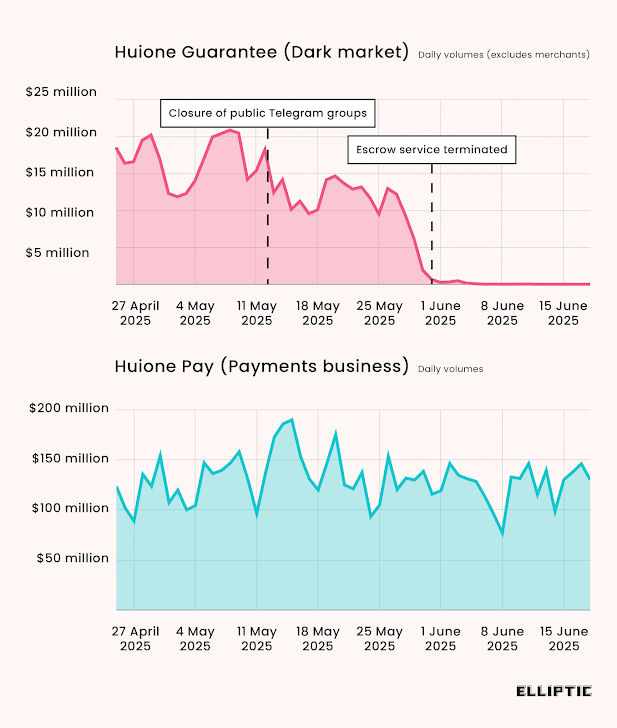
  • Tudou Guarantee Takes Lead After HuiOne Shutdown — An illicit Telegram marketplace called Tudou Guarantee has emerged as the main winner following the closure of HuiOne Guarantee last month. The latest findings show that it's business as usual for Chinese-language black markets in the wake of Telegram's takedown of the two biggest of those bazaars, HuiOne Guarantee and Xinbi Guarantee. Both the services are estimated to have enabled a staggering $35 billion in transactions. Blockchain intelligence firm Elliptic said it's tracking more than thirty highly-active guarantee markets. "Most notably, Tudou Guarantee has seen users more than double – and cryptocurrency inflows are now approximately equal to those seen for HuiOne Guarantee prior to its shutdown," the company said. "Many of the merchants operating on Tudou are the same ones that previously sold through HuiOne Guarantee, offering stolen data, money laundering services and other products needed by scammers." The shift is also significant in light of the fact that HuiOne Guarantee is a major shareholder in Tudou Guarantee. It acquired a 30% stake in December 2024. "These scammers have inflicted misery on millions of victims around the world, stealing billions of dollars. Unless these marketplaces are actively pursued, they will continue to flourish," Elliptic's Tom Robinson was quoted as saying to WIRED.
  • South Korea Targeted by MeshAgent and SuperShell — Windows and Linux servers in South Korea are being targeted by Chinese-speaking threat actors to drop web shells like SuperShell and remote desktop software such as MeshAgent to establish persistent access and install additional payloads. The IP address used to stage the payloads has also been found to include WogRAT (short for "WingsOfGod"), a backdoor that can collect system information and execute arbitrary commands issued by a remote server. The exact initial access vector used in the attacks is unknown, according to AhnLab. "The attacker seems to target not only Windows but also Linux, attempting to take control of the network where the infected system belongs by moving from the initial penetration phase to the lateral movement phase," the cybersecurity company said. "While the ultimate goal is unknown, the attacker may steal sensitive information or infect the network with ransomware if they successfully take control of the organization's network."
  • AndroxGh0st Malware Evolves to Add New Flaws — The threat actors behind the AndroxGh0st malware have been found leveraging compromised websites associated with the University of California, San Diego, and an unnamed Jamaican events aggregator platform for C2 purposes. Attacks mounted by the Python-based cloud attack tool are known to leverage a wide range of known security flaws, including those affecting Apache Struts, Apache Shiro, FasterXML, Lantronix PremierWave, Popup Maker WordPress plugin, and Spring Framework, to obtain initial access and drop the malware. "The botnet exploits popular platforms (e.g., Apache Shiro, Spring framework, WordPress) and IoT devices (Lantronix), enabling remote code execution, sensitive data theft, and cryptomining," CloudSEK said.
  • Phishing Campaign Leverages CapCut Lures — A new phasing campaign is employing fake CapCut invoice lures to trick recipients into clicking on bogus links that mimic Apple account login pages and prompt them to enter their financial information to receive a refund. However, the attack is designed to stealthily hoover their credentials and credit card details to an external server. "As CapCut continues to dominate the short-form video editing scene, cybercriminals are seizing the opportunity to exploit its popularity," Cofense said.
  • Dutch Police Contact 126 Individuals in Connection with Cracked.io — Dutch police have identified and contacted 126 individuals who held accounts on the Cracked.io hacking forum. Authorities filed criminal cases against eight suspects and warned the remaining individuals against engaging in further criminal activity. The youngest person contacted by authorities was 11 years old. Law enforcement agencies from the U.S. and Europe seized Cracked and Nulled earlier this January. Prior to the takedown, the forum had more than 4.7 million users and was known for selling hacking services, stolen data, and malware.
  • Vulnerabilities in Airoha SoCs — Cybersecurity researchers have discovered three flaws in devices that incorporate Airoha Systems on a Chip (SoCs) that could be weaponized to take over susceptible products without requiring any authentication or pairing, and on certain phones, even eavesdrop on conversations and extract call history and stored contacts. "Any vulnerable device can be compromised if the attacker is in Bluetooth range," the researchers said. The vulnerabilities, assigned the CVE identifiers CVE-2025-20700, CVE-2025-20701, and CVE-2025-20702, relate to missing authentication for GATT Services, missing authentication for Bluetooth BR/EDR, and an unspecified vulnerability in a custom protocol that allows for manipulating the device. The Bluetooth chipset, according to cybersecurity company ERNW, is used in headsets, earbuds, dongles, speakers, and wireless microphones. "Some vendors are not even aware that they are using an Airoha SoC," ERNW noted. "They have outsourced parts of the development of their device, such as the Bluetooth module."
  • Operation Overload Uses API to Amplify Pro-Russian Propaganda — A Russian disinformation operation known as Operation Overload has adopted artificial intelligence (AI) to generate Russian propaganda and spread it across Telegram, X, BlueSky, and TikTok. The activity involves AI-generated or deceptively edited content, often impersonating journalists, public figures, and respected institutions, to interfere with the political discourse in Ukraine, France, Germany, Poland, Moldova, and the United States. "While anti-Ukrainian narratives continue to dominate, election interference stands out as a prominent theme," CheckFirst said.
  • Crypto Drainer Scam Impersonates Tax Authorities — A new phishing campaign dubbed Declaration Trap has been observed targeting cryptocurrency users by impersonating European tax authorities, specifically Dutch agencies Belastingdienst and MijnOverheid. In these attacks, prospective victims are lured via email messages to phishing sites that harvest personal information and run crypto drainer phishing kits to siphon seed phrases, and perform unauthorized withdrawals by sending malicious transaction signing requests. "The victim's journey begins with an email that appears to come from Belastingdienst or MijnOverheid and tells the recipient they need to complete a special declaration form for their crypto assets due to new tax regulations introduced in 2025," Group-IB said. "Scammers use pressure tactics: they set short deadlines for completing the form and threaten victims with fines if they don't comply." The disclosure comes as IBM X-Force detailed a phishing campaign that's targeting financial institutions across the world with weaponized Scalable Vector Graphics (SVG) files embedded with JavaScript to steal credentials and drop remote access trojans (RATs). "When executed, the SVG-embedded JavaScript drops a ZIP archive containing a JavaScript file that is used to download a Java-based loader," IBM said. "If Java is present, it deploys modular malware including Blue Banana RAT, SambaSpy, and SessionBot."
  • Hive0131 Campaign Delivers DCRat in Colombia — In a new phishing campaign detected in early May 2025, the threat actor tracked as Hive0131 targeted users in Colombia with bogus notifications about criminal proceedings to initiate an attack chain that ultimately delivered the modular DCRat malware to harvest files, keystrokes, and audio and video recordings. "Hive0131 is a financially motivated group likely originating from South America that routinely conducts campaigns largely in Latin America (LATAM) to deliver a wide array of commodity payloads," IBM X-Force said. "The current campaigns imitate official correspondence and contain either an embedded link or a PDF lure with an embedded link. Clicking on the embedded link will initiate the infection chain to execute the banking trojan 'DCRat' in memory." The attacks, which have also been found to either contain a PDF lure with a link to a TinyURL or an embedded link to a Google Docs location, are characterized by the use of an obfuscated .NET loader dubbed VMDetectLoader that's used to download and execute DCRat.
  • CISA and NSA Call for Adoption of Memory-Safe Languages — The U.S. Cybersecurity and Infrastructure Security Agency, along with the National Security Agency (NSA), issued guidance on adopting memory-safe languages (MSLs) such as Rust to mitigate memory-related vulnerabilities in software. MSLs offer built-in mechanisms such as bounds checking, memory management, data race prevention, and runtime safety checks to protect against memory bugs. "Achieving better memory safety demands language-level protections, library support, robust tooling, and developer training," the agencies said. "MSLs offer built-in safeguards that shift safety burdens from developers to the language and the development environment. By integrating safety mechanisms directly at the language level, MSLs enhance security outcomes and reduce reliance on after-the-fact analysis tools." However, the report also points out the challenges with adopting MSLs due to legacy systems and tightly coupled code, performance overhead, and the availability (or lack thereof) of tools and libraries available for an MSL.
  • New SmartAttack Technique Uses Smartwatches to Steal Air-Gapped Data — A new side-channel attack dubbed SmartAttack has demonstrated the use of smartwatches as receivers for ultrasonic covert communication in air-gapped environments. The approach, according to Dr. Mordechai Guri, the head of the Offensive Cyber Research Lab in the Department of Software and Information Systems Engineering at the Ben Gurion University of the Negev in Israel, utilizes the built-in microphones of smartwatches to capture covert signals in real-time within the ultrasonic frequency range of 18-22 kHz. As with other attacks of this kind, the threat model presupposes that the attacker has already infiltrated the air-gapped system and implanted malware that operates stealthily, transmitting information using the infected machine's speakers in a frequency range that's inaudible to humans. On the other end, the attack also requires the threat actor to compromise the smartwatch of an individual with access to the secured environment, and deploy malware capable of receiving the covert ultrasonic communication, decoding it, reconstructing it, and forwarding it to the attacker's infrastructure. In an experimental setup, SmartAttack can be used to transmit data through ultrasonic signals over distances of more than 6 meters, with data rates of up to 50 bits per second. Dr. Guri, who disclosed RAMBO and PIXHELL attacks last year to exfiltrate data from air-gapped systems, said the findings highlight the "security risks posed by smartwatches in high-security environments." Possible mitigations include prohibiting smartwatches and similar audio-capable wearables when entering secure environments, deploying ultrasonic monitoring systems to identify unauthorized transmissions, deploying ultrasonic jammers, and physically removing or disabling audio hardware components.
  • Google Adds New Security Feature to Tackle XSS Attacks — Google has added a new security feature to the Chrome browser that automatically escapes "<" and ">" characters inside HTML attributes. The new feature is designed to prevent cross-site scripting attacks that rely on slipping in malicious code inside HTML code. The feature shipped with the stable version of Chrome 138 released on June 24, 2025. "It's possible that a sanitizer may have a DOM tree it considers safe; however, after re-parsing, this DOM tree will be materially different, resulting in an XSS," Google's Michał Bentkowski said. This type of XSS attack is called mutation XSS (mXSS).

🎥 Cybersecurity Webinars

  • Designing Identity for Trust at Scale—With Privacy, AI, and Seamless Logins in Mind In today's AI-powered world, customer identity is all about trust. This webinar unpacks insights from the Auth0 2025 Trends Report—covering how users react to AI, rising privacy expectations, and the latest identity threats. Whether you're building login flows or trust strategies, you'll get clear, practical advice to stay ahead.
  • Stop Pip Installing and Praying: Secure Your Python Supply Chain in 2025 The Python ecosystem in 2025 is under attack—from repo jacking and typosquatting to hidden flaws in common container images. If you're still "pip installing and hoping," it's time to rethink. Join security experts as they unpack real threats, explain tools like CVE, Sigstore, and SLSA, and share how PyPI is responding. Whether you're using YOLO models or managing production apps, you'll get clear, practical steps to secure your Python supply chain today.

🔧 Cybersecurity Tools

  • RIFT Microsoft has open-sourced RIFT, a tool that helps analysts spot attacker-written code in complex Rust malware. As Rust becomes more popular among threat actors, malware is getting harder to analyze. RIFT cuts through the noise by using automated signature matching and binary diffing to highlight only the custom code—saving time and improving detection.

Disclaimer: These newly released tools are for educational use only and haven't been fully audited. Use at your own risk—review the code, test safely, and apply proper safeguards.

🔒 Tip of the Week

Beyond Defaults: Mastering Windows Hardening ➝ Default Windows settings are built for ease, not security. That's fine for casual use—but if you care about protecting your data, business, or even just your privacy, it's time to go beyond the basics.

The good news? You don't need to be a sysadmin to lock down your system. Tools like HardeningKitty, CIS-CAT Lite, and Microsoft's Security Compliance Toolkit do the heavy lifting for you. They scan your system and tell you exactly what to fix—like disabling outdated protocols (SMBv1, NetBIOS), hardening Office macros, or turning off risky Windows features you don't even use.

If that sounds a bit much, don't worry—there are one-click apps too. ConfigureDefender lets you max out Microsoft Defender's protection (including turning on hidden advanced rules). WPD and O&O ShutUp10++ help you cut Windows tracking, bloatware, and junk settings in minutes. Think of them as the "Privacy + Security" switches Microsoft should've given you by default.

Want to get serious? Start with CIS-CAT Lite to see where your system stands, then run HardeningKitty to close the gaps. These aren't just checkboxes—you're cutting off real-world attack paths like phishing payloads, document-based malware, and lateral movement across networks.

Bottom line: You don't have to "just use Windows as it is." You can make it work for you, not against you—without breaking anything. Small changes, big impact.

Conclusion

It's easy to get caught up in the technical details, but at the end of the day, it's about making smart decisions with the tools and time we have. No one can fix everything at once—but knowing where the cracks are is half the battle. Whether it's a quick configuration check or a deeper policy rethink, small steps add up.

Take a few minutes to scan the highlights and see where your team might need a second look.

Found this article interesting? Follow us on Twitter and LinkedIn to read more exclusive content we post.


from The Hacker News https://ift.tt/2A8XCvR
via IFTTT