Posts on Security, Cloud, DevOps, Citrix, VMware and others.
Words and views are my own and do not reflect on my companies views.
Disclaimer: some of the links on this site are affiliate links, if you click on them and make a purchase, I make a commission.
Microsoft has warned of phishing campaigns distributing an installer for the MSP360 Remote Monitoring and Management (RMM) software under the guise of meeting invitations, PDF-themed lures, software update prompts, and other social-engineering content.
"Once executed, the legitimate MSP360 installer, distributed under a deceptive file name established remote management access on affected devices and enabled threat actors to gain an initial foothold using trusted administrative software," the Microsoft Security Research team said.
The initial foothold is then used to download and install a ConnectWise ScreenConnect client, offering threat actors a redundant remote-access channel to compromised endpoints. The access is then abused to deliver additional tools and carry out information collection and credential-access operations. The activity has not been attributed to any known threat actor or group.
The multi-stage intrusion chain, which the Windows maker detected in July 2026, begins with phishing emails distributing a digitally signed MSP360 RMM v2.5.0.67 installer under deceptive names such as below -
The installer packages are staged on attacker-controlled infrastructure and legitimate cloud services including Amazon S3, Cloudflare R2, Dropbox, GitLab, and Supabase.
Once launched, the installer drops multiple DLLs, while relaunching itself by invoking the Windows User Account Control (UAC) elevation workflow to run in a privileged context, establish persistent access by deploying MSP360, and leverage the RMM tool to execute PowerShell for stealthily installing ScreenConnect.
The installer also enumerates installed .NET runtimes and registers two Windows services (RMM.Agent.exe and RMM.Agent.Launcher.exe) and creates Registry-based autorun entries to ensure that MSP360 is automatically launched when users sign-in to the machine.
Furthermore, it modifies the Windows Firewall configuration to allow inbound UDP traffic to MSP360 (i.e., RMM.Agent.exe) on port 48678.
The dual-RMM remote access attack enables the attacker to transfer additional executables and facilitate post-compromise activity, while camouflaging malicious activity within regular remote administration workflows. The payloads are run through ScreenConnect's native RunFile functionality.
Microsoft said it also observed a separate set of attacks in July 2026 that switched MSP360 for Faronics Deploy Agent to find a way in, and then used it to download and install ScreenConnect. This suggests that the threat actors are putting multiple RMM tools for remote access.
"This activity highlights how threat actors continue to abuse legitimate remote administration software to blend into normal IT operations while maintaining persistent access and reducing detection opportunities," Microsoft said.
"The combination of MSP360 and ScreenConnect provided the threat actor with redundant remote administration channels and enabled the transfer, execution, and management of additional tooling during subsequent stages of the intrusion."
from The Hacker News https://ift.tt/NwThzIL
via IFTTT
Cybersecurity researchers have disclosed technical details of a recently patched critical security flaw in Citrix NetScaler ADC and Gateway that has come under active exploitation in the wild.
The vulnerability, tracked as CVE-2026-88772 (CVSS score: 9.5), has been described as a memory overflow bug in the Datagram Transport Layer Security (DTLS) protocol handling that's rooted in the NetScaler Packet Processing Engine (NSPPE).
"Citrix NetScaler ADC and NetScaler Gateway contain an improper restriction of operations within the bounds of a memory buffer vulnerability that could allow for remote code execution or denial-of-service," the U.S. Cybersecurity and Infrastructure Security Agency (CISA) said.
The issue, per watchTowr, is that NetScaler implicitly trusts the declared fragment size in the DTLS handshake header's fragment_length field (i.e., 1 byte), while the header simultaneously claims that the complete message, as denoted by the length field, is 120 bytes long.
This parsing inconsistency can be exploited by an attacker to craft a malicious record that makes the record look small, while the actual data being copied to the buffer is much larger in size, resulting in an overflow.
"For example, a 120-byte handshake message can arrive as 120 fragments. Every fragment has length=120, but each one can have fragment_length=1," security researcher Sina Kheirkhah explained. "Their offsets would be 0, 1, 2, and so on up to 119. Once every position has arrived, the server considers the 120-byte message complete. Joining those pieces is called reassembly."
Each received packet of 1,459 bytes is stored in NetScaler Buffers (NSBs), which is then stitched into a single scratch buffer of only 35,840 bytes. Given that the vulnerable version does not check whether the next packet can fit into the scratch buffer, data gets written past the end of the buffer and leads to a buffer overflow.
"The malicious records tell the reassembly code that each record supplies only one byte of a 120-byte handshake message," Kheirkhah said. "However, NSPPE keeps almost the whole record in an NSB. After 120 records, the handshake message is considered complete, but its NSB chain contains about 174 KB of data."
watchTowr's analysis further found that this overflow can be weaponized to divert control flow to arbitrary shellcode with root-level privileges by using the mprotect() system call to defeat NX (no-execute) protections.
The disclosure comes a day after the preemptive exposure management company released a proof-of-concept (PoC) for CVE-2026-88771, which has been abused alongside CVE-2026-88772 in real-world attacks.
from The Hacker News https://ift.tt/BEqTdnC
via IFTTT
We review the potential Anthropic IPO, in the context of revenue trajectory, expense trajectory and planned commitments, past and future funding rounds, future expanse commitments to large datacenter projects, and the strengths and weaknesses of the business in the current and potentially future political climates in the US and around the world.
Russian state hackers known as Star Blizzard have been using fake event invitations to trick people into installing a backdoor on their Windows computers, according to Microsoft.
The campaigns, aimed at people and organizations tied to Ukraine, have affected more than 100 organizations since January, mostly in the U.S. and U.K. At least one computer was infected, but the number of breached organizations has not been disclosed.
Security agencies in the U.S., U.K., Australia, Canada and New Zealand said in December 2023 that Star Blizzard almost certainly works under Center 18 of Russia's Federal Security Service (FSB). The group has long stolen email passwords by posing as people its targets know.
By 2023, it had already used fake conference and event invitations as bait, often exchanging messages with a target before sending a malicious link.
Microsoft counted at least 13 larger campaigns this year, each with tens to hundreds of emails, on top of the group's usual targeted phishing.
Since March, those campaigns have used email accounts on WordPress and cPanel websites, which Microsoft is highly confident the group hacked for that purpose. Before, the group mostly used free email services such as Proton and Microsoft consumer accounts.
In 2025, the group delivered its malware through fake CAPTCHA pages that tricked targets into running commands themselves, a method known as ClickFix. This year it switched to a method Microsoft calls RedFlick. RedFlick uses scheduled tasks, jobs that Windows runs automatically, to install a backdoor named CosmicPulse.
The invitations name well-known think tanks or NGOs as hosts, such as Chatham House and the Atlantic Council. Many emails are written to appear to come from within the target's organization.
The first email usually carries no attachment. If the target replies, the group sends a password-protected RAR or ZIP archive, with the password shown in an image.
The first campaigns, in January and February, posed as Ukrainian authorities and sent fake tax audit and fine notices to users of the Ukrainian email service Ukr.net. Later lures included a water shutdown notice for hotels in Kyiv and a payment notice for staff at an international financial organization.
One March campaign worked differently. People who replied to an Atlantic Council-themed invitation got a link to DarkSword, an iPhone exploit kit, instead of the Windows backdoor, according to Microsoft.
Proofpoint reported Atlantic Council-themed emails from the group in March, along with a sharp rise in its email volume.
Trellix found 4 such emails sent on March 26. Its confidence that the emails led to DarkSword is medium, because the exploit pages were offline and no exploit code was recovered.
How the Backdoor Gets In
Microsoft traced several versions of the infection chain. In all of them, a shortcut (LNK) file disguised as a PDF initiates the attack, and a Windows Installer (MSI) package sets up scheduled tasks.
Opening the shortcut quietly runs commands that fetch the installer from a remote server. In January, a hidden script used the SSH program to download it. In July, the shortcut downloaded a PDF with a hidden command that tries to fetch the installer.
In the version seen in April, the installer created 3 scheduled tasks named to look like normal network components:
Internet Quality Test Connection
Network Configuration Manager
System Health Monitor
The first task sends the computer name and user name to the group's command-and-control (C2) server and can run more code from a remote location. The second sets up WebDAV, a Windows feature that opens a web address as if it were a folder. The third uses control.exe, the Windows Control Panel program, to run the next stage from the C2 server.
The next stage is a downloader disguised as a Control Panel item. It installs CosmicPulse, a Python-based backdoor. The downloader is the one earlier reports called NOROBOT or BAITSWITCH.
Microsoft says these techniques overlap with a June campaign, reported by Digital Security Lab Ukraine, that targeted Ukrainian civil society organizations. That campaign used fake invitations to the Ukraine Recovery Conference. The lab did not name the attackers and could not recover the final payload.
Two indicators appear in both Microsoft's list and the June report, a comparison by The Hacker News found: the IP address 103.160.59[.]97 and the domain secure-dns-hub[.]com. Sharing them does not by itself show that the same group ran both campaigns.
What Defenders Can Check
Microsoft published hunting queries and indicators for the campaigns, with advice for government bodies, NGOs, and think tanks that work on or support Ukraine policy. It also notifies customers it sees as targeted or compromised.
One domain, secure-dns-hub[.]com, was still in use when Microsoft published the report on September 29, according to the company.
Organizations likely to be targeted can take these steps:
Check sender addresses. In these campaigns, the real organization's name appears before the @ sign rather than in the domain. When in doubt, contact the sender through a phone number or email address you already know.
Search for the 3 scheduled task names above and for the Microsoft Defender detections Trojan:Script/RedFlick and Backdoor:Python/CosmicPulse.
Widen the time range of Microsoft's 3 Defender XDR hunting queries, which look back only 7 days as published. Defender's advanced hunting keeps up to 30 days of raw data, so checking back to January needs logs kept longer, for example in Microsoft Sentinel.
Block or limit outbound SSH connections the business does not need. The January version used SSH to fetch its installer.
If you use Microsoft Defender, turn on the attack surface reduction rules that block rare, new, or untrusted executable files and obfuscated scripts.
Use phishing-resistant sign-in methods. The group still runs password phishing with Evilginx, a tool that can also steal session cookies to get around two-factor authentication.
Update iPhones to iOS 26.3 or later, which fixes all 6 flaws DarkSword uses, and turn on Lockdown Mode where that is not yet possible, Trellix advises.
Microsoft's public report does not list specific cleanup steps for a computer where the tasks are found. Defender XDR customers can check the company's threat analytics reports, which include recommended response actions.
from The Hacker News https://ift.tt/JHkbghX
via IFTTT
In July 2026, Microsoft Defender Experts observed phishing campaigns targeting organizations across multiple industries that distributed a masqueraded MSP360 Remote Monitoring and Management (RMM) installer through meeting invitations, PDF-themed lures, software update prompts, and other social-engineering content. Once executed, the legitimate MSP360 installer, distributed under a deceptive file name established remote management access on affected devices and enabled threat actors to gain an initial foothold using trusted administrative software.
Microsoft observed the MSP360 deployment being used to download and install a ConnectWise ScreenConnect client, creating a secondary remote-access channel that provided redundant access to compromised systems. Microsoft did not observe exploitation of ScreenConnect software itself; rather, threat actors abused legitimately obtained remote administration software to establish and maintain access. After access was established, threat actors used these remote administration channels to deploy additional tools and conduct post-compromise activity, including information collection and credential-access operations.
This activity highlights how threat actors continue to abuse legitimate remote administration software to blend into normal IT operations while maintaining persistent access and reducing detection opportunities. Microsoft Defender for Endpoint detects suspicious and uncommon remote-management activity, while the hunting queries and mitigations in this post can help organizations identify and restrict unapproved RMM use.
Attack chain overview
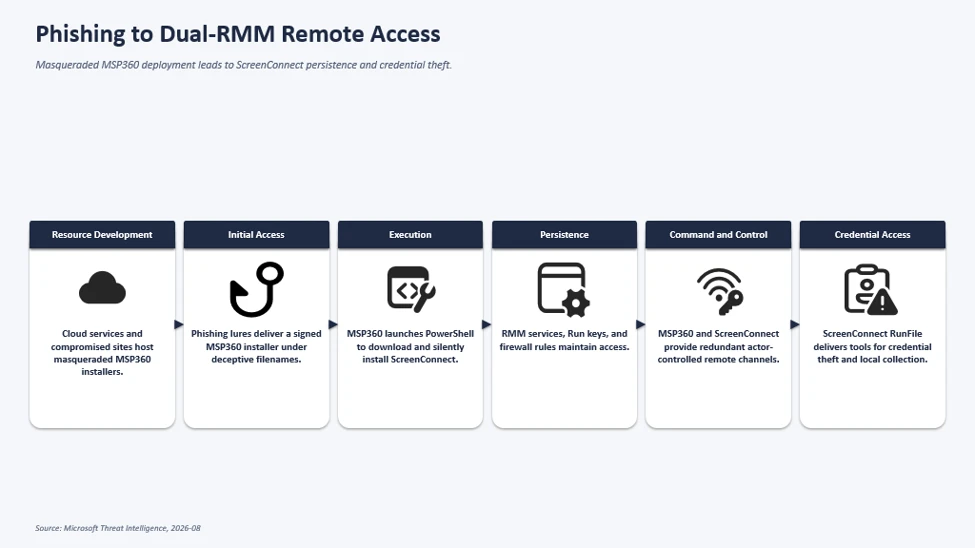
The observed multi-stage intrusion chain began when phishing lures delivered a legitimate, digitally signed MSP360 RMM v2.5.0.67 installer under deceptive filenames. Following successful User Account Control (UAC) elevation, the installer established MSP360 services for persistent access and leveraged the RMM agent to invoke PowerShell, download, and silently install ConnectWise ScreenConnect.
This effectively introduced a second remote administration channel on the compromised device, which the threat actor subsequently used to transfer and execute additional tooling supporting credential access, local data collection, and other post-compromise activity.
Figure 1. Attack chain showing phishing delivering a masqueraded MSP360 RMM installer that deploys ScreenConnect for persistent remote access and follow-on activity.
Microsoft observed multiple phishing campaigns that used a multi-stage delivery chain to distribute legitimate, digitally signed MSP360 RMM software (v2.5.0.67). Phishing emails directed users to actor-controlled landing pages that impersonated document-sharing portals, invitation workflows, Adobe Reader download pages, Zoom installation pages, and business collaboration platforms.
Upon user interaction, victims were redirected to download locations hosted on both attacker-controlled infrastructure and legitimate cloud services including Amazon S3, Cloudflare R2, Dropbox, GitLab, and Supabase. The downloaded executables used filenames crafted to resemble legitimate business content, meeting invitations, PDF documents, and software installers. Analysis of downloaded samples showed that many ultimately contained the same MSP360 RMM installer package despite appearing as different files to the victim.
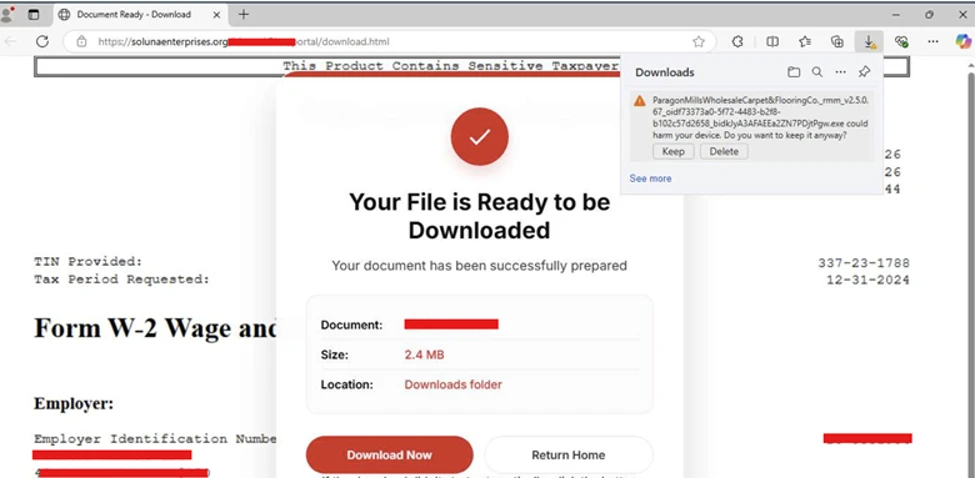
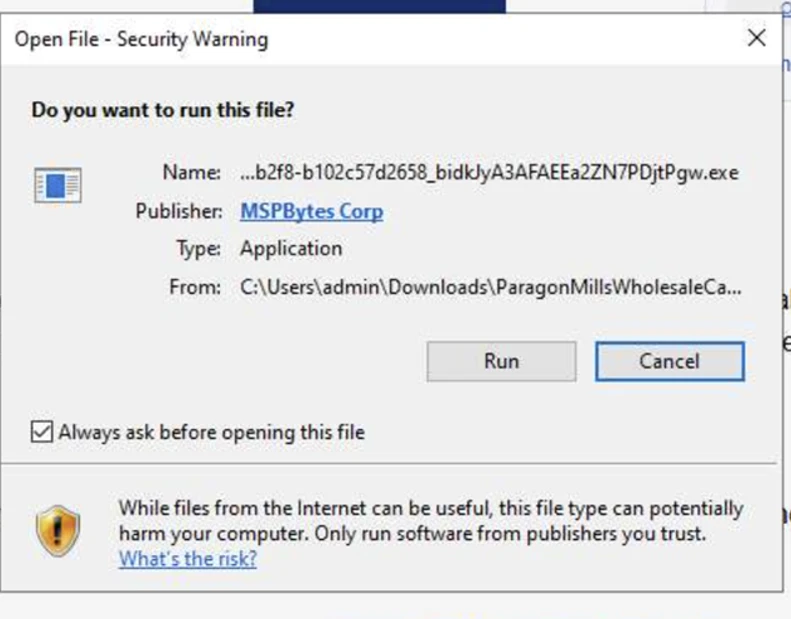
Figure 2. Actor-controlled tax-document lure prompting download of a masqueraded MSP360 installer.Figure 3. Image displaying the execution of downloaded MSP360 RMM.
The campaign relied on a diverse set of payload-hosting mechanisms. Microsoft observed the actor distributing the payload through attacker-controlled domains, websites assessed to be compromised, and legitimate cloud-hosted services. Cloud-hosted services used for payload distribution included Amazon S3, Cloudflare R2, Dropbox, GitLab, and Supabase.
This approach enabled the actor to rapidly rotate delivery infrastructure while continuing to distribute the same MSP360 installer using different lure themes and filenames.
RMM platforms are attractive to threat actors because they are designed to provide administrators with broad remote management capabilities across managed endpoints, including remote command execution, software deployment, file transfer, and persistent service-based access. When abused, these same capabilities can give threat actors a flexible post-compromise channel for maintaining access, deploying additional tooling, and conducting follow-on activity while blending in with legitimate remote administration workflows.
MSP360 RMM installation and foothold establishment
After victims downloaded and executed the masqueraded MSP360 installer, the binary launched from the user’s Downloads directory under a filename designed to resemble a legitimate business document.
The installer subsequently dropped multiple installation components, including System.dll, nsExec.dll, and UAC.dll, to the following folder paths before relaunching itself through an elevation workflow generated by the installer framework. Next, the installer invoked a Windows User Account Control (UAC) elevation workflow. In observed successful installations, the process continued with elevated privileges, allowing deployment of MSP360 components and services. In unsuccessful installations, the elevation did not complete, and deployment terminated before the software was fully installed.
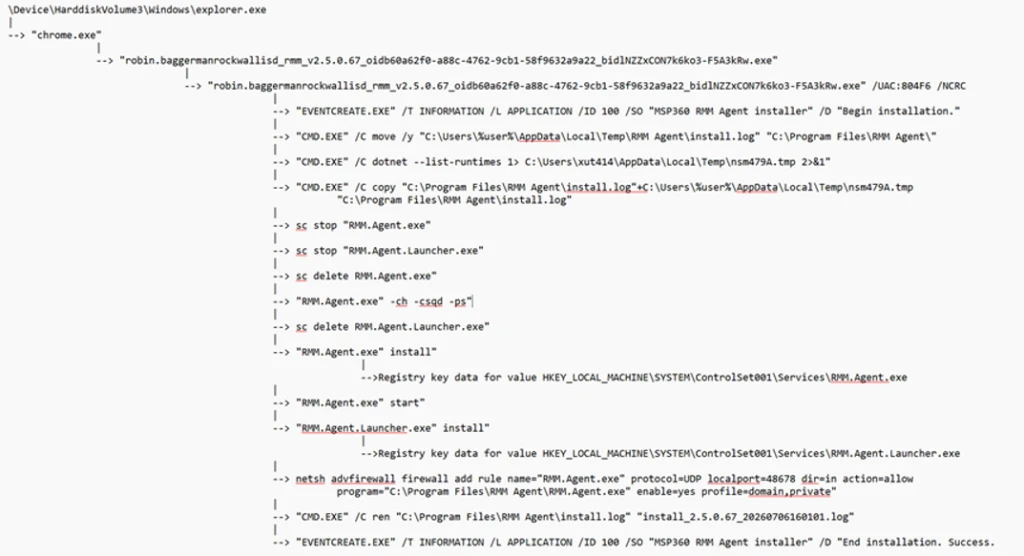
Following elevation, the installer initiated the MSP360 installation workflow and recorded installation status messages using Windows eventcreate.exe. The installer generated “Begin installation” and “End installation. MSP360 de Success.” events under the event source: MSP360 RMM Agent installer. The installer dropped multiple MSP360 plugins and binaries within the installation directory: C:\Program Files\RMM Agent\.
The installer also performed prerequisite discovery by enumerating installed .NET runtimes using: dotnet –list-runtimes. To establish long-term access on the affected device, the installer registered two Windows services: RMM.Agent.exe & RMM.Agent.Launcher.exe. Microsoft observed events indicating stopping any existing MSP360 services and installing new MSP360 services.
In addition to service-based persistence, the installer created registry-based autorun entries for MSP360 user interface components, ensuring the tray applications would automatically launch when users signed in.
The installation routine also modified the Windows Firewall configuration by creating an inbound allow rule for the MSP360 agent. The rule allowed inbound UDP traffic to C:\Program Files\RMM Agent\RMM.Agent.exe on port 48678. This configuration enabled network communications required by the remote management platform.
Figure 4. Process execution flow of the MSP360 RMM installation.
Not every execution of the installer resulted in a successful deployment. In some instances, the installer was launched by the user and began its installation routine but subsequently attempted to obtain elevated privileges through User Account Control (UAC). When elevation was denied or aborted, the installation terminated before completing deployment of the MSP360 RMM components. The process execution flow showed installation initialization activity followed by events indicating that administrative privileges were required, with no subsequent evidence of the persistence mechanisms, services, or remote management functionality observed during successful installations.
Figure 5. Unsuccessful installation of MSP360 RMM.
Remote command execution from MSP360 Agent and ScreenConnect deployment
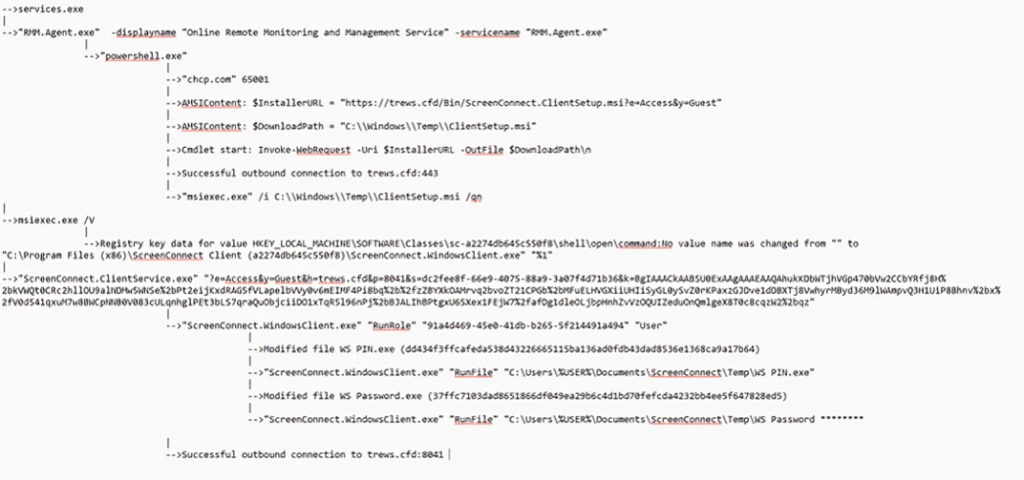
Following successful installation of MSP360 RMM, the newly installed RMM.Agent.exe service launched PowerShell. The PowerShell process modified the execution policy for the current session and executed Invoke-WebRequest commands to download an MSI package named ClientSetup.msi from actor-controlled infrastructure. The downloaded package was then installed silently through msiexec.exe using the /qn switch, eliminating visible user interaction. This installation activity resulted in the deployment of a ConnectWise ScreenConnect client on the compromised endpoint, including ScreenConnect.ClientService.exe, ScreenConnect.WindowsClient.exe, and supporting components.
The installer additionally created Windows service registrations, application uninstall entries, and authentication-related registry modifications associated with the newly deployed ScreenConnect client.
Figure 6. The process execution flow of the remote command execution and ScreenConnect deployment.
Following deployment, the ScreenConnect client service launched with configuration parameters referencing actor-controlled infrastructure and subsequently established successful outbound communications. The service then spawned ScreenConnect.WindowsClient.exe, providing an additional remote access channel independent of MSP360. Following establishment of the ScreenConnect session, the threat actor used ScreenConnect to transfer and stage additional executables in the following directories:
These files were among the most frequently observed utilities delivered by the threat actor following establishment of a ScreenConnect session. Several filenames were intentionally chosen to resemble legitimate Windows, Microsoft Defender, Phone Link, and security-related components, likely to reduce user suspicion and blend into normal operating system activity. These utilities were observed during post-compromise activity and were used to support subsequent operations on affected systems. Several of the observed tools are commonly associated with credential access, information collection, execution of additional payloads, and efforts to reduce defender visibility.
The execution of these files occurred through ScreenConnect’s built-in RunFile functionality, which allows files to be transferred to and executed on managed endpoints. This activity demonstrates how the threat actor leveraged a legitimate MSP360 RMM deployment to establish an initial foothold before deploying ConnectWise ScreenConnect as a secondary remote access platform. The combination of MSP360 and ScreenConnect provided the threat actor with redundant remote administration channels and enabled the transfer, execution, and management of additional tooling during subsequent stages of the intrusion.
The threat actor subsequently used these remote access platforms to facilitate follow-on activities including information collection, credential access, and the deployment of additional utilities on compromised systems.
Microsoft also observed separate activity during July in which FaronicsDeployAgent.exe, a legitimate deployment and remote access application, was used in a similar manner to MSP360 RMM. In this activity, the threat actor leveraged FaronicsDeployAgent.exe as the initial remote management platform and subsequently used it to download and install ScreenConnect. This observation demonstrates that the deployment of ScreenConnect was not limited to MSP360-based intrusions, with additional legitimate remote administration software also being leveraged to establish remote access and facilitate ScreenConnect installation.
Attribution
Microsoft has not attributed this activity to a named threat actor. The campaigns are tracked as unattributed activity.
Mitigation and protection guidance
Microsoft recommends the following actions to help organizations reduce their exposure to this activity. Check the recommendations card for the deployment status of monitored mitigations.
Govern approved RMM tools: For approved RMM systems used in your environment, enforce security settings where possible to implement multi-factor authentication (MFA).
Restrict unauthorized software: Use Application Control for Windows to create policies to block unapproved IT management tools. Both solutions include functionality to block specific software publisher certificates:
Application Control for Windows file rule levels allow administrators to specify the level at which they want to trust their applications, including listing certificates as untrusted.
AppLocker’s publisher rule condition is available for files that are digitally signed, which can enable organizations to block non-approved RMM instances that include publisher information.
Block specific signed applications: Microsoft Defender for Endpoint also provides functionality to block specific signed applications using the block certificate action.
Consider searching for unapproved RMM software installations (see the Advanced hunting section). If an unapproved installation is discovered, reset passwords for accounts used to install the RMM services. If a system-level account was used to install the software, further investigation may be warranted.
Strengthen endpoint protection: Turn on cloud-delivered protection in Microsoft Defender Antivirus or the equivalent for your antivirus product to cover rapidly evolving attacker tools and techniques. Cloud-based machine learning protections provide near-instant, automated protection against new and emerging threats.
Investigate unauthorized installations: Turn on the following attack surface reduction rule to block or audit activity associated with this threat:
Block process creations originating from PsExec and WMI commands. Some organizations may experience compatibility issues with this rule on certain server systems but should deploy it to other systems to prevent lateral movement originating from PsExec and WMI
Microsoft Defender XDR detections
Microsoft Defender XDR customers can refer to the list of applicable detections below. Microsoft Defender XDR coordinates detection, prevention, investigation, and response across endpoints, identities, email, and apps to provide integrated protection against attacks like the threat discussed in this blog.
Tactic
Observed activity
Microsoft Defender coverage
Initial access
Delivery of masqueraded MSP360 application v2.5.0.67
Microsoft Defender Antivirus – SupportScam:Win32/RogueMSP.MU!MTB
Execution
Execution of the RMM software
Microsoft Defender for Endpoint – Suspicious usage of remote management software – Uncommon remote access software
Persistence
Persistence established by RMM software
Microsoft Defender for Endpoint – Anomaly detected in ASEP registry – Suspicious file registered as a service
Credential Access
Potential credential-access activity following RMM deployment
Microsoft Defender for Endpoint – Possible theft of passwords and other sensitive web browser information
Threat intelligence reports
Microsoft customers can use Microsoft Defender XDR Threat Analytics and related Microsoft threat intelligence reporting to stay current on the malicious activity, indicators, detection coverage, and recommended response actions associated with this campaign. These reports provide investigation context, protection guidance, and updated intelligence that security teams can use to prevent, mitigate, or respond to related activity in their environments.
Advanced hunting
// Run this query to identify the presence of MSP360 RMM agent
let MSP360RMM = "108ef7e628d7a20bd6241a5b57149e27a6061f467123eb64061975559f8f73dc";
DeviceFileEvents
| where Timestamp >= ago(30d)
| where SHA256 =~ MSP360RMM
// Run this query to identify the remote command execution from MSP360 RMM Agent
DeviceProcessEvents
| where Timestamp >= ago(30d)
| where (InitiatingProcessVersionInfoCompanyName == "MSP360" and ProcessCommandLine == "\"powershell.exe\"") or ( InitiatingProcessCommandLine == "\"powershell.exe\"" and ProcessCommandLine has_all ("msiexec.exe","\\Temp\\",".msi") and InitiatingProcessParentFileName == "RMM.Agent.exe")
// Run this query to identify the suspicious network connections from the threat actor’s use of ScreenConnect
let MaliciousURLs =  DeviceNetworkEvents
| where Timestamp >= ago(30d)
| where InitiatingProcessCommandLine == "\"powershell.exe\""
| where InitiatingProcessParentFileName == "RMM.Agent.exe"
| where isnotempty(RemoteUrl)
| distinct  RemoteUrl;
DeviceNetworkEvents
| where Timestamp >= ago(30d)
| where InitiatingProcessFileName has_any ( "ScreenConnect.ClientService.exe","ScreenConnect.WindowsClient.exe","ScreenConnect.Client.exe")
| where isnotempty(RemoteUrl)
| where RemoteUrl in (MaliciousURLs)
// Run this query to identify the suspicious payloads dropped and launched by the threat actor’s use of ScreenConnect
DeviceProcessEvents
| where Timestamp >= ago(30d)
| where InitiatingProcessCommandLine  has_all ("ScreenConnect.WindowsClient.exe", "RunFile","\\Documents\\","\\Temp\\")
MITRE ATT&CK Techniques observed
This campaign has exhibited use of the following attack techniques. For standard industry documentation about these techniques, refer to the MITRE ATT&CK framework.
Resource Development
T1583.001 Acquire Infrastructure: Domains | Domains were used to host phishing landing pages, payload delivery infrastructure, and ScreenConnect services associated with the campaign.
T1583.006 Acquire Infrastructure: Web Services | The threat actor leveraged legitimate cloud-hosting providers including Amazon S3, Cloudflare R2, Dropbox, GitLab, and Supabase for payload distribution.
Initial Access
T1566.002 Phishing: Spearphishing Link | Victims received workplace meeting, Zoom, Google Meet, invitation, RSVP, PDF, and Adobe-themed phishing emails containing links that redirected to malicious payload download locations.
T1204 User Execution | Victims downloaded and executed a masqueraded MSP360 installer distributed under deceptive filenames designed to resemble legitimate business documents and software.
T1036 Masquerading | The actor distributed legitimate MSP360 software under filenames designed to resemble meeting applications, invitations, PDFs, and business documents.
T1036.005 Match Legitimate Name or Location | Follow-on tooling used filenames that closely resembled legitimate Windows, Microsoft Defender, security, and Phone Link applications.
T1112 Modify Registry | MSP360 and ScreenConnect modified registry locations associated with services, persistence, credential provider components, protocol handlers, and uninstall entries.
Command and Control
T1219 Remote Access Software | The threat actor abused legitimate remote administration software including MSP360 RMM and ConnectWise ScreenConnect to maintain access to victim systems.
T1105 Ingress Tool Transfer | MSP360 downloaded ScreenConnect, while the threat actor’s use of ScreenConnect was subsequently used to transfer and execute additional tooling on compromised endpoints.
T1573 Encrypted Channel | Payload retrieval and remote access communications occurred over encrypted network channels.
T1102 Web Service | Multiple cloud-hosted web services were used throughout the delivery and command-and-control infrastructure.
Discovery
T1082 System Information Discovery | The installer enumerated installed .NET runtimes using dotnet –list-runtimes during the installation workflow.
Collection
T1005 Data from Local System | Additional tooling delivered through ScreenConnect was observed in post-compromise activity and used to collect information from victim devices.
Indicators of compromise (IOCs)
Observed indicators associated with this campaign are listed below.
Legitimate MSP360 RMM v2.5.0.67 installer observed being distributed under deceptive filenames during the campaign. The observed sample was signed using a certificate that has since been revoked.
Utilities transferred or executed through ScreenConnect sessions and observed during post-compromise activity. Several of the identified tools are commonly associated with credential access, information collection, and efforts to reduce defender visibility.
To hear stories and insights from the Microsoft Threat Intelligence community about the ever-evolving threat landscape, listen to the Microsoft Threat Intelligence podcast.
Review our documentation to learn more about our real-time protection capabilities and see how to enable them within your organization.
An attacker used stolen passwords of staff at France's tax administration to take tax data on hundreds of thousands of taxpayers and businesses in June and July.
Neither the tax administration nor France's national cybersecurity agency saw the data leave. The attack was not sophisticated, the agency, ANSSI, says in a report (in French) published on Tuesday: it worked because of weak login protection, poorly separated networks and gaps in monitoring.
The tax administration, known as the DGFIP, runs France's tax website, impots.gouv.fr. The data came from E-Contact, the tool taxpayers use to message the tax administration.
For individuals, the data that may have been viewed or copied includes their tax ID, contact details, family situation, reference taxable income and tax withholding rate, plus a list of the messages they exchanged with the DGFIP. For fewer than 250 people, the messages themselves may also have been taken.
For businesses, it covers the company name, SIREN registration number, address and basic details of their messages. For fewer than 2,076 businesses, the content of those messages may have been seen.
The theft became known on August 12, when the attacker claimed it on an online forum, seven weeks after the first batch of data was taken. Prime Minister Sébastien Lecornu then asked ANSSI for an in-depth audit. In August, the ministry overseeing the DGFIP offered a different explanation.
It said at the time that the DGFIP's access checks had not revealed the theft "because of the sophistication of the attack" (translated from French).
How the Attacker Got In
The attacker used two separate routes, according to the report. The first began with suspicious logins in early May and led to E-Contact.
The first route relied on several dozen passwords belonging to DGFIP staff, stolen over three months. They were probably taken by infostealers, malware that quietly copies saved logins, from computers the DGFIP did not manage, most likely staff's own devices.
Two portals the attacker used, PIGP and ADER, asked only for a password, so a stolen one worked at once. PIGP is a web portal that DGFIP staff used for email and HR services. ADER provides access to certain DGFIP applications via the RIE, the network that connects French government ministries.
The attacker reached the RIE through compromised Education ministry systems connected to it. Sensitive DGFIP applications were not separated from the rest of the RIE, allowing them to be accessed from parts of the network with no apparent need. Investigators also found traces of many attempts to move into other government bodies on the network.
The accounts the attacker used had no special privileges, yet they could reach a large amount of data. ANSSI did not look at how user rights were managed for this report.
The second route led to land-registry data. It went through APEX, a portal for partners such as notaries and land surveyors, which asked for a password and a one-time code sent by email.
The DGFIP's investigation found that a land surveyor's computer at a private firm had possibly been compromised, allowing the attacker to bypass that code. The data was taken between July 27 and August 8. It concerns nearly 435,000 households, according to a note from the Senate finance committee, dated September 4 and reported by Public Sénat.
Why No One Saw the Theft
The DGFIP already had a routine for stolen staff logins, ANSSI says. Its security operations center (SOC) is the team that watches for attacks. When the SOC detected a compromised account or a threat intelligence provider flagged one, it reset the password.
That routine caught some of the attacker's activity but not the theft. On June 7, searches using a stolen account set off an alert and a same-day password reset, but the SOC missed that the attacker had moved from PIGP to ADER.
On June 23, the provider flagged another account the attacker was using, and searches made with it opened a SOC ticket at 8:50 p.m. Paris time. At 4:26 a.m. the next day, the attacker began pulling data from E-Contact via ADER using automated scraping tools that copy data page by page.
The SOC handled the ticket at 10:40 a.m. by resetting the account's password. The reset addressed the alert on PIGP but did not terminate the attacker's open session on ADER. Data kept flowing for almost 16 more hours, until 2:31 a.m. on June 25.
In July, the SOC again caught the attacker's searches but not the theft. The attacker restarted the automated extraction on July 22 with another stolen account. The SOC spotted suspicious searches with that account the next day and reset it on July 24.
The DGFIP's SOC was not monitoring ADER at all. No system linked the warning signs, such as logins at night and connections from VPNs, from addresses in India or from addresses known to be malicious. Data volumes raised no alert either, including the 11 GB exchanged between June 22 and 25.
The number of requests each user made was not checked either, although scraping needs one request per page. On their own, such signals usually cause many false alarms, but together they could have raised an alert, ANSSI says.
ANSSI's own monitoring missed the theft too. Its detection sensors sit only at the entry and exit points of the RIE and the internet, and the agency has no access to application logs.
Because the attacker used real staff accounts, ANSSI's network monitoring did not see the activity. Even so, the total number of requests should have raised alerts, the agency says.
On June 9, the Education ministry's security team told the security teams of all ministries about an incident on its network, shared 17 indicators of compromise and asked them to watch connections from the ministry's addresses. The attacker had already used one of those addresses and did so again in late June. ANSSI says the time taken to analyze and share such indicators should have been kept to a minimum.
On August 6, ANSSI passed the DGFIP two suspicious addresses it had found by searching its past sensor data. The DGFIP blocked them and reset five accounts, but neither agency identified the theft until the attacker claimed it on August 12.
What Has Changed and What ANSSI Recommends
When the report was written, DGFIP staff accounts had been shut out of ADER since August 13 and out of PIGP since August 18. The DGFIP does not expect to reopen either portal to them.
APEX was locked and the surveyor's account disabled on August 14, and the firm's other accounts were disabled four days later. These cuts significantly disrupted some DGFIP services and partner organizations.
An action plan has been drawn up to extend monitoring to all DGFIP business applications, implement strong authentication, and set limits on the amount of data that can be accessed. ANSSI says only a fuller audit, already planned, will identify all the weaknesses that could be exploited.
E-Contact, which had no second login step, will have one, and tools to detect unusual volumes of data viewed or copied will be deployed, according to the Senate note. By the time of the note, staff could no longer reach DGFIP tools from their personal devices.
ANSSI's recommendations for the DGFIP include:
Revoke every active session, on all applications and portals, whenever a password is reset.
When an account is reported as compromised, check what it did from the likely date of compromise.
Use multi-factor authentication (MFA) on every application, with a second factor that still protects the account if the password is stolen. A one-time code sent by email is not enough if the same password opens the mailbox. Hardware tokens or authenticator apps, ideally on a separate device, are preferred.
Monitor every business application in a SIEM, a system that collects security logs. Set quotas on the records accessed, requests made and data exchanged over a given period.
Do not allow personal devices to access work resources.
Found this article interesting? Follow us on Google News, Twitter and LinkedIn to read more exclusive content we post.
from The Hacker News https://ift.tt/U80r3PR
via IFTTT
A group of academics from VUSec and Scuola Superiore Sant'Anna have disclosed details of a new Spectre CPU vulnerability variant that affects Just-In-Time (JIT) engines present in web browsers, language runtimes, and the operating system kernel, across multiple CPU vendors.
"The key insight is that, while modern CPUs restore architectural code coherence after self-modification, they do not necessarily invalidate stale indirect branch prediction entries (i.e., branch targets)," researchers Sander Wiebing, Yuhui Zhu, Alessandro Biondi, and Cristiano Giuffrida said in an accompanying paper.
"In JIT engines, these stale targets can outlive the original code and later be reused when the code cache is repopulated, yielding a transient execute-after-free primitive. This allows attackers to hijack transient control flow to newly generated code at obsolete offsets, bypassing software hardening or reaching misaligned gadgets."
BTR was evaluated against SpiderMonkey (the JIT engine of Mozilla Firefox), GraalVM, and the Linux kernel's cBPF JIT, all of which have been found to be affected, although with "markedly different exploitability characteristics and leakage rates."
As a proof-of-concept, two end-to-end exploits have been devised against the Linux kernel that can be used to leak and recover the root password hash within minutes from a fully patched Intel system with default protections enabled.
Spectre refers to a class of CPU security vulnerabilities first discovered in 2017 that exploit speculative execution, a performance optimization technique that modern processors use to predict and execute instructions beforehand.
An attacker can exploit this loophole to trick a CPU into performing speculative operations that access sensitive data, and then infer that data through a cache timing side channel.
Spectre v2 is one specific type of the Spectre attack that abuses indirect branch prediction in modern processors to achieve the same goals. Specifically, it poisons the CPU's branch prediction mechanism to cause a victim program to execute an indirect branch, which, in turn, causes the CPU to mispredict the branch and speculatively execute attacker-controlled code or a gadget.
Although the results of the misprediction are discarded, an attacker can infer what the victim's speculative execution accessed by taking advantage of the cache state changes and measuring the cache changes.
"BTR targets JIT engines and arises from the interplay between Self-Modifying Code (SMC) and indirect branch prediction," the researchers said, adding, "JIT engines do expose exploitable transient-execution opportunities induced by SMC for the first time."
The attack presumes an attacker who is able to run unprivileged code in a JIT engine and is seeking to disclose sensitive data from the host environment. The entire sequence of actions is as follows -
The attacker lures the JIT engine into allocating a training chunk and forces the victim branch to jump to it, thereby inserting a BTB entry referencing the current entry point.
The attacker forces a deallocation of the training chunk and an allocation of the target chunk that partially reuses the same address.
The attacker triggers the indirect branch again, the CPU uses the now-stale branch target buffer (BTB) entry and speculatively jumps to the old training-chunk entry point.
The end result is control-flow hijacking and secret data disclosure.
"By redirecting control flow to an architecturally invalid entry point, the attacker can bypass Spectre hardening mitigations or execute misaligned instructions, ultimately disclosing secret data," the researchers explained.
However, a key aspect BTR hinges on is that the stale BTB entry must not be invalidated or replaced after the JIT engine frees the training chunk, and the branch predictor must select the stale BTB entry for prediction.
Following responsible disclosure, mitigations for BTR have been released and merged into the Linux kernel (CVE-2026-64507 and CVE-2026-64508).
"GraalVM instead hinders region reuse by randomizing JIT code-cache locations," the researchers said. "Mozilla considered IBPB [Indirect Branch Predictor Barrier]-based mitigations, but is currently prioritizing the completion and deployment of site isolation."
The disclosure comes nearly two months after MIT CSAIL researchers Daniël Trujillo and Mengjia Yan disclosed a speculative execution attack technique called Interrupt Injection that can bypass Spectre v2 defenses and leak arbitrary kernel memory from Intel- and AMD-based Linux systems.
from The Hacker News https://ift.tt/AyX8UzV
via IFTTT
In late September 2026, Mandiant Consulting and Google Threat Intelligence Group (GTIG) identified active, in-the-wild exploitation of a zero-day vulnerability (CVE-2026-88772) affecting Citrix NetScaler ADC and NetScaler Gateway appliances. We have observed evidence that organizations in North America and Europe in the government, financial services, technology, education, energy and utilities, and legal and professional services sectors were likely impacted by this exploitation campaign, which has been ongoing since at least early September. According to vendor disclosures, threat actors are also actively exploiting a second zero-day vulnerability (CVE-2026-88771).
Exploitation of CVE-2026-88772 bypasses authentication and triggers an unhandled termination of the NetScaler Packet Processing Engine (NSPPE) to establish initial root-level access. Analysis of the actor’s post-exploitation toolkit reveals newly discovered custom PHP web shells, such as WHIPSHOT, capable of disguising Base64-encoded command-and-control (C&C) payloads within native HTTP headers. The toolkit also includes a novel companion Python tunneler, SLAPSHOT, capable of proxying traffic into internal networks for reconnaissance and credential theft. In at least one observed intrusion, the threat actor routed traffic through this proxy to manually conduct internal reconnaissance and credential theft.
Citrix issued guidance for customers on newly addressed vulnerabilities and recommended updates here. We encourage defenders to review the Citrix documentation and prioritize patching of these vulnerabilities. As part of this blog, Mandiant is also issuing containment and remediation guidance.
Campaign Overview
Initial Access
During the initial pre-authentication cryptographic handshake the NSPPE parses inbound DTLS record structures. While Google Threat Intelligence Group does not possess exploit code, analysis of frontline telemetry suggests that transmitting specially malformed or fragmented record headers induces heap memory boundary corruption within the packet engine, diverting control flow to execute arbitrary shellcode with root-level operating system privileges on the underlying FreeBSD platform.
Successful exploitation attempts generated two log artifacts:
Figure 1: SSL Handshake Failure recorded in Syslog
qat0: Process <PID> NSPPE-<##> exit with orphan rings 5:500
pitboss[<##>]: pitboss <DATETIME> NOT restarting NSPPE-<##> (<PID>)
Figure 2: NSPPE Process Termination (/var/log/messages) recorded by the FreeBSD kernel and the appliance watchdog daemon (pitboss)
Establish Foothold and Persistence
Following successful exploitation, the initial web shell payload self-installs by modifying target httpd.conf files, configuring the system to treat specified non-script file types as executable PHP scripts, setting the stage for the deployment of additional custom malware including WHIPSHOT (a PHP web shell) and SLAPSHOT (a Python proxy/tunneler).
Web Server Persistence Method A: Package Handler Masquerading (.deb)
In one case, the initial installer modified /etc/httpd.conf to have the web server handle .deb files as though they were PHP scripts.
php_flag engine on
  <FilesMatch "\.deb$">
    Header set Cache-Control "no-cache"
  </FilesMatch>
AddHandler application/x-httpd-php .deb
Figure 3: Persistence via package handler masquerading
This configuration change allowed the actor to stage web shells with deceptive file type extensions in /netscaler/gui/vpn/scripts/linux.
Web Server Persistence Method B: Icon Aliasing and Signature File Handler (.sig)
In other intrusions, the threat actor implemented a stealthier configuration hook that disguised web shell execution as image requests:
Figure 4: Persistence via icon aliasing and signature file handler
This configuration directive performs three actions:
Enables the mod_php engine.
Registers .sig files as executable PHP scripts.
Maps any incoming HTTP request ending in .ico under /vpn/media/ directly to a corresponding .sig file with the same base name inside /var/netscaler/gui/vpn/scripts/linux/.
For example, clients accessing /vpn/media/e6ee7c85.ico would be served by the dropped PHP web shell e6ee7c85.sig. In at least one case, web server access logs showed GET requests returning HTTP 404 responses, but exhibiting elevated processing durations and multi-kilobyte response sizes. In subsequent days, the actor attempted access to non-existent .sig files, which generated missing-file errors in httperror-vpn logs implying the files were not there. This may be an indication of attackers managing similar web shells in multiple compromised environments.
Root Privilege Persistence
Although the initial exploitation of CVE-2026-88772 executes with root privileges, subsequent requests processed by the web server (httpd) run under an unprivileged web service context. To establish persistent root-level execution for its web shells, the threat actor leveraged its lightweight installer web shells to assert the setuid (Set User ID) bit on the /bin/sh executable:
chmod u+s /bin/sh
Figure 5: Command to set the User ID
By altering the permissions of /bin/sh, the threat actor was able to ensure that subsequent web requests processed by the web server would execute with the elevated permissions. To apply the /etc/httpd.conf modifications alongside the SUID shell change, the installer initiated a full NetScaler appliance reboot (/netscaler/nsshutdown -R).
In other variations of the web shell, the threat actor issued a command to restart the web service directly and assign root setuid (Set User ID) permissions to the /bin/sh executable.
The threat actor has deployed multiple PHP web shells and a tunneler malware to proxy traffic into the victim organization’s network facilitating internal reconnaissance, lateral movement and credential harvesting.
Installer and Standalone web shells
Mandiant recovered several lightweight PHP web shells staged in files with .deb and .sig extensions that provide direct command execution and automated appliance persistence. Across directly observed intrusions, the web shell filenames varied between victims. We observed multiple examples of lightweight web shells using variations of “nginstaller,” often followed by a number, as the filename.
One example, when executed via command-line interface (CLI), it modifies /etc/httpd.conf, enables setuid root permissions on /bin/sh (chmod u+s /bin/sh), scrubs references to /vpn/scripts/linux from /etc/crontab, and initiates an appliance reboot via /netscaler/nsshutdown -R. Over HTTP, it extracts Base64-encoded commands from the HTTP_NSC_LDAP header, executes them via shell_exec(), and returns Base64-encoded output.
Another observed web shell variant that returns a spoofed HTTP 404 Not Found response code. It restarts the Apache daemon (/bin/httpd -k restart -f /etc/httpd.conf) to apply configuration changes and executes incoming payloads using eval(). For evasion, it uses a regular expression (#^.*/vpn/scripts/linux.*\n#m) to systematically scrub its installation path from system `/etc/crontab`. The web shell executes incoming Base64-encoded payloads received via HTTP from the HTTP_NSC_LDAP header directly as PHP using `eval()`.
e6ee7c85.sig: A web shell variant that also enforces HTTP 404 Not Found responses, but extracts Base64-encoded payloads from the HTTP_NSC_CLIENTTYPE request header, likewise executing via eval().
WHIPSHOT
WHIPSHOT is a PHP web shell disguised as a Debian package and placed in /netscaler/ns_gui/vpn/scripts/linux/. It functions as an HTTP transport bridge for the SLAPSHOT proxy daemon.
Key capabilities and behaviors include:
HTTP Chunked Transport: It inspects incoming HTTP request headers for sequential parameter blocks (HTTP_X_UX_0 through HTTP_X_UX_95 or HTTP_X_UX). It concatenates these header values, Base64-decodes the resulting stream, and forwards the data over loopback to the SLAPSHOT proxy.
Process Management & Launcher: Before establishing a connection, WHIPSHOT checks for the presence of /tmp/.uxdport and /tmp/.uxdlock. If the proxy is not active, WHIPSHOT extracts an embedded Base64 payload containing SLAPSHOT and spawns it in the background using:
Figure 7: Command to execute SLAPSHOT in the background
Loopback IPC: Once SLAPSHOT is active, WHIPSHOT reads the dynamic TCP port recorded in /tmp/.uxdport, establishes a socket connection to 127.0.0.1:<port>, and relays the client request.
Evasion: WHIPSHOT suppresses standard error reporting (error_reporting(0)) and sets an HTTP 404 Not Found response header while returning the tunneled TCP response within the HTTP body.
SLAPSHOT
SLAPSHOT is a TCP tunneling tool written in Python. It acts as an internal network bridge, accepting commands from WHIPSHOT and forwarding arbitrary TCP streams to internal hosts.
Key capabilities and behaviors include:
Dynamic Port Binding & Locking: When launched, SLAPSHOT binds to an ephemeral port on 127.0.0.1, writes the active port number to a specified file such as /tmp/.uxdport, and uses fcntl.flock to secure an exclusive file lock on a lock file such as /tmp/.uxdlock via ensuring only a single instance runs concurrently.
Custom Wire Protocol: Communication with the proxy uses a custom binary protocol where each message consists of a 4-byte big-endian length prefix followed by a JSON payload. Supported command actions include:
open: Establishes an outbound TCP socket to a target host and port.
push: Writes data to an open session.
pull: Polls and reads data from an open session socket.
exch: Sends and receives C&C data to and from an open session socket.
close: Terminates a specified network session.
ping: Performs a basic health-check verification.
Idle Timeout: The daemon monitors connection activity and automatically closes the individual session sockets after 15 minutes of inactivity. If no active sessions or commands are received within 10 minutes (configurable via the UXD_IDLE_EXIT variable), SLAPSHOT removes its port and lock files, and terminates its process to minimize memory footprint and detection risk.
Implications
This campaign underscores the continued targeting of edge devices to gain initial access to victim networks, a trend that GTIG has tracked across a range of threat actors. Notably, these vulnerabilities made up about half of the enterprise-related zero-days in 2025. These appliances—including Application Delivery Controllers, VPN gateways, and firewalls—remain attractive targets because they are exposed to the internet, sit outside the reach of endpoint detection and response (EDR) tools, and often store or process credentials that can be used to move deeper into the network. We expect threat actors to continue to exploit vulnerabilities in edge devices, given the proven effectiveness of this tactic.
Hunting, Containment, and Remediation Guidance
Organizations should begin by analyzing existing logs and configuration files to detect potential signs of compromise.
Hunting Strategies
Citrix NetScaler ADC Appliances
Verify Web Server Configuration: Inspect /etc/httpd.conf on all NetScaler ADC appliances for unauthorized MIME types, script handler directives, or web path aliasing. Any instance of AddHandler or AddType registering non-PHP file extensions (such as .deb, .sig, .html, .rpm, or .tgz) to run as PHP scripts, or any AliasMatch diverting public web paths (/vpn/media/, /vpn/theme/, /vpn/images/) to appliance script directories, indicates compromise.
2. Audit Appliance Staging and Client Plug-in Directories: Audit the contents of native client plug-in paths (/var/netscaler/gui/vpn/scripts/linux/, /var/netscaler/gui/vpns/scripts/vista/, /var/netscaler/gui/vpns/scripts/mac/) and web asset paths (/netscaler/ns_gui/vpn/media/, /var/vpn/theme/). Legitimate client deliverables in these directories are compiled binaries or archives; any file identified as ASCII text or containing PHP script markers is anomalous. In default installations, these directories contain legitimate compiled client binaries and static web assets. Inspect them for plain-text scripts masquerading under non-script extensions or files containing PHP code:
Figure 9: Inspect client plugin paths for scripts masquerading as non-script extensions or files containing PHP code
3. Review Web Server Access & Error Logs: Review /var/log/httperror* for syntax, parse, or execution errors referencing disguised or non-standard file extensions (which persist even if access logs were scrubbed). Audit /var/log/httpaccess.log for requests targeting static media, icons, or script paths returning simulated HTTP 404 status codes or unexpectedly large response payloads. Search access logs for sudden chronological gaps or truncated lines around /vpn/scripts/ or /vpn/media/, which may indicate execution of the actor's regex-based log wiper.
Figure 11: Search for unexpectedly large response payloads
4. Check for Ephemeral IPC Artifacts: Inspect the /tmp/ directory on appliances for lock files and port pointer files created by SLAPSHOT. The presence of /tmp/.uxdport or /tmp/.uxdlock indicates active or recent execution of the SLAPSHOT proxy daemon. Responders should record the port contained in .uxdport and inspect the listening process via sockstat -4 -l:
ls -la /tmp/.uxdport* /tmp/.uxdlock
Figure 12: Search for files created by SLAPSHOT
5. Verify Shell and Binary Permissions: Inspect /bin/sh to confirm unauthorized SUID permissions have not been established. If permissions indicate -rwsr-xr-x with root ownership, the binary has been modified for persistent setuid privilege escalation.
ls -l /bin/sh
Figure 13: Check for unauthorized SUID permissions
6. Examine Process Execution & Shell History: Inspect active system processes for anomalous Python interpreters executing background commands referencing /tmp/.uxdport or running under nohup. Review /var/log/sh.log for administrative commands executed outside change windows, including forced restarts (/netscaler/nsshutdown -R) and manual Apache restarts (httpd -k restart).
ps aux | grep -E "python.*(\.uxd|uxdport|uxdlock|base64)"
Figure 14: Inspect system process for anomalous Python interpreters
Note: Citrix has published guidance on using its indicator of compromise (IOC) Scanner to identify potential indicators of compromise on an organization’s NetScaler infrastructure. For additional details, refer to the following Citrix documentation:
Note: Organizations should apply hunting techniques holistically across their broader infrastructure to identify potential lateral movement originating from the NetScaler infrastructure. These techniques should be applied across the environment, including, but not limited to, other Privileged Access Management (PAM) platforms.
Containment and Remediation Strategies
Organizations that have not yet applied the latest security updates should immediately assess their exposure and risk. Broad internet isolation or strict IP allow-listing on NetScaler Gateways can create significant disruption for organizations supporting remote workforces through Citrix Virtual Apps and Desktops (formerly XenApp and XenDesktop). For this reason, Mandiant recommends a targeted, phased approach that prioritizes patching while applying appropriate containment and compensating controls based on the organization’s risk profile.
Immediate Mitigation
Organizations should evaluate the following options based on their risk tolerance, evidence of compromise, and operational requirements.
Option 1 — Apply the Latest Citrix Build (Mandiant Recommended)
Implement the latest Citrix build that addresses the in-scope vulnerabilities. Organizations should upgrade to the following fixed releases (or later) depending on their current deployment track:
NetScaler 14.1 Track: Upgrade to version 14.1-73.37 and later releases.
NetScaler 13.1 Track: Upgrade to version 13.1-64.23 and later releases of 13.1.
Note: Specific patched builds are also available for 14.1-FIPS and 13.1-FIPS/NDcPP deployments
Organizations that cannot locate specific builds in the Citrix customer downloads portal should open a Severity 1 support case with Citrix to confirm and obtain the latest build containing the required fixes.
Option 2 — Isolate Compromised or Suspected Appliances
For confirmed or suspected compromise, isolate affected NetScaler appliances from the network. This option can introduce significant business disruption, particularly when the appliance provides remote access or other critical services.
If the hunting strategies described above identify indicators of compromise, Mandiant recommends implementing the following containment actions:
Isolate the node. Immediately remove the confirmed or suspected appliance from the network.
Halt HA synchronization. For NetScalers deployed in High Availability (HA) pairs, assess both nodes independently. Disable configuration synchronization until both nodes have been validated to prevent a compromised node from replicating malicious changes, such as modified httpd.conf files, to the standby node.
Restrict egress. Block observed threat actor infrastructure and restrict outbound internet connectivity from the appliance. In particular, prevent arbitrary outbound TCP/UDP traffic and block outbound SMTP over TCP/25 unless explicitly required.
Review hypervisor network isolation. If the NetScaler runs as a VPX appliance in a virtualized environment, review vSphere vSwitch and Port Group configurations. Confirm that the NetScaler VPX is appropriately segmented and does not share a Layer 2 network with hypervisor management interfaces, such as ESXi vmk0 or vCenter, or other highly sensitive infrastructure tiers. Refer to the Mandiant hardening guidance for vSphere for additional recommendations.
Option 3 — Apply Targeted Compensating Controls
If immediate patching is not possible, organizations should implement targeted controls to reduce the exposed attack surface until the affected appliances can be updated. The DTLS and UDP/443 controls below are specific to CVE-2026-88772 and should not be relied on to mitigate CVE-2026-88771. Installing a fixed NetScaler build remains required to address both vulnerabilities.
Part A — Network Restrictions
Disable DTLS where operationally feasible. If patching is delayed, disable DTLS on internet-facing NetScaler Gateway virtual servers where it is not required. In this campaign, the exploit payload is delivered over UDP/443 using Datagram Transport Layer Security (DTLS).
Restrict inbound UDP/443 upstream. Block inbound UDP/443 to affected appliances unless DTLS is explicitly required. This control should be implemented on an upstream perimeter firewall or edge router. Relying exclusively on local NetScaler ACLs allows traffic to reach the vulnerable packet-processing engine (nsppe) before it is dropped.
Implement upstream IP allow-listing where feasible. Organizations using NetScaler strictly for load balancing, or operating Access Gateways that serve a predictable set of external source IP addresses, should consider upstream network ACLs that drop unauthorized traffic before it reaches the appliance.
For public-facing VPNs supporting large remote workforces, this approach may not be practical because dynamic residential IP addresses can create significant administrative and operational overhead.
Preserve virtual appliance state for forensic analysis. For NetScalers deployed as virtual appliances, including NetScaler VPX on VMware vSphere or other hypervisors, take a full VM snapshot with memory state included before rebooting whenever operationally possible.
Part B — Credential Rotation and Session Termination
Organizations should operate under the assumption that credentials stored on a compromised appliance may have been exposed. Credential rotation and session termination should be coordinated across the appliance and connected systems.
Revoke active sessions. Invalidate existing administrative, Gateway, and VPN sessions to remove potentially compromised session tokens. For organizations using the appliance as a gateway for Citrix Virtual Apps and Desktops, this should include terminating active ICA/HDX sessions where appropriate. Refer to Citrix CTX584227 for additional guidance.
Rotate appliance secrets. Rotate NetScaler administrator credentials, local appliance accounts, Secure Shell (SSH) keys, TLS certificates, and associated private keys.
Rotate integration credentials. Rotate LDAP bind and service accounts, RADIUS shared secrets, TACACS credentials, SNMP community strings, and NITRO/application programming interface (API) credentials.
Audit downstream Citrix infrastructure. Review systems that the NetScaler communicates with directly, particularly Citrix StoreFront servers, Citrix Delivery Controllers (DDCs), and internal Citrix Virtual Apps and Desktops hosts. Review Windows Event Logs for anomalous interactive logons, unexpected remote desktop protocol (RDP) activity, signs of credential dumping, and other evidence of lateral movement.
Organizations should also consider revoking and rotating TLS certificates and associated private keys stored on compromised appliances.
Note: Organizations should rotate credentials after the appliance has been successfully patched.
Part C — Control Plane Restrictions
Organizations should apply additional restrictions to the NetScaler control and management planes.
Restrict internet-facing services to required ports and protocols only.
Implement default-deny outbound firewall rules for NetScaler appliances.
Permit outbound connectivity only to explicitly approved destinations and services, including DNS, NTP, required OCSP/CRL services, approved backend applications, and approved management and security infrastructure.
Explicitly block outbound SMTP over TCP/25 unless there is a documented business requirement.
Prevent NSIP and management interfaces from being exposed to the internet.
Restrict SSH, HTTPS management, and NITRO/API access to dedicated administrative networks, approved jump hosts, and explicitly approved source IP ranges.
Part D — Logging and Detection Engineering
Detection is a critical component of the response strategy. Mandiant recommends approaching detection across two areas: ensuring the necessary telemetry is available and implementing detections that correlate network, appliance, file system, and identity activity.
Logging and Visibility
Several of the detections below depend on logs that NetScaler does not forward by default. Before implementing detection logic, confirm that the SIEM receives the following telemetry:
NetScaler audit logs (ns.log) through a syslog action, including SSL-related events.
The appliance’s FreeBSD system log (/var/log/messages), which records NSPPE termination/crashes and pitboss messages and is not included in standard ns.log forwarding.
Web server logs (/var/log/httpaccess.log and /var/log/httperror*), NetScaler Web Logging, or AppFlow telemetry. Because TLS terminates on the appliance, upstream network devices generally cannot inspect HTTP request paths or headers.
Firewall or network flow logs for traffic originating from NetScaler NSIP and SNIP addresses.
Secret Server or other privileged access management (PAM) audit logs.
Detection Engineering
Protocol and Traffic Analysis
Alert on exploit-pattern DTLS failures. Look for SSL_HANDSHAKE_FAILURE events where ClientVersion is DTLSv1.0 and the reason is Handshake failure-Internal Error. Successful exploitation observed during this activity produced this event. Review individual occurrences and prioritize clusters originating from the same appliance.
Correlate DTLS failures with engine termination/crashes. A matching DTLS handshake failure followed within minutes by an NSPPE termination/crash on the same appliance is a strong exploitation signal and should be investigated with high priority.
Review unexpected inbound UDP/443. Focus on appliances where DTLS is disabled or not expected. Baseline the sources that normally establish DTLS connections with each Gateway. Because exploitation can require very little traffic, volume-based anomaly detection alone may not identify the activity.
Appliance Process and Memory Stability
Monitor for NSPPE termination/crashes. Generate high-severity alerts for kernel messages indicating that an NSPPE process exited or was terminated by a signal. Also monitor for the creation of new NSPPE core files under /var/core/.
Alert when pitboss does not restart NSPPE. Monitor for pitboss messages containing pitboss NOT restarting NSPPE. Alert on these messages and NSPPE kernel termination/crash events independently rather than requiring both conditions to occur.
Correlate with availability events. Treat unexpected HA failovers or appliance restarts on internet-facing Gateways within the same time window as supporting evidence of potential exploitation.
File System and Configuration Integrity
Monitor critical VPN script paths. Detect the creation, modification, or staging of .sig files, including files such as nsgclient.sig, within VPN-related directories such as:
/var/netscaler/gui/vpn/scripts/linux/
/netscaler/ns_gui/vpn/scripts/linux/
/var/netscaler/gui/vpns/scripts/vista/
/var/netscaler/gui/vpns/scripts/mac/
/netscaler/ns_gui/vpn/media/
/var/vpn/theme/
Detect unauthorized web server configuration changes. Monitor /etc/httpd.conf, /nsconfig/httpd.conf, and /flash/nsconfig/httpd.conf for unauthorized modifications. In particular, alert on:
The addition or modification of AddHandler application/x-httpd-php .[ext] directives.
php_flag engine on configurations or other changes that enable PHP execution. Threat actor activity has included PHP-based web shells using extensions other than .php, and the specific extension may vary by environment. Alias, AliasMatch, or RewriteRule directives that map web asset paths such as /vpn/media/, /vpn/theme/, or /vpn/images/ to script directories or executable files.
Check runtime state on a recurring basis. Monitor for:
The SUID bit being set on /bin/sh
The presence of /tmp/.uxdport or /tmp/.uxdlock
Python processes launched through nohup or containing Base64-encoded payloads
Unexpected changes to persistent configuration or startup files under /nsconfig/
Egress and Interaction Monitoring
Detect suspicious web shell interaction with static or client-script paths. Focus on behavior rather than the requested path alone, since legitimate clients routinely access /vpn/media/ resources. Potential indicators include:
404 responses to /vpn/media/*.ico or /vpn/scripts/ paths that return multi-KB response bodies or exhibit unusually long processing times.
“File does not exist” entries in HTTP error logs involving .sig or other non-standard files under /vpn/scripts/. These events may remain visible even when access logs have been modified or cleared.
Gaps, malformed entries, or truncated lines in httpaccess.log around requests to /vpn/scripts/ or /vpn/media/.
Identify anomalous appliance egress. Monitor outbound connections originating directly from NetScaler appliances and alert when destinations fall outside the organization’s approved egress allow-list. Prioritize activity involving credential vaults and PAM systems, connections to domain controllers over unexpected ports, connections to a large number of internal systems within a short period, and outbound SMTP over TCP/25.
Indicators of Compromise (IOCs)
Network & Transport Indicators
Type
Description
Indicator
Inbound Network Traffic
Delivery protocol used for zero-day exploit delivery
UDP :443 (DTLSv1.0)
HTTP Request Header
Inbound command execution header used by nsginstaller.deb
HTTP_NSC_LDAP
HTTP Request Header
Inbound command execution header used by nsgclient.sig
HTTP_NSC_CLIENTTYPE
HTTP Request Header
Chunked Base64 transport headers used by WHIPSHOT
HTTP_X_UX / HTTP_X_UX_[0-9]+
URI Path
Masquerading icon request URI routed to .sig web shell via AliasMatch
/vpn/media/nsgclient.ico / /vpn/media/*.ico
URI Path
Staging path for malicious PHP web shells on NetScaler Gateway
Netscaler exploitation and installation of basic web shell backdoor
157.254.167.12
To assist the wider community in hunting and identifying activity outlined in this blog post, we have included indicators of compromise (IOCs) in a GTI Collection for registered users.
File Indicators
File Path
/tmp/.uxdport
SLAPSHOT Active Port Artifact
File Path
/tmp/.uxdlock
SLAPSHOT Process Lock Artifact
Detections
YARA Rules
rule G_APT_Backdoorwebshell_WHIPSHOT_1
{
    meta:
        description = "Detects WHIPSHOT PHP webshell tunneling frontend deployed on Citrix NetScaler ADC appliances"
        author = "GTIG"
        family = "WHIPSHOT"


    strings:
        // Chunked transport headers
        $sh1 = "HTTP_X_UX" ascii
        $sh2 = "HTTP_X_UX_" ascii

        // IPC lock and port pointers to local proxy daemon
        $si1 = "/.uxdport" ascii
        $si2 = "/.uxdlock" ascii
        $si3 = "/tmp/.uxdport /tmp/.uxdlock" ascii

        // Socket forwarding logic
        $sf1 = "fsockopen" ascii
        $sf2 = "127.0.0.1" ascii
    condition:
        filesize < 50KB and (
            ($sh1 or $sh2) and ($si1 or $si2 or $si3) and ($sf1 or $sf2)
        )
}
rule G_APT_Tunneler_SLAPSHOT_1
{
    meta:
        description = "Detects SLAPSHOT Python proxy daemon and tunneling tool deployed alongside WHIPSHOT on compromised NetScaler appliances"
        author = "GTIG"
        family = "SLAPSHOT"

   strings:
        // Lock and port files
        $ss1 = "/tmp/.uxdport" ascii fullword
        $ss2 = "/tmp/.uxdlock" ascii fullword
        $ss3 = "UXD_IDLE_EXIT" ascii fullword
        $ss4 = "127.0.0.1" ascii

        // Wire protocol command verbs
        $sc1 = "\"open\"" ascii fullword
        $sc2 = "\"conn\"" ascii fullword
        $sc3 = "\"push\"" ascii fullword
        $sc4 = "\"pull\"" ascii fullword
        $sc5 = "\"exch\"" ascii fullword
        $sc6 = "\"close\"" ascii fullword
        $sc7 = "\"ping\"" ascii fullword

        // Protocol parameter names
        $sp1 = "\"sid\"" ascii fullword
        $sp2 = "\"host\"" ascii fullword
        $sp3 = "\"port\"" ascii fullword
        $sp4 = "\"data\"" ascii fullword
    condition:
        filesize < 30KB and (
            ($ss1 and $ss2 and $ss3) or
            ($ss4 and ($ss1 or $ss2) and 3 of ($sc*) and 2 of ($sp*)) or
            ($ss3 and 3 of ($sc*) and 2 of ($sp*))
        )
}
rule G_Hunting_Config_NetScaler_PHP_1
{
    meta:
        description = "Detects unauthorized Apache configuration directives registering non-standard extensions as PHP scripts, or aliasing web paths to appliance script directories on Citrix NetScaler ADC"
        author = "GTIG"

    strings:
        // NetScaler appliance configuration context markers
        $ns1 = "/netscaler" ascii nocase
        $ns2 = "/var/netscaler" ascii nocase
        $ns3 = "/vpn/" ascii nocase
        $ns4 = "ns_gui" ascii nocase
        $ns5 = "<VirtualHost *:81>" ascii nocase
        $ns6 = "Listen 81" ascii nocase

        // Generic type or handler registration mapping non-standard file extensions to PHP
        $t1 = /Add(Handler|Type)\s+['"]?application\/x-httpd-php['"]?\s+\.([^p\s\r\n][a-zA-Z0-9_-]*|p[^h\s\r\n][a-zA-Z0-9_-]*|ph[^p\s\r\n][a-zA-Z0-9_-]*|php[^s\s\r\n][a-zA-Z0-9_-]*|phps[a-zA-Z0-9_-]+)/ ascii nocase

        // Diversion of web asset paths (media, theme, help, logon, images) to script staging directories
        $a1 = "AliasMatch" ascii nocase
        $a2 = /\^?\/vpn(s)?\/(media|theme|themes|images|help|logon|support)\// ascii nocase
        $a3 = /\/var\/netscaler\/gui\/vpn(s)?\/scripts\// ascii nocase
        $a4 = /\/vpn(s)?\/scripts\// ascii nocase

        // PHP execution flags
        $p1 = "php_flag engine on" ascii nocase

        // Exclusions for web pages, markup, and source code
        $not_html1 = "<html" ascii nocase
        $not_html2 = "<!DOCTYPE" ascii nocase
        $not_html3 = "<?xml" ascii nocase
        $not_code1 = "package " ascii
        $not_code2 = "#include " ascii
    condition:
        filesize < 100KB and not (
            $not_html1 or $not_html2 or $not_html3 or $not_code1 or $not_code2
        ) and (1 of ($ns*)) and (
            // Any directive registering a non-PHP extension as PHP
            $t1 or
            // Any AliasMatch diverting web paths to script directories
            ($a1 and ($a2 or $a3 or $a4)) or
            // Generic combination of php_flag engine on with script directory aliasing
            ($p1 and $a1 and ($a3 or $a4))
        )
}
rule G_Hunting_Backdoorwebshell_NetScaler_C2Headers_1
{
    meta:
        description = "Detects standalone PHP webshells deployed on NetScaler appliances extracting commands from custom or native SetEnvIf HTTP headers"
        author = "GTIG"

   strings:
        // NetScaler C2 header patterns (both HTTP_NSC_* and raw NSC_*, covering all native SetEnvIf variables)
        $h1 = /(HTTP_)?NSC_[a-zA-Z0-9_]+/ ascii
        $h2 = /(HTTP_)?NSC_(USER|NONCE|LDAP|CLIENTTYPE|FT_HIDE)/ ascii nocase

        // Specific named NetScaler SetEnvIf headers
        $hs1 = "HTTP_NSC_LDAP" ascii fullword nocase
        $hs2 = "HTTP_NSC_CLIENTTYPE" ascii fullword nocase
        $hs3 = "HTTP_NSC_USER" ascii fullword nocase
        $hs4 = "HTTP_NSC_NONCE" ascii fullword nocase
        $hs5 = "HTTP_NSC_FT_HIDE" ascii fullword nocase
        $hs6 = "NSC_USER" ascii fullword nocase
        $hs7 = "NSC_NONCE" ascii fullword nocase
        $hs8 = "NSC_LDAP" ascii fullword nocase
        $hs9 = "NSC_CLIENTTYPE" ascii fullword nocase
        $hs10 = "NSC_FT_HIDE" ascii fullword nocase

        // Dynamic execution sinks
        $e1 = "eval(base64_decode(" ascii
        $e2 = "shell_exec(base64_decode(" ascii
        $e3 = "system(base64_decode(" ascii
        $e4 = "passthru(base64_decode(" ascii
        $e5 = "eval(" ascii
        $e6 = "base64_decode(" ascii
        $e7 = "shell_exec(" ascii
        $e8 = "passthru(" ascii
        $e9 = "system(" ascii
        $e10 = "exec(" ascii
        $e11 = "popen(" ascii
        $e12 = "proc_open(" ascii
        $e13 = "assert(" ascii

        // Concealment and response markers
        $c1 = "http_response_code(404)" ascii
        $c2 = "REQUEST_METHOD" ascii
        $c3 = "<FATO>" ascii
        $c4 = "</FATO>" ascii
    condition:
        filesize < 50KB and (
            // Any NSC header accessed alongside dynamic execution
            ((1 of ($h*) or 1 of ($hs*)) and ($e1 or $e2 or $e3 or $e4 or ($e6 and ($e5 or $e7 or $e8 or $e9 or $e10 or $e11 or $e12 or $e13)))) or
            // Any NSC header paired with concealment markers
            ((1 of ($h*) or 1 of ($hs*)) and ($c3 or $c4 or ($c1 and $c2))) or
            // Standalone FATO marker webshell
            (($c3 and $c4) and ($e1 or $e2 or ($e5 and $e6) or ($e6 and $e7)))
        )
}
rule G_Hunting_Script_NetScaler_Persistence_1
{
    meta:
        description = "Detects appliance staging, installer, and anti-forensic maintenance scripts deployed during NetScaler compromise"
        author = "GTIG"

    strings:
        // Appliance restart / shutdown commands
        $cmd1 = "/netscaler/nsshutdown" ascii
        $cmd2 = "nsshutdown -R" ascii

        // SUID root backdoor creation
        $cmd3 = "chmod u+s /bin/sh" ascii

        // Web server reload / restart
        $cmd4 = "/bin/httpd -k restart" ascii
        $cmd5 = "httpd -k restart -f /etc/httpd.conf" ascii

        // Forensic access log scrubbing regex pattern (across any staging path)
        $scrub1 = /#\^\.\*\/vpn(s)?\/(scripts|media|theme|themes|help|logon)/ ascii

        // Apache configuration modification strings
        $cfg1 = "AddHandler application/x-httpd-php" ascii
        $cfg2 = "AddType application/x-httpd-php" ascii
        $cfg3 = "php_flag engine on" ascii
        $cfg4 = "AliasMatch" ascii
        $cfg5 = "SetEnvIf" ascii
    condition:
        filesize < 50KB and (
            // Log scrubber + privilege escalation or web server restart
            ($scrub1 and ($cmd3 or $cmd4 or $cmd5)) or
            // SUID root backdoor creation + appliance command or config modification
            ($cmd3 and ($cmd1 or $cmd2 or $cmd4 or $cmd5 or $cfg1 or $cfg2 or $cfg3 or $cfg4 or $cfg5)) or
            // Configuration tampering + appliance command
            (($cfg1 or $cfg2 or $cfg4) and ($cmd1 or $cmd2 or $cmd4 or $cmd5)) or
            // Generic 2 of the specific appliance maintenance commands
            (2 of ($cmd*))
        )
}
Google Security Operations
Google Security Operations is continuously developing and updating rules within the Mandiant Intel Emerging Threats rule pack to ensure robust protection for customers. New rules are under active testing for threat activity detailed in this post, detection coverage will be added and deployed across Google SecOps.
Acknowledgements
This analysis would not have been possible without the assistance of Bella Valdescruz, Bhavesh Dhake, Chris Linklater, Christopher Romano, Geoff Carstairs, Greg Blaum, Josh Thackston, Kimberly Goody, Lianis Oliva, Matthew Quick, Michael Edie, Omar ElAhdan, Peter Ukhanov, Sagun Chetry, Stuart Carrera, Tyler McLellan.
from Threat Intelligence https://ift.tt/YimKcaM
via IFTTT