Friday, October 2, 2026

Critical FortiMail Zero-Day Flaw Exploited in Attacks Allows Unauthenticated Arbitrary File Writes

The U.S. Cybersecurity and Infrastructure Security Agency (CISA), on Thursday, added a critical security flaw impacting Fortinet FortiMail to its Known Exploited Vulnerabilities (KEV) catalog, following reports of active exploitation.

The vulnerability, tracked as CVE-2026-104286 (CVSS score: 9.8), allows unauthenticated attackers to write arbitrary files on the underlying system.

"An improper limitation of a pathname to a restricted directory ('path traversal') [CWE-22] and improper neutralization of NULL byte or NULL character [CWE-158] vulnerability may allow an unauthenticated attacker to write arbitrary files on the underlying system via crafted HTTP or HTTPS requests," Fortinet said in an advisory.

The vulnerability impacts the following versions -

  • FortiMail 8.0.0 through 8.0.1 (Upgrade to upcoming 8.0.2 or above)
  • FortiMail 7.6.0 through 7.6.6 (Upgrade to upcoming 7.6.7 or above)
  • FortiMail 7.4.0 through 7.4.8 (Upgrade to upcoming 7.4.9 or above)
  • FortiMail 7.2.0 through 7.2.9 (Upgrade to branch 7.4 or above)
Cybersecurity

Fortinet has acknowledged that the vulnerability has been exploited in the wild, urging customers to apply the following workarounds until fixes are available for certain versions -

  • Disable IBE feature support using the following CLI command:
config system encryption ibe
set status disable
end
  • Disable access to the FortiMail management interface from the internet or restrict access only from trusted private networks.

Fortinet credited Gwendal Guégniaud of the Fortinet Product Security team with discovering and reporting the flaw. It has shared the following indicators of compromise -

  • IP addresses -
    • 79.141.169[.]187
    • 45.129.0[.]192
  • Files -
    • /data/lib/liblog.so (added)
    • /data/bin/webconsole (added)
    • /data/bin/mailservice (added)
    • /data/etc/ld.so.preload (added)
    • /bin/smit (modified)
    • /data/etc/httpd.conf (modified)
    • /data/migadmin.tar.gz (modified)

In light of active exploitation, Federal Civilian Executive Branch (FCEB) agencies are recommended to apply the patch or workarounds by October 4, 2026.

Cybersecurity

The development comes as number of security flaws in Check Point (CVE-2026-85102 and CVE-2026-93616), Arista VeloCloud Orchestrator (CVE-2026-93952), F5 BIG-IP Access Policy Manager (CVE-2026-94127), Cisco Catalyst SD-WAN Manager (CVE-2026-76504), and Citrix NetScaler ADC and NetScaler Gateway (CVE-2026-88771 and CVE-2026-88772) have come under in-the-wild exploitation.

Found this article interesting? Follow us on Google News, Twitter and LinkedIn to read more exclusive content we post.


from The Hacker News https://ift.tt/JZei09a
via IFTTT

Thursday, October 1, 2026

Give yourself room to be human

Give yourself room to be human

Welcome to this week’s edition of the Threat Source newsletter. 

Fall is officially here in Maryland, and I can’t be more relieved. I flourish in 50 degree weather, where it feels natural to burrow under blankets, knit sweaters, and listen to an audiobook. 

Beyond that, though, can I say that I’m glad fall is here because the end of summer has been a bit of a shitshow? I’m allowed to curse on here, right? 

Without going into too much detail, my uncle was diagnosed with a rare cancer, and my family decided we were going to fly out to spend a week with him. I was determined to find a way to make it work, but on top of all of the emotions, my mind was racing with trying to figure out how to request the time off and get coverage for the tasks I’d be missing. 

I was anxious to ask, but my manager’s response to me requesting the week off was:

“Family always, always comes first at Talos. You spend as much time with your family as you need. Don’t worry, we’ll work everything out. We have your back.”

I knew I was in such a fortunate position to have that kind of support. Yet, even with the explicit encouragement to step away, there was still a lingering weight on my shoulders that I couldn't quite set down. 

LinkedIn might be an awful, artificial place, but occasionally I’ll find a non-AI-generated think piece or quote that sticks with me. On a recent post, I read, “We’d all be better off if we gave each other a little more room to be human here without worrying it makes us look less capable.” 

Okay, ouch! That described the unsettled feeling to a T. Ever since I was laid off at my previous company, my trauma response has insisted I prove myself, make myself “indispensable” and capable of taking on any challenges thrown my way. I'm sure if you've been through a layoff, you can relate. 

If you’re scared of your team perceiving you as less capable and more dispensable, please hear this: You are not a machine, and your value to your team isn't defined by how much personal or professional weight you take on without a break. It's so easy to extend grace to others, to insist that they spend time with their ill family members, but we have to extend the same grace to ourselves. 

If your team is great, they’ll want you at your best, not just your most productive, so you can fight the good fight. Don't let this fear stop you from taking the time you need. Life is worth living now, and we’re better at what we do when we’re well in all aspects of life.

The one big thing  

For Cybersecurity Awareness Month, Talos is sharing crowdsourced strategies from our researchers to help you master “The Fine Art of Frustrating the Adversary.” By deploying deception techniques, behavioral detections, and strict controls over legitimate tools, defenders can strip away an attacker's advantages. The goal is to make every alternative slower, less stealthy, and significantly more expensive for the threat actor. Ultimately, we want to force them to make mistakes or give up entirely. 

Why do I care? 

Threat actors rely on predictable environments, dual-use tools, and manufactured urgency to execute operations at scale. If defenders rely solely on tool-specific detections, adversaries can easily pivot by simply swapping out a payload. Shifting to behavior-based detections and introducing friction, like honeypots or strict AI boundaries, exploits the fact that attackers have rigid end goals. This approach slows down their operations and gives defenders earlier opportunities to interrupt the attack chain. 

So now what? 

Start by allowlisting approved remote monitoring and management (RMM) tools and blocking unauthorized ones to prevent dual-use abuse. Build resilient behavioral analytics that target underlying techniques rather than specific malware. Consider deploying deception tactics like fake employee profiles or false infrastructure. Ensure any AI agents in your environment have identifiable, short-lived credentials and strict network boundaries. And, of course, explore the blog to dive deeper into these strategies. 

Top security headlines of the week 

South Africa seeks help after cyber attack targets air traffic control 
The South African state-owned company that provides air traffic control and weather operations for approximately 10% of the world's airspace discovered ransomware-linked malware in an OT network. (Dark Reading) 

Automated AI agent used to breach cybersecurity nonprofit DIVD 
The Dutch Institute for Vulnerability Disclosure (DIVD) suffered an AI-driven cyber attack that the organization described as “loud and very, very messy.” Evidence uncovered during the ongoing investigation indicates the attacker exploited a vulnerability, but the attack's purpose and impact remain unclear at this stage. (Bleeping Computer)

Citrix confirms 2 NetScaler zero-days after admins pulled the plug 
Citrix rushed out patches for two critical NetScaler zero-day vulnerabilities that have been exploited in the wild. The advisory covers eight vulnerabilities affecting NetScaler ADC and NetScaler Gateway. (SecurityWeek) 

Pentagon personnel agency data breach impacts 3 million people 
The US Defense Manpower Data Center (DMDC), which maintains personnel records for the Pentagon, has started notifying people that their personal information was exposed. Unauthorized users had access to one of its file-sharing servers for roughly nine months. (SecurityWeek) 

TeamViewer urges users to patch severe flaws “as soon as possible” 
Remote access software company TeamViewer warned customers on Tuesday to immediately patch a set of high-severity vulnerabilities affecting its client and host software. (Bleeping Computer) 

Cisco’s Relentless Defense report is available now 
Cisco asked 8,000 security leaders from across the globe how they’re coping with a threat landscape being reshaped by AI, including whether their processes can keep pace with AI’s ability to surface thousands of vulnerabilities at once, and whether they’re confident staying ahead of the volume of new threats being discovered. (Cisco) 

Can’t get enough Talos? 

China-nexus UAT-11587 targets government and policy organizations across Asia with Antino backdoor 
Cisco Talos uncovered a cluster of activity we track as UAT-11587 targeting government and policy organizations across Asia, including in Taiwan, India, the Philippines, and Cambodia, to deliver a previously undocumented backdoor referred to as “Antino” in developer artifacts. 

Securing the keys to the kingdom: Announcing Executive Threat Detection 
For a sophisticated threat actor, an executive is not only a high-ranking employee, but also a high-yield target. Talos IR’s new service offers protection for up to 10 principals, with monthly custom threat hunts and reports relevant to your organization’s most high-value IT assets. 

Beers with Talos: Your AI malware experiments are showing 
Adversaries are experimenting with AI-integrated malware, and today's guest, Talos researcher Ryan Fetterman, has been looking at their working notes. 

Upcoming events where you can find Talos 

Most prevalent malware files from Talos telemetry over the past week 

SHA256: 9f1f11a708d393e0a4109ae189bc64f1f3e312653dcf317a2bd406f18ffcc507  
MD5: 2915b3f8b703eb744fc54c81f4a9c67f  
Talos Rep: https://talosintelligence.com/talos_file_reputation?s=9f1f11a708d393e0a4109ae189bc64f1f3e312653dcf317a2bd406f18ffcc507 
Example Filename: sample.exe  
Detection Name: W32.9F1F11A708-100.SBX.TG** 

SHA256: 96fa6a7714670823c83099ea01d24d6d3ae8fef027f01a4ddac14f123b1c9974 
MD5: aac3165ece2959f39ff98334618d10d9  
Talos Rep: https://talosintelligence.com/talos_file_reputation?s=96fa6a7714670823c83099ea01d24d6d3ae8fef027f01a4ddac14f123b1c9974 
Example Filename: d4aa3e7010220ad1b458fac17039c274_63_Exe.exe  
Detection Name: W32.Injector:Gen.21ie.1201 

SHA256: 90b1456cdbe6bc2779ea0b4736ed9a998a71ae37390331b6ba87e389a49d3d59  
MD5: c2efb2dcacba6d3ccc175b6ce1b7ed0a  
Talos Rep: https://talosintelligence.com/talos_file_reputation?s=90b1456cdbe6bc2779ea0b4736ed9a998a71ae37390331b6ba87e389a49d3d59 
Example Filename: tmp00055df5.dll  
Detection Name: Auto.90B145.282358.in02 

SHA256: 540080fea97d88ed902c5e4f9a026b4fcd32ab263706c520e00728f1a29578b8 
MD5: d65c7b544a97b0c3f2773b5fcc57d30e  
Talos Rep: https://talosintelligence.com/talos_file_reputation?s=540080fea97d88ed902c5e4f9a026b4fcd32ab263706c520e00728f1a29578b8 
Example Filename: f_006048.exe  
Detection Name: W32.540080FEA9-95.SBX.TG 

SHA256: 9896a6fcb9bb5ac1ec5297b4a65be3f647589adf7c37b45f3f7466decd6a4a7f 
MD5: 38de5b216c33833af710e88f7f64fc98  
Talos Rep: https://talosintelligence.com/talos_file_reputation?s=9896a6fcb9bb5ac1ec5297b4a65be3f647589adf7c37b45f3f7466decd6a4a7f 
Example Filename: SECOH-QAD.exe  
Detection Name: W32.9896A6FCB9-95.SBX.TG


from Cisco Talos Blog https://ift.tt/taMny13
via IFTTT

Trust Docker for the agents you don’t

Cloud Sandboxes, open Kits, and a developer community building the next generation of AI software

Docker Cloud Sandboxes are here. At WeAreDevelopers World Congress North America, we launched a way for developers to start agent work in a safe way on their laptop, move to the same microVM environment on Docker-managed cloud compute, and bring the results back. Longer tasks can keep running, even after you close your laptop. 

That launch reflects a bigger ambition. We want developers to be able to give agents useful work with confidence in the systems around them. That means a place for the agent to run, clear limits on what it can access, and a way to inspect what happened. It also means keeping the freedom to choose the agent and model that fit the job.

We brought that message to San Jose with Cloud Sandboxes, the open Sandbox Kit specification, and a commitment to bring the spec to the Cloud Native Computing Foundation (CNCF). Three mainstage talks explored what trust requires in practice. Four workshops gave developers time with the tools. Across the Docker Pavilion and booth, customers, partners, and community members brought their own experience and questions into the discussion.

A year after announcing our partnership to bring WeAreDevelopers to North America, it was exciting to join more than 10,000 developers, AI builders, and technology leaders at the inaugural event, September 23-25. Here is what we shared, and where developers can get started.

Introducing Docker Cloud Sandboxes

An agent working through a large refactor or migration may need more time than you want to keep a laptop open. Running several tasks at once can put pressure on local resources, too. Cloud Sandboxes gives those tasks somewhere else to run.

Each sandbox is an isolated microVM, a small virtual machine with its own kernel and Docker daemon. The agent can install dependencies, build applications, and run containers inside that environment. With Cloud Sandboxes, Docker supplies the compute, and developers use sbx, the same command-line tool they use for local sandboxes.

The workflow starts wherever the developer needs it to. Begin locally, move the sandbox’s filesystem to the cloud for a longer run, and bring it back when it is time to review the results. The same reusable agent packages, called Kits, work in both environments. Local and cloud credentials and policies are configured separately, so the access granted in each environment remains an explicit decision.

Cloud Sandboxes are available now, with compute billed by the second. For developers, that opens up a useful choice: keep interactive work on the laptop and give longer agent tasks their own capacity. It makes the move from local experimentation to sustained agent work a practical part of the development workflow.

The foundation for trusting agents with more work

In his opening keynote, Docker President and COO Mark Cavage explained why giving agents more freedom also requires a stronger foundation. He described four requirements for an agent factory: containment, control, choice, and capacity. Teams need to know where agents can act, see and stop their activity, choose their models and tools, and run work beyond a single laptop.

The keynote included a clear example of what can go wrong. An agent running in a container with the host Docker socket mounted found a way to read a secret on the host. It had not discovered a new vulnerability. It was using access the configuration had given it.

Docker Sandboxes puts a microVM boundary around the agent. In a subsequent demonstration, the same attempt to reach the host through the Docker socket failed inside the sandbox. Containers still do the job of packaging and running applications; the sandbox gives the agent building those applications an execution boundary of its own.

This is what we mean by trust Docker for the agents you don’t. The infrastructure enforces the boundary, even when an agent chooses an unexpected course of action. Developers can decide how much access to grant and retain responsibility for the work that ships.

Cavage also addressed the limits of those controls. Blocking an unapproved network destination is different from recognizing that an otherwise permitted email is going to the wrong customer. Narrow permissions, such as allowing an agent to read and draft messages without letting it send them, remain an essential part of using agents responsibly. There is still work to do on whether an action matches the user’s intent, and we should be clear about that.

Open Kits for environments teams can share

Once an agent has a place to run, the next question is what belongs in that environment. Which tools does it need? Which services may it reach? What credentials and storage should be available?

The new Docker Sandbox Kit specification puts those requirements in an artifact teams can share and review. A Kit is an OCI image containing the agent and its tools, together with declarations of the access it needs. It works with familiar image tooling: teams can build, push, pull, scan, and pin it by digest.

That makes an environment easier to reproduce, and it makes changes to its requested permissions visible. If a Kit asks for another network destination or credential, reviewers can see that change alongside the rest of the package. The runtime decides which requests to grant and enforces the resulting policy outside the agent.

We published the specification under Apache 2.0 and committed to bringing it to the CNCF for neutral governance. Docker Sandboxes is the first runtime to implement it. Opening the format gives other runtimes a specification they can adopt and developers a common way to describe an agent environment.

Nous Research joined Cavage onstage with Hermes, its open-source agent, as a launch partner. Packaging an independently developed agent as a Kit demonstrated the choice we want developers to have: use the agent that fits the work, with an environment and controls the team can understand.

Governing agents across the organization

Docker CTO Tushar Jain’s keynote, “Govern the Runtime, Not the Agent,” took the discussion to the team level. Organizations use different models and agent tools. Governing each tool separately makes it harder to maintain a consistent policy and see the full picture of agent activity.

Tushar made the case for a common runtime layer that can govern execution, tools, credentials, permissions, and spend. His demo supplied a concrete example: an agent’s request to delete a GitHub repository was blocked by a default-deny rule and returned HTTP 403. Enforcement came from the runtime. In the Q&A, he described team-specific policies that can give a finance user and a developer different access to the same agent, while acknowledging that agent identity remains an open industry challenge.

Docker CISO Mark Lechner connected those ideas to security in his keynote, “One Boundary for the Agentic Era”. His talk connected those runtime controls to the software supply chain. An agent consumes dependencies and tools, then creates code that a team has to review and ship. Lechner showed how a Kit manifest describes the agent’s requested access, and how a proxy can use a credential without exposing the raw API key inside the sandbox.

Managing those capabilities as code gives security teams something concrete to review. They can inspect the environment an agent receives and compare its permissions with the activity recorded during a task. Across the three talks, the common goal was to make greater agent autonomy something teams can govern.

Building with our customers, partners, and community

The Docker Pavilion kept the discussion going across Thursday and Friday, with customers, partners, and Docker engineers sharing how these ideas apply to real systems. A field-notes panel compared lessons from rolling out sandboxed agents to thousands of developers. Our engineers took questions about Sandboxes and AI Governance. A panel with Spectro Cloud and J.P. Morgan Payments asked what it takes to own how AI is deployed and governed, beyond simply consuming more tokens.

The customer and partner sessions covered several parts of the agent workflow:

• Running real workloads. Spectro Cloud showed repeatable agent workloads at the edge. J.P. Morgan Payments brought a two-container payments example that starts with docker compose up. ClickHouse showed what changes when a database starts from a hardened image, and BAND demonstrated separately sandboxed agents exchanging work.

• Controlling access and investigating activity. Palo Alto Networks connected agent audit records to investigation, while Datadog followed a security incident from detection to response. Prediction Guard demonstrated model-call controls alongside execution isolation, and Snyk showed how to inspect work inside a sandbox. GitGuardian, Mend, and Merge covered secrets, runtime guardrails, and third-party integrations.

• Providing context and reviewing results. Box, Cognee, and SurrealDB explored giving agents useful knowledge and memory with visible limits. Chainloop brought signed records to the review process, and Sonar showed how to verify generated code.

These sessions showed how the sandbox fits into a wider system of tools for running agents, protecting their access, and checking their work.

Eli Aleyner and Kelsey Hightower also sat down for a fireside chat at the Pavilion, bringing the cloud-native community into the program alongside customers, partners, and Docker engineers. The platform and security roundtables gave smaller groups space to compare what they were seeing in their own organizations.

Four workshops to get hands-on

On Wednesday, September 23, our stage and workshop program gave developers time to work with the tools themselves. All four workshops connected the larger message to practical development tasks:

• Dan Ndombe introduced Docker’s sbx command for running agents in isolated sandboxes, then worked through network rules, tools connected through Model Context Protocol (MCP), and packaging agent workflows with Kits.

• Michael Irwin built an AI-ready developer environment with Kits and sbxenv files, which describe a set of sandbox environments as configuration.

• Oleg Šelajev connected Sandboxes, MCP, and the infrastructure beneath agent workflows in a hands-on agentic platform workshop.

• Ajeet Raina focused on Docker Hardened Images and supply chain security when agents write the code.

The shorter talks connected those pieces to ordinary development work. Michael showed how to make an agent environment work across machines. Ajeet and Docker Captain Kristiyan Velkov covered Docker tools developers may have missed, including Testcontainers and Scout. Other sessions examined giving an agent its own machine and verifying the components agents put into a software build.

Demos and conversations at the Docker booth

There was plenty to explore at the Docker booth, where a steady stream of visitors could see the tools working and talk with the team. In the coding factory demo, an agent worked on a Next.js app inside its own microVM, built and served the application, and encountered a network destination blocked by organization policy. The audit view recorded the policy decision, letting visitors follow the agent’s work and see where a rule had been enforced. The demonstration connected the infrastructure controls to a familiar result: a working application developers could inspect.

The booth also hosted Sandbox Royale, an AI game challenge that invited visitors to connect agents through Model Context Protocol (MCP) and compete in a shared virtual town. Agents negotiated, traded fictional assets, and navigated a trust dilemma in fifteen-minute games with a live leaderboard. It was a lively way to explore how agents behave when they interact with other agents and untrusted input.

The steady booth traffic, demonstrations, and conversations gave our team opportunities to hear directly from developers about the work they want agents to take on.

Build with us

We came to WeAreDevelopers with a clear direction for Docker’s work in AI: make agents easier to run, make their access visible and controllable, and give developers the tools to build with them on their own terms. Cloud Sandboxes and the open Kit specification are concrete steps in that direction.

The conference gave us the chance to put that work in front of developers alongside the partners and community helping shape it. Thank you to everyone who spent time with us in San Jose. We are looking forward to seeing what you build next.

Try Docker Cloud Sandboxes, start locally with Docker Sandboxes, or explore and contribute to the Sandbox Kit specification.


from Docker https://ift.tt/ZTSm1R2
via IFTTT

Google Rolls Out Gemini 4 Argon to Trusted Cyber Defenders, Plans Guardrail-Free Version

Google on Wednesday announced its latest frontier artificial intelligence (AI) model, Gemini 4 Argon, that it said is being rolled out to a set of trusted cyber defenders through its Fairwind Program.

"It delivers frontier performance in complex workflows across real-world software engineering, enterprise knowledge work like legal and finance, and cybersecurity defense," Koray Kavukcuoglu, senior vice president of Google DeepMind and Chief AI Architect at Google, said.

The development comes nearly a month after the tech giant unveiled Gemini 3.8 Flash Cyber, which it described as the most capable cybersecurity model.

Like similar models from rivals Anthropic and OpenAI, Argon is assessed to be highly capable at autonomously finding, validating, and patching critical software vulnerabilities.

This includes a previously unknown critical vulnerability exposing sensitive personal information across healthcare software used by hospitals worldwide. Google did not reveal which software was affected by the security flaw.

Argon, according to Google, demonstrates "impressive leaps" in vulnerability discovery over 3.8 Flash Cyber, and outperforms the model when it comes to discovering the attack surface and generating proof-of-concepts (PoCs) to validate the findings.

Google said it plans to release a version of Argon without cyber guardrails to trusted defenders and its internal teams so that they can take advantage of its full capabilities.

Ahead of a broader rollout, the company said it's working to strengthen safeguards to rein in misalignment, prevent model misuse by bad actors, and make it resilient to indirect prompt injections (IPIs). According to a model evaluation released by Google, Argon outperforms other models to take the top spot in the Gray Swan's IPI benchmark.

"We are deploying misalignment mitigations that monitor Argon’s chain-of-thought and actions and stop execution when necessary," Google said. "We strongly encourage the rest of the industry to preserve reasoning transparency in these pivotal moments of increased capabilities while navigating alignment risks, so that model thoughts remain helpful in identifying and diagnosing misalignment."


from The Hacker News https://bit.ly/4hzelAp
via IFTTT

Apple CoreGraphics PoC Emerges as WhatsApp PDF Checks Hint at Possible Delivery Path

Security researchers have published the first public proof-of-concept for CVE-2026-86950, an Apple CoreGraphics flaw Apple says may have been used in attacks against specific targeted individuals.

The trigger is a malicious PDF with a crafted embedded font that crashes unpatched iPhones and Macs. The code causes a crash, not an execution error. Turning the memory corruption into a working exploit is separate work the analysis does not demonstrate.

Apple patched the flaw on September 28, crediting Meta Product Security with the discovery and noting it may have been used in an "extremely sophisticated attack against specific targeted individuals on versions of iOS before iOS 27."

The U.S. Cybersecurity and Infrastructure Security Agency added the flaw to its Known Exploited Vulnerabilities catalog the following day, requiring federal agencies to apply the fix by October 2.

Apple has not listed iOS 27 or macOS Golden Gate 27 as affected in the September 28 advisories. No workaround has been described for systems that cannot update immediately.

What the Researchers Found

The analysis was published September 30 by Dion Blazakis, Josh Maine, and Anna Groza of Calif, a firm known for research into zero-click attack surfaces in messaging apps. They started from a publicly available binary comparison of iOS 26.7 and 26.7.1.

CoreGraphics is the Apple framework for 2D drawing, image rendering, and PDF processing. It was the only library changed in 26.7.1, with the same fix applied more than 20 times across eight rasterizer functions.

The patched code converts a glyph coordinate from floating-point to a 32-bit fixed-point value. Before the patch, two of the eight functions handled out-of-range values differently: one saturated the result, the other truncated it.

That difference caused the calculated bounding box for a glyph to be too narrow. CoreGraphics then allocated a working buffer smaller than the edges it needed to draw, and wrote outside it.

To trigger the bug, the researchers built a TrueType font with coordinates large enough to force the overflow. Embedding it in a PDF with a text matrix and nested composite-glyph scaling pushes those coordinates past the limit. They published the generation scripts and a sample PDF in a public GitHub repository.

The harness calls the same ImageIO thumbnail path an app uses when previewing a received attachment. The researchers say the crash occurs on both macOS and iOS.

The macOS result includes a full debugger call stack. The iOS claim is Calif's, with no separate trace published.

The crash exposes a controlled out-of-bounds write that affects two adjacent 16-bit values in a buffer that the attacker can control, allowing writes to the stack or heap. Calif says converting that primitive into working code execution is separate work. Calif did not obtain the in-the-wild sample and cannot say how the attacker completed the chain.

The WhatsApp Question

Calif examined WhatsApp because Meta Product Security was credited with finding the flaw. The firm compared two recent WhatsApp versions, 26.37.73 and 26.38.74, and found new code in WhatsApp's Kaleidoscope attachment scanner.

The newer version reads PDF files for embedded font streams and flags suspicious ones with three defect tags: MalformedFontProgram, UndecodableFontProgram, and UnverifiedFontProgram. Any such tag returns a high-risk score to WhatsApp's attachment checker, which then stops automatic parsing of the flagged file.

Calif described those changes as circumstantial evidence pointing toward WhatsApp as a possible delivery vector. The firm's post describes its research as covering a possible WhatsApp zero-click path.

The published analysis does not describe or test a WhatsApp delivery path. The initial version did: it said the researchers' analysis suggested WhatsApp could deliver a PDF that triggers the flaw when a victim opens a chat from a trusted contact with automatic media downloads on.

That sentence was removed 85 minutes after publication in a commit by Calif CEO Thai Duong, who described the change as removing the WhatsApp speculation.

The analysis closes with a question: whether the flaw "was combined with additional vulnerabilities in WhatsApp to reach parsing with less user interaction." That phrasing suggests the path Calif studied would require user action or further WhatsApp vulnerabilities in the chain.

WhatsApp has published no advisory linking this flaw to its products. Its 2026 advisory page lists two unrelated vulnerabilities.

The Hacker News asked Meta whether WhatsApp was involved in the reported attacks. Meta did not respond before publication.

An earlier case makes the hypothesis plausible. In August 2025, WhatsApp assessed that a flaw in its linked-device synchronization messages may have been combined with a separate Apple out-of-bounds write and used against fewer than 200 targeted users, a pair of vulnerabilities THN covered at the time.

The Hacker News asked Calif about the removed delivery claim and whether the researchers had obtained the in-the-wild sample since publication. Calif did not respond before publication.

No network indicators, attacker identifiers, or exploit payload names have been made public. Apple has not said whether Lockdown Mode would have blocked the delivery path used in the reported attacks.


from The Hacker News https://bit.ly/4z6jln0
via IFTTT

MetaMask Security Incident Prompts Exit of Affected Ethereum Validators

MetaMask on Thursday said it's responding to what it described as an "ongoing security incident" impacting part of its infrastructure.

"We are actively addressing and remediating the issue internally, in coordination with external partners and security advisors," the software cryptocurrency wallet maker said. "At this time, we have identified no immediate threat to MetaMask wallets."

MetaMask did not disclose any additional details related to the security issue. As a precautionary measure, MetaMask said it's proactively exiting affected validators within its non-custodial staking operations, in coordination with clients and partners.

"As a reminder, our staking operations are non-custodial in nature, and we do not manage withdrawal keys for stake on behalf of our clients," it added.

Lido, a decentralized liquid staking solution for Ethereum, said MetaMask has taken steps to protect client assets related to its operated Ethereum validators.

"These steps include exiting its Ethereum (ETH) validators in the Lido protocol, and will likely incur foregone rewards as well as possible downtime penalties should validators be taken offline in the near future to reduce risks related to potential network penalties," it said.

"Relevant validators have begun the exit process, with the final validators expected to be exited (but not fully withdrawn) by the end of October 7, 2026."

(This is a developing story. Please check back for more details.)


from The Hacker News https://bit.ly/4rHn5J9
via IFTTT

Citrix NetScaler Post-Exploitation Payload Creates Superuser, Maps Web Shell to CSS-Like URLs

Threat actors have been observed exploiting a critical pre-authentication command injection vulnerability in Citrix NetScaler ADC and NetScaler Gateway to drop web shells and attempt theft of configuration data.

LevelBlue's Threat Hunt Operations & Research (THOR) team, which analyzed the exploitation activity across multiple customer environments, said it identified malicious NetScaler authentication events containing attacker-controlled usernames designed to weaponize CVE-2026-88771.

CVE-2026-88771 (CVSS score: 9.5) is an improper input validation vulnerability that could allow an unauthenticated attacker to execute arbitrary commands.

The security flaw, along with CVE-2026-88772, was disclosed last week after reports that the Dutch National Cyber Security Centre (NCSC-NL) reportedly sent a pre-notification to organizations in the Netherlands that urged organizations to shut their appliances down, citing active exploitation. As of writing, there are currently no details about who is behind these efforts.

"One of the most consistent characteristics across the identified events was attacker-controlled authentication data containing variations of the pitboss and NSPPE strings associated with exploitation of CVE-2026-88771," LevelBlue said.

Other attempts have been observed using curl or wget to fetch additional payloads from external servers, or extract NetScaler configuration data -

  • 64.94.85[.]67:443/update_c08937.pl
  • 31.56.197[.]72:9090/lula
  • 31.56.197[.]72:9090/lula
  • 23.27.143[.]20:9000/main.py

"Taken together, the observed commands demonstrate activity extending beyond basic vulnerability validation," LevelBlue said. "The attempts included payload retrieval and execution as well as collection and staging of NetScaler configuration data."

Notable among the second-stage payloads is a Python script ("main.py") that's designed to establish a reverse shell to "45.141.21[.]130" over TCP port 443. It also searches for running processes associated with "/var/python/bin/customsnmpd" and forcefully terminates them by issuing a "kill -9" command.

Another second-stage payload, "update_c08937.pl," is a Perl script with several post-exploitation capabilities -

  • Modify "/flash/nsconfig/ns.conf" to create a local account named sec_monitor and assign it the superuser role.
  • Archive the "/flash/nsconfig" directory into "/tmp/update_result_3567cs.tgz" and upload the resulting archive containing NetScaler configuration data to "64.94.85[.]67:443." The script then deletes the archive and erases itself to reduce the forensic footprint on disk.
  • Change the permissions of "/bin/sh" to 6555 and deploy a PHP web shell at "/var/netscaler/logon/LogonPoint/.local_journal" for remote command execution and file upload and download.
  • Modify "/etc/httpd.conf" to enable PHP execution and map the web shell to URLs resembling legitimate NetScaler CSS resources, corroborating activity observed by GreyNoise.

"While some attempts used commands such as whoami to test command execution, others attempted to retrieve additional payloads, collect NetScaler configuration data, establish reverse shells, create privileged accounts, and deploy web shells," LevelBlue said.

The disclosure comes a day after Mandiant Consulting and Google Threat Intelligence Group (GTIG) said dozens of organizations have been impacted by attacks exploiting CVE-2026-88772 to deliver PHP web shells, like WHIPSHOT, and a Python tunneler dubbed SLAPSHOT.


from The Hacker News https://bit.ly/4hCrmJi
via IFTTT

Wednesday, September 30, 2026

​​Secure what’s next: Your guide to Microsoft Security at Microsoft Ignite 2026

In the agentic era, the stakes are higher: AI agents now act with real access to your identities, your data, and your cloud, so every adoption decision is a trust decision. That is why security is a through line at Microsoft Ignite 2026, from a Security Pre-Day before the event opens to a security segment in the keynote, and four security themes across all four days.

Join us in San Francisco from November 17 to 20, 2026, or online. See the Microsoft Security roadmap first, get hands-on with new agentic security solutions, and connect directly with the experts, partners, and peers who can help you make it real. This year we spotlight our AI-first, end-to-end security platform designed to protect identities, devices, data, applications, clouds, infrastructure, and the AI agents now working alongside your teams.

Why you should attend Microsoft Ignite

  • Understand where Microsoft is placing its bets. See what is being announced, what is shipping next, and what it means for your architecture, your security operations center (SOC), and your governance model.
  • Build skills you can use immediately. Technical breakouts run from level 200 to level 400, paired with instructor-led labs and onsite certifications, so you leave with implementation guidance rather than slideware.
  • Pressure-test your plans with the people who built it. Bring your real architecture, deployment, and roadmap questions to Microsoft engineers, MVPs, and the product teams behind these tools.
  • See the proof, not the promise. Customer stories, live demos, and partner solutions show what is already working in production today.
  • Connect with the people who make it real. Expert meetups, connection pods, table talks, and evening events put you alongside security practitioners, leaders, Microsoft partners, and peers working the same problems.

Make the most of your time at Microsoft Ignite

Whether you join us in San Francisco or online, you will have access to a full slate of experiences designed to help you connect, learn, and grow as a security professional. Here is what is in store.

Start a day early at the Security Pre-Day

On Monday, November 16, 2026, from 1:00 PM PT to 5:00 PM PT, the Security Pre-Day gives you four hours with Microsoft Security leaders and external industry voices before the main event begins. Expect presentations paired with interactive roundtables and ask-me-anythings (AMAs) with our security experts, built for security decision makers and practitioners alike.

Select the Security Pre-Day option during Microsoft Ignite registration.

Hear the news first in the keynote and Innovation Session

The opening keynote runs Tuesday, November 17, 2026, from 10:00 AM PT to 12:00 PM PT at Chase Center and sets the direction for the week with Satya Nadella, Microsoft CEO, and Judson Althoff.

Later in the week, the Security Innovation Session goes deeper on the security news with executive-led demos.

Where the security community comes together

Microsoft Ignite is where the security community gathers. Beyond the sessions, you will find expert meetups, connection pods, and evening experiences created for security professionals and leaders.

Two women networking at Microsoft Ignite 2025.

Secure the Night

You are invited to Secure the Night on Tuesday, November 17, 2026, an evening bringing the security community together to connect, celebrate, and have some fun. Join fellow customers and Microsoft Security leaders for a night designed to make meaningful connections.

Interested in attending? Fill out the interest form to be notified when registration goes live.

Security and Agent 365 Neighborhood at Microsoft Hub

Bring your hardest questions to the people who build and defend with these products every day. Microsoft engineers, MVPs, and partners staff the Hub throughout the week. Experience hands-on demo, participate in community conversations and happy hours with industry experts. Also check out our Security Insider podcast recorded real time.

Partners and the Microsoft Intelligent Security Association

Microsoft Intelligent Security Association (MISA) members have a full week ahead at Microsoft Ignite. Beyond the partner-focused security sessions running throughout the event, the MISA Demo Station returns to the Expert Meetup Hub from November 17 to 19, 2026, where members will demo their solutions with customers on the show floor.

Thank you to our MISA partners Ascent Solutions, Avertium, BlueVoyant, Devicie, Huntress, Illumio, Mphasis, and RSM who are sponsoring the Microsoft Secure the Night party, each hosting an interactive activation on the party floor, and the week wraps with an exclusive MISA Happy Hour on November 19, 2026—a chance for MISA partners to network with fellow members and select Microsoft Security stakeholders. For information on registration for the MISA Happy Hour, please reach out to your dedicated MISA representative.

Explore the Security sessions at Microsoft Ignite 2026

A photo of a security session stage from Microsoft Ignite 2025.

Below are the four themes shaping this year’s Security track, along with a few sessions you will not want to miss. You can view the full catalog here and filter by topic, format, and role to plan your week.

Here is an overview of the Security tracks with some highlights of our top sessions.

Defend with AI

Security operations are being rebuilt around agents. This track covers what changes when AI can not only analyze but act, and how the SOC’s operating model, data foundation, and response playbooks have to evolve to keep pace.

Sessions to watch for

  • The Alert Is Dead. The Blueprint for the Agentic SOC, which maps what replaces alert-centric operations end to end.
  • The Agentic SOC Reality Check: Market Hype vs. AI Models vs. Automation, a real-time architectural breakdown with no slides and no canned speeches.
  • Winning the Race Against Time with Autonomous Protection, on how AI is changing the economics of cyberattacks and how to compress your response window.
  • Turn signal into real-time protections with Project Perception, a hands-on lab in agentic security.

Also in this track: threat intelligence at AI speed, AI-powered endpoint vulnerability discovery and remediation, attack disruption, finding and fixing code vulnerabilities with codename MDASH, and building the security data foundation the agentic SOC runs on.

Secure AI

Your organization is already shipping agents. This track is about seeing them, governing them, and protecting them from code to runtime, across the identities they use and the data they touch.

Sessions to watch for

  • When AI acts, security has to answer: Microsoft Security for AI, the platform view of securing agentic AI.
  • Inside look: Microsoft Security as customer zero for Agent 365, covering what we learned running it ourselves.
  • Local agents are here. Can you find and secure them?, paired with a companion lab on end-to-end threat protection for local agents.
  • AI Agents Are Scaling. Are Your Access Controls Ready?, a peer discussion on identity for non-human actors.

Also in this track: prioritizing and remediating your riskiest agents, a Zero Trust approach to securing AI runtime with Microsoft Defender, data protection and governance for agents with Microsoft Purview, securing Microsoft 365 Copilot and Cowork, and turning AI security research into deployable defenses.

Get Ready for AI

Before you scale AI, the fundamentals have to hold: identity, device and app trust, data hygiene, exposure management, and Zero Trust. This track is the practitioner’s path to an AI-ready security foundation.

Sessions to watch for

  • Build secure foundations to scale AI across your organization, the anchor session for this track.
  • Identity Knows What Your SOC Doesn’t: Stop Threats Faster Together, on closing the gap between identity and security operations.
  • Can’t Phish a Passkey. But Can You Prove Who’s Behind It? and SMS MFA Is Dead. What Comes Next?, a pair on the state of phishing-resistant authentication.
  • Zero Trust for AI workshop, a hands-on lab with a companion lightning talk, Apply Zero Trust for AI: the practitioner’s shortlist.
  • Insights from Microsoft’s journey to prepare its data for AI adoption, on what it actually took internally.

Also in this track: reducing exposure across your digital estate, a single policy model for humans and agents, protecting cloud and container applications from code to runtime, getting privileged access right, and getting more out of the E5 you already own.

Secure Data

Data is the substrate AI runs on, and the thing cyberattackers are after. This track is about discovering, classifying, and protecting sensitive data across clouds, devices, AI apps, and agents.

Sessions to watch for

  • Microsoft Purview: Build the Trusted Data Foundation for AI, the place to start.
  • Strengthen and Manage Data Security Posture with Microsoft Purview, on data security posture management in practice.
  • Deploy Copilot with confidence: Find and protect exposed sensitive data, a hands-on lab to run before you turn Copilot loose.
  • Microsoft Purview AMA: Preparing Your Data for Secure AI, where you can bring your questions to the product team.

Also in this track: closing exfiltration gaps with data loss prevention, and turning global regulatory requirements into operating controls.

Choose the session format that fits how you learn

  • Breakout sessions run 45 minutes at level 200 to 400, led by experts with live demos and real architecture. They are the technical core of the Security track.
  • Theater sessions are 25 minutes of fast, demo-driven content in the Hub, designed to show rather than tell.
  • Lightning talks are 15 minutes in intimate mini-theaters, built for curiosity, questions, and quick insight.
  • Table talks are 45-minute, small-group technical discussions on real-world challenges and trade-offs, moderated by Microsoft subject matter experts.
  • Hands-on labs are 75 minutes, instructor-led and proctor-supported, in a live environment. RSVP is required and labs fill fast.

Build your schedule

Do not miss your chance to be part of Microsoft Ignite. Explore the full session catalog, filter by topic, format, and role to plan your week, and register today to connect with the global security community and get hands-on with the latest innovations.

To learn more about Microsoft Security solutions, visit our website. Bookmark the Security blog to keep up with our expert coverage on security matters. Also, follow us on LinkedIn (Microsoft Security) and X (@MSFTSecurity) for the latest news and updates on cybersecurity.

The post ​​Secure what’s next: Your guide to Microsoft Security at Microsoft Ignite 2026 appeared first on Microsoft Security Blog.


from Microsoft Security Blog https://ift.tt/RZQNbto
via IFTTT

Attackers Abuse MSP360 to Deploy ScreenConnect in Dual-RMM Phishing Attacks

Microsoft has warned of phishing campaigns distributing an installer for the MSP360 Remote Monitoring and Management (RMM) software under the guise of meeting invitations, PDF-themed lures, software update prompts, and other social-engineering content.

"Once executed, the legitimate MSP360 installer, distributed under a deceptive file name established remote management access on affected devices and enabled threat actors to gain an initial foothold using trusted administrative software," the Microsoft Security Research team said.

The initial foothold is then used to download and install a ConnectWise ScreenConnect client, offering threat actors a redundant remote-access channel to compromised endpoints. The access is then abused to deliver additional tools and carry out information collection and credential-access operations. The activity has not been attributed to any known threat actor or group.

The multi-stage intrusion chain, which the Windows maker detected in July 2026, begins with phishing emails distributing a digitally signed MSP360 RMM v2.5.0.67 installer under deceptive names such as below -

  • VIP_ECARD_INVITATION_rmm_v2.5.0.67_oid[redacted].exe
  • ZoomSetup_Installation_v2.5.0.67_ oid[redacted].exe
  • PDF Reader & Editor the Adobe Acrobatte_rmm_v2.5.0.67_ oid[redacted].exe
  • RSVP_INVITATION_E_CARD_rmm_v2.5.0.67_ oid[redacted].exe
  • SSA.GOV_STATEMENT_rmm_v2.5.0.67_ oid[redacted].exe

The installer packages are staged on attacker-controlled infrastructure and legitimate cloud services including Amazon S3, Cloudflare R2, Dropbox, GitLab, and Supabase.

Once launched, the installer drops multiple DLLs, while relaunching itself by invoking the Windows User Account Control (UAC) elevation workflow to run in a privileged context, establish persistent access by deploying MSP360, and leverage the RMM tool to execute PowerShell for stealthily installing ScreenConnect.

The installer also enumerates installed .NET runtimes and registers two Windows services (RMM.Agent.exe and RMM.Agent.Launcher.exe) and creates Registry-based autorun entries to ensure that MSP360 is automatically launched when users sign-in to the machine.

Furthermore, it modifies the Windows Firewall configuration to allow inbound UDP traffic to MSP360 (i.e., RMM.Agent.exe) on port 48678.

The dual-RMM remote access attack enables the attacker to transfer additional executables and facilitate post-compromise activity, while camouflaging malicious activity within regular remote administration workflows. The payloads are run through ScreenConnect's native RunFile functionality.

Microsoft said it also observed a separate set of attacks in July 2026 that switched MSP360 for Faronics Deploy Agent to find a way in, and then used it to download and install ScreenConnect. This suggests that the threat actors are putting multiple RMM tools for remote access.

"This activity highlights how threat actors continue to abuse legitimate remote administration software to blend into normal IT operations while maintaining persistent access and reducing detection opportunities," Microsoft said.

"The combination of MSP360 and ScreenConnect provided the threat actor with redundant remote administration channels and enabled the transfer, execution, and management of additional tooling during subsequent stages of the intrusion."


from The Hacker News https://ift.tt/NwThzIL
via IFTTT

Citrix NetScaler CVE-2026-88772 Exploit Details Show Pre-Auth Path to Shellcode Execution

Cybersecurity researchers have disclosed technical details of a recently patched critical security flaw in Citrix NetScaler ADC and Gateway that has come under active exploitation in the wild.

The vulnerability, tracked as CVE-2026-88772 (CVSS score: 9.5), has been described as a memory overflow bug in the Datagram Transport Layer Security (DTLS) protocol handling that's rooted in the NetScaler Packet Processing Engine (NSPPE).

"Citrix NetScaler ADC and NetScaler Gateway contain an improper restriction of operations within the bounds of a memory buffer vulnerability that could allow for remote code execution or denial-of-service," the U.S. Cybersecurity and Infrastructure Security Agency (CISA) said.

The issue, per watchTowr, is that NetScaler implicitly trusts the declared fragment size in the DTLS handshake header's fragment_length field (i.e., 1 byte), while the header simultaneously claims that the complete message, as denoted by the length field, is 120 bytes long.

This parsing inconsistency can be exploited by an attacker to craft a malicious record that makes the record look small, while the actual data being copied to the buffer is much larger in size, resulting in an overflow.

"For example, a 120-byte handshake message can arrive as 120 fragments. Every fragment has length=120, but each one can have fragment_length=1," security researcher Sina Kheirkhah explained. "Their offsets would be 0, 1, 2, and so on up to 119. Once every position has arrived, the server considers the 120-byte message complete. Joining those pieces is called reassembly."

Each received packet of 1,459 bytes is stored in NetScaler Buffers (NSBs), which is then stitched into a single scratch buffer of only 35,840 bytes. Given that the vulnerable version does not check whether the next packet can fit into the scratch buffer, data gets written past the end of the buffer and leads to a buffer overflow.

"The malicious records tell the reassembly code that each record supplies only one byte of a 120-byte handshake message," Kheirkhah said. "However, NSPPE keeps almost the whole record in an NSB. After 120 records, the handshake message is considered complete, but its NSB chain contains about 174 KB of data."

watchTowr's analysis further found that this overflow can be weaponized to divert control flow to arbitrary shellcode with root-level privileges by using the mprotect() system call to defeat NX (no-execute) protections.

The disclosure comes a day after the preemptive exposure management company released a proof-of-concept (PoC) for CVE-2026-88771, which has been abused alongside CVE-2026-88772 in real-world attacks.


from The Hacker News https://ift.tt/BEqTdnC
via IFTTT

The Anthropic IPO?

We review the potential Anthropic IPO, in the context of revenue trajectory, expense trajectory and planned commitments, past and future funding rounds, future expanse commitments to large datacenter projects, and the strengths and weaknesses of the business in the current and potentially future political climates in the US and around the world. 

SHOW: 1067

SHOW TRANSCRIPT: The EntAIShow #1067 - The Anthropic IPO?

SHOW SPONSORS

SHOW LINKS

Strengths:

  • Brand awareness of Claude with software developers
  • Use-Case adoption for Enterprise workers (white-collar, software, research, etc.)
  • Depth and experience of Anthropic Frontier Labs (Model Building, Research, etc.)

Weaknesses

  • CEO who frequently scares the world with his proclamations about doom
  • Uncertainty about alignment to US government after 2026
  • Increasing annual losses against revenue
  • Security and safety concerns (Mythos)
  • Future commitments and long-term financials?


FEEDBACK?

FEEDBACK?


from The Cloudcast (.NET) https://ift.tt/ej1syng
via IFTTT

Tuesday, September 29, 2026

Russia's Star Blizzard Targets 100+ Organizations With Fake Event Invites to Deliver Backdoor

Russian state hackers known as Star Blizzard have been using fake event invitations to trick people into installing a backdoor on their Windows computers, according to Microsoft.

The campaigns, aimed at people and organizations tied to Ukraine, have affected more than 100 organizations since January, mostly in the U.S. and U.K. At least one computer was infected, but the number of breached organizations has not been disclosed.

Security agencies in the U.S., U.K., Australia, Canada and New Zealand said in December 2023 that Star Blizzard almost certainly works under Center 18 of Russia's Federal Security Service (FSB). The group has long stolen email passwords by posing as people its targets know.

By 2023, it had already used fake conference and event invitations as bait, often exchanging messages with a target before sending a malicious link.

Microsoft counted at least 13 larger campaigns this year, each with tens to hundreds of emails, on top of the group's usual targeted phishing.

Since March, those campaigns have used email accounts on WordPress and cPanel websites, which Microsoft is highly confident the group hacked for that purpose. Before, the group mostly used free email services such as Proton and Microsoft consumer accounts.

In 2025, the group delivered its malware through fake CAPTCHA pages that tricked targets into running commands themselves, a method known as ClickFix. This year it switched to a method Microsoft calls RedFlick. RedFlick uses scheduled tasks, jobs that Windows runs automatically, to install a backdoor named CosmicPulse.

The invitations name well-known think tanks or NGOs as hosts, such as Chatham House and the Atlantic Council. Many emails are written to appear to come from within the target's organization.

The first email usually carries no attachment. If the target replies, the group sends a password-protected RAR or ZIP archive, with the password shown in an image.

The first campaigns, in January and February, posed as Ukrainian authorities and sent fake tax audit and fine notices to users of the Ukrainian email service Ukr.net. Later lures included a water shutdown notice for hotels in Kyiv and a payment notice for staff at an international financial organization.

One March campaign worked differently. People who replied to an Atlantic Council-themed invitation got a link to DarkSword, an iPhone exploit kit, instead of the Windows backdoor, according to Microsoft.

Proofpoint reported Atlantic Council-themed emails from the group in March, along with a sharp rise in its email volume.

Trellix found 4 such emails sent on March 26. Its confidence that the emails led to DarkSword is medium, because the exploit pages were offline and no exploit code was recovered.

How the Backdoor Gets In

Microsoft traced several versions of the infection chain. In all of them, a shortcut (LNK) file disguised as a PDF initiates the attack, and a Windows Installer (MSI) package sets up scheduled tasks.

Opening the shortcut quietly runs commands that fetch the installer from a remote server. In January, a hidden script used the SSH program to download it. In July, the shortcut downloaded a PDF with a hidden command that tries to fetch the installer.

In the version seen in April, the installer created 3 scheduled tasks named to look like normal network components:

  • Internet Quality Test Connection
  • Network Configuration Manager
  • System Health Monitor

The first task sends the computer name and user name to the group's command-and-control (C2) server and can run more code from a remote location. The second sets up WebDAV, a Windows feature that opens a web address as if it were a folder. The third uses control.exe, the Windows Control Panel program, to run the next stage from the C2 server.

The next stage is a downloader disguised as a Control Panel item. It installs CosmicPulse, a Python-based backdoor. The downloader is the one earlier reports called NOROBOT or BAITSWITCH.

Microsoft says these techniques overlap with a June campaign, reported by Digital Security Lab Ukraine, that targeted Ukrainian civil society organizations. That campaign used fake invitations to the Ukraine Recovery Conference. The lab did not name the attackers and could not recover the final payload.

Two indicators appear in both Microsoft's list and the June report, a comparison by The Hacker News found: the IP address 103.160.59[.]97 and the domain secure-dns-hub[.]com. Sharing them does not by itself show that the same group ran both campaigns.

What Defenders Can Check

Microsoft published hunting queries and indicators for the campaigns, with advice for government bodies, NGOs, and think tanks that work on or support Ukraine policy. It also notifies customers it sees as targeted or compromised.

One domain, secure-dns-hub[.]com, was still in use when Microsoft published the report on September 29, according to the company.

Organizations likely to be targeted can take these steps:

  • Check sender addresses. In these campaigns, the real organization's name appears before the @ sign rather than in the domain. When in doubt, contact the sender through a phone number or email address you already know.
  • Search for the 3 scheduled task names above and for the Microsoft Defender detections Trojan:Script/RedFlick and Backdoor:Python/CosmicPulse.
  • Widen the time range of Microsoft's 3 Defender XDR hunting queries, which look back only 7 days as published. Defender's advanced hunting keeps up to 30 days of raw data, so checking back to January needs logs kept longer, for example in Microsoft Sentinel.
  • Block or limit outbound SSH connections the business does not need. The January version used SSH to fetch its installer.
  • If you use Microsoft Defender, turn on the attack surface reduction rules that block rare, new, or untrusted executable files and obfuscated scripts.
  • Use phishing-resistant sign-in methods. The group still runs password phishing with Evilginx, a tool that can also steal session cookies to get around two-factor authentication.
  • Update iPhones to iOS 26.3 or later, which fixes all 6 flaws DarkSword uses, and turn on Lockdown Mode where that is not yet possible, Trellix advises.

Microsoft's public report does not list specific cleanup steps for a computer where the tasks are found. Defender XDR customers can check the company's threat analytics reports, which include recommended response actions.


from The Hacker News https://ift.tt/JHkbghX
via IFTTT

Phishing Abuses RMM Tools for Persistent Access

In July 2026, Microsoft Defender Experts observed phishing campaigns targeting organizations across multiple industries that distributed a masqueraded MSP360 Remote Monitoring and Management (RMM) installer through meeting invitations, PDF-themed lures, software update prompts, and other social-engineering content. Once executed, the legitimate MSP360 installer, distributed under a deceptive file name established remote management access on affected devices and enabled threat actors to gain an initial foothold using trusted administrative software.

Microsoft observed the MSP360 deployment being used to download and install a ConnectWise ScreenConnect client, creating a secondary remote-access channel that provided redundant access to compromised systems. Microsoft did not observe exploitation of ScreenConnect software itself; rather, threat actors abused legitimately obtained remote administration software to establish and maintain access. After access was established, threat actors used these remote administration channels to deploy additional tools and conduct post-compromise activity, including information collection and credential-access operations.

This activity highlights how threat actors continue to abuse legitimate remote administration software to blend into normal IT operations while maintaining persistent access and reducing detection opportunities. Microsoft Defender for Endpoint detects suspicious and uncommon remote-management activity, while the hunting queries and mitigations in this post can help organizations identify and restrict unapproved RMM use.

Attack chain overview

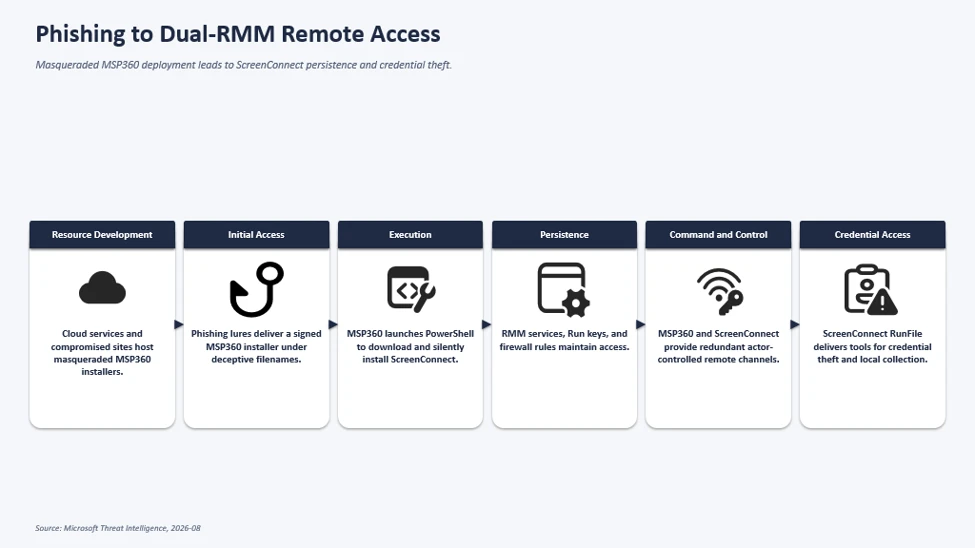
The observed multi-stage intrusion chain began when phishing lures delivered a legitimate, digitally signed MSP360 RMM v2.5.0.67 installer under deceptive filenames. Following successful User Account Control (UAC) elevation, the installer established MSP360 services for persistent access and leveraged the RMM agent to invoke PowerShell, download, and silently install ConnectWise ScreenConnect.

This effectively introduced a second remote administration channel on the compromised device, which the threat actor subsequently used to transfer and execute additional tooling supporting credential access, local data collection, and other post-compromise activity.

Phishing installs MSP360 RMM, which deploys ScreenConnect for persistent access and follow-on activity
Figure 1. Attack chain showing phishing delivering a masqueraded MSP360 RMM installer that deploys ScreenConnect for persistent remote access and follow-on activity.

Initial Access: Phishing Campaign Delivering Masqueraded MSP360 RMM Installer

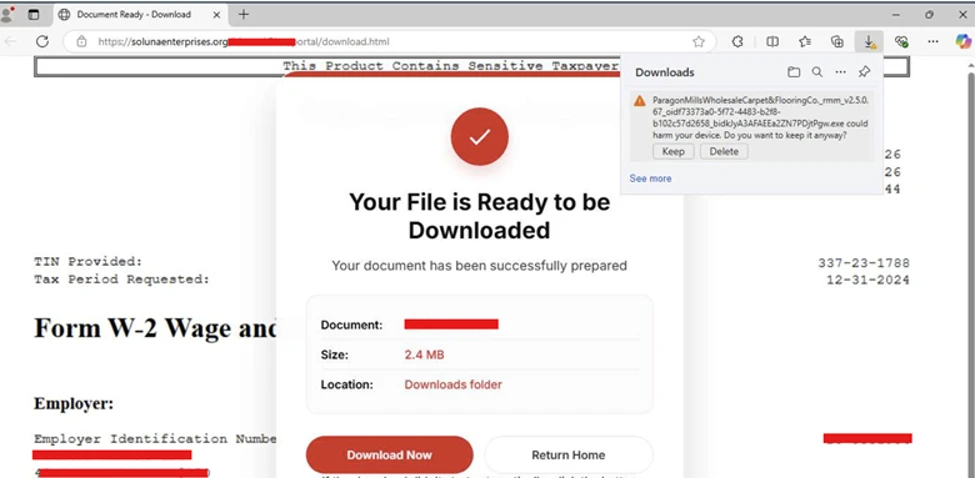
Microsoft observed multiple phishing campaigns that used a multi-stage delivery chain to distribute legitimate, digitally signed MSP360 RMM software (v2.5.0.67). Phishing emails directed users to actor-controlled landing pages that impersonated document-sharing portals, invitation workflows, Adobe Reader download pages, Zoom installation pages, and business collaboration platforms.

Upon user interaction, victims were redirected to download locations hosted on both attacker-controlled infrastructure and legitimate cloud services including Amazon S3, Cloudflare R2, Dropbox, GitLab, and Supabase. The downloaded executables used filenames crafted to resemble legitimate business content, meeting invitations, PDF documents, and software installers. Analysis of downloaded samples showed that many ultimately contained the same MSP360 RMM installer package despite appearing as different files to the victim.

MSP360 SHA256: 108ef7e628d7a20bd6241a5b57149e27a6061f467123eb64061975559f8f73dc

MSP360 SHA1: f34330d4c6e0aa978dc3af40360c14b31ad51127

Observed lure themes:

We have observed the threat actor using multiple social-engineering themes, including:

  • Workplace meeting requests
  • Zoom and Google Meet installation prompts
  • Adobe Acrobat and PDF reader updates
  • RSVP invitations and e-cards
  • Job offer documents
  • Document review and signature requests
  • DHL and package-delivery themed content

Examples of observed filenames included:

  • VIP_ECARD_INVITATION_rmm_v2.5.0.67_oid[redacted].exe
  • ZoomSetup_Installation_v2.5.0.67_ oid[redacted].exe
  • PDF Reader & Editor the Adobe Acrobatte_rmm_v2.5.0.67_ oid[redacted].exe
  • RSVP_INVITATION_E_CARD_rmm_v2.5.0.67_ oid[redacted].exe
  • SSA.GOV_STATEMENT_rmm_v2.5.0.67_ oid[redacted].exe
Image displaying the Download page of Masqueraded MSP360 RMM
Figure 2. Actor-controlled tax-document lure prompting download of a masqueraded MSP360 installer.
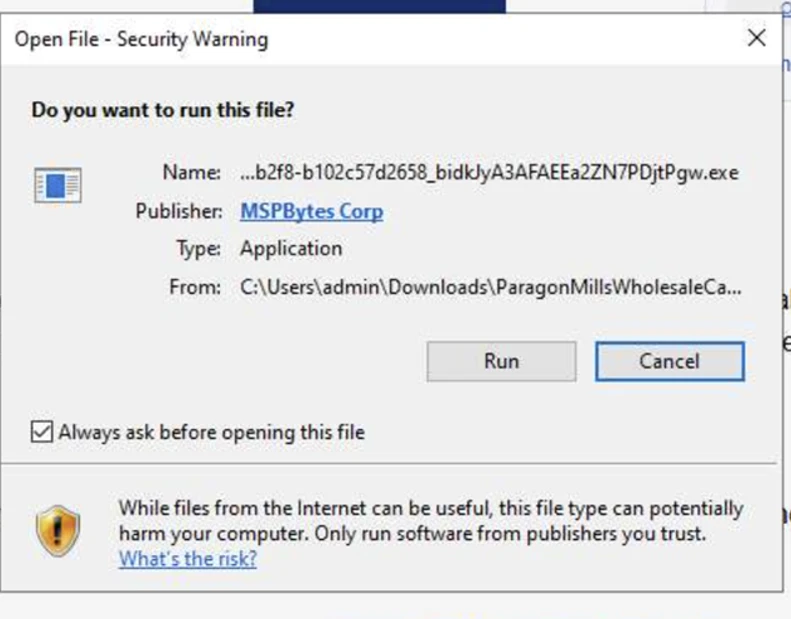
Image displaying the execution of downloaded MSP360 RMM
Figure 3. Image displaying the execution of downloaded MSP360 RMM.

The campaign relied on a diverse set of payload-hosting mechanisms. Microsoft observed the actor distributing the payload through attacker-controlled domains, websites assessed to be compromised, and legitimate cloud-hosted services. Cloud-hosted services used for payload distribution included Amazon S3, Cloudflare R2, Dropbox, GitLab, and Supabase.

This approach enabled the actor to rapidly rotate delivery infrastructure while continuing to distribute the same MSP360 installer using different lure themes and filenames.

RMM platforms are attractive to threat actors because they are designed to provide administrators with broad remote management capabilities across managed endpoints, including remote command execution, software deployment, file transfer, and persistent service-based access. When abused, these same capabilities can give threat actors a flexible post-compromise channel for maintaining access, deploying additional tooling, and conducting follow-on activity while blending in with legitimate remote administration workflows.

MSP360 RMM installation and foothold establishment

After victims downloaded and executed the masqueraded MSP360 installer, the binary launched from the user’s Downloads directory under a filename designed to resemble a legitimate business document.

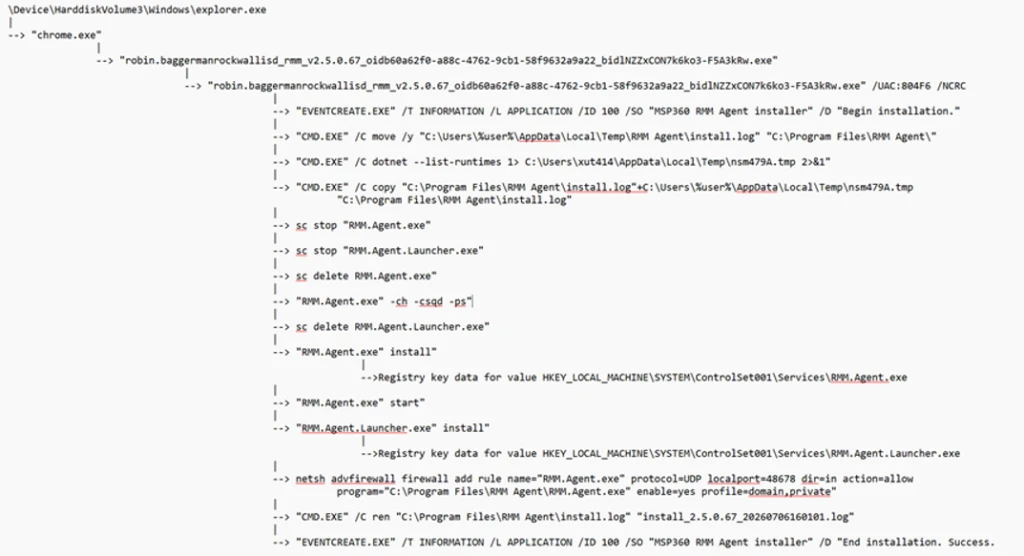
The installer subsequently dropped multiple installation components, including System.dll, nsExec.dll, and UAC.dll, to the following folder paths before relaunching itself through an elevation workflow generated by the installer framework. Next, the installer invoked a Windows User Account Control (UAC) elevation workflow. In observed successful installations, the process continued with elevated privileges, allowing deployment of MSP360 components and services. In unsuccessful installations, the elevation did not complete, and deployment terminated before the software was fully installed.

Following elevation, the installer initiated the MSP360 installation workflow and recorded installation status messages using Windows eventcreate.exe. The installer generated “Begin installation” and “End installation. MSP360 de Success.” events under the event source: MSP360 RMM Agent installer. The installer dropped multiple MSP360 plugins and binaries within the installation directory: C:\Program Files\RMM Agent\.

The installer also performed prerequisite discovery by enumerating installed .NET runtimes using: dotnet –list-runtimes. To establish long-term access on the affected device, the installer registered two Windows services: RMM.Agent.exe & RMM.Agent.Launcher.exe. Microsoft observed events indicating stopping any existing MSP360 services and installing new MSP360 services.

In addition to service-based persistence, the installer created registry-based autorun entries for MSP360 user interface components, ensuring the tray applications would automatically launch when users signed in.

The installation routine also modified the Windows Firewall configuration by creating an inbound allow rule for the MSP360 agent. The rule allowed inbound UDP traffic to C:\Program Files\RMM Agent\RMM.Agent.exe on port 48678. This configuration enabled network communications required by the remote management platform.

Image displaying the process execution flow of MSP360 RMM installation
Figure 4. Process execution flow of the MSP360 RMM installation.

Not every execution of the installer resulted in a successful deployment. In some instances, the installer was launched by the user and began its installation routine but subsequently attempted to obtain elevated privileges through User Account Control (UAC). When elevation was denied or aborted, the installation terminated before completing deployment of the MSP360 RMM components. The process execution flow showed installation initialization activity followed by events indicating that administrative privileges were required, with no subsequent evidence of the persistence mechanisms, services, or remote management functionality observed during successful installations.

Image displaying unsuccessful installation of MSP360 RMM.
Figure 5. Unsuccessful installation of MSP360 RMM.

Remote command execution from MSP360 Agent and ScreenConnect deployment

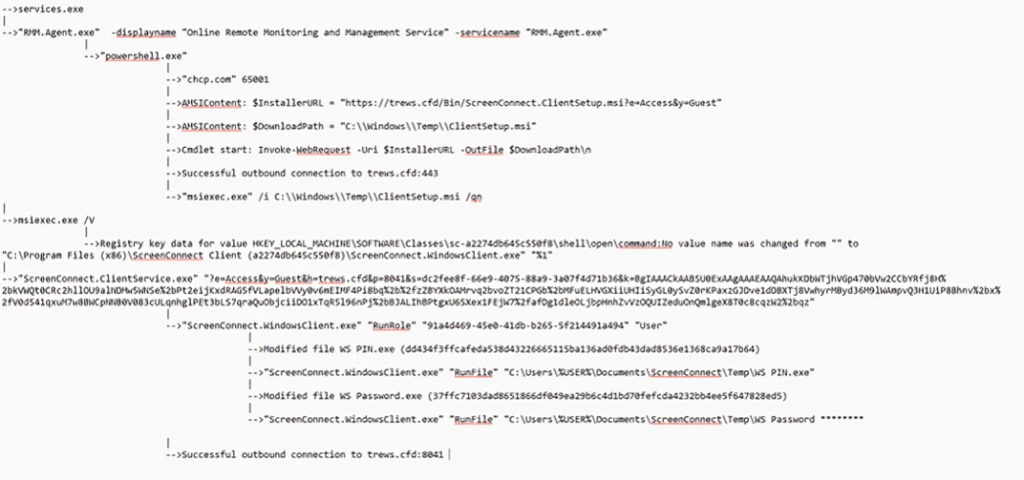
Following successful installation of MSP360 RMM, the newly installed RMM.Agent.exe service launched PowerShell. The PowerShell process modified the execution policy for the current session and executed Invoke-WebRequest commands to download an MSI package named ClientSetup.msi from actor-controlled infrastructure. The downloaded package was then installed silently through msiexec.exe using the /qn switch, eliminating visible user interaction. This installation activity resulted in the deployment of a ConnectWise ScreenConnect client on the compromised endpoint, including ScreenConnect.ClientService.exe, ScreenConnect.WindowsClient.exe, and supporting components.

The installer additionally created Windows service registrations, application uninstall entries, and authentication-related registry modifications associated with the newly deployed ScreenConnect client.

Image displaying the process execution flow of demote command execution and ScreenConnect deployment
Figure 6. The process execution flow of the remote command execution and ScreenConnect deployment.

Following deployment, the ScreenConnect client service launched with configuration parameters referencing actor-controlled infrastructure and subsequently established successful outbound communications. The service then spawned ScreenConnect.WindowsClient.exe, providing an additional remote access channel independent of MSP360. Following establishment of the ScreenConnect session, the threat actor used ScreenConnect to transfer and stage additional executables in the following directories:

  • C:\Users\%user%\OneDrive\Documents\ScreenConnect\Temp\
  • C:\Users\%user%\Documents\ScreenConnect\Temp\

Examples of frequently observed files included:

  • WindVerify.exe
  • WindowsUpdate.exe
  • WindowsSecurity_PIN.exe
  • WindowsSecurity_Password.exe
  • WindowsPassKey.exe
  • SCHider.exe
  • PIN.exe
  • phonepc.exe
  • DefenderDT.exe
  • DefenderControl.exe
  • phonelinkupdate.exe
  • PhoneLinkPrompt.exe
  • Passwords.EXE
  • OpenCamera.exe
  • open_phone_link.exe
  • MouseHiderGUI.exe
  • HideUL.exe
  • HideMouseApp.dll
  • HideMouse.exe
  • HideFromControlPanel.exe
  • HideCursor.exe
  • BannerHider.exe
  • WebBrowserBookmarksView.exe
  • WebBrowserPassView.exe

These files were among the most frequently observed utilities delivered by the threat actor following establishment of a ScreenConnect session. Several filenames were intentionally chosen to resemble legitimate Windows, Microsoft Defender, Phone Link, and security-related components, likely to reduce user suspicion and blend into normal operating system activity. These utilities were observed during post-compromise activity and were used to support subsequent operations on affected systems. Several of the observed tools are commonly associated with credential access, information collection, execution of additional payloads, and efforts to reduce defender visibility.

The execution of these files occurred through ScreenConnect’s built-in RunFile functionality, which allows files to be transferred to and executed on managed endpoints. This activity demonstrates how the threat actor leveraged a legitimate MSP360 RMM deployment to establish an initial foothold before deploying ConnectWise ScreenConnect as a secondary remote access platform. The combination of MSP360 and ScreenConnect provided the threat actor with redundant remote administration channels and enabled the transfer, execution, and management of additional tooling during subsequent stages of the intrusion.

The threat actor subsequently used these remote access platforms to facilitate follow-on activities including information collection, credential access, and the deployment of additional utilities on compromised systems.

Microsoft also observed separate activity during July in which FaronicsDeployAgent.exe, a legitimate deployment and remote access application, was used in a similar manner to MSP360 RMM. In this activity, the threat actor leveraged FaronicsDeployAgent.exe as the initial remote management platform and subsequently used it to download and install ScreenConnect. This observation demonstrates that the deployment of ScreenConnect was not limited to MSP360-based intrusions, with additional legitimate remote administration software also being leveraged to establish remote access and facilitate ScreenConnect installation.

Attribution

Microsoft has not attributed this activity to a named threat actor. The campaigns are tracked as unattributed activity.

Mitigation and protection guidance

Microsoft recommends the following actions to help organizations reduce their exposure to this activity. Check the recommendations card for the deployment status of monitored mitigations.

  • Govern approved RMM tools: For approved RMM systems used in your environment, enforce security settings where possible to implement multi-factor authentication (MFA).
  • Restrict unauthorized software: Use Application Control for Windows to create policies to block unapproved IT management tools. Both solutions include functionality to block specific software publisher certificates:
    • Application Control for Windows file rule levels allow administrators to specify the level at which they want to trust their applications, including listing certificates as untrusted.
    • AppLocker’s publisher rule condition is available for files that are digitally signed, which can enable organizations to block non-approved RMM instances that include publisher information.
  • Block specific signed applications: Microsoft Defender for Endpoint also provides functionality to block specific signed applications using the block certificate action.
  • Consider searching for unapproved RMM software installations (see the Advanced hunting section). If an unapproved installation is discovered, reset passwords for accounts used to install the RMM services. If a system-level account was used to install the software, further investigation may be warranted.
  • Strengthen endpoint protection: Turn on cloud-delivered protection in Microsoft Defender Antivirus or the equivalent for your antivirus product to cover rapidly evolving attacker tools and techniques. Cloud-based machine learning protections provide near-instant, automated protection against new and emerging threats.
  • Investigate unauthorized installations: Turn on the following attack surface reduction rule to block or audit activity associated with this threat:

Microsoft Defender XDR detections

Microsoft Defender XDR customers can refer to the list of applicable detections below. Microsoft Defender XDR coordinates detection, prevention, investigation, and response across endpoints, identities, email, and apps to provide integrated protection against attacks like the threat discussed in this blog.

Tactic Observed activity Microsoft Defender coverage
Initial accessDelivery of masqueraded MSP360 application v2.5.0.67Microsoft Defender Antivirus
– SupportScam:Win32/RogueMSP.MU!MTB
ExecutionExecution of the RMM softwareMicrosoft Defender for Endpoint
– Suspicious usage of remote management software
– Uncommon remote access software
PersistencePersistence established by RMM softwareMicrosoft Defender for Endpoint
– Anomaly detected in ASEP registry
– Suspicious file registered as a service
Credential AccessPotential credential-access activity following RMM deploymentMicrosoft Defender for Endpoint
– Possible theft of passwords and other sensitive web browser information

Threat intelligence reports

Microsoft customers can use Microsoft Defender XDR Threat Analytics and related Microsoft threat intelligence reporting to stay current on the malicious activity, indicators, detection coverage, and recommended response actions associated with this campaign. These reports provide investigation context, protection guidance, and updated intelligence that security teams can use to prevent, mitigate, or respond to related activity in their environments.

Advanced hunting

// Run this query to identify the presence of MSP360 RMM agent

let MSP360RMM = "108ef7e628d7a20bd6241a5b57149e27a6061f467123eb64061975559f8f73dc";
DeviceFileEvents
| where Timestamp >= ago(30d)
| where SHA256 =~ MSP360RMM

// Run this query to identify the remote command execution from MSP360 RMM Agent

DeviceProcessEvents
| where Timestamp >= ago(30d)  
| where (InitiatingProcessVersionInfoCompanyName == "MSP360" and ProcessCommandLine == "\"powershell.exe\"") or ( InitiatingProcessCommandLine == "\"powershell.exe\"" and ProcessCommandLine has_all ("msiexec.exe","\\Temp\\",".msi") and InitiatingProcessParentFileName == "RMM.Agent.exe")

// Run this query to identify the suspicious network connections from the threat actor’s use of ScreenConnect

let MaliciousURLs =  DeviceNetworkEvents
| where Timestamp >= ago(30d)
| where InitiatingProcessCommandLine == "\"powershell.exe\""
| where InitiatingProcessParentFileName == "RMM.Agent.exe"
| where isnotempty(RemoteUrl)
| distinct  RemoteUrl;
DeviceNetworkEvents
| where Timestamp >= ago(30d)
| where InitiatingProcessFileName has_any ( "ScreenConnect.ClientService.exe","ScreenConnect.WindowsClient.exe","ScreenConnect.Client.exe")
| where isnotempty(RemoteUrl)
| where RemoteUrl in (MaliciousURLs)

// Run this query to identify the suspicious payloads dropped and launched by the threat actor’s use of ScreenConnect

DeviceProcessEvents
| where Timestamp >= ago(30d)  
| where InitiatingProcessCommandLine  has_all ("ScreenConnect.WindowsClient.exe", "RunFile","\\Documents\\","\\Temp\\")

MITRE ATT&CK Techniques observed

This campaign has exhibited use of the following attack techniques. For standard industry documentation about these techniques, refer to the MITRE ATT&CK framework.

Resource Development

Initial Access

  • T1566.002 Phishing: Spearphishing Link | Victims received workplace meeting, Zoom, Google Meet, invitation, RSVP, PDF, and Adobe-themed phishing emails containing links that redirected to malicious payload download locations.
  • T1204 User Execution | Victims downloaded and executed a masqueraded MSP360 installer distributed under deceptive filenames designed to resemble legitimate business documents and software.

Execution

Persistence

Defense Evasion

  • T1036 Masquerading | The actor distributed legitimate MSP360 software under filenames designed to resemble meeting applications, invitations, PDFs, and business documents.
  • T1036.005 Match Legitimate Name or Location | Follow-on tooling used filenames that closely resembled legitimate Windows, Microsoft Defender, security, and Phone Link applications.
  • T1112 Modify Registry | MSP360 and ScreenConnect modified registry locations associated with services, persistence, credential provider components, protocol handlers, and uninstall entries.

Command and Control

  • T1219 Remote Access Software | The threat actor abused legitimate remote administration software including MSP360 RMM and ConnectWise ScreenConnect to maintain access to victim systems.
  • T1105 Ingress Tool Transfer | MSP360 downloaded ScreenConnect, while the threat actor’s use of ScreenConnect was subsequently used to transfer and execute additional tooling on compromised endpoints.
  • T1071.001 Application Layer Protocol: Web Protocols | PowerShell and ScreenConnect communicated with actor-controlled infrastructure over HTTP/HTTPS.
  • T1573 Encrypted Channel | Payload retrieval and remote access communications occurred over encrypted network channels.
  • T1102 Web Service | Multiple cloud-hosted web services were used throughout the delivery and command-and-control infrastructure.

Discovery

Collection

  • T1005 Data from Local System | Additional tooling delivered through ScreenConnect was observed in post-compromise activity and used to collect information from victim devices.

Indicators of compromise (IOCs)

Observed indicators associated with this campaign are listed below.

IndicatorTypeDescription
•108ef7e628d7a20bd6241a5b57149e27a6061f467123eb64061975559f8f73dcSHA256Legitimate MSP360 RMM v2.5.0.67 installer observed being distributed under deceptive filenames during the campaign. The observed sample was signed using a certificate that has since been revoked.
•f094b8263471c7b76dbed03d420736449920368fa0eca2ed6b1aea2645138d97
•857c2f283de799faa74b56e862c0a9f96e67aa1b4fa4a9e46395098365b99de3
•6a89de024ca62536de6f5fc10e49896bb1ac330ca39dce30203afdcc45ae237e
•4188c6588f3dcda881c3f2d12df580051179a999f040b799af506edeb3211a26
SHA256Legitimate MSP360 RMM Agent Service observed during the campaign
•adswre[.]cfd
•trews[.]cfd
•swedcorry[.]stefneyv[.]com
•ojsuyw[.]niyari[.]org
•bunstar[.]harej[.]si
•adsaw[.]cfd
•sdfghj[.]rd-team[.]ru
DomainsDomains contacted by ScreenConnect clients in observed malicious sessions.
•ceb3f7fe9a618ff29a21b126383c23900fad58d6ae2b5552d7e306e4b6acf4b0
•02f2ce03a2650f17bfe6e8744eebbf58522016cbdb92af8f2217b5dd4a1ad550
•499d07894f730fb685ee3cbfc1a933e0da93750c1ed25a49b2eb9c32adef156a
•d49cc01641c3045bf3119f9d71e7ffd29bfce32ca4b27cc96340716ed4d41cdc
•67c979dc13961b09f24f85a801e4c918420adca6117c92efbeeeaa68a6344f55
•6cc665057c4a4fe42a309afd3a7fa96cf1af126e9c6e08e56df5105e05378bcc
•dd434f3ffcafeda538d43226665115ba136ad0fdb43dad8536e1368ca9a17b64
•40f8e774e1e7a484b78c7ae4336bc47aa9cab20dc8e1e67d89838e807975f9b1
•3ff5e49fd2f2bd0758467763c44d69e781b7460af84a6e3966e2621bc5bf7096
•374c4934b14a1151ea68847c8627c3f1c0b878f4e673bda3f15e4388dfde0187
•bc8b1b0c80512ba0e8ffccfee5b507df16a3355db1143c3ba81ef42dac1baa6c
•c2c004a56de2a99f5b06ceb58d8a4b371fb60fd66ff5936786fe8d8037ead208
•5bf8cf29ac6803e7269b045dea48003af7cfe48bedfc081b57ff9e86cb08971b
•19035c8e2520fb70b3e2ec5338c14311b88a26cc1fb8304a01494260b6b55af1
•d232d82e410de12702a67c58acf927304ee42f3e6d81a9d71eca99f9052126db
•d3cb7ded277b49be06e6a1860f7c7e913e252802e9d32453a185e24797bf53ef
•e31e5da7c58a7e8f89f9629f095edd7d741a1fb0b85fcb39f3818dbd9497b1e3
•1a534d04bf30894d20764e91f7e94e0a73f060f0abacc9feeedba427995c83a8
•77fb0e75f4396cb57bbbd28f6dc5310369a87abec9e2acc457aa99a0063ed27a
•fc96a04c615847f0fb1391f04d9d1aac7f78ddfb7d459168df0a4172b98354e2
•06ad69b9bebad3cc75b594cc5bb1ca0035ea22bb8a683002ca051d948566426b
•a93c946c237b981189d2668d938a9d4d1d9681757e48dae8d9d65ed25b5da657
•529543b4fe6a4c21d28be56dbf92fcac91d8df808d8518b4275c973fa547ad63
•ccea4e1acc51ac43ba9da76ada00e7e308cc33d9c5c264dff82d1be83e957b88
•a03c84ae9e569c04fdd271277f508bba5a299d53c3c0efe0819338d178fe1c5b
SHA256Utilities transferred or executed through ScreenConnect sessions and observed during post-compromise activity. Several of the identified tools are commonly associated with credential access, information collection, and efforts to reduce defender visibility.

Learn More

For the latest security research from the Microsoft Threat Intelligence community, check out the Microsoft Threat Intelligence Blog.

To get notified about new publications and to join discussions on social media, follow us on LinkedIn, X (formerly Twitter), and Bluesky.

To hear stories and insights from the Microsoft Threat Intelligence community about the ever-evolving threat landscape, listen to the Microsoft Threat Intelligence podcast.

Review our documentation to learn more about our real-time protection capabilities and see how to enable them within your organization.  

The post Phishing Abuses RMM Tools for Persistent Access appeared first on Microsoft Security Blog.


from Microsoft Security Blog https://ift.tt/d7LBCoq
via IFTTT