Written by: Stuart Carrera
Introduction
Building on recent BRICKSTORM research from Google Threat Intelligence Group (GTIG), this post explores the evolving threats facing virtualized environments. These operations directly target the VMware vSphere ecosystem, specifically the vCenter Server Appliance (VCSA) and ESXi hypervisors. To help organizations stay ahead of these risks, we will focus on the essential hardening strategies and mitigating controls necessary to secure these critical assets.
By establishing persistence at the virtualization layer, threat actors operate beneath the guest operating system where traditional security protections are ineffective. This strategy takes advantage of a significant visibility gap, as these control planes do not support standard endpoint detection and response (EDR) agents and have historically received less security focus than traditional endpoints.
This activity is not the result of a security vulnerability in vendors' products or infrastructure. Instead, these intrusions rely on the effectiveness of exploiting weak security architecture and identity design, a lack of host-based configuration enforcement, and limited visibility within the virtualization layer. By operating within these unmonitored areas, attackers can establish long-term persistence and gain administrative control over the entire vSphere environment.

Figure 1: BRICKSTORM vSphere attack chain
This guide provides a framework for an infrastructure-centric defense. To help automate some of this guidance and secure the control plane against threats like BRICKSTORM, Mandiant released a vCenter Hardening Script that enforces these security configurations directly at the Photon Linux layer. By implementing these recommendations, organizations can transform the virtualization layer into a hardened environment capable of detecting and blocking persistent threats.
vCenter Server Appliance Risk Analysis
The vCenter Server Appliance (VCSA) is the central point of control and trust for the vSphere infrastructure. Running on a specialized Photon Linux operating system, the VCSA typically hosts critical Tier-0 workloads, such as domain controllers and privileged access management (PAM) solutions. This means the underlying virtualization platform inherits the same classification and risk profile as the highly sensitive assets it supports.
A compromise of the vCenter control plane grants an attacker administrative control over every managed ESXi host and virtual machine, effectively rendering traditional organizational tiering irrelevant. Because the VCSA is a purpose-built appliance, relying on out-of-the-box defaults is often insufficient; achieving a Tier-0 security standard requires intentional, custom security configurations at both the vSphere and the underlying Photon Linux layers.
For a threat actor, the VCSA provides:
-
Centralized Command: This provides the ability to power off, delete, or reconfigure any virtual machine combined with the ability to reset root credentials on any managed ESXi host providing full control of the hypervisor.
-
Total Data Access: Access to the underlying storage (VMDKs) of every application, bypassing operating system permissions and traditional file system security. This provides a direct path for data exfiltration of Tier-0 assets.
-
Command-Line Logging Gaps: If an attacker gains access to the underlying Photon OS shell via Secure Shell (SSH), there is no remote logging of the shell commands.
Management Plane Dependencies
Many organizations host their Active Directory domain controllers as virtual machines (VMs) within the same vSphere cluster managed by a vCenter that is itself AD-integrated. If an attacker disables the virtual network or encrypts the datastores, vCenter loses its ability to authenticate administrators. In a scenario where the VCSA is encrypted or wiped, the tools required for large-scale recovery are also lost. This forces organizations to rely on manual restores via individual ESXi hosts, extending the recovery timeline exponentially.
vSphere 7 End of Life
vSphere 7 reached End of Life (EoL) in October 2025. Organizations with this legacy technical debt will have vSphere software entering a window (until upgrade) where they will no longer receive critical security patches. This provides an opportunity for threat actors to exploit known vulnerabilities that will not be fixed.
The Strategic Advantage of Proactive Measures
To secure the control plane, organizations should adopt a strategy where the infrastructure itself acts as the primary line of defense.
A resilient defense relies on two strategies:
- Technical Hardening: Defense-in-depth should be applied to the hypervisor layer to reduce the attack surface. Threat actors target insecure defaults. Hardening measures, such as enabling Secure Boot, strictly firewalling management interfaces, and disabling shell access, create “friction.” When a threat actor attempts to write a persistence script to
/etc/rc.local.dor modify a startup file, a hardened configuration can block the action or force the actor to use methods that generate excessive log telemetry. -
High-Fidelity Signal Analysis: Threat actors are adept at rotating infrastructure and recompiling tools to change their signatures. Relying on a blocklist of bad IPs or a database of known malware hashes is not an effective strategy as threat actors utilize command-and-control servers and native binaries. Instead, the focus should shift entirely to behavioral patterns.
Building on this strategic foundation where the infrastructure itself acts as the primary line of defense, this guide outlines four phases of technical enforcement:
-
Phase 1: Benchmarking and Base Controls – Establishing the foundation with Security Technical Implementation Guides (STIG) and patching.
-
Phase 2: Identity Management – Hardening administrative access to critical infrastructure via PAWs and PAM solutions.
-
Phase 3: vSphere Network Hardening – Eliminating lateral movement with Zero Trust networking.
-
Phase 4: Logging and Forensic Visibility – Transforming the appliance into a proactive security sensor.
Phase 1: Benchmarking and Base Controls
Organizations should use the hardening measures outlined in the Mandiant vSphere hardening blog post combined with a strict patching and upgrade strategy. This provides a standard foundation to develop a strong security posture. By implementing an enhanced security baseline centered on the Photon Linux DISA STIG and VMware security hardening guides, organizations can harden the OS-level components that actors target.
Key Frameworks:
STIG Control Mappings to Attacker TTPs
|
STIG ID |
Control Title |
TTP |
Detail |
|
Require Multi-factor authentication (MFA) |
Establish Foothold / Privilege Escalation |
MFA on vCenter web login prevents compromised Active Directory credentials from granting full access. |
|
|
Real-time Alert on SSO Account Actions |
Persistence / Anti-Forensics |
Creates local accounts, deploys backdoors, and deletes the accounts within minutes. Real-time alerting on PrincipalManagement events is required to catch this activity. |
|
|
Verify User Roles (Least Privilege) |
Data Exfiltration |
Identifies and removes excessive permissions from standard user roles that are aggregated into non-admin roles. |
|
|
Limit membership to "BashShellAdministrators" |
Escalate Privileges |
Even if an attacker compromises a vSphere Admin account, they cannot access the Photon OS bash shell unless that account is in this specific single sign-on (SSO) group. It blocks the "VAMI-to-Shell" pivot used to deploy backdoors. |
|
|
Disable SSH Enablement |
Initial Access |
Actors often use the VAMI (Port 5480) to enable SSH before deploying the backdoor. This control ensures that SSH is "Disabled." |
vSphere Infrastructure-Level Data Exfiltration
Standard vSphere configurations typically mask high-risk permissions such as VM cloning and exporting within generalized administrative roles, allowing these actions to blend into the background noise of routine operations. This architecture provides a threat actor with the means to execute a silent exfiltration of a domain controller or credential repository. Organizations should transition from a model of permissive vSphere access control to a comprehensive cryptographic enforcement policy.
|
Security Control |
What It Protects Against |
Implementation Method |
|
vSphere VM Encryption |
Theft of VMDK files from the datastore; offline analysis and snapshot of memory |
Enable in VM Policies (Requires a KMS) |
|
In-Guest Encryption (BitLocker) |
Mounting the VMDK to another VM; offline file system browsing |
Enable inside Windows OS (Requires a vTPM) |
|
vMotion Encryption |
Capture of in-memory credentials (krbtgt hashes) during live migration |
Set vMotion to "Required" in VM Options |
|
Virtual TPM (vTPM) & Secure Boot |
Bootkit persistence and tampering; strengthens in-guest features like Credential Guard |
Enable in VM Options (Hardware & Boot sections) |
|
Lock Boot Order & BIOS |
Booting from a malicious ISO to reset passwords or bypass security controls |
Set a VM BIOS password and configure boot options |
|
Disable Copy/Paste |
Silent data exfiltration of credentials or secrets via the VM console |
Set VM Advanced Settings ( |
Resilience against vSphere data exfiltration requires a shift in how high-value virtual assets are governed:
-
Mandatory Tier-0 Encryption: The enforcement of vSphere-native VM encryption is the primary and most essential control for all critical Tier-0 virtual machines. Organizations should mandate that every domain controller, certificate authority, and password vault be encrypted at the virtual machine level.
-
Cryptographic Isolation: Tier-0 assets should be subject to a unique key-locked encryption policy. By mandating a separate key management server (KMS) cluster for these workloads, organizations ensure that a threat actor cannot unlock a cloned disk without access to a secure, hardware-backed vault.
-
Entitlement De-coupling: The "Clone" and "Export" privileges should be stripped from standard administrative roles. These functions should be reassigned to a highly restricted, auditable "break-glass" identity, used exclusively for emergency recovery scenarios.
Phase 2: Identity Management
Best practices for Identity management in vSphere focuses on mandating all vSphere administrative sessions originate from dedicated privileged access workstations and utilize a PAM while also enforcing host-level hardening through the restriction of the vpxuser shell access.
Privileged Access Workstations (PAWs)
To prevent a threat actor from pivoting to the virtualization management plane from compromised user endpoints or appliances, administrative sessions should originate from a dedicated PAW. This is a dedicated hardened workstation only utilized when interfacing with vSphere administrative functions or interfaces.
Privileged Access Management (PAM)
PAM tools serve as an intermediary to mitigate specific threats such as the BRICKSTEAL credential harvester. By mandating credential injection, organizations ensure that passwords are never typed or exposed in memory on the target system where malware could intercept them. Automated secret rotation should be enforced to limit the lifespan of any compromised credentials, particularly for root passwords and service account keys.
Authentication and Platform Hardening
Accounts residing in the default vsphere.local single sign-on (SSO) domain, most notably the built-in administrator@vsphere.local superuser, pose a specific security risk because they do not support modern MFA integration. Due to this limitation, organizations should limit the use of vsphere.local accounts for daily administration; instead, they should be treated as emergency "break-glass" credentials that are secured with complex, vaulted passwords.
The vSphere VPXUSER
The vpxuser is a high-privilege system account provisioned by vCenter on each managed host to facilitate core infrastructure management operations.
A threat actor possessing administrative control over the VCSA effectively inherits the delegated authority of the vpxuser across the entire managed cluster. This entitlement enables a pivot from the management plane to the host-level shell.
The Primary Mitigation (vSphere ESXi 8.0+): Disabling Shell Access
To mitigate this lateral movement vector, vSphere 8.0 introduced a technical control allowing administrators to remove shell access from the vpxuser account. Enforce the following configuration on all ESXi 8.0+ hosts to restrict the vpxuser identity:
esxcli system account set -i vpxuser -s falseESXi Host Identity Hardening Strategy
Additional hardening measures to prevent bypasses via alternative mechanisms, such as Host Profile manipulation, include:
|
Control Type |
Strategic Requirement |
Implementation Method |
|
Pivot Mitigation |
VPXUSER Shell Lock |
Disable shell access for the management account to sever the vCenter-to-Host attack path. |
|
Account Obfuscation |
Rename root Account |
Transition the default |
|
Credential Entropy |
15+ Character Baseline |
Enforce a strict, system-wide password complexity policy using |
|
Vaulted Identity |
Secure Credentials |
Mandate the use of an enterprise password vault for all local host credentials to ensure auditable "break-glass" access. |
Phase 3: vSphere Network Hardening
Securing the Virtualization Network
Establishing a vSphere Zero Trust network posture is the foundational requirement for securing a resilient Tier-0 architecture. Because the vCenter Server Appliance (VCSA) and ESXi hypervisors lack native MFA support for local privileged accounts, identity-based validation is insufficient as a singular point of security enforcement. Once a threat actor harvests these credentials, the logical network architecture remains the only defensive layer capable of preventing the threat actor's access to the vSphere management plane.
| A strictly segmented architecture integrating physical network isolation with host-based micro-segmentation serves as the definitive safeguard; by systematically eliminating all logical network paths from untrusted zones to the management zone, the underlying attack vector is neutralized, ensuring that a BRICKSTORM intrusion remains physically and logically incapable of compromising the vCenter control plane. |
The architectural blueprint shown in Figure 2 is designed to eliminate these common internal attack vectors.
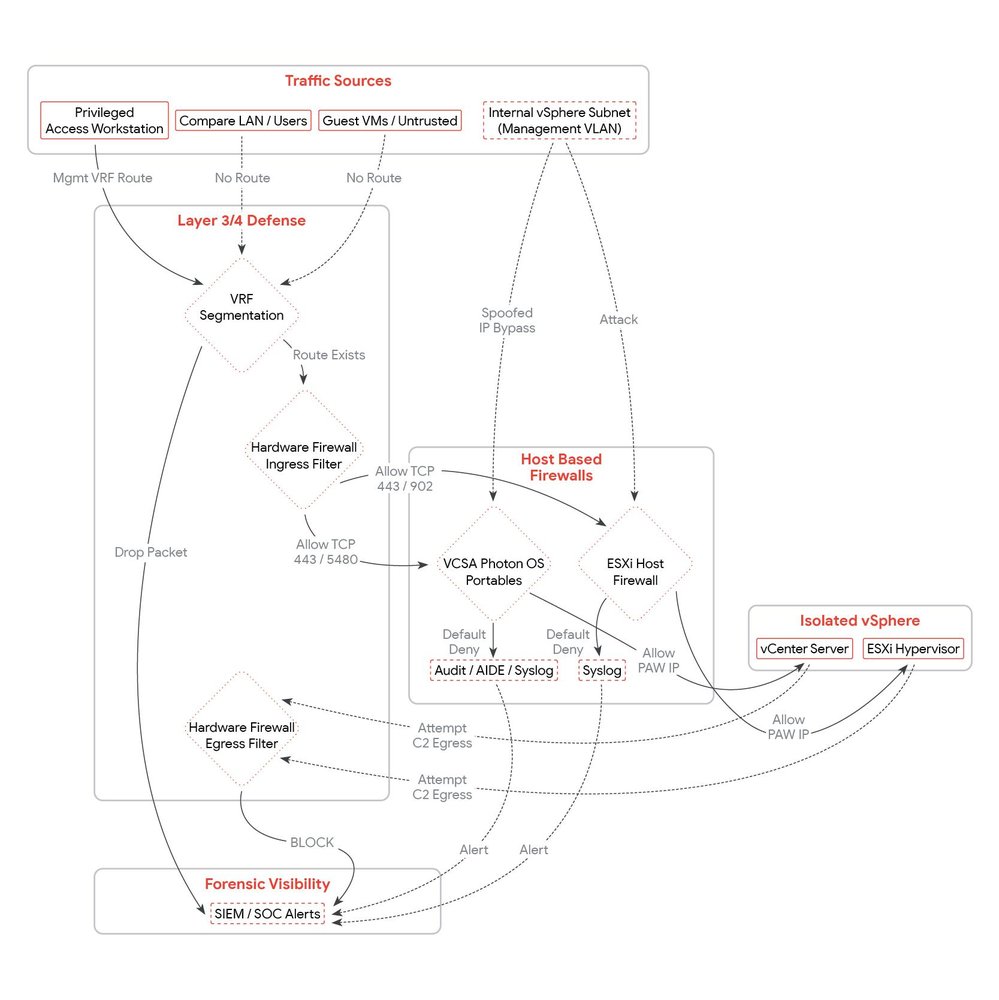
Figure 2: vSphere Zero Trust networking and detection
1. Immutable Virtual Local Area Network (VLAN) Segmentation
Organizations should enforce isolation through distinct 802.1Q VLAN IDs. Threat actors will exploit "flat" or poorly partitioned networks where a compromise in a low-security/low-trust zone (such as a demilitarized zone [DMZ] or edge appliance) can route directly to the Management VAMI (Port 5480) or shell access to the VCSA (Port 22) high-trust network segments.
|
VLAN |
Description |
Members |
Strategic Security Policy |
|
Host Management |
ESXi Hypervisor Control Plane |
ESXi vmk0 Management Interfaces |
Restricted Access. Exclusively accepts traffic from the VCSA and authorized PAWs. |
|
VCSA / Infrastructure |
Cluster Management Applications |
vCenter (VCSA), Backup Servers, NSX Managers |
Tier-0 Restricted Zone. Should be logically and physically unreachable from all Guest VM segments. |
|
vMotion |
Live Memory Migration |
ESXi vmk1 (vMotion Stack) |
Non-Routable. Prevents interception of unencrypted RAM data during migration. |
|
Storage |
vSAN / iSCSI / NFS |
ESXi vmk2 (Storage Stack) |
Non-Routable. Critical for block-level data integrity; prevents out-of-band disk manipulation. |
|
Virtual Machine |
Production Workloads |
Virtual Machine Port Groups |
Untrusted Zone. Entirely isolated from all infrastructure management VLANs. |
2. Routing as a Security Barrier
The objective is to transform the Management Network into a secured zone. A threat actor residing on a standard corporate subnet or Wi-Fi network should be physically unable to communicate with the VCSA.
A. Virtual Routing and Forwarding (VRF) Segmentation
-
Action: Transition all Infrastructure VLANs into a dedicated VRF instance on the core routing layer.
-
Strategic Impact: This creates a defined routing table. Even in the event of a total compromise in the "User" or "Guest" VRF, the network hardware will have no route to the "Management" VRF, preventing lateral movement even if physical adjacency exists.
B. Privileged Admin Workstation (PAW Exclusive Access)
-
Action: Deconstruct all direct routes from the general corporate LAN to the Management Subnet(s).
-
Strategic Impact: Access to the Management Subnet should originate from a designated PAW IP range / subnet. All other internal subnets including standard user workstations, and guest VMs should have no route or be subject to an explicit Deny policy at the gateway. This forces the threat actor to attempt a compromise of the PAW, a significantly more hardened and monitored target, before they can connect to the VCSA.
3. Hardened Perimeter Ingress and Egress Filtering
These rules should be enforced at the hardware firewall or Layer 3 Core acting as the gateway for the Management Subnet. Because the VCSA's GUI-based native firewall is architecturally incapable of enforcing egress (outbound) policy, the upstream network gateway should enforce this policy. Organizations should implement a restrictive egress policy to ensure that if a VCSA is compromised, it cannot connect to malicious command-and-control infrastructure or exfiltrate Tier-0 data.
A. Ingress Filtering (Incoming to Management)
|
Source |
Destination |
Protocol / Port |
Policy |
Mitigation |
|
PAW |
Mgmt VLAN |
TCP / 443 |
ALLOW |
Authorized vSphere Client/API Access |
|
PAW |
ESXi VLAN |
TCP / 902 |
ALLOW |
Secure Remote Console (MKS) Access |
|
ESXi |
VCSA IP |
TCP / 443 |
ALLOW |
ESXi Host to vCenter communication |
|
Backup |
VCSA IP |
TCP / 443 |
ALLOW |
Backup API Access |
|
Monitoring |
Mgmt VLAN |
ICMP Ping UDP / 161 (SNMP) |
ALLOW |
Verified Infrastructure Health Probes |
|
ANY |
Mgmt VLAN |
TCP / 22 |
DENY |
MANDATORY SSH BLOCK. Enforce shell access via PAW only. |
|
ANY |
Mgmt VLAN |
TCP / 5480 |
DENY |
MANDATORY VAMI BLOCK. Prevents unauthorized management enablement. |
|
Guest VM |
Mgmt VLAN |
ANY |
DENY |
Eliminates all East-West lateral movement paths |
B. Egress Filtering (Outbound from VCSA/Management)
|
Source |
Destination |
Protocol / Port |
Policy |
Mitigation |
|
VCSA |
Internal DNS |
UDP/TCP 53 |
ALLOW |
Restrict DNS to trusted internal resolvers only. |
|
VCSA |
Remote Syslog |
TCP / 6514 |
ALLOW |
TLS Encrypted Telemetry. Required for SIEM visibility |
|
VCSA |
Public IP for VMware Update Manager |
TCP / 443 |
ALLOW |
Strictly limit to "162.159.140.167" and "172.66.0.165" (VMware Update servers). |
|
VCSA |
Identity Provider |
TCP / 443 |
ALLOW |
Required for Federated Authentication (Okta/Entra) |
|
VCSA |
Internal Subnets |
ANY |
DENY |
Block Internal Scanning. Prevents VCSA-to-Internal pivots. |
|
VCSA |
Internet (ANY) |
ANY |
DENY |
Suppresses C2. Blocks DoH, SOCKS proxies, and data exfiltration. |
Note on Micro-Segmentation: While physical firewalls secure the management plane (North-South), VMware NSX Distributed Firewall (DFW) is the required standard for controlling guest-to-guest (East-West) traffic. Where applicable, NSX should be used to protect the data plane, while physical network hardware remains the control of the management plane.
Host-Based Firewalls for VCSA and ESXi
Host-based firewalls should be used in tandem with network-based firewalls to achieve a resilient defense-in-depth posture. While network firewalls effectively manage "North-South" traffic (entering/leaving the subnet), they are blind to "East-West" traffic within the same VLAN. Host-based firewalls are capable of blocking an attacker sitting on the same network segment. By enforcing security at the individual endpoint, organizations can ensure that the access path does not grant logical authority over the vSphere control plane.
The VCSA Host-Based Firewall (Photon OS)
Managed via the Virtual Appliance Management Interface (VAMI), the VCSA firewall is a native control to prevent lateral movement from compromised "trusted" entities such as backup servers or monitoring devices that share the management VLAN. The firewall should be used as a primary layer of defense to enforce the "principle of least privilege" at the host network level.
Strategic Implementation: The default policy should be transitioned to "Default Deny." You should explicitly define authorized IP addresses for every management service.
Recommended VCSA Host-Based Firewall Scoping
|
Port |
Protocol |
Source |
Detail |
|
UI / API (443) |
TCP |
PAW IP + Backup IP |
Restricts vSphere Client access to hardened Admin stations. |
|
VAMI (5480) |
TCP |
PAW IP Only |
Prevents unauthorized SSH enablement or log tampering. |
|
SSH (22) |
TCP |
PAW IP Only |
Eliminates the primary shell residency path. |
|
Heartbeat (902) |
UDP |
ESXi Management Subnet |
Required for continuous Host-to-vCenter synchronization. |
|
Internal (LADB) |
TCP |
Localhost (127.0.0.1) |
Protects local inter-process communication. |
|
ANY / ANY |
ANY |
DENY ALL |
Blocks all unauthorized internal discovery. |
Limitations of the VAMI GUI Firewall
While the host-based firewall in the VCSA is a mandatory component of a defense-in-depth strategy, administrators should recognize that the standard VAMI GUI has the following operational limitations for defending against threat actors:
-
Lack of Port-Specific Granularity:The VAMI GUI lacks the precision required for a True Zero Trust model. In all versions, creating an IP-based rule for a specific server (e.g., a virtual backup server) forces an "all-or-nothing" approach. To grant that server legitimate access to the vSphere API on TCP 443, the administrator is often forced to trust that IP for all ports.
The Risk: This simultaneously grants the backup server unauthorized access to highly sensitive management interfaces like SSH (22) and the VAMI (5480). If an attacker compromises the backup server, they inherit an unobstructed management path to the VCSA shell.
-
Circular Administrative Dependency:A fundamental weakness of the native vCenter host-based firewall is its logical placement within the management plane it is intended to secure. The firewall is managed via the VAMI, which represents a secondary management entry point residing on TCP port 5480. This interface is logically adjacent to the standard vSphere Client (TCP port 443) and is frequently exposed across the same management network segments.
The Risk: Credentials captured viaBRICKSTEALgrant a threat actor authority to reconfigure the appliance itself. By pivoting to the VAMI, the actor can use their compromised role to deactivate the firewall. This circular dependency ensures the firewall is managed by the very application it is intended to protect, allowing a threat actor to disable controls using the system's own management tools.
-
Forensic Visibility Gaps:The standard VAMI firewall is designed for connectivity management, not security monitoring. It does not generate remote logs for denied connection attempts or specific shell activity.
The Risk: This blinds security teams to active lateral movement. A threat actor can scan the VCSA from an unauthorized VM multiple times or use a VCSA shell unmonitored; because the firewall does not notify when it blocks a connection and shell commands are not logged, the SOC remains unaware of the intrusion attempt until the final stage of the attack.
-
Inbound-Only Policy Visibility Gaps:The GUI focuses primarily only on inbound traffic, leaving the Outbound (Egress) policy unmanaged.
The Risk: Modern malware, such as theBRICKSTORMbackdoor, relies on outbound "Phone Home" (C2) traffic to receive commands. A firewall that does not restrict outbound traffic allows a compromised VCSA to communicate with external malicious infrastructure without restriction.
To overcome these limitations of the native VAMI firewall, organizations are recommended to consider the transition from native vSphere GUI-based management to OS-level hardening using the underlying Photon Linux iptables or nftables.
-
Tamper-Proof Integrity: By implementing granular firewall rules directly at the Photon Linux operating system level, the controls become independent of vCenter application permissions. Even a compromised vCenter Administrator cannot disable Photon OS-level rules via the VCSA GUI.
-
Granular Logic: OS-level rules allow for strict "Source IP + Destination Port" mapping, ensuring a backup server only sees port 443 and is rejected on all others.
-
Transformation into a Sensor: Unlike the VCSA GUI, Photon OS-level logging can be "bridged" to a security information and event management (SIEM) which transforms every denied connection attempt into a high-fidelity, early-warning alert.
The VAMI GUI firewall should be viewed as a basic security control, not a comprehensive Tier-0 security control. To effectively mitigate the attack vectors required for advanced campaigns, organizations should bypass the vulnerable GUI and enforce a strictly validated, granular, and logged firewall policy at the VCSA Photon Linux kernel level.
- aside_block
- <ListValue: [StructValue([('title', 'vCenter Hardening Script'), ('body', <wagtail.rich_text.RichText object at 0x7f7c3d17e640>), ('btn_text', 'Get the tool!'), ('href', 'https://ift.tt/WQCDlGw'), ('image', None)])]>
The ESXi Hypervisor Firewall
The ESXi firewall is a stateful packet filter sitting between the VMkernel and the network. Restricting individual services to authorized management IPs is the only way to block an attacker on the same VLAN from reaching the host API or SSH port.
Strategic Implementation: Access should be restricted at the service level by deselecting "Allow connections from any IP address" and entering specific management IPs.
Recommended ESXi Host-Based Firewall Rules
|
Service Category |
Service Name |
Port / Protocol |
Authorized Source |
Strategic Defensive Value |
|
Management Access |
SSH Server, vSphere Web Client/Access |
22, 443 / TCP |
PAW Subnet / IPs only |
Ensures shell and GUI access is restricted to hardened admin PAWs. |
|
vCenter Control Plane |
vCenter Agent (vpxa), Update Manager |
902, 80 / TCP |
VCSA IP Only |
Prevents unauthorized entities from impersonating the VCSA. |
|
Intra-Cluster |
vMotion, HA, Fault Tolerance, DVSSync |
8000, 8182 / TCP, 12345 / UDP |
ESXi Mgmt Subnet / IPs |
Prevents interception of unencrypted RAM data and heartbeat tampering. |
|
Storage |
NFC (File Copy), HBR (Replication) |
902, 31031 / TCP |
VCSA IP + Cluster IPs |
Prevents unauthorized VMDK extraction or out-of-band data cloning. |
|
Telemetry |
Syslog, SNMP, NTP, DNS |
514, 161, 123, 53 / UDP |
SIEM & Infra Subnets |
Ensures telemetry and core services are bound to verified internal providers. |
|
Legacy / High Risk |
CIM Server, SLP (Discovery) |
5988, 5989 / TCP, 427 / UDP |
EXPLICIT DENY / Monitoring IP |
Neutralizes RCE vectors targeting the primary attack surface used for ESXi-specific ransomware (VMSA-2021-0002). |
Hardening as a Detection Enabler
When the infrastructure is configured with a "Default Deny" posture, it creates the friction necessary to expose a threat actor. In an unhardened environment, an attacker's port scan or lateral movement attempt is silent and successful; in a hardened environment, those same actions become indicators of compromise.
The Multi-Layered Signal Chain
-
Network-Level Visibility: Detection begins at the transit layer. Organizations should ensure that logging is enabled at the physical network and virtual switch (VDS) levels. This allows the SOC to track the "path" of a threat actor, identifying unauthorized scanning or connection attempts as they traverse subnets toward the vSphere management plane.
-
Host-Based Firewall Logging (IPtables): While the VCSA provides a management GUI for its firewall, it does not natively log denied access. To transform the appliance into a sensor, host-based firewall logging is strictly dependent on a custom OS-level IPtables configuration. By adding a logging target to the underlying Photon OS kernel, every rejected packet is recorded, providing the proof that an unauthorized threat actor is attempting to access the VCSA.
-
Immutable Logging: By enabling Remote Syslog Forwarding, these rejection logs are offloaded instantly. Even if an attacker eventually compromises the host, they cannot delete the local log sources.
Early Detection Signals
By correlating the denied access with identity-based events, organizations can identify a pattern of a BRICKSTORM lifecycle event in its earliest stages:
-
Failed Authentication Alerts: A log entry in the standard auth.log (for SSH) or a vCenter UserLoginSessionEvent showing a "Failed Login Attempt" from an unauthorized internal IP is a high-value alert.
-
Account Lockout Events: When an actor attempts to brute-force or use harvested credentials against local "break-glass" accounts (like administrator@vsphere.local), the resulting "Account Locked" event provides a high-priority signal that a targeted credential attack is in progress.
-
Behavioral Pattern Correlation: The most powerful signal occurs when the SIEM correlates these disparate sources. For example, a Firewall Drop (via IPtables) followed immediately by a Failed Login (via SSO) from the same source IP is a high-confidence indicator of an active intrusion attempt.
Network segmentation at the switch level is a prerequisite, but host-based firewalls are the primary enforcement point of a vSphere Zero Trust architecture. By complementing network-based firewalls with host-level filtering, organizations can eliminate the visibility gap on the management VLAN and transform the VCSA and ESXi hosts into sensors capable of exposing an adversary at the earliest stage of an intrusion.
Phase 4: Logging and Forensic Visibility
To facilitate the detection within the vSphere control plane, organizations should achieve comprehensive telemetry across the previously unmonitored layers of the underlying VCSA operating system.
The primary operational advantage exploited in this campaign is the lack of visibility inherent in the virtualization control plane. This monitoring visibility gap is driven by three critical factors:
-
The Logging Gap: By default, VCSA does not forward kernel-level audit logs. If an attacker wipes the local disk, the evidence of their residency is permanently erased.
-
The Restricted Logging Pipeline: Standard modern log forwarding agents such as Fluentd or Logstash are not supported for installation on the VCSA. To maintain appliance integrity, defenders are restricted to using the native rsyslog daemon. This prevents on-host log enrichment or advanced parsing, forcing the SIEM to process raw, legacy data streams. This technical complexity often leads to critical kernel-level signals being misclassified or ignored.
-
Operational Telemetry Fragmentation: Security indicators are frequently buried within standard cluster and application level events. As detailed in the vCenter Event Mapping, critical actions like
VmNetworkAdapterAddedEventorVmClonedEventare logged as routine infrastructure management tasks. Because these signals are operational rather than security-focused, a threat actor's movements are easily disguised as routine tasks.
|
Securing the VCSA requires a transition from passive cluster monitoring to active OS-level hardening, utilizing a 'Default Deny' posture to eliminate the network path often exploited during advanced campaigns. This architectural shift transforms the appliance into a proactive security sensor, where the friction of blocked network activity and initial access serves as a high-fidelity indicator. By moving beyond complex vSphere application telemetry, organizations can generate the precise early warning signals needed to expose a BRICKSTORM intruder at the very moment they attempt unauthorized discovery. |
What is auditd?
The Linux Audit Daemon (auditd) is the kernel's primary subsystem for tracking security-relevant events. Unlike standard "system logs" (which record application and management events), auditd records system calls. It sees exactly what commands were executed in the shell, which files were modified, and which users escalated privileges. The default Photon auditd rules cover Identity (useradd/del) and privilege escalation (sudo/privileged).
auditd Status: Verifying the Current Defensive Posture
auditd is the core forensic foundation for detecting low-level movements. While VCSA Photon logs provide visibility into management tasks, they are fundamentally blind to the "living-off-the-land" (LotL) techniques that define this campaign. This threat actor operates deep within the VCSA shell to execute binary injections, modify startup scripts using sed, and utilize sudo to fuel the BRICKSTEAL credential harvester. Only auditd, by recording the underlying system calls (syscalls), provides a granular record of these command-line maneuvers. In an environment where traditional EDR is absent, auditd captures the minute behavioral patterns that standard logs ignore.
The Default Configuration Gap
Modern VCSAs (vSphere 7 and 8) ship with a pre-configured set of STIG rules (located in /etc/audit/rules.d/audit.STIG.rules). However, there is a restriction in the default configuration:
-
Local Only: By default, auditd writes to a local file (
/var/log/audit/audit.log). -
Invisible to VAMI: The remote logging you configure in the VAMI (Port 5480) does not include these kernel logs by default.
-
The Attack Vector: Actors can gain root access, perform their actions, and simply run
rm -rf /var/log/audit/*to delete the evidence. Unless these logs are streamed to your SIEM in real time, your forensic trail is non-existent. -
Local Log Rotation: Since the local log location is
/var/log/audit/audit.log, it is subject to rotation and deletion. If an attacker wipes this file, the remote syslog version is your only forensic record.
All auditd logs should be forwarded via the VCSA remote syslog. Remote forwarding of auditd is dependent on a "auditd bridge" configuration. If /etc/audisp/plugins.d/syslog.conf is set to active = yes, these logs will be tagged and forwarded. If set to no, they are stored locally only. To enable remote logging of auditd events and ensure forensic persistence, the following steps should be taken:
Step A: Check Service and Rule Status
Before activating the auditd remote logging bridge, you should determine if your VCSA is currently configured for auditd. Run these commands as root:
# 1. Check if the audit service is active
systemctl status auditd

# 2. List the rules currently enforced by the kernel memory
auditctl -l
If auditctl -l returns nothing, your rules have not been loaded, and the kernel is not "watching" for attacker behavior.
Step B: Check the "auditd Bridge" Status
Verify if kernel events are stored on the local disk or being forwarded to your remote SIEM.
# Check the active status of the syslog plugin
# Note: vSphere 8 still uses the /etc/audisp/ path for compatibility
grep "^active" /etc/audisp/plugins.d/syslog.confIf this returns active = no, remote logging of auditd is not configured. The logs are sent only to the VCSA local disk where an attacker can easily wipe them.
Mapping Standard STIG Rules to Attacker TTPs
If your auditctl -l output shows the standard rules are now loaded, you have the following rules in place mapped to identified attacker tactics, techniques, and procedures (TTPs). These rules move you from periodic auditing or threat hunting to real-time behavioral detection.
|
Standard STIG Rule / Key |
TTP Phase |
Defensive Value |
|
-k useradd / -k userdel |
Establish Foothold |
Creates local accounts, deploys backdoors, and deletes them within ~13 minutes. These rules log both ends of this rapid lifecycle. |
|
-k execpriv (execve syscalls) |
Binary Execution |
Triggers when the actor executes unauthorized binaries (e.g., |
|
-k perm_mod (chmod, chown) |
Weaponization |
Actors use sed to inject code into startup scripts and then run |
|
-k privileged (sudo, su) |
Credential Theft |
|
|
-k modules (init_module) |
Establish Persistence |
Logs attempts to load malicious kernel modules or persistence drivers into the Photon OS. |
|
-k shadow / -k passwd |
Anti-Forensics |
Logs any manual edits to the system's identity files used to create "trapdoor" root users. |
Activating Remote Logging for auditd
Step 1: Enable the Syslog Plugin
The Audit Dispatcher (audisp) should be configured to send events to the local syslog service so they can be forwarded via the VCSA remote syslog.
# Use sed to change the status from 'no' to 'yes'
sed -i 's/^active = no/active = yes/' /etc/audisp/plugins.d/syslog.conf

# Verify the change
grep "^active" /etc/audisp/plugins.d/syslog.conf
Step 2: Restart the Audit Daemon
You should reload the service to initialize the dispatcher and the syslog bridge:
kill -HUP $(pidof auditd)Step 3: Verify the Bridge Is Operational
Check the local system messages to ensure the plugin has started successfully:
grep "audisp-syslog" /var/log/messagesYou should see a message indicating the plugin has initialized or started.
Step 4: Confirm Logs Are Forwarded
journalctl -f | grep auditYou should see events with msg=audit prefix.
Syslog Tag (Key): In your SIEM, you should search for the field msg=audit followed by the key="XYZ" (e.g., key="execpriv"). This allows you to filter out of standard system logs and focus only on high-fidelity security events.
Additional Auditd Rules
Based on a default audit.STIG.rules output contained in the Photon OS 4.0 STIG auditd config, these three rules should be added.
|
Recommended Rule Addition |
TTP |
Detail |
|
-w /usr/bin/rpm -p x -k software_mgmt |
Malware Deployment |
Detects SLAYSTYLE: Logs the execution of the RPM installer. Essential for spotting the deployment of unauthorized tools or malicious packages. |
|
-w /etc/init.d/ -p wa -k startup_scripts |
Establish Persistence |
Detects Startup Injections: Directly identifies the sed-based modifications used by threat actors to ensure backdoors survive a reboot. |
|
-w /root/.ssh/authorized_keys -p wa -k ssh_key_tamper |
Establish Persistence |
Persistence Sensor: Any write ( |
Advanced Intrusion Detection Environment (AIDE)
While auditd provides low-level monitoring, AIDE serves as the source of digital validation for the VCSA. AIDE is a host-based file integrity monitoring (FIM) tool that is considered the industry standard for high-security Linux environments and is a requirement for DISA STIG compliance (PHTN-40-000237).
Note: Mandiant recommends organizations perform comprehensive testing and fine-tuning of these rules within a staging environment before production deployment to account for variations in specific vSphere configurations and operational workloads. Proper calibration of monitoring thresholds and file exclusion lists is essential to achieve an optimal signal-to-noise ratio and ensure high-fidelity alerting of unauthorized modifications.
Why AIDE Is Essential Alongside auditd
Relying on a single telemetry stream is insufficient to counter the sophisticated tactics of BRICKSTORM. By pairing AuditD's behavioral auditing with AIDE's cryptographic integrity checks, organizations establish a mutual defense that reduces an attacker's ability to operate undetected.
- auditd (Behavioral Monitoring): Captures the action (e.g., "Root used sed to modify a script"). If an attacker achieves high-level privileges and "blinds" the audit service or wipes the local logs, the behavioral trail is lost.
- AIDE (State Monitoring): Captures the result. AIDE creates a cryptographic baseline (DNA fingerprint) of every critical system file. It does not care how a file was changed or if the audit logs were wiped; it only cares that the file is no longer authentic.
Using AIDE Alongside auditd
The following steps walk through how to verify the current AIDE integrity foundation, add BRICKSTORM specific detections, and establish an immutable cryptographic baseline.
1: Diagnostic Assessment
Before modifying the environment, you should confirm the AIDE configuration status. Log in to the VCSA via SSH and run these commands as root:
Confirm AIDE is installed and compiled with the required config (WITH_AUDIT and SHA-512).
# Check version and compiled options
aide -v
2. Verify the AIDE Database
AIDE requires that a cryptographic baseline (snapshot) exists. Check the status of the database:
# Resolve the database directory (typically /var/lib/aide)
grep "@@define DBDIR" /etc/aide.conf
# Check for the active database
ls -lh /var/lib/aide/aide.db.gz
If aide.db.gz is missing, you have no baseline. If it exists but the timestamp is months old, your integrity foundation is stale and will produce high-noise alerts during a check.
3. Audit Current AIDE Coverage
Determine which parent directories are currently being monitored by the default rules:
# Filter for active file selection rules
grep -v "^#" /etc/aide.conf | grep "^/"
4. Editing AIDE Rule Set for BRICKSTORM Coverage
Open the configuration file.
vi /etc/aide.confAppend these BRICKSTORM specific rules to the bottom. Use the STIG rule group to ensure SHA-512 enforcement.
# --- BRICKSTORM TARGETS ---
/root/.ssh              STIG    # Detects unauthorized SSH
/lib64                  STIG    # Detects system-level libraries
/etc/aide.conf          STIG    # Detects tampering with AIDE
/etc/audit/             STIG    # Detects attempts to edit config
/etc/audisp/            STIG    # Detects attempts to sever bridge
Append the file for log exclusions to reduce noise [the ! should come before the rules that tell AIDE to watch the parent folders (like /opt or /etc)].
# --- NOISE REDUCTION: EXCLUDE DYNAMIC LOGS ---
!/var/log/.*             # Ignore all standard logs
!/opt/vmware/var/log/.*  # Ignore vCenter-specific service logs
!/var/lib/.*             # Ignore dynamic database/state files
Note: Remove all # from append statements.
5. Initializing the AIDE Database
Once the rules are defined, you should generate a new cryptographic snapshot. This should only be performed when the VCSA is verified clean (e.g., immediately after patching).
# 1. Initialize the new fingerprint database
aide --init

# 2. Activate the database
mv /var/lib/aide/aide.db.new.gz /var/lib/aide/aide.db.gz
Copy the aide.db.gz to a read-only, off-box location. Comparing the VCSA against an off-box "Gold Image" ensures that even root-level attackers cannot hide their modifications by re-initializing the local database.
6. Enable the Remote Logging of AIDE Events via Logger Pipe
# Run a check and bridge the output to Syslog/SIEM
aide --check | logger -t AIDE_TRAP -p local6.crit
7. Enable Automation of AIDE Database Check
To move from manual oversight to automated alerting, you should establish a recurring scheduled task. This ensures that the VCSA programmatically verifies its own state and reports any discrepancies.
Open crontab:
crontab -eAdd the following edit to configure the task:
# Execute check every 6 hours and send results via VCSA remote syslog
0 */6 * * * /usr/bin/aide --check | logger -t AIDE_TRAP -p local6.crit
8. Conduct a Test Event
To confirm your defense is operational and your SIEM is successfully receiving AIDE alerts, perform a simulated breach.
Add a comment to a monitored area (e.g., /etc/rc.local):
echo "# Forensic Bridge Test" >> /etc/rc.localTrigger a remote event trap:
aide --check | logger -t AIDE_TRAP -p local6.critVerify the Alert: Check the VCSA remote syslog target for the tag AIDE_TRAP:
AIDE found differences between database and filesystem!! followed by Changed files: /etc/rc.local.VCSA Shell History
On a Photon-based VCSA, the /root/.bash_history file is not replicated to any other log file, nor is it sent to a remote syslog by default. This represents a major forensic visibility gap that threat actors take advantage of to maintain their unmonitored persistence.
-
The Buffer Issue: Commands typed into the shell are kept in a memory buffer. They are only written (appended) to the physical file on the disk when the user logs out of the session.
-
The Anti-Forensics Risk: If a threat actor gains shell access, their first move is often to run
unset HISTFILEorhistory -c. This prevents the memory buffer from ever being written to the disk. Even if the file is written, an attacker can simply runrm /root/.bash_historybefore exiting. -
No Remote Transmission: Standard VCSA syslog configurations monitor directories like
/var/log/. They do not monitor hidden user files like.bash_history.
The reason the auditd remote syslog discussed in the previous steps is so critical is that it bypasses the need for .bash_history entirely. auditd intercepts system calls (syscalls) at the kernel level and exfiltrates detailed forensic data including the original User ID (AUID) and command outcomes to a remote SIEM as the command is executed. This bridge ensures that even if a threat actor purges local logs or crashes the session, an immutable, real-time audit trail remains securely preserved off-appliance.
Logging Design Principles
Recent CISA reporting and GTIG analysis describe threat actors abusing management interfaces (including enabling SSH), making persistence-related configuration changes, and using vCenter capabilities to access high-value virtual machines. An organization's logging strategy should therefore prioritize management-plane audit trails, service-state changes, identity events, hypervisor telemetry, and centralized forwarding.
-
Centralize first, then tune. Forward logs off-host in near real time so an attacker cannot tamper with them by wiping local disks. Configure both VCSA and ESXi to forward to a central syslog/SIEM target.
-
Treat logs as Tier-0 data. If vCenter is Tier-0, then vCenter/ESXi logs are also Tier-0. Restrict who can read them, who can change forwarding settings, and who can stop logging services.
-
Make timestamps defensible. Ensure consistent Network Time Protocol (NTP) across VCSA, ESXi hosts, jump boxes, and log collectors so correlation is reliable during an incident.
-
Log the actions that matter, not everything. For threat actor activity, you care less about generic "system is running" noise and more about: who accessed management, what changed, what was cloned/exported, what services were enabled, what binaries/configs were modified, and where the appliance/host talked to on the network.
Organizations should establish a "vSphere logging fundamentals" previously described by Mandiant by offloading all infrastructure logs to a centralized, remote SIEM.
The vSphere Unified Logging Architecture
The following summary table provides a definitive map of the vSphere telemetry streams described. By implementing these steps, organizations can move from a single localized log to a multilayered remote detection architecture that covers the entire BRICKSTORM malware lifecycle.
|
Type |
Forensic Layer |
Signal Observed |
TTP Phase |
Detail |
|
vCenter Application Events |
Management Plane (API/UI) |
Programmatic Event IDs: VmClonedEvent, VibInstalledEvent, HostSshEnabledEvent |
Initial Access / Exfiltration |
Tells you "What" high-level action was performed (e.g., a domain controller was cloned) and the Admin IP responsible. |
|
Identity (SSO) Events |
Identity Layer |
Principal Events: com.vmware.sso.PrincipalManagement |
Establish Persistence |
Detects "Who" was created. Specifically catches the transient accounts used as deployment vehicles for backdoors. |
|
AuditD Kernel Logs |
OS Kernel (Photon OS) |
Syscall Keys: key="execpriv", key="useradd", key="privileged" |
Establish Persistence |
Tells you "How" the shell was used. Captures commands typed by an intruder (e.g., sudo, sed, rpm) even if they delete their bash history. |
|
AIDE Integrity |
Filesystem |
Syslog Tag: AIDE_TRAP stating: "differences found between database and filesystem" |
Establish Persistence |
Tells you "What was modified" to ensure residency. Detects physical changes to binaries and startup scripts that standard logs miss. |
|
IPtables OS Firewall |
Network Layer (Host-Based) |
Kernel Message: VCSA_FW_DROP + Source IP + Destination Port |
Initial Access / Lateral Movement |
Tells you "Who is probing?". Identifies compromised internal VMs attempting to scan or brute-force VCSA management ports (SSH/VAMI). |
Implementation Best Practices
For both the VCSA and ESXi hosts, the implementation of remote syslog should move beyond legacy, unencrypted protocols. The following standards are required to ensure the integrity and survivability of the forensic trail:
-
Encryption via TLS (TCP Port 6514): Sending logs over UDP/514 is insecure and unreliable. Threat actors can access management traffic or spoof log entries. Organizations should enforce TCP with TLS encryption for all syslog traffic. This ensures that logs are encrypted in transit and guarantees delivery through the TCP handshake.
-
Certificate Validation: To prevent man-in-the-middle (MitM) attacks on the logging pipeline, the VCSA and ESXi hosts should be configured to validate the SSL certificate of the remote syslog server. This ensures that telemetry is being sent to a verified security authority and not a rogue listener controlled by the attacker.
-
VCSA Custom Shell Bridging: Because the VCSA does not forward shell activity or denied firewall connections by default, administrators should consider implementing an agentless bridge at the Photon OS level. By configuring the
audisp(Audit Dispatcher) and pipingiptableslogs into the native rsyslog service, the VCSA is transformed from a passive appliance into an active sensor, capable of streaming real-time kernel-level alerts directly into the encrypted TLS pipeline. -
Standardized Retention: Given this threat actor's dwell time averages 393 days, the remote syslog repository should be configured with a minimum retention period of 400 days. This allows investigators to correlate the programmatic
eventTypeIdof a year-old initial compromise with the low-level auditd signals of a current breach.
Summary of Logging Detections
|
Attack Phase |
TTP |
Key Forensic Log Source(s) |
Technical Detail |
|
Initial Access |
Edge Appliance Exploitation |
Tomcat Audit Logs: /home/kos/auditlog/fapi_cl_audit_log.log |
Detects requests to /manager/text/deploy (CVE-2026-22769) to deploy malicious WAR files like SLAYSTYLE. |
|
Reconnaissance & Scanning |
VCSA firewall_audit: SSH_BLOCKED_NEW, WEB_BLOCKED_NEW, VAMI_BLOCKED_NEW |
Identifies attempts to probe management ports (22, 443, 5480) from unauthorized, non-whitelisted IPs. |
|
|
Lateral Movement |
Credential Abuse |
Windows Event 4624 (Type 3); VCSA firewall_audit: ALLOWED SSH |
Detects network logins from appliance IPs using stolen service account credentials. |
|
Stealth Pivoting (Ghost NICs) |
vCenter Events: VmNetworkAdapterAddedEvent (8.0u3+) or VmReconfiguredEvent |
VmNetworkAdapterAddedEvent is a high-fidelity "Critical" signal for bridging VMs into restricted networks. Legacy builds use VmReconfiguredEvent to track unauthorized NIC additions. |
|
|
Takeover |
Management Interface Access |
VAMI Logs: /var/log/vmware/vami/vami-httpd.log |
Records POST requests to /rest/com/vmware/cis/session followed by SSH enablement via PUT requests on port 5480. |
|
Interactive Shell Escape |
SSO Audit (PrincipalManagement); VCSA SHELL_COMMAND |
Monitors membership changes to BashShellAdministrators to escape VAMI to bash; tracks interactive commands like whoami or netstat. |
|
|
Persistence |
Startup Script Injections |
AuditD Key -k startup_scripts; VCSA init files |
Detects sed commands modifying /etc/sysconfig/init or /opt/vmware/etc/init.d/vami-lighttp. |
|
Transient SSO Accounts |
SSO Audit (audit_events.log) |
Rapid creation and deletion of local accounts (e.g., in vsphere.local) used solely for malware deployment. |
|
|
Filesystem Integrity / Binary |
AIDE Monitor (AIDE_TRAP); AuditD Key -k execpriv |
Detects physical changes to binaries in /lib64 or /root/.ssh and execution of unauthorized binaries like vmsrc. |
|
|
Rogue "Ghost VMs" |
AUDIT log “vmx -x” /var/log/shell.log “/bin/vmx” /var/log/shell.log |
Detection of unregistered virtual machine files (.vmx) hidden from standard management consoles. |
|
|
Credential Theft |
Tomcat Memory Scraping |
vCenter Web Logs; AuditD Key -k privileged |
Monitors HTTP requests to /web/saml2/sso/* (BRICKSTEAL); tracks sudo usage for scraping memory or DB credentials. |
|
Offline NTDS.dit Theft |
vCenter Events; vCenter VPXD Logs; ESXi hostd.log |
VmClonedEvent or VmBeingClonedEvent targeting domain controllers followed by VmDiskHotPlugEvent to mount disks offline to extract the ntds.dit database. |
|
|
Exfiltration |
C2 & Data Tunnelling |
VCSA firewall_audit: INTERNET_BLOCKED, ZT_OUTBOUND_DENIED |
Captures VCSA attempting unauthorized outbound calls to external C2 nodes via SOCKS proxies or DoH. |
Conclusion
It is critical for organizations to recognize that the vCenter Server control plane is a primary target for state-sponsored espionage and global ransomware operations. Technical hardening is essential to create the friction required to generate high-fidelity signals. By enforcing barriers such as VCSA OS-level firewalls, phishing-resistant MFA, and restricted management interfaces, organizations force a threat actor to attempt actions that are inherently suspicious.
Addressing forensic visibility gaps through the implementation of auditd, AIDE, and centralized remote logging ensures that evidence of persistence is preserved for incident response activities. Organizations should leverage this enhanced telemetry to build pattern-based behavioral detections rather than relying on static Indicators of Compromise (IoCs). As adversaries increasingly leverage AI across the entire attack lifecycle, the hardening and logging controls outlined in this guide should become the universal vSphere security baseline to ensure every unauthorized movement results in an immediate and immutable forensic response.
from Threat Intelligence https://ift.tt/F3bSrI0
via IFTTT


No comments:
Post a Comment