Enterprise storage requirements roughly double every few years. Organizations absorb new workloads faster than storage budgets grow. The storage layer is where availability and performance intersect – and where recovery either works or doesn’t. If your design doesn’t match the workload, the consequences show up fast: slow applications, missed backup windows, or ransomware recovery that drags on for weeks.
What is enterprise data storage?
Enterprise data storage is hardware and software built to store, manage, protect, and provide access to large volumes of business-critical data. Consumer storage optimizes for price and simplicity. Enterprise systems add redundant hardware paths, hot-swap components, consistent performance under concurrent load, and the management APIs that production environments depend on. A desktop NAS might hold the same terabytes as an enterprise filer, but a single controller failure on the desktop model takes everything down with it. We’ve seen it happen.
The main architectures fit different access patterns. I’ll explain why the choice matters in a moment.
Why enterprise storage matters
Ransomware has made storage architecture a security decision. Modern attacks target both primary storage and backup repositories. If you think air-gapped backups are overkill, wait until you need them. That assumption is expensive.
Regulatory compliance adds retention and access requirements that mid-market storage can’t meet reliably. Hospitals retain imaging data for years under HIPAA (which carries specific access and audit rules). Financial institutions produce trade records on demand under SOX. Manufacturers keep quality data for product liability periods. Each needs audit-capable storage that can demonstrate chain of custody.
Uptime requirements have tightened too. Applications that carried loose SLAs a decade ago now run payment systems and patient care workflows. Five nines availability is roughly 5.26 minutes of downtime per year. Achieving that typically requires redundant controllers, automatic failover, and often synchronous replication to a secondary site. It isn’t cheap, and it isn’t simple.
Block, file, and object: the access models
Most environments use all three, but that doesn’t mean you should treat them the same.
Block storage presents raw volumes to the operating system, which formats them as local disks. Databases write directly to blocks, and operating systems boot from block volumes. VMware vSphere, Hyper-V, Oracle, and SQL Server rely on block storage because it gives the lowest latency and lets applications control the I/O path directly.
File storage organizes data into a directory hierarchy accessed over NFS or SMB. Multiple users and services can read and write the same files simultaneously. Shared workspaces and home directories are typical file storage use cases.
Object storage treats data as discrete objects with metadata and a unique identifier, accessed via HTTP-based APIs like S3. Because there is no directory structure to maintain, object storage scales far beyond the practical limits of conventional file systems. The tradeoff is latency. This kind of storage isn’t designed for random block I/O and is generally unsuitable as primary storage for databases. It fits data lakes, backup repositories, and compliance archives that otherwise would’ve gone to tape. For a detailed comparison, see block vs object storage on the StarWind blog.
Six architectures that show up in production
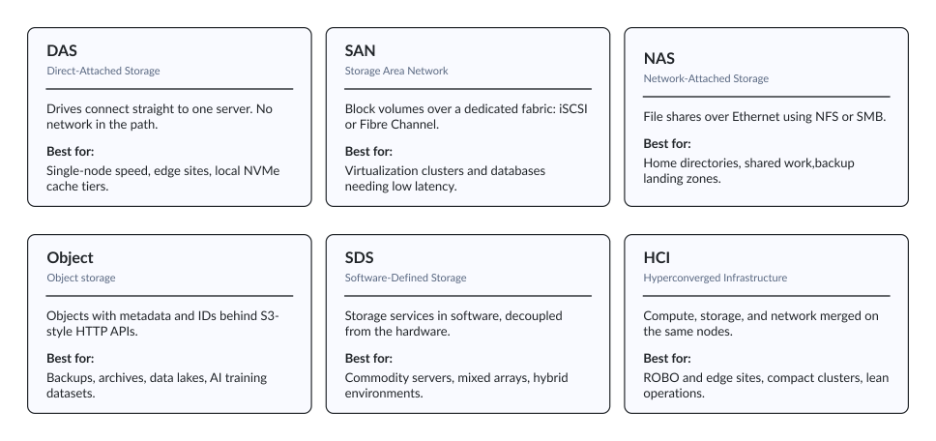
Here’s where theory meets the hardware you’ll actually buy. We’ve worked with environments that ran four of these six types simultaneously, usually because different teams bought different things and nobody wanted to rip anything out. That mess is more common than vendors admit, and it’s why the “one platform” pitch never quite lands.
DAS (direct-attached storage)
DAS connects drives directly to a single server with no network layer in between. It gives the fastest access for single-node workloads. The limitation is that DAS can’t be accessed by other servers without copying data. It’s most useful when raw local performance matters more than centralized access.
SAN (storage area network)
SANs present block-level volumes to servers over a dedicated high-speed network. The OS treats these volumes as local disks. Virtualization clusters and high-performance databases run on SAN infrastructure because it provides consistent low-latency block I/O.
That I/O can be shared across multiple hosts without the overhead of a file system layer or the contention that starts when NFS locks fight your database checkpoint threads. Pure Storage FlashArray, Dell PowerStore, and HPE Alletra are the dedicated-appliance segment of the market – as opposed to the software-defined or white-box options.
NAS (network-attached storage)
NAS delivers file-level storage over Ethernet using NFS or SMB. It suits shared file environments, including home directories, collaborative workspaces, video production storage, and backup landing zones.
NetApp ONTAP and Dell PowerScale are widely used enterprise platforms. Mid-range NAS solutions typically include deduplication, compression, snapshots, and thin provisioning. Many enterprise NAS platforms also expose storage over iSCSI. That makes them dual-protocol devices that can handle both file and block workloads from the same hardware. If you’re supporting a small or midsize office, NAS is often all the shared storage infrastructure you need.
Object storage
Object storage manages unstructured data at scale through S3-compatible APIs. DataCore Swarm, for example, provides an on-premises S3-compatible platform with support for S3 Object Lock, which allows organizations to deploy immutable backup targets and compliance archives without sending data to public cloud.
At scale, object storage generally offers a lower cost per terabyte than block or file storage, while its flat namespace can grow well beyond the limits of traditional file systems. The tradeoff is latency.
SDS (software-defined storage)
SDS separates the storage control plane from physical hardware. (This is the same abstraction idea that made VMware popular in compute, but storage admins are often more skeptical of it.) The software layer manages storage services across commodity servers or existing arrays.
It presents a unified interface regardless of the hardware underneath. DataCore SANsymphony runs on standard servers and provides auto-tiering, caching, mirroring, and high availability across heterogeneous storage platforms, including Dell, HPE Alletra, Pure Storage, and NetApp ONTAP. This makes it possible to consolidate SAN services without replacing existing equipment. VMware vSAN and Red Hat Ceph cover similar ground for larger clusters with different trade-offs in management complexity and hardware requirements.
HCI (hyperconverged infrastructure)
HCI puts compute and storage on the same physical nodes, manages networking there too, and treats the whole stack as one system. It reduces hardware footprint and simplifies deployment for remote offices and edge locations where maintaining separate storage hardware isn’t practical. Nutanix AOS and StarWind HCI Appliance are both widely deployed in this segment.
StarWind HCI Appliance is designed for compact two-node or small-cluster configurations where storage and compute share the same hardware, high availability remains local, and there is no dependency on a dedicated storage network.
You can use the table below as a starting point to match your workload requirements with the storage architecture.
| Storage type | Best for | Scalability | Performance |
|---|---|---|---|
| DAS | Single-server workloads | Low | High |
| SAN | Virtualization and databases | Medium | High |
| NAS | File sharing and collaboration | Medium | Medium |
| Object storage | Backups, archives, AI datasets | Very high | Low |
| SDS | Hybrid environments, virtualization | High | High |
| HCI | ROBO and edge deployments | Medium | High |
How to choose without buying the wrong thing
No single architecture fits every workload. Start with what you actually need.
A virtualization cluster serving dozens of VMs has completely different requirements than a backup repository, a surveillance archive, or a data lake holding training data for a model that only runs on Tuesdays. Block workloads need consistent low-latency I/O. Sequential bulk workloads such as AI training and video ingest require throughput. Archival workloads need low cost per terabyte at scale. Since no single platform optimizes all three equally well, tiered architectures remain common.
Storage deployed at 70% capacity at launch often reaches 90% within 18 months as backup sets grow and new workloads arrive. Prioritize platforms that can scale by adding nodes or shelves without requiring disruptive data migration. In many cases, the labor cost of a forced migration exceeds the initial price difference between platforms that don’t offer graceful scale-out.
Performance planning is commonly underestimated. Teams benchmark storage under synthetic load and miss what happens when production workloads run in parallel. Checkpoint writes and backup operations running alongside peak database traffic can expose limitations that benchmarks never reveal. I’ve sat through vendor presentations where the benchmark numbers looked incredible, but the array fell over when we added backup traffic during a synthetic OLTP test. Ask for a mixed-workload demo. If they won’t do it, that tells you something.
Data protection requirements should define which features are non-negotiable before evaluation begins. The backup and DR architecture should be designed alongside the primary storage selection. Vendor support and ecosystem fit, including clean integration with your existing VMware, Hyper-V, or backup software, reduce implementation friction and day-to-day operational overhead. I’ve bought the wrong array before because the benchmark looked pretty and I didn’t ask about mixed workloads. Never again.
Backup storage and cyber resilience
Backup storage is a discipline of its own. You can’t afford to treat it as an afterthought.
The 3-2-1-1 strategy is the working baseline: three copies of data, on two different media types, one offsite, and one immutable or air-gapped. Immutability is the addition that ransomware recovery patterns made necessary. When attackers compromise primary storage and then locate and encrypt backup repositories, immutable backups with write-once semantics are often the only reliable recovery path left.
S3 Object Lock prevents overwriting or deleting objects for a defined retention period, regardless of credential compromise. DataCore Swarm supports Object Lock, so it works well as an immutable backup target if you’re running Veeam, Commvault, Rubrik, or comparable enterprise backup platforms. If you’re designing a cyber-resilient backup architecture, combining Object Lock, separate credentials, isolated backup access paths, and network segmentation can significantly reduce the impact of a storage-layer attack.
Restore testing is where backup strategies most often fail. Organizations that have never completed a full-scale restore at production data volumes usually discover weaknesses during an incident rather than during a planned exercise.
Healthcare organizations operating under HIPAA, financial institutions subject to SOX and PCI-DSS, and public sector entities all face specific retention and recovery requirements. The backup platform must support demonstrable compliance.
What is actually changing
NVMe and NVMe-oF are moving into mainstream enterprise deployments, not just hyperscale. It gives significantly lower latency than SATA or SAS SSDs do, and NVMe over Fabrics extends that performance over the network. Shared all-flash storage can now approach the latency of directly attached drives, which isn’t something you could’ve said five years ago.
If you’re running a mid-size enterprise, NVMe-oF is no longer exotic. As AI inference and real-time analytics demand lower and more consistent I/O, it is increasingly common as a shared hot-tier architecture. Both StarWind Virtual SAN and DataCore SANsymphony support NVMe-oF as a transport layer. That makes software-defined deployments viable for environments that previously required dedicated NVMe SAN hardware.
AI and GPU workloads are creating storage demand patterns that traditional NAS and SAN platforms weren’t originally designed to handle. Training large models requires high-throughput parallel reads, burst checkpoint writes, fast KV-cache access, and low-latency metadata operations during inference. Storage teams now design tiered AI storage separately from general-purpose shared storage, with NVMe close to compute, a parallel file system for the active training tier, and S3-compatible object storage for the data lake.
Hybrid and multi-cloud storage is the operational reality for most organizations. Primary data lives on-premises, cold data migrates to cloud tiers, and cloud compute handles overflow training runs. Storage platforms with native cloud tiering reduce the complexity of managing data movement between locations, which is why they’ve become popular.
Immutable storage and cyber resilience have moved from best-practice guidance to standard requirements. Some compliance frameworks now explicitly require demonstrable immutability for backup copies and tested air-gapped recovery environments. At the same time, HCI adoption continues to grow in remote and edge environments as edge computing expands in manufacturing and retail, though it’s still rare in heavy industry.
Mistakes that keep happening
Storage errors repeat across organizations of every size.
The most common error is underestimating scalability requirements. Data growth consistently outpaces what teams projected at procurement time, as new workloads and expanding backup sets pile up faster than budget cycles allow. Log retention periods stretch too, often without anyone updating the capacity model. Capacity shortages rarely emerge during planned upgrade cycles; they usually appear as operational emergencies. You can’t schedule your way out of exponential growth.
Teams often try to add backup immutability after deployment, which usually means they haven’t thought through recovery timelines. Immutable copies and backup network isolation are architectural decisions that need to be made before storage is purchased, not retrofitted after a recovery incident makes the gap obvious.
When you use the same platform for both primary and backup, you remove the separation that makes recovery possible when primary storage is compromised. Backup storage should be architecturally distinct, with separate credentials and a network path that production systems cannot reach. One backup copy is equally problematic. True resilience comes from maintaining multiple copies and regularly validating restore procedures.
Insufficient performance testing before purchase remains a common oversight.
Synthetic benchmarks may look impressive, but checkpoint writes and backup operations running alongside peak database traffic can expose limitations that benchmarks never reveal. If you’re evaluating a storage platform, mixed-workload testing should be part of the decision process. I once watched a team skip mixed-workload testing because the vendor’s datasheet looked convincing. The array lasted a few months before the database team started complaining about latency spikes during backup windows. Don’t make that mistake.
Another frequent mistake is failing to integrate storage monitoring into the broader observability strategy. Latency spikes and capacity growth often go unnoticed until they trigger user-facing issues. Queue depths often climb quietly in the background until someone notices the application timeouts. Storage metrics should feed into the same monitoring platform used for compute and networking infrastructure, or you’ll miss the warning signs.
Conclusion
If you have fewer than a hundred VMs and no dedicated storage admin, start with HCI or a dual-protocol NAS. You’ll get shared storage and replication without building a SAN fabric. Budget for NVMe block storage if you’re running Oracle, SQL Server, or anything that counts latency in milliseconds. And whatever you buy, test your restores before you sign the acceptance paperwork.
FAQ
What is enterprise data storage?
Enterprise data storage consists of hardware and software platforms designed to store, manage, protect, and provide access to large volumes of business-critical data. Unlike consumer-grade storage, enterprise solutions include redundancy, high availability, data protection capabilities, and centralized management tools designed for production environments.
What storage is best for AI workloads?
Active training datasets benefit from high-throughput parallel access, either a parallel file system or local NVMe staging. Data lakes and cold datasets suit S3-compatible object storage, while checkpoint writes need a tier built for burst write performance. Most AI deployments use a tiered architecture matched to each stage of the pipeline.
What is the difference between enterprise and consumer storage?
Enterprise storage includes dual controllers, hot-swap components, end-to-end error correction, consistent performance under concurrent multi-user load, snapshot and replication capabilities, and REST management APIs. Consumer storage lacks most of these features and is not designed for continuous operation under shared production workloads.
from StarWind Blog https://ift.tt/RON4n79
via IFTTT


No comments:
Post a Comment